
מָבוֹא
This manual provides comprehensive instructions for the OMAIC EN2Q36H replacement remote control, designed for Hisense Smart TVs. It covers essential information regarding setup, operation, and maintenance to ensure optimal performance and user experience. This remote offers a direct replacement solution without the need for complex programming.
הגדרה
The OMAIC EN2Q36H remote control is designed for immediate use with compatible Hisense Smart TVs. No programming or pairing is required.
התקנת סוללה
- אתר את תא הסוללות בגב השלט הרחוק.
- החלק את מכסה הסוללה כלפי מטה או בכיוון המצוין על ידי החץ כדי לפתוח אותו.
- Insert two AAA alkaline batteries (not included), ensuring the positive (+) and negative (-) terminals align correctly with the markings inside the compartment.
- החזר את מכסה הסוללה למקומו על ידי החלקתו בחזרה עד שיישמע נקישה.
Once batteries are installed, the remote is ready to operate your Hisense Smart TV.

הוראות הפעלה
This remote control utilizes infrared (IR) technology for communication with your Hisense Smart TV. Ensure a clear line of sight between the remote and the TV's IR receiver for optimal performance.
תכונות מפתח
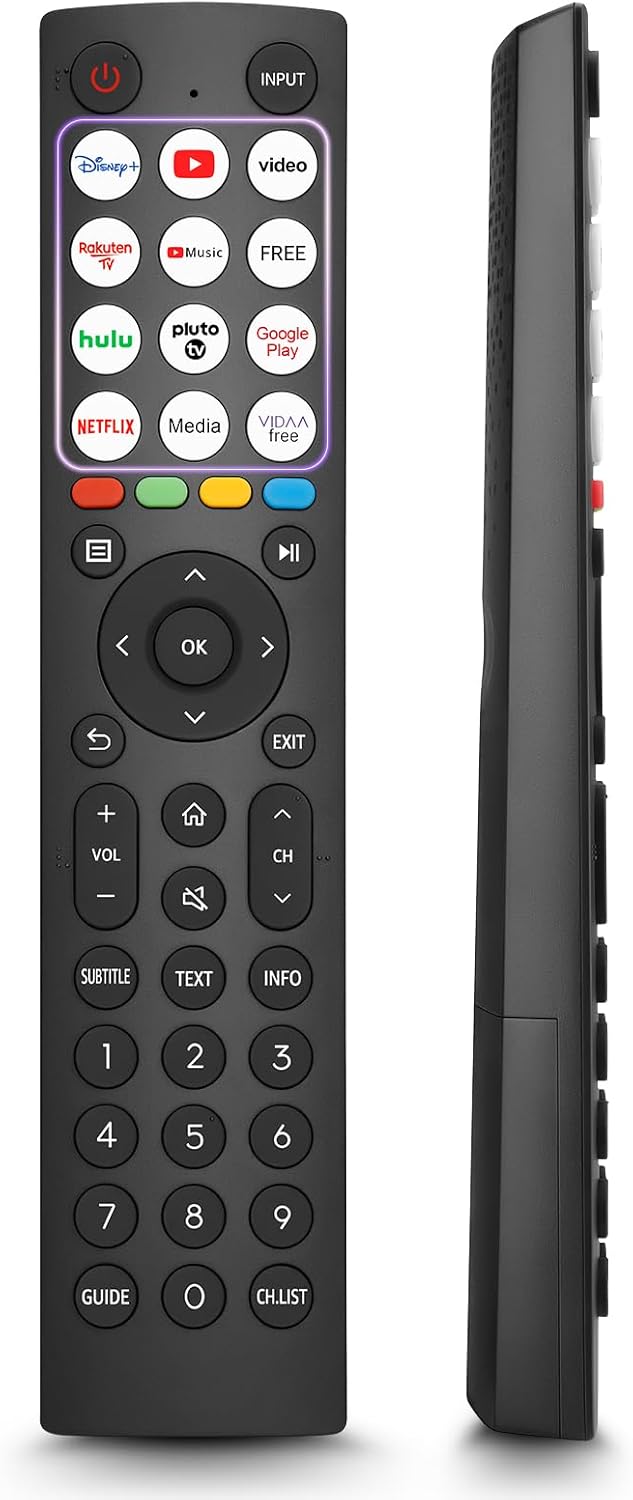
- 12 Shortcut Buttons: Quickly access popular streaming services and applications with dedicated buttons.
- Strong IR Signal: Provides a longer transmission distance and quick response without noticeable delay.
- בנייה עמידה: Made from high-quality ABS and silicone materials for extended lifespan.

פונקציות כפתור
Familiarize yourself with the functions of each button on your OMAIC EN2Q36H remote control:
| לַחְצָן | פוּנקצִיָה |
|---|---|
| כּוֹחַ | Switches the TV on or into standby mode. |
| קֶלֶט | בחירת מקורות קלט (HDMI, AV וכו'). |
| APP Buttons | Quick access buttons for specific applications (e.g., Disney+, Netflix, YouTube). |
| תַפרִיט | Displays the Quick Setup menu. |
| בקרת MEDIA | Buttons for Play, Pause, Stop, Fast Forward, Rewind. |
| ניווט (למעלה/למטה/שמאלה/ימינה) | Navigates on-screen menus and adjusts system settings. |
| OK | Confirms selection in on-screen menus. |
| בְּחֲזָרָה | חוזר לתפריט הקודם. |
| יְצִיאָה | יוצא מהתפריט הנוכחי. |
| VOL +/- | מכוונן את עוצמת הקול. |
| בַּיִת | Enters the Home screen. |
| לְהַשְׁתִיק | משתיק או שחזור צליל הטלוויזיה. |
| CH ^/v | מחליף ערוצים. |
| SUBTITLE | Activates or deactivates subtitle mode. |
| טֶקסט | Turns teletext function on and off. |
| מידע | מציג מידע על התוכנית הנוכחית. |
| NUMBER Buttons (0-9) | Direct channel selection or number input. |
| מַדְרִיך | Displays the Electronic Programme Guide (DTV input). |
| רשימת CH.List | Displays the Channel List on the screen. |

דגמי טלוויזיה תואמים של Hisense
The OMAIC EN2Q36H replacement remote control is compatible with the following Hisense VIDAA 4K HDTV Smart TV series:
- 32A4K, 40A4K, 43A4K
- 32A5KQ, 40A5KQ
- 43A6K, 50A6K, 55A6K, 58A6K, 65A6K, 70A6K, 75A6K, 85A6K
- 55U6KQ, 65U6KQ
- 43A7KQ, 50A7KQ, 55A7KQ, 65A7KQ, 75A7KQ
- 43E7KQ, 50E7KQ, 55E7KQ, 65E7KQ, 75E7KQ
תַחזוּקָה
כדי להבטיח את תפקודו התקין ואורך החיים של השלט הרחוק, יש להקפיד על הנחיות התחזוקה הבאות:
- ניקוי: Use a soft, dry cloth to clean the remote. Avoid using liquid cleaners or abrasive materials, as they may damage the surface or internal components.
- החלפת סוללה: Replace batteries when the remote's response becomes sluggish or stops working. Always replace both batteries at the same time with new ones of the same type (AAA alkaline).
- אִחסוּן: יש לאחסן את השלט במקום קריר ויבש, הרחק מאור שמש ישיר, טמפרטורות קיצוניות ולחות גבוהה.
- הימנע מטיפות: הגן על השלט מפני פגיעות פיזיות, מכיוון שנפילות עלולות לפגוע במעגלים הפנימיים.
פתרון בעיות
אם נתקלת בבעיות עם השלט הרחוק שלך, עיין בשלבי פתרון הבעיות הבאים:
| בְּעָיָה | סיבה אפשרית | פִּתָרוֹן |
|---|---|---|
| מרחוק לא מגיב | סוללות מתות או שהוכנסו בצורה שגויה. | החליפו את הסוללות בסוללות אלקליין AAA חדשות, תוך הקפדה על קוטביות נכונה. |
| מרחוק לא מגיב | חסימה בין השלט לטלוויזיה. | Ensure a clear line of sight to the TV's IR receiver. Remove any objects blocking the path. |
| מרחוק לא מגיב | השלט רחוק מדי מהטלוויזיה. | Move closer to the TV. The remote has an extended range, but extreme distances may affect performance. |
| הלחצנים דביקים או לא מגיבים | לכלוך או פסולת מתחת לכפתורים. | Gently clean around the buttons with a soft, dry cloth. Avoid liquids. |
| פונקציות ספציפיות לא פועלות | TV model incompatibility (rare). | Verify your Hisense TV model is listed in the 'Compatible Hisense TV Models' section. |
מפרטים
| תכונה | פְּרָט |
|---|---|
| שם הדגם | EN2Q36H |
| מותג | OMAIC |
| מכשירים תואמים | Hisense Smart TVs |
| טכנולוגיית קישוריות | אינפרא אדום (IR) |
| מספר כפתורים | 48 |
| סוג בקרה | בקרת כפתור |
| תכונות מיוחדות | Universal, Comfortable |
| צֶבַע | שָׁחוֹר |
| תיאור הסוללה | AAA (Alkaline) |
| Supported Devices (Max) | 1 |
| מידות מוצר (בקירוב) | 34.7 x 24.7 x 2.2 ס"מ |
| משקל המוצר (בערך) | 80 גרם |

אחריות ותמיכה
OMAIC is committed to the quality and compatibility of its replacement remote controls. We provide professional after-sales support to ensure customer satisfaction.
If you have any questions or concerns regarding your OMAIC EN2Q36H remote control or your order, please contact us directly. Our support team aims to respond to inquiries within 12 working hours.