
truefree Truefree EarFit DS1
User Manual for truefree DS1 Open-Ear Headphones
Model: Truefree EarFit DS1 | Brand: truefree
מָבוֹא
The truefree DS1 Open-Ear Headphones are designed to provide a comfortable and immersive audio experience while keeping you aware of your surroundings. Featuring an open-ear design, these wireless earbuds are ideal for all-day wear, sports, and daily activities. They come equipped with advanced audio technology, clear call capabilities, and long-lasting battery life.
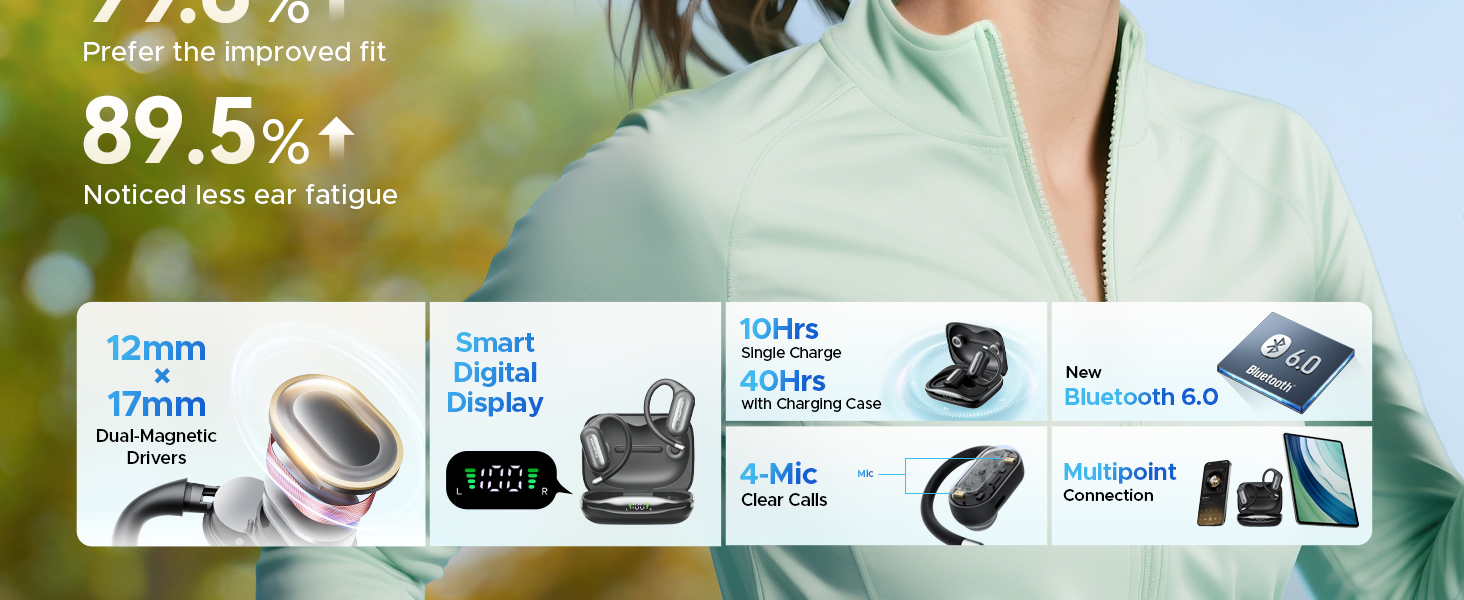
The open-ear design allows you to stay connected to your audio while remaining aware of your environment, enhancing safety during outdoor activities.
מה יש בקופסה
ודא שכל הפריטים נמצאים בחבילה שלך:
- Truefree Earfit DS1 Wireless Earbuds (2)
- נרתיק טעינה אלחוטי (1)
- כבל טעינה USB-C (1)
- Silicone Eartips (2 pairs)
- Anti-lost Strap (1)
- מדריך למשתמש (1)

A visual representation of the Truefree DS1 package contents, ensuring all components are included.
המוצר נגמרview
Familiarize yourself with the components of your truefree DS1 headphones and charging case.
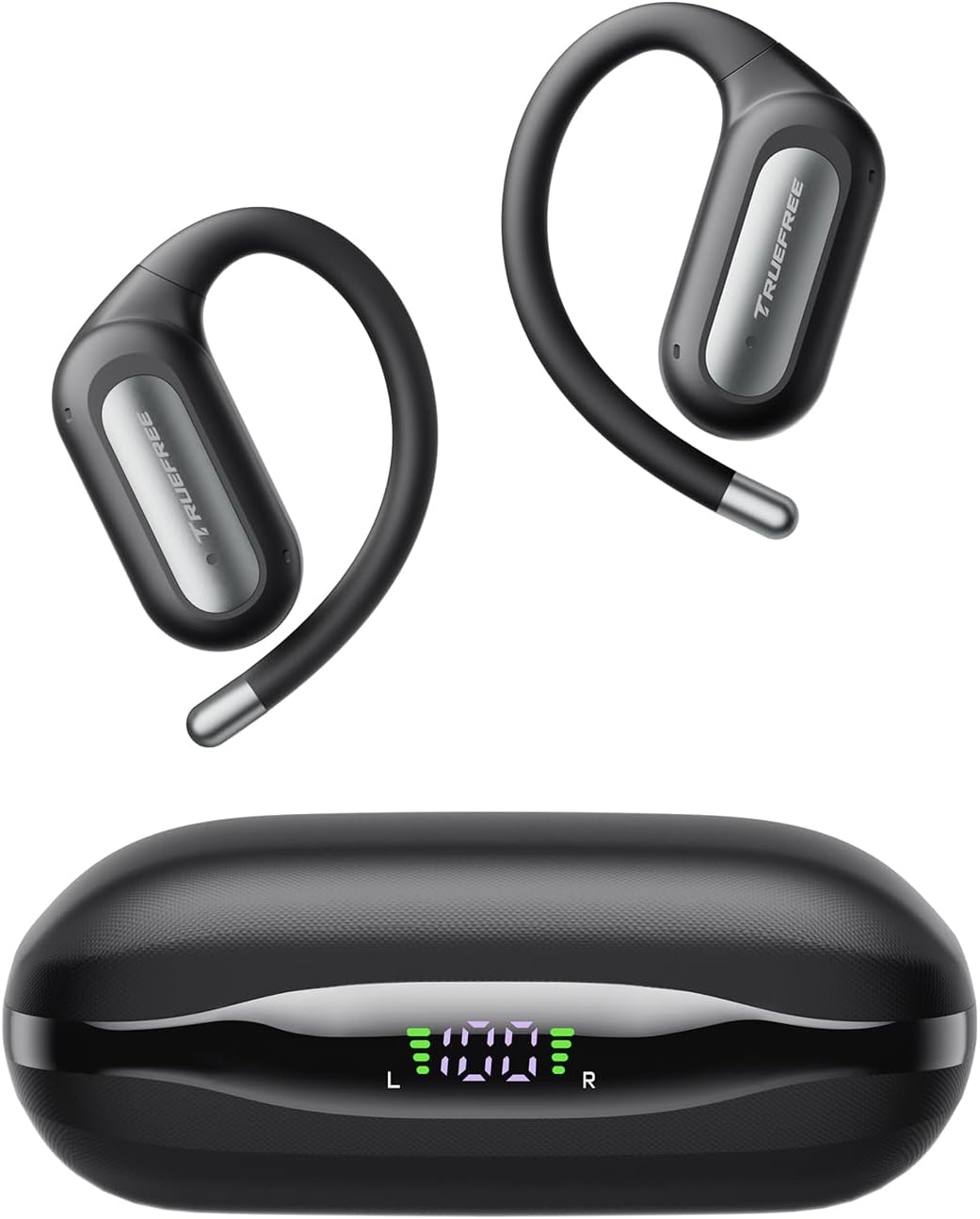
The truefree DS1 earbuds and their compact charging case, featuring an LED display for battery status.
הגדרה
1. טעינת האוזניות והמארז
Before first use, fully charge the charging case and earbuds. The case features an LED display to indicate battery levels.
- חבר את כבל הטעינה USB-C ליציאת הטעינה במארז ולמקור חשמל.
- תצוגת ה-LED שעל המארז תציג את התקדמות הטעינה.
- הניחו את האוזניות במארז הטעינה. האוזניות יתחילו להיטען באופן אוטומטי.
- A 10-minute quick charge provides 2 hours of playback. A full charge offers up to 10 hours of playtime per earbud, with a total of 40 hours using the charging case.

The charging case's LED display clearly indicates the power levels of both the case and individual earbuds.
2. זיווג Bluetooth
The truefree DS1 uses Bluetooth 6.0 for stable and fast connectivity.
- פתחו את מארז הטעינה. האוזניות ייכנסו אוטומטית למצב צימוד.
- במכשיר שלך (סמארטפון, טאבלט וכו'), הפעל את Bluetooth.
- חפש "Truefree EarFit DS1" in the list of available Bluetooth devices and select it to connect.
- לאחר החיבור, תשמעו אישור קולי.

Bluetooth 6.0 ensures a stable and efficient wireless connection for your audio experience.
3. חיבור רב נקודות
The DS1 supports connecting to two devices simultaneously, allowing seamless switching between them.
- Pair the earbuds with your first device as described above.
- השבת את ה-Bluetooth במכשיר הראשון. האוזניות ייכנסו מחדש למצב צימוד.
- התאם את האוזניות למכשיר השני שלך.
- הפעל מחדש את ה-Bluetooth במכשיר הראשון. האוזניות אמורות להתחבר אוטומטית לשני המכשירים.
- You can now switch audio playback between the two connected devices without re-pairing.

Multipoint connection allows for effortless switching between your phone and laptop, or other paired devices.
4. איך לובשים
For optimal comfort and sound, ensure the earbuds are worn correctly.
- Gently place the earbuds over your ears, ensuring the ear hook sits securely behind your ear.
- Twist the earbud slightly to follow the contour of your ear for a snug and comfortable fit.
- The flexible titanium memory wire hooks are designed to be comfortable even for glasses wearers.

Proper wearing ensures both comfort and secure placement of the earbuds during use.
הוראות הפעלה
1. גע בפקדים
The truefree DS1 earbuds feature intuitive touch controls for managing audio and calls.
- Volume - (L): נגיעה אחת על האוזניה השמאלית.
- Volume + (R): נגיעה אחת על האוזניה הימנית.
- Play/Pause (L/R): הקש פעמיים על אחת האוזניות.
- Previous Song (L): הקש והחזק את האוזניה השמאלית למשך 1.5 שניות.
- Next Song (R): הקש והחזק את האוזניה הימנית למשך 1.5 שניות.
- Answer/End Call (L/R): הקש פעמיים על אחת האוזניות.
- Reject Call (L/R): הקש והחזק את אחת האוזניות למשך 1.5 שניות.
- Activate Voice Assistant (R): הקש שלוש פעמים על האוזניה הימנית.

A comprehensive guide to the touch controls for music playback, call management, and voice assistant activation.
2. App Control and Sound Customization
Download the Truefree App to unlock advanced features and personalize your audio experience.
- חפש "TRUEFREE" in your device's app store (Google Play Store or Apple App Store).
- Install and open the app, then connect your DS1 headphones.
- בתוך האפליקציה, אתה יכול:
- Adjust EQ presets and personalize sound effects.
- Access 9 sound modes optimized for different music genres.
- Fine-tune audio settings to match your preferences.
- Manage headphone functions and customize touch controls.

The Truefree App provides extensive control over your audio settings, including EQ and sound modes.
3. פונקציות שיחה
The DS1 features a 4-mic array and wind-reduction technology for clear calls.
- Each earbud includes dual microphones for enhanced voice pickup.
- Wind-reduction technology minimizes ambient noise by up to 80%, ensuring your voice is clear even in outdoor environments.
- Directional audio design further enhances call clarity.

The 4-mic array system ensures crystal-clear voice transmission during calls, even in noisy conditions.
4. Spatial Audio and Bass Enhancement
Experience immersive sound with the DS1's advanced audio features.
- Powered by oversized 12 x 17mm dual-magnet drivers and dynamic EQ tuning.
- Delivers rich bass and true 360° spatial audio for a multi-dimensional sound field.
- Interchangeable acoustic conduits reduce sound leakage by up to 98.9%, maintaining privacy and immersion.

The large dual-magnetic drivers and spatial audio technology provide powerful bass and an immersive listening experience.
5. Gaming Mode (Ultra-Low Latency)
For an optimized gaming experience, the DS1 offers ultra-low latency.
- Activate gaming mode via the Truefree App for a latency as low as 0.06 seconds.
- This minimizes audio delay, ensuring synchronized sound with on-screen action during gaming.

The ultra-low latency gaming mode provides a competitive edge by ensuring audio and visuals are perfectly synchronized.
תַחזוּקָה
1. ניקיון
ניקוי קבוע מסייע לשמור על הביצועים ועל אורך החיים של האוזניות שלכם.
- השתמשו במטלית רכה, יבשה ונטולת סיבים כדי לנגב את האוזניות ואת מארז הטעינה.
- עבור לכלוך עיקש, מעט דחוףampשטפו את המטלית במים. הימנעו משימוש בכימיקלים חזקים או בחומרים שוחקים.
- ודאו שמגעי הטעינה הן באוזניות והן בנרתיק נקיים ויבשים.
2. עמידות למים (IPX5)
The truefree DS1 earbuds are IPX5-rated, offering protection against sweat and splashes.
- IPX5 rating means the earbuds can withstand a sustained, low-pressure water jet spray.
- הם מתאימים לאימונים ולגשם קל.
- חָשׁוּב: Do not submerge the earbuds in water. The charging case is not water-resistant.
- ודאו שהאוזניות יבשות לחלוטין לפני החזרתן לנרתיק הטעינה כדי למנוע נזק.

The IPX5 water resistance makes the DS1 suitable for active use, protecting against sweat and splashes.
3. אחסון
Store your headphones in a cool, dry place when not in use.
- Always store the earbuds in their charging case to protect them and keep them charged.
- הימנע מטמפרטורות קיצוניות ואור שמש ישיר.
- Utilize the included anti-lost strap for added security during sports or active use.

The anti-lost strap provides extra security, preventing accidental drops during vigorous activities.
פתרון בעיות
| בְּעָיָה | סיבה / פתרון אפשרי |
|---|---|
| Earbuds not turning on/charging. |
|
| לא ניתן לבצע התאמה עם המכשיר. |
|
| אין צליל או עוצמת קול נמוכה. |
|
| איכות השיחה ירודה. |
|
| בעיות חיבור רב-נקודתי. |
|
מפרטים
| מותג | אמיתי |
| שם הדגם | Truefree EarFit DS1 |
| מיקום אוזניים | אוזן פתוחה |
| גורם צורה | אוזן פתוחה |
| טכנולוגיית קישוריות | אלחוטי (בלוטות' 6.0) |
| עַכָּבָּה | 16 אוהם |
| תגובת תדר | 20 KHz |
| בקרת רעש | אין (עיצוב אוזן פתוחה) |
| מיקרופונים | 4-mic array with wind-reduction technology |
| עמידות במים | IPX5-Rated |
| חיי סוללה (אוזניות) | עד 10 שעות לכל טעינה |
| זמן משחק כולל (עם נרתיק) | עד 40 שעות |
| טעינה מהירה | 10 דקות טעינה לשעתיים של נגינה |
| מידות המוצר | 0.79 x 0.59 x 0.31 cm; 150 g (earbuds and case) |
| יַצרָן | אמיתי |
| ארץ מוצא | סִין |
אחריות ותמיכה
For warranty information and customer support, please refer to the official truefree website or contact their customer service directly. Details are typically provided in the packaging or on the manufacturer's webאֲתַר.
יַצרָן: אמיתי
ASIN: B0F52VVMYJ
דֶגֶם: Truefree EarFit DS1
לסיוע נוסף, אנא בקרו באתר truefree Store on Amazon.
Ask a question about this manual
Ask about setup, troubleshooting, compatibility, parts, safety, or missing instructions. Manuals+ will review the question and use this page’s manual context to help answer it.