
1. הקדמה
תודה על הרכישהasing the JVC XS-N3214PB Portable Bluetooth Party Speaker. This manual provides important information regarding the setup, operation, and maintenance of your speaker. Please read it thoroughly before using the product to ensure proper function and to maximize your listening experience. Keep this manual for future reference.
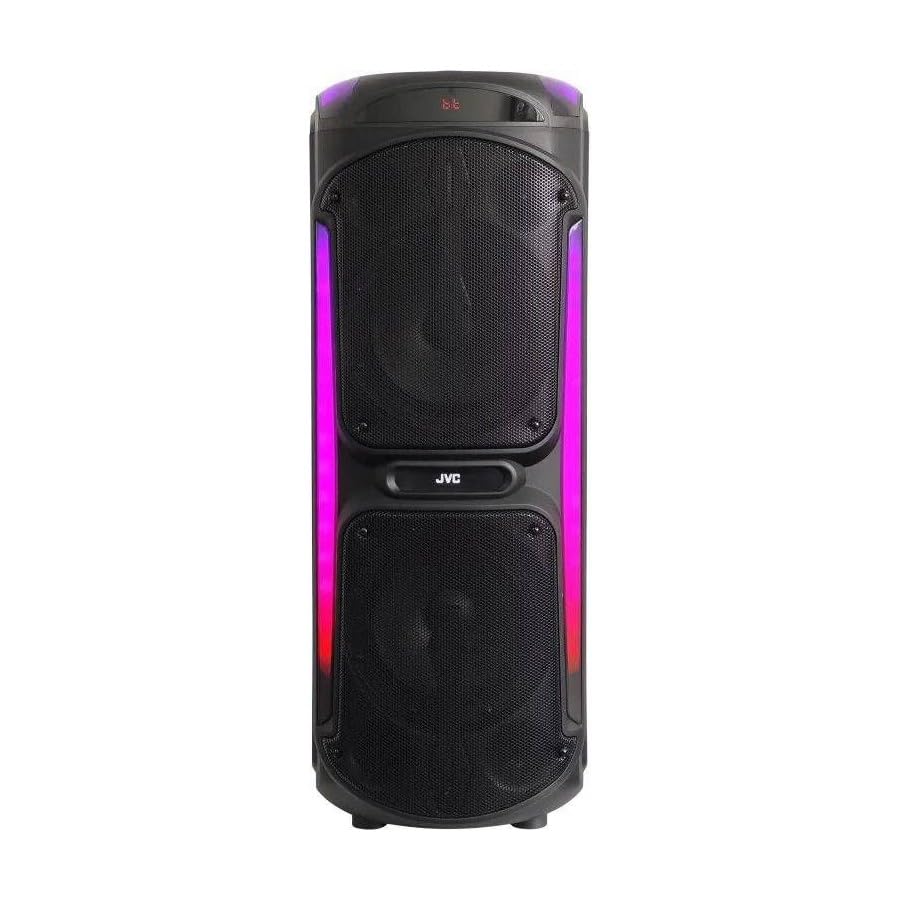
Image: The JVC XS-N3214PB Portable Bluetooth Party Speaker, shown with two microphones, highlighting its versatile connectivity options including Bluetooth, FM Radio, MP3 playback, AUX input, and USB input. The speaker features integrated LED lighting.
2. מידע בטיחות
כדי להבטיח פעולה בטוחה ולמנוע נזק, אנא הקפידו על אמצעי הזהירות הבאים:
- אין לחשוף את הרמקול למים, לחות או טמפרטורות קיצוניות.
- אין לנסות לפרק או לשנות את הרמקול. יש לפנות לכל טיפול וטיפול באנשי מקצוע מוסמכים.
- הרחק את הרמקול ממקורות חום, אור שמש ישיר וחומרים דליקים.
- השתמש רק במתאם הטעינה שצוין.
- הימנעו מהנחת חפצים כבדים על הרמקול.
- נקו את הרמקול בעזרת מטלית רכה ויבשה. אין להשתמש בחומרי ניקוי נוזליים או בתרסיסים.
- יש לוודא אוורור נאות סביב הרמקול במהלך השימוש.
3. תכולת החבילה
ודא שכל הפריטים נמצאים בחבילה:
- JVC XS-N3214PB Portable Bluetooth Party Speaker (1 unit)
- Power Adapter/Charging Cable (1 unit)
- שלט רחוק (יחידה אחת)
- מדריך למשתמש (מסמך זה)
- (Optional: Microphone, if included with your specific purchase)
4. המוצר נגמרview
4.1. תכונות
- Powerful 800W Audio Output
- קישוריות אלחוטית Bluetooth
- סוללה נטענת מובנית לניידות
- Integrated LED Party Lights
- מקלט רדיו FM
- הפעלת USB
- כניסת AUX
- Microphone Input for Karaoke
- תפעול שלט רחוק
- Deep Bass Performance
4.2. בקרות ויציאות
Familiarize yourself with the speaker's control panel and connection ports. (Refer to diagrams in the full printed manual for exact locations).
- לחצן הפעלה: מדליק/מכבה את הרמקול.
- לחצן מצב: Switches between Bluetooth, FM, USB, and AUX modes.
- בקרת עוצמת הקול: כוונון עוצמת הקול הראשית.
- לחצן הפעלה/השהה: שולט בהפעלת מדיה.
- לחצני המסלול הקודם/הבא: ניווט בין רצועות או תחנות FM.
- לחצן אור LED: מפעיל/ה החלפת אפקטים של תאורת LED.
- בקרות עוצמת קול/הד של המיקרופון: כוונון קלט המיקרופון ואפקט ההד.
- יציאת USB: להשמעת כונן USB.
- כניסת AUX (3.5 מ"מ): לחיבור התקני שמע חיצוניים.
- כניסת מיקרופון (6.35 מ"מ): לחיבור מיקרופון חוטי.
- נמל DC IN: לחיבור ספק הכוח לטעינת הרמקול.
5. התקנה
5.1. טעינת הרמקול
- Connect the power adapter to the DC IN port on the speaker.
- חבר את הקצה השני של מתאם החשמל לשקע בקיר.
- The charging indicator light will illuminate (color may vary) to show the speaker is charging.
- Allow approximately 4-6 hours for a full charge. The indicator light may change or turn off when fully charged.
- Disconnect the power adapter once charging is complete or when using the speaker on battery power.
5.2. הפעלה / כיבוי
- כדי להפעיל: Press and hold the Power button for a few seconds until the display illuminates.
- כדי לכבות: Press and hold the Power button again for a few seconds until the display turns off.
6. הוראות הפעלה
6.1. זיווג Bluetooth
- הפעל את הרמקול. הוא ייכנס אוטומטית למצב צימוד Bluetooth, כפי שיסומן על ידי סמל Bluetooth מהבהב או הנחיה קולית.
- במכשיר הנייד שלך (סמארטפון, טאבלט וכו'), הפעל את Bluetooth וחפש מכשירים זמינים.
- Select "JVC XS-N3214PB" from the list of devices.
- Once paired, the speaker will confirm with an audible tone or a solid Bluetooth icon.
- כעת ניתן להשמיע אודיו מהמכשיר דרך הרמקול.
6.2. רדיו FM
- Press the Mode button until "FM" is displayed.
- לחץ על כפתור ההפעלה/השהיה כדי לסרוק ולשמור תחנות FM זמינות באופן אוטומטי.
- השתמשו בלחצני הרצועה הקודמת/הבאה כדי לנווט בין תחנות שנשמרו.
6.3. השמעת USB
- הכנס כונן הבזק מסוג USB (מעוצב ל-FAT32) המכיל קובץ שמע בפורמט MP3 files לתוך יציאת ה-USB.
- The speaker will automatically switch to USB mode and begin playing the first track. If not, press the Mode button to select USB.
- השתמשו בכפתורי ההפעלה/השהיה והרצועה הקודמת/הבאה כדי לשלוט בהפעלה.
6.4. קלט AUX
- חבר קצה אחד של כבל שמע 3.5 מ"מ (לא כלול) ליציאת AUX IN ברמקול.
- חבר את הקצה השני של הכבל ליציאת השמע של המכשיר החיצוני שלך (למשל, נגן MP3, מחשב נייד).
- Press the Mode button until "AUX" is displayed.
- שלוט בהשמעה ובעוצמת הקול מהמכשיר החיצוני שלך.
6.5. פונקציית מיקרופון וקריוקי
- Connect a wired microphone (not included) to the Microphone Input port.
- Adjust the microphone volume and echo effect using the dedicated controls on the speaker.
- Play music via Bluetooth, USB, or AUX, and sing along through the microphone.
6.6. אורות למסיבות LED
Press the LED Light button to cycle through different lighting modes or to turn the lights off.
6.7. שלט רחוק
The included remote control allows for convenient operation of the speaker from a distance. Functions include power on/off, mode selection, volume adjustment, track control, and LED light control. Ensure the remote control has working batteries and is pointed towards the speaker's sensor.
7. תחזוקה
- ניקוי: Wipe the speaker's exterior with a soft, dry, lint-free cloth. Do not use abrasive cleaners, waxes, or solvents.
- אִחסוּן: If storing the speaker for an extended period, ensure it is fully charged, then power it off. Store in a cool, dry place away from direct sunlight. Recharge the battery every few months to maintain its lifespan.
- טיפול בסוללה: To prolong battery life, avoid fully discharging the speaker frequently. Charge it before the battery is completely depleted.
8. פתרון תקלות
| בְּעָיָה | סיבה אפשרית | פִּתָרוֹן |
|---|---|---|
| הרמקול לא נדלק. | הסוללה התרוקנה. כבל החשמל אינו מחובר. | Charge the speaker. Ensure power cable is securely connected to both speaker and outlet. |
| אין קול. | Volume is too low. Incorrect mode selected. Device not paired (Bluetooth). AUX cable loose. | Increase volume on speaker and source device. Press Mode button to select correct input. Re-pair Bluetooth device. Check AUX cable connection. |
| לא ניתן לבצע התאמה בין מכשירי בלוטות'. | הרמקול לא במצב צימוד. המכשיר רחוק מדי. הפרעות. | Ensure speaker is in Bluetooth mode and flashing. Move device closer to speaker. Turn off other Bluetooth devices. |
| ניגון USB לא עובד. | USB drive not formatted correctly (FAT32). Unsupported file format. USB drive faulty. | Ensure USB drive is FAT32 and contains MP3 fileש. נסה כונן USB אחר. |
| השלט רחוק לא עובד. | Batteries depleted. Obstruction between remote and speaker. | Replace remote control batteries. Ensure clear line of sight to speaker's IR sensor. |
9. מפרטים
| מספר דגם | XS-N3214PB |
| מותג | JVC |
| כוח פלט | 800W (שיא) |
| קישוריות | Bluetooth, USB, AUX (3.5mm), FM Radio, Microphone Input (6.35mm) |
| מצב פלט שמע | סטריאו |
| חוֹמֶר | פּלָסטִי |
| סוג הרכבה | קומה עומדת |
| שיטת בקרה | שלט, כפתור |
| מידות (D x B x H) | 35D x 31W x 94H סנטימטרים |
| רכיבים כלולים | 1 x JVC XS-N3214PB 800W Party Portable Bluetooth Speaker, Power Adapter, Remote Control, User Manual |
10. אחריות ותמיכה
10.1. מידע על אחריות
This JVC XS-N3214PB speaker comes with a 1 שנות אחריות ממועד הרכישה. אחריות זו מכסה פגמי ייצור וביצוע תחת שימוש רגיל. היא אינה מכסה נזק שנגרם כתוצאה משימוש לרעה, תאונות, שינויים לא מורשים או בלאי רגיל. אנא שמור את הוכחת הרכישה שלך לצורך תביעות אחריות.
10.2. תמיכת לקוחות
For technical assistance, warranty claims, or product inquiries, please contact JVC customer support through the retailer where the product was purchased or visit the official JVC webאתר לקבלת פרטי קשר ספציפיים לאזור שלך.