
1. הקדמה
תודה על הרכישהasing the Geevon DCF 0397 Weather Station. This device provides accurate indoor and outdoor temperature and humidity readings, a 12-hour weather forecast, DCF radio-controlled time, moon phase display, and an alarm clock function. This manual will guide you through the setup, operation, and maintenance of your new weather station.
2. מידע בטיחות
- Read all instructions carefully before use and keep this manual for future reference.
- אין לחשוף את היחידה הראשית או את החיישן לטמפרטורות קיצוניות, לאור שמש ישיר או לחות.
- Use only the specified power adapter (if included) and batteries.
- Do not attempt to disassemble or repair the device. Contact customer support if service is required.
- יש להרחיק סוללות מהישג ידם של ילדים. יש להשליך סוללות משומשות באחריות.
3. תכולת החבילה
אנא בדקו את תוכן החבילה כדי לוודא שכל הפריטים נמצאים:
- Geevon DCF 0397 Main Weather Station Unit
- Wireless Outdoor Sensor (1 unit)
- מתאם מתח
- סוללות AA (5 יחידות)
- מדריך למשתמש (מסמך זה)
4. המוצר נגמרview
Main Unit and Outdoor Sensor Components
Familiarize yourself with the main components of your weather station:

Image 4.1: Main Unit and Outdoor Sensor Components. This image displays the front and back of the main weather station unit, along with the outdoor sensor. Key features labeled include the weather forecast display, frost warning, low battery indicator, max/min temperature/humidity records, comfort indicator, city display, sunrise/sunset times, automatic dimming, alarm, snooze, RCC (Radio Controlled Clock) indicator, hanging hole, DC jack, battery compartment, stand, channel slide switch, and rope eyelet.
Main Unit (Front Display)
- טמפרטורה ולחות פנימית/חיצונית: Displays current readings.
- תחזית מזג האוויר: Icons indicating predicted weather conditions for the next 12 hours.
- זמן תאריך: DCF radio-controlled time, day of the week, and date.
- שלב הירח: תצוגת שלב הירח הנוכחי.
- מחוון נוחות: Shows indoor comfort level based on temperature and humidity.
- אזעקה ונודניק: Indicators for active alarms and snooze function.
- מחוון סוללה חלשה: For both main unit and outdoor sensor.
Main Unit (Rear)
- שקע: לחיבור מתאם החשמל.
- תא סוללות: עבור סוללות גיבוי.
- לַעֲמוֹד: למיקום שולחן.
- חור תלייה: להרכבה על הקיר.
חיצוני חיישן
- תא סוללות: For AA batteries.
- Channel Slide Switch: To select the transmission channel (1, 2, or 3).
- מחוון LED: מהבהב במהלך העברת נתונים.
5. התקנה
5.1 התקנת סוללה
- חיישן חיצוני: Open the battery compartment on the back of the outdoor sensor. Insert 2 AA batteries, observing the correct polarity (+/-). Close the compartment.
- יחידה ראשית: Open the battery compartment on the back of the main unit. Insert 3 AA batteries, observing the correct polarity (+/-). Close the compartment. These batteries serve as a backup in case of power loss.
5.2 חיבור מתח
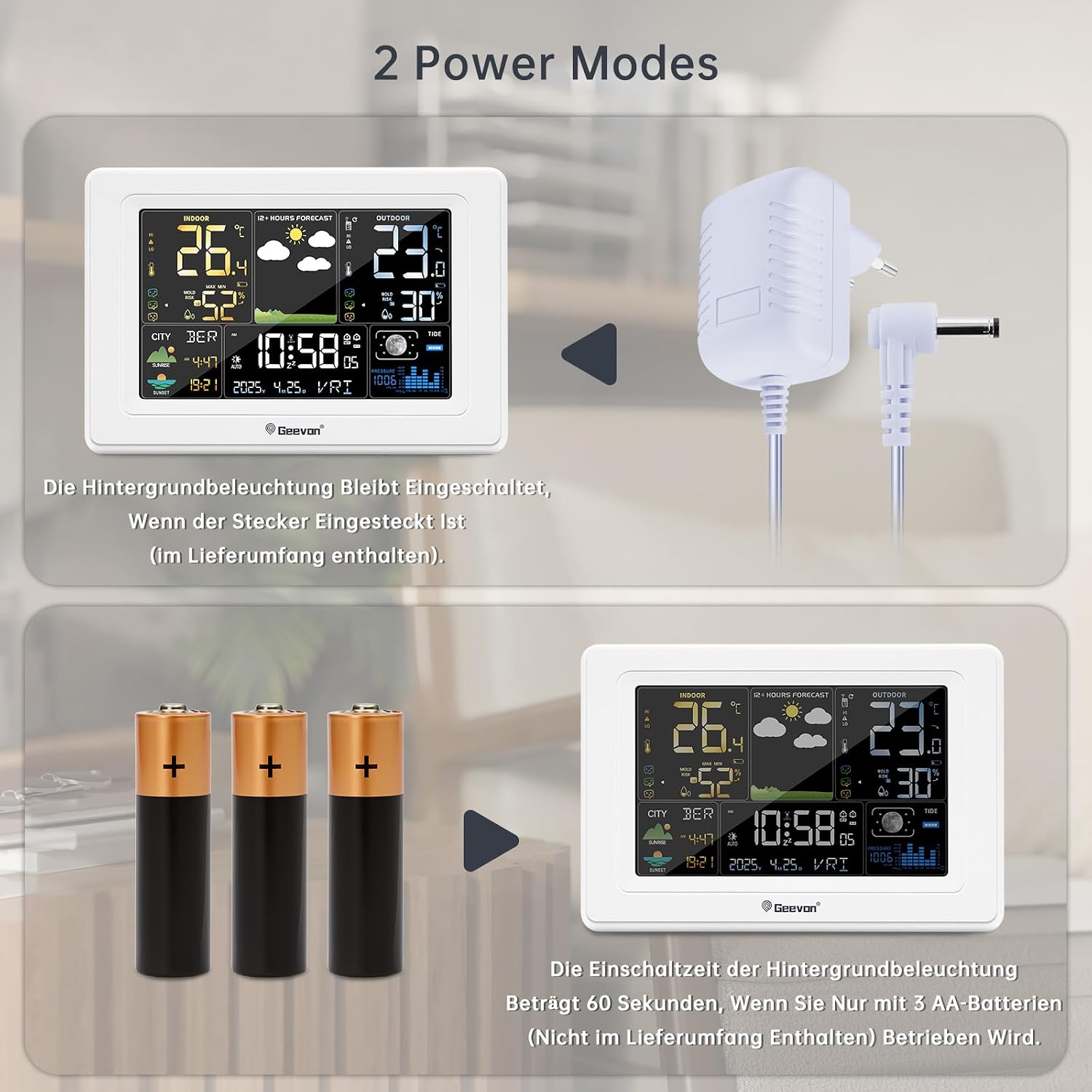
Image 5.1: Power Modes. The weather station can be powered by the included AC adapter for continuous backlight, or by 3 AA batteries (not included for primary power) for temporary use, where the backlight activates for 60 seconds when a button is pressed.
For continuous display backlight and optimal functionality, connect the included power adapter to the DC jack on the back of the main unit and plug it into a power outlet. The backlight will remain on when powered by the adapter.
5.3 מיקום חיישן חיצוני
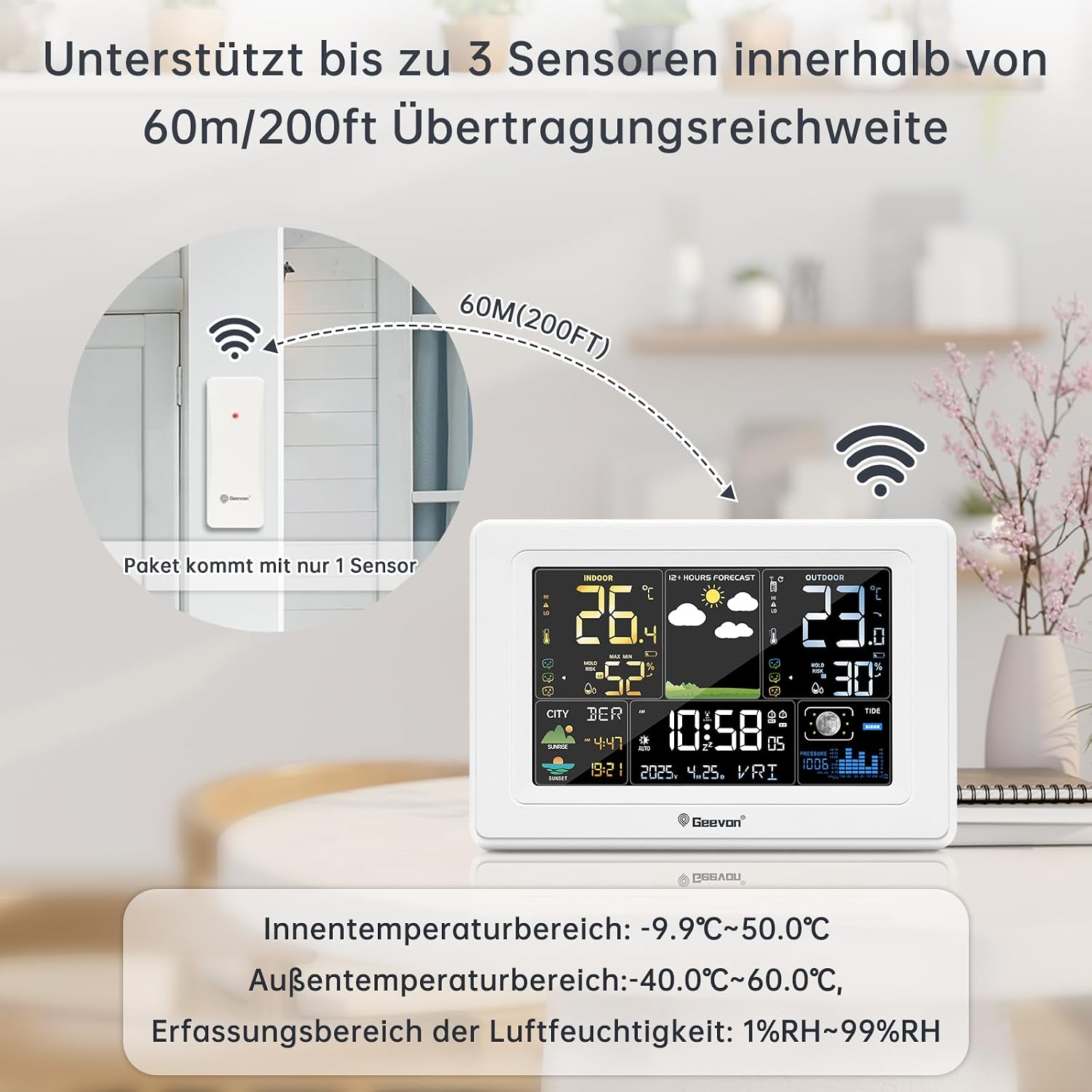
Image 5.2: Sensor Placement. This image illustrates the recommended placement of the outdoor sensor, emphasizing that it supports up to 3 sensors within a 60m/200ft transmission range. The package includes only one sensor.
- Place the outdoor sensor in a shaded, dry location, protected from direct sunlight and rain, to ensure accurate temperature and humidity readings.
- Ensure the sensor is within the maximum transmission range of 60 meters (200 feet) from the main unit. Walls and other obstacles can reduce this range.
- Select a channel (1, 2, or 3) on the outdoor sensor using the slide switch. The main unit will automatically detect the sensor.
5.4 סנכרון ראשוני
After powering on both units, the main unit will automatically search for the outdoor sensor signal and the DCF radio signal. This process may take a few minutes. Once synchronized, the outdoor temperature/humidity and the correct time will be displayed.
6. הוראות הפעלה
6.1 פונקציות תצוגה
The main unit's display provides a wealth of information at a glance. Refer to Image 4.1 for a visual guide to the display sections.
6.2 Time and Date Setting (DCF Atomic Clock)

Image 6.1: DCF Atomic Clock with DST. This image highlights the DCF atomic clock feature with Daylight Saving Time (DST) support, covering 150 cities in Europe, 24 time zones, 7 week languages (German, English, French, Italian, Spanish, Dutch, Danish), and 3 barometric pressure formats.
The weather station automatically synchronizes with the DCF atomic clock signal, ensuring accurate time and date, including automatic adjustment for Daylight Saving Time (DST). The display supports 7 languages for the day of the week: German, English, French, Italian, Spanish, Dutch, and Danish.
- הגדרת זמן ידנית: If the DCF signal is weak or unavailable, you can manually set the time and date. Consult the full instruction manual for specific button sequences.
- אזור זמן: The device supports 24 time zones. Adjust as needed for your location.
6.3 פונקציית אזעקה

Image 6.2: Alarm and Snooze. This image demonstrates the alarm and snooze functions. Pressing the SNZ/LIGHT button activates a 5-minute snooze. Pressing any other button (besides SNZ/LIGHT) will turn off the alarm. Two separate alarm times can be set for weekdays and weekends, with snooze duration adjustable from 5 to 60 minutes.
- הגדרת אזעקות: The weather station allows setting two separate alarm times, which can be configured for weekdays, weekends, or daily.
- פונקצית נודניק: כאשר נשמעת אזעקה, לחצו על SNZ/LIGHT button to activate the snooze function. The snooze duration is adjustable from 5 to 60 minutes.
- כיבוי אזעקה: כדי לכבות לחלוטין את האזעקה, לחצו על כל כפתור מלבד SNZ/LIGHT.
6.4 Weather Forecast, Moon Phase, and Brightness
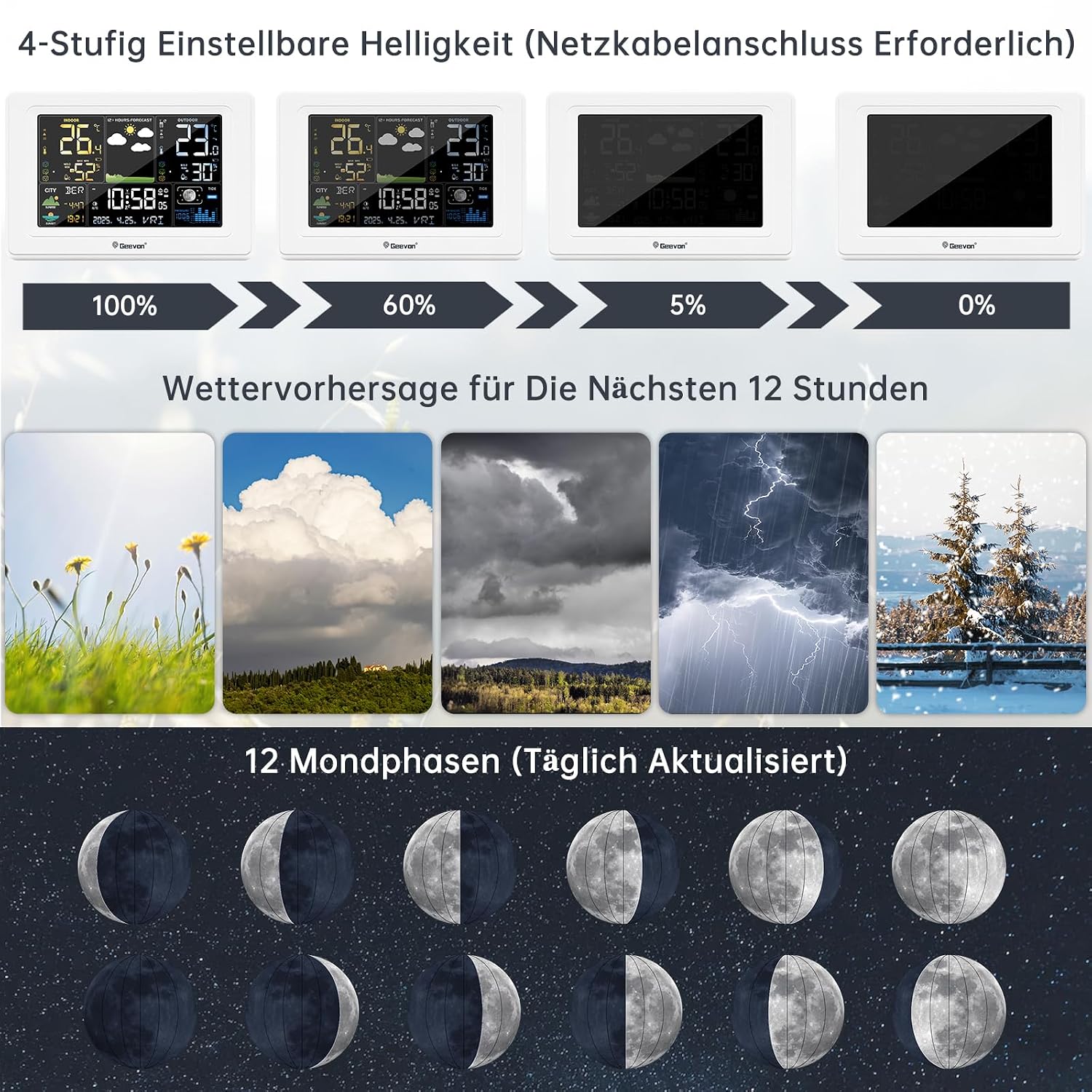
Image 6.3: Display Features. This image illustrates the 4-level adjustable brightness (requires power adapter), the 12-hour weather forecast icons (sunny, cloudy, overcast, stormy, snowy), and the 12 moon phases, which are updated daily.
- תחזית מזג האוויר: The station provides a 12-hour weather forecast using intuitive icons (e.g., sunny, partly cloudy, cloudy, rainy, snowy). This forecast is based on barometric pressure changes.
- שלב הירח: The display shows 12 different moon phases, updated daily.
- בהירות מתכווננת: When powered by the AC adapter, the display backlight has 4 adjustable brightness levels (100%, 60%, 5%, 0%). Use the appropriate button (refer to the full manual) to cycle through these levels.
6.5 אפשרויות מיקום

Image 6.4: Placement Options. This image demonstrates two ways to place the weather station: standing on a surface using its integrated stand, or hanging on a wall using the hanging hole. It also highlights the 350° clear viewזווית התצוגה.
The main unit can be placed on a tabletop using its integrated stand or mounted on a wall using the hanging hole on the back. The display is designed for a 350° clear viewזווית ing.
7. תחזוקה
- ניקוי: נגבו את היחידה הראשית והחיישן בעזרת מטלית רכהamp בַּד. אין להשתמש בחומרי ניקוי שוחקים או ממסים.
- החלפת סוללה: החליפו את הסוללות הן ביחידה הראשית והן בחיישן החיצוני כאשר מחוון הסוללה החלשה מופיע על הצג. ודאו כי הקוטביות נכונה.
- טיפול בחיישנים: Periodically check the outdoor sensor for debris or obstructions that might affect its performance.
8. פתרון תקלות
| בְּעָיָה | סיבה אפשרית | פִּתָרוֹן |
|---|---|---|
| אין קריאת טמפרטורה/לחות חיצונית | Sensor out of range or interference; low sensor battery; incorrect channel. | Move sensor closer to main unit; replace sensor batteries; ensure sensor and main unit are on the same channel. Press the 'Sensor' button on the main unit to re-search. |
| תצוגת זמן שגויה | Weak DCF signal; manual time not set correctly. | Move main unit to a location with better signal reception (e.g., near a window); manually set the time and date. |
| התצוגה עמומה או כבויה | Main unit not connected to power adapter; low main unit batteries. | Connect the power adapter for continuous backlight; replace main unit batteries if running on battery power. |
| תחזית מזג האוויר נראית לא מדויקת | Weather forecasts are predictions based on barometric pressure changes and may not always be 100% accurate for local conditions. | Use the forecast as a general guide. The device predicts for the next 12 hours. |
9. מפרטים
| תכונה | פְּרָט |
|---|---|
| מספר דגם | 250397 |
| מספר חלק של היצרן | 0397 |
| מידות (L x W x H) | 3 x 5 x 10 cm (Main Unit); 350 grams |
| חוֹמֶר | אקרילוניטריל בוטאדיאן סטירן (ABS) |
| מקור כוח | Battery Powered (Main Unit: 3x AA, Sensor: 2x AA) and AC Adapter |
| סוללות כלולות | כן (5 סוללות AA) |
| סוג תצוגה | LCD |
| טווח טמפרטורות מקורה | -9.9°C עד 50.0°C (14.2°F עד 122°F) |
| טווח טמפרטורות בחוץ | -40.0°C עד 60.0°C (-40°F עד 140°F) |
| טווח זיהוי לחות | 1% RH עד 99% RH |
| Temperature Reading Accuracy | ±0.5 מעלות צלזיוס |
| טכנולוגיית חיישנים | רדיו (אלחוטי) |
| טווח אלחוטי | עד 60 מטרים (200 רגל) באוויר הפתוח |
| טכנולוגיית קישוריות | Wi-Fi (Note: This likely refers to internal wireless communication, not internet Wi-Fi) |
| תכונה מיוחדת | DCF Atomic Clock, Alarm, Snooze, Weather Forecast, Moon Phase |
| שפה (ידנית) | German (Original provided, translated to English here) |
10. אחריות ותמיכה
Geevon is committed to providing high-quality products and customer satisfaction. We offer a lifetime consulting service for our products.
If you have any questions or encounter problems with your Geevon DCF 0397 Weather Station, please do not hesitate to contact our customer support. Your feedback is important to us, and we are dedicated to resolving any issues you may experience.
For specific warranty details, please refer to the documentation provided with your purchase or contact your retailer.