1. הקדמה
The xDuoo XD-05 Basic is a high-performance portable audio device combining a Digital-to-Analog Converter (DAC) and a headphone amplifier. It is designed to enhance audio quality from various sources, including computers, mobile phones, and dedicated audio players. This manual provides detailed instructions for its setup, operation, and maintenance to ensure optimal performance and user experience.

2. תכונות עיקריות
The XD-05 Basic offers a range of features designed for high-fidelity audio playback and versatile connectivity:
- High-Resolution Audio Decoding: Supports PCM signals up to 32-bit/384kHz, DSD256, and DXD384 for exceptional sound clarity.
- Powerful Headphone Ampליפיקציה: Delivers 500mW output power (at 32Ω load) to drive headphones with impedances ranging from 16Ω to 600Ω.
- קישוריות רב-תכליתית: Features USB, optical, and coaxial inputs for compatibility with Windows, macOS, iOS, and Android devices, as well as gaming consoles like PS4, Xbox, and Nintendo Switch.
- צליל הניתן להתאמה אישית: Includes adjustable gain settings (+6/9/16dB), a bass boost function (0/+6dB), and DAC filter settings to tailor the audio output to personal preferences.
- תצוגת OLED: A 0.91-inch OLED screen provides real-time information on sampling rate, input source, power status, and DAC filter settings.
- User-Replaceable Op-Amps: Allows for customization of sound characteristics by swapping operational ampשבבי ליפייר.
- ספק כוח כפול: Operates on a built-in 3.7V/4000mAh rechargeable lithium polymer battery for portable use, or external power via USB.


3. תכולת החבילה
ודא שכל הפריטים נמצאים בחבילה:
- xDuoo XD-05 Basic Unit (1 pc)
- USB Type-C Cable (1 pc)
- USB Type-C to Type-C OTG Cable (1 pc)
- USB Type-C to Micro USB OTG Cable (1 pc)
- USB Type A to Type C Plug (1 pc)
- 6.5mm to 3.5mm Jack Plug (1 pc)
- Magic Glue (3 pcs)
- Silicone Feet (10 pcs)
- מדריך למשתמש (1 מחשב)
- תעודת אחריות (1 יחידה)

4. פריסת המכשיר ובקרות
Familiarize yourself with the physical components and controls of the XD-05 Basic:
פאנל קדמי:
- PHONE Output: שקע אוזניות 6.35 מ"מ.
- לחצן קלט: Selects the audio input source (USB, Optical, Coaxial, AUX).
- BASS Switch: Toggles bass boost on/off.
- GAIN Switch: מתאים את amplification gain level.
- ידית VOLUME: שולט בעוצמת הפלט.
- תצוגת OLED: מציג את מצב התפעול וההגדרות.
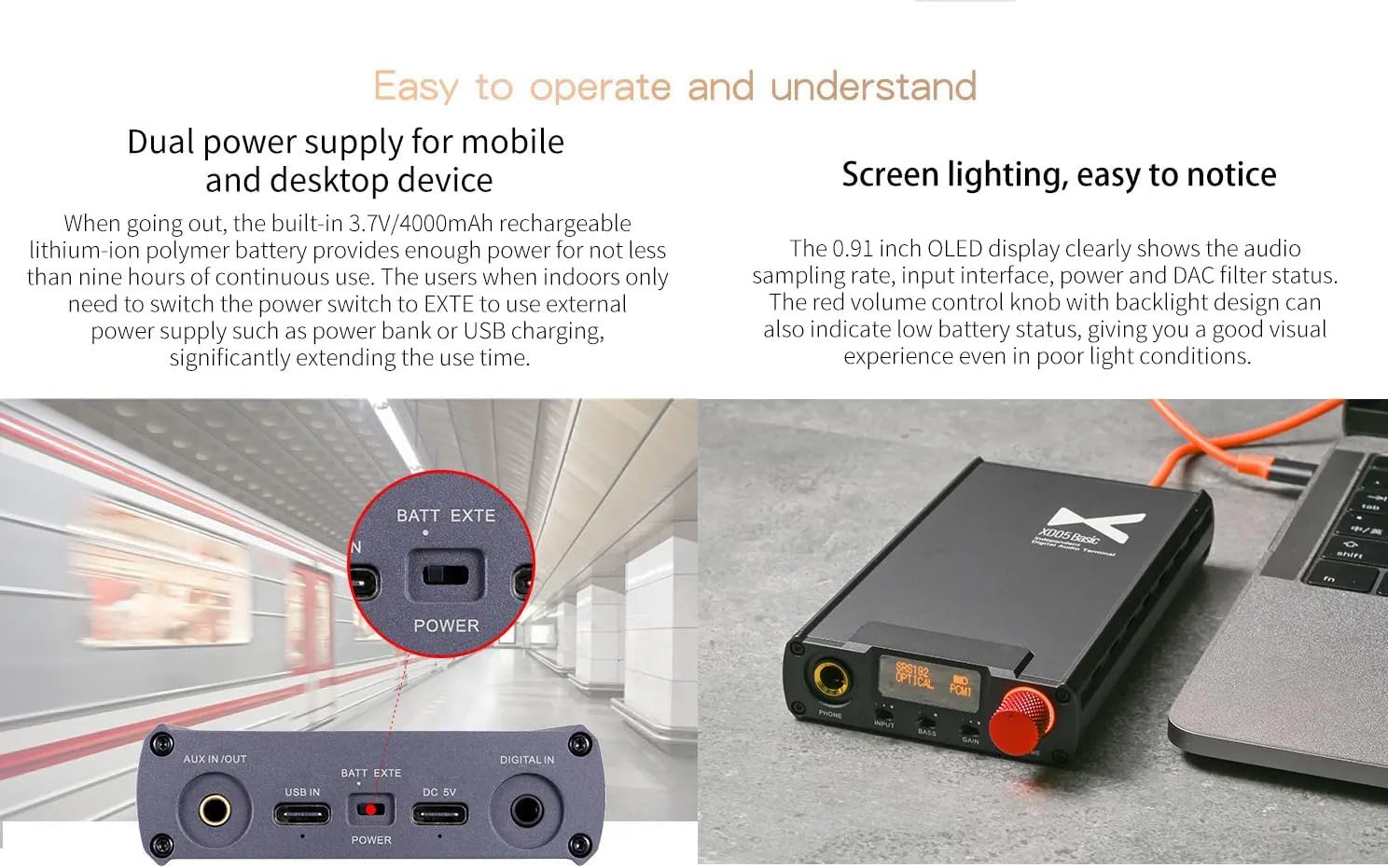
לוח אחורי:
- AUX IN/OUT: 3.5mm auxiliary input/output port.
- כניסת USB: USB Type-C port for data and charging.
- DC 5V: כניסת חשמל לטעינה.
- BATT/EXTE Switch: Selects between internal battery power and external power.
- DIGITAL IN: Optical and Coaxial digital audio inputs.
5. הגדרה וחיבורים
Follow these steps to connect your XD-05 Basic to various audio sources:
5.1. Connecting to a Computer (PC/Mac)
- Connect the XD-05 Basic to your computer using the provided USB Type-C cable.
- Ensure the XD-05 Basic is powered on.
- On your computer, select the XD-05 Basic as the audio output device. Drivers may be required for Windows systems (refer to xDuoo's official webאתר להורדות).
5.2. Connecting to Mobile Devices (iOS/Android)
- Use the appropriate OTG cable (USB Type-C to Type-C or USB Type-C to Micro USB) to connect your mobile device to the XD-05 Basic's USB IN port.
- Ensure the XD-05 Basic is powered on.
- Your mobile device should automatically recognize the XD-05 Basic as an audio output device.
5.3. Connecting to Gaming Consoles (PS4, Xbox, Nintendo Switch)
The XD-05 Basic supports digital audio input from gaming consoles:
- PS4/Xbox: Connect the console's optical output to the XD-05 Basic's DIGITAL IN (Optical) port using an optical cable (not included).
- מתג נינטנדו: Connect the Switch's line output (via its dock) to the XD-05 Basic's AUX IN, or use a USB Type-C connection if supported by the dock.

6. הוראות הפעלה
6.1. הפעלה/כיבוי
To power on the device, slide the power switch located on the rear panel to the 'ON' position. To power off, slide it to 'OFF'.
6.2. בחירת קלט
הקש על קֶלֶט button on the front panel to cycle through available input sources: USB, Optical, Coaxial, and AUX. The selected input will be displayed on the OLED screen.
6.3. התאמת עוצמת הקול
סובב את ה כֶּרֶך knob clockwise to increase volume and counter-clockwise to decrease it. Adjust to a comfortable listening level before placing headphones on.
6.4. הגדרות הגברה
ה לְהַשִׂיג switch allows you to adjust the amplification level to match your headphones' impedance and sensitivity. Select the appropriate gain setting (+6dB, +9dB, or +16dB) for optimal sound quality and volume control range.
6.5. בוסט בס
החלף את בס switch to enable or disable the bass boost function (+6dB). This can enhance low-frequency response for certain music genres or personal preference.
6.6. DAC Filter Settings (External)
The XD-05 Basic allows for external adjustment of DAC chip filters to achieve different listening experiences. Refer to the device's menu or specific instructions for accessing and changing these settings.
6.7. SRC Function (External)
The external SRC (Sample Rate Converter) function can be adjusted to improve the quality of low-bit rate audio files by upsampling them to 48kHz, 96kHz, or 192kHz. This helps restore musical details and provides a smoother sound. Refer to the device's menu or specific instructions for accessing and changing these settings.
6.8. מידע על צג OLED
The 0.91-inch OLED screen displays critical information:
- Current input source (e.g., USB, OPTICAL).
- אודיו sampling rate (e.g., 44.1KHz, 192KHz).
- Audio format (e.g., PCM, DSD).
- מחוון רמת הסוללה.
- DAC filter status.
7. תחזוקה
To ensure the longevity and optimal performance of your XD-05 Basic:
- ניקוי: השתמשו במטלית רכה ויבשה לניקוי המכשיר. הימנעו משימוש בחומרי ניקוי נוזליים או ממסים.
- אִחסוּן: יש לאחסן את המכשיר במקום קריר ויבש, הרחק מאור שמש ישיר וטמפרטורות קיצוניות.
- טיפול בסוללה: להשגת חיי סוללה אופטימליים, הימנעו מפריקה מלאה של הסוללה לעתים קרובות. אם מאחסנים אותה לפרקי זמן ממושכים, טען את הסוללה לכ-50% כל כמה חודשים.
- הימנע מהשפעה: הגן על המכשיר מפני נפילות ופגיעות, אשר עלולות לפגוע ברכיבים הפנימיים.
8. פתרון תקלות
If you encounter issues with your XD-05 Basic, refer to the following common problems and solutions:
| בְּעָיָה | סיבה אפשרית | פִּתָרוֹן |
|---|---|---|
| אין פלט קול | Incorrect input selected; Volume too low; Loose headphone connection; Device not recognized by source. | Verify input selection; Increase volume; Reconnect headphones; Check source device's audio settings and drivers. |
| המכשיר לא נדלק | Battery depleted; Power switch in wrong position; Faulty charging cable. | Charge the device; Ensure power switch is 'ON'; Try a different charging cable. |
| איכות צליל מעוותת או ירודה | Incorrect gain setting; Source audio quality is low; Damaged cable; Interference. | Adjust gain to match headphones; Use high-quality audio files; Replace cables; Move away from potential interference sources. |
| המכשיר לא מזוהה על ידי המחשב | Missing drivers (Windows); Faulty USB cable; Incorrect USB port. | Install necessary drivers from xDuoo website; Try a different USB cable or port; Restart computer and device. |
9. מפרטים
Detailed technical specifications for the xDuoo XD-05 Basic:
- מקור כוח: Built-in 3.7V/4000mAh rechargeable lithium polymer battery
- מָסָך: מסך OLED בגודל 0.91 אינץ'
- מערכת הפעלה תואמת: Windows 7/8/10, Mac OS X, iOS, Android system
- כוח פלט: 500mW (עומס 32Ω)
- תגובת תדירות:
- AMP: 10Hz~100KHz (±0.5dB)
- USB/SPDIF: 20Hz~20KHz (±0.5dB)
- Sampתמיכת תעריף ling:
- USB PCM: 16-32Bit/44.1K-384KHz
- DSD: DOP/NATIVE mode, DSD64-256 (1Bit/2.8M-11.2M)
- DXD: 24-32Bit/352.8K-384KHz
- OPT/COA PCM: 16-24BIT/44.1K-192KHZ
- לְהַשִׂיג: +6/9/16dB
- Boost Boost: 0 / + 6dB
- THD+N:
- USB IN: 0.0025%@1kHz
- COAXIAL IN: 0.0025%@1kHz
- OPTICAL IN: 0.0025%@1kHz
- AUX IN: 0.0018%@1kHz
- S/N: 115dB
- צלב: ≥75dB
- חיי סוללה:
- ≥9H (USB IN)
- ≥12H (SPDIF IN)
- ≥16H (AUX IN)
- זמן טעינה: טעינה מהירה 5H (עם מטען), טעינה איטית 11H (עם מחשב)
- מידות: 139 x 75.2 x 22.8 מ"מ
- מִשׁקָל: 268 גרם
10. אחריות ותמיכה
The xDuoo XD-05 Basic comes with a standard manufacturer's warranty. Please refer to the included Warranty Card for specific terms and conditions, including warranty period and coverage details. For technical support, driver downloads, or further assistance, please visit the official xDuoo webלאתר או לפנות למחלקת שירות הלקוחות שלהם.
שמור את קבלת הרכישה כהוכחת קנייה לתביעות אחריות.