1. הקדמה
Thank you for choosing the DS i20 Ultra 2 Max Suit Smartwatch and Wireless Earphones 10-in-1 Set. This comprehensive package combines a feature-rich smartwatch with a large 2.3-inch infinite display and a pair of wireless earphones, designed to enhance your daily activities, communication, and entertainment. This manual provides essential information for proper setup, operation, and maintenance of your new devices.
2. מה בקופסה
Your DS i20 Ultra 2 Max Suit 10-in-1 Set includes the following components:
- DS i20 Ultra 2 Max Suit Smartwatch
- אוזניות אלחוטיות עם נרתיק טעינה
- Multiple Interchangeable Watch Straps (various designs and materials)
- Smartwatch Charging Cable
- Earphones Charging Cable
- Protective Case for Smartwatch
- מדריך למשתמש (מסמך זה)
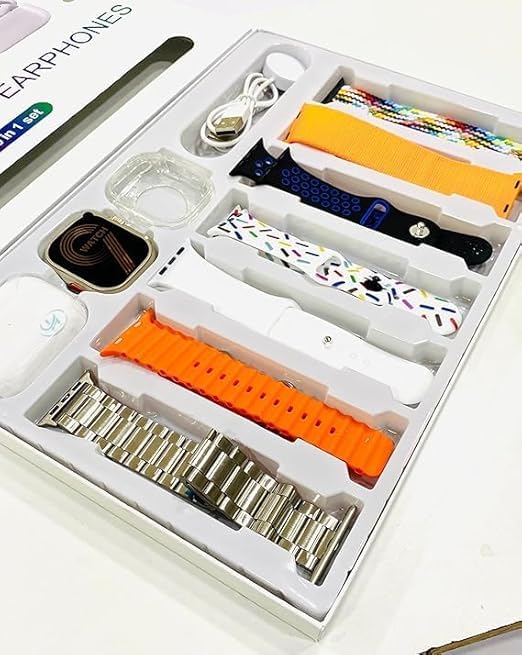
Image: All components included in the DS i20 Ultra 2 Max Suit 10-in-1 Set, neatly arranged in the product box. This includes the smartwatch, wireless earphones, various watch straps, and charging accessories.
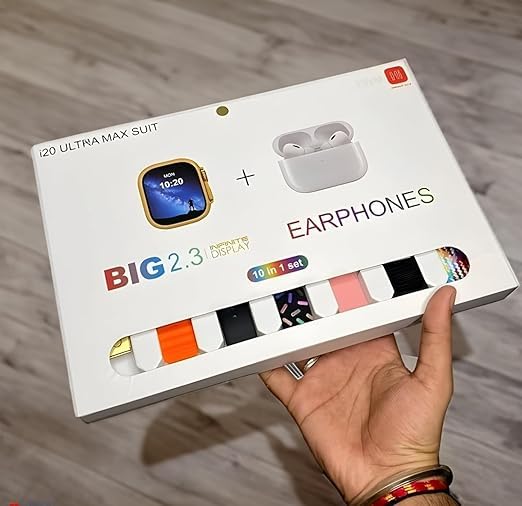
Image: The exterior packaging of the DS i20 Ultra 2 Max Suit, highlighting the smartwatch and earphones, and indicating the '10-in-1 set' contents.
3. התקנה
3.1. Smartwatch Initial Setup
- טעינת השעון החכם: Connect the smartwatch to its dedicated charging cable and plug it into a USB power source. Ensure the charging pins align correctly. A full charge typically takes approximately 2 hours.
- הפעלה: Press and hold the power button on the side of the smartwatch until the display illuminates.
- הורידו את אפליקציית המלווה: Scan the QR code provided in the manual or on the watch display (if available) to download the official companion application on your smartphone. Alternatively, search for the app name (usually indicated in the watch's initial setup screen) in your phone's app store (Android or iOS).
- התאמה עם סמארטפון:
- הפעל Bluetooth בטלפון החכם שלך.
- פתחו את האפליקציה הנלווית ופעל לפי ההוראות שעל המסך כדי להוסיף מכשיר חדש.
- Select 'DS i20 Ultra 2 Max Suit' from the list of available devices.
- אשר את בקשת הצימוד הן בטלפון החכם והן בשעון החכם.
- התאמה אישית של הגדרות: Once paired, use the app to set your preferences, such as watch faces, notification settings, health tracking goals, and personal information.
3.2. Wireless Earphones Initial Setup
- טעינת האוזניות: Place the earphones into their charging case. Connect the charging case to a USB power source using the provided cable. The indicator lights on the case will show charging status.
- הפעלה והתאמה:
- פתחו את מארז הטעינה. האוזניות ייכנסו אוטומטית למצב צימוד (מסומן על ידי אורות מהבהבים).
- On your smartphone or smartwatch, go to Bluetooth settings and search for new devices.
- Select the earphones (e.g., 'DS Earphones' or similar) from the list to connect.
- Once connected, a confirmation sound or message will be heard.
4. תפעול
4.1. Smartwatch Operation
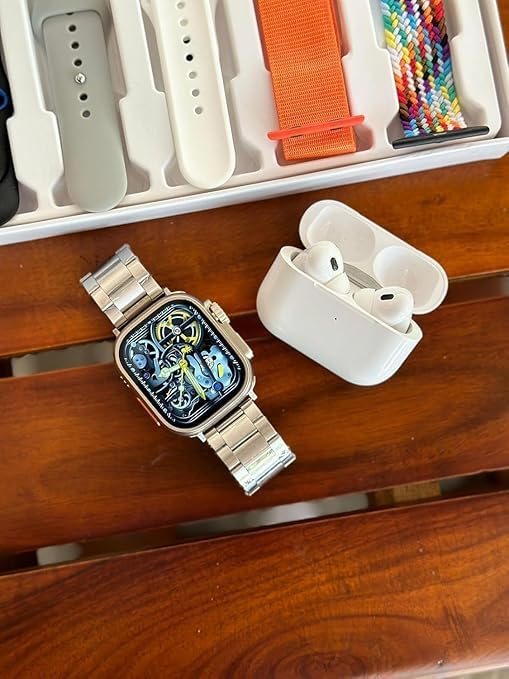
Image: The DS i20 Ultra 2 Max Suit Smartwatch, shown with a metal strap, alongside the wireless earphones. This illustrates the primary devices in the set.
תצוגה וניווט
- 2.3-inch Infinite Display: The large touchscreen allows for clear viewing and intuitive interaction.
- מחוות מגע:
- החלק למעלה/מטה: Navigate through menus or notifications.
- החלק שמאלה/ימינה: Access quick widgets or different screens.
- בֶּרֶז: בחר פריט או פתח יישום.
- לחץ והחזק: התאמה אישית של לוחות השעון (במסך הבית).
- כפתור(ים) צדדי(ים): Typically used for power on/off, returning to the home screen, or accessing the app menu. Refer to the on-screen prompts for specific functions.
תכונות מפתח
- שיחות בלוטות': Once paired with your smartphone, you can make and receive calls directly from your smartwatch. Ensure your phone is within Bluetooth range.
- התראות: Receive alerts for calls, messages, and app notifications from your paired smartphone. Manage these settings via the companion app.
- מעקב כושר: Monitor steps, distance, calories burned, heart rate, and other health metrics. Data is synced to the companion app for detailed analysis.
- בקרת מוזיקה: Control music playback on your smartphone directly from the smartwatch.
- פונקציות אחרות: May include alarm, stopwatch, timer, weather, and remote camera control. Explore the watch's app menu for all available features.
4.2. Wireless Earphones Operation
בקרות בסיסיות
- הפעל/השהה: נגיעה אחת על כל אחת מהאוזניות.
- הרצועה הבאה: הקש פעמיים על האוזניה הימנית.
- רצועה קודמת: הקש פעמיים על האוזניה השמאלית.
- מענה/סיום שיחה: נגיעה אחת על כל אחת מהאוזניות במהלך שיחה נכנסת.
- דחה שיחה: לחץ והחזק את האחת מהאוזניות במהלך שיחה נכנסת.
- עוזר קולי: Triple tap on either earphone (if supported by your connected device).
טְעִינָה
- Place earphones back into the charging case to recharge them.
- Charge the case itself using the provided USB cable when its battery is low.
5. תחזוקה
5.1. ניקיון
- שעון חכם: Wipe the screen and body with a soft, lint-free cloth. For stubborn smudges, slightly dampשטפו את המטלית במים. הימנעו מכימיקלים חזקים או מחומרים שוחקים.
- רצועות: Clean silicone or fabric straps with mild soap and water, then rinse and dry thoroughly. Metal straps can be wiped with a dry cloth.
- אוזניות: Gently wipe the earphones and charging case with a dry, soft cloth. Use a cotton swab to carefully clean ear tips and charging contacts.
5.2. טיפול בסוללה
- הימנעו מפריקת הסוללה באופן מלא לעתים קרובות.
- Do not expose the devices to extreme temperatures (hot or cold), as this can degrade battery life.
- אם מאחסנים את המכשירים לתקופה ממושכת, יש לטעון אותם עד לכ-50% לפני האחסון.
6. פתרון תקלות
| בְּעָיָה | סיבה אפשרית | פִּתָרוֹן |
|---|---|---|
| שעון חכם לא נדלק | סוללה חלשה; תקלה במכשיר | Charge the smartwatch for at least 30 minutes. If it still doesn't turn on, contact support. |
| Cannot pair smartwatch/earphones with phone | Bluetooth off; device out of range; pairing mode not active; interference | Ensure Bluetooth is on. Bring devices closer. Restart both devices. Ensure smartwatch/earphones are in pairing mode. Clear previous Bluetooth connections on your phone. |
| Notifications not appearing on smartwatch | הרשאות אפליקציה; הגדרות התראות; Bluetooth מנותק | Check app permissions on your phone. Verify notification settings in the companion app. Ensure smartwatch is connected via Bluetooth. |
| Earphones no sound/low volume | Low battery; not connected; volume too low on source device | Charge earphones. Re-pair earphones. Adjust volume on your phone/smartwatch. |
| נתוני כושר לא מדויקים | Improper wear; incorrect personal settings | Ensure the smartwatch is worn snugly on your wrist. Update personal information (height, weight) in the companion app. |
7. מפרטים
Below are the key technical specifications for the DS i20 Ultra 2 Max Suit Smartwatch and Wireless Earphones:
| תכונה | פְּרָט |
|---|---|
| שם הדגם | Ultra 2 Max Suit |
| גודל תצוגה | 2.3-inch (Infinite Display) |
| סוג תצוגה | תצוגת HD |
| קישוריות | בלוטות' |
| מַעֲרֶכֶת הַפעָלָה | קנייני |
| קיבולת אחסון זיכרון | 32 מגה-בייט |
| גודל זיכרון RAM מותקן | 1 ג'יגה-בייט |
| תכונות מיוחדות | שיחות Bluetooth |
| מכשירים תואמים | סמארטפון |
| קיבולת סוללה | 12 Amp שעות |
| זמן טעינה | 2 שעות |
| משקל פריט | 75 g (Smartwatch) |
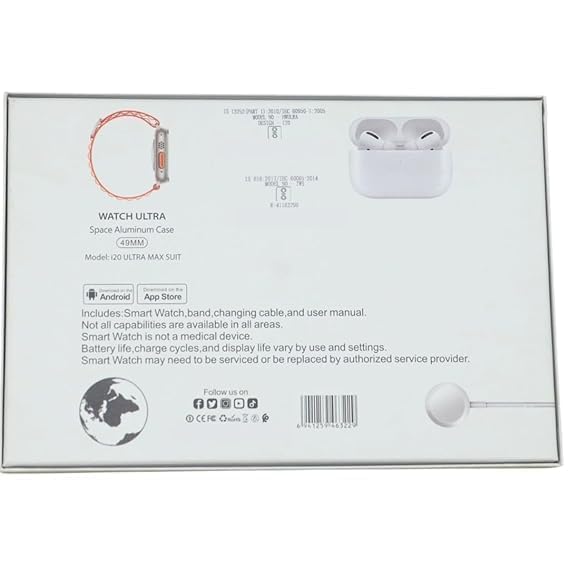
Image: The rear of the product packaging, displaying key product information, model number, and compliance marks.
8. אחריות ותמיכה
For warranty information, please refer to the documentation included in your product packaging or contact the retailer where the product was purchased. Smartwatch functionality and battery life may vary based on usage and settings. If you encounter issues that cannot be resolved using the troubleshooting guide, please contact customer support for assistance.
פֶּתֶק: The Smartwatch is not a medical device. All capabilities may not be available in all regions or with all smartphone models.


