
Qukaim QukaimBLAD13757YYZK-3
Qukaim TOKQI M02 AI 3-Axis Handheld Stabilizer Kit User Manual
Model: QukaimBLAD13757YYZK-3
המוצר נגמרview
The Qukaim TOKQI M02 AI 3-Axis Handheld Stabilizer Kit is designed to provide professional-grade stability for smartphone videography. It features advanced 3-axis motor technology, AI tracking, gesture control, and a magnetic LED fill light, making it an ideal tool for vlogging, live streaming, and capturing smooth, high-quality video content.
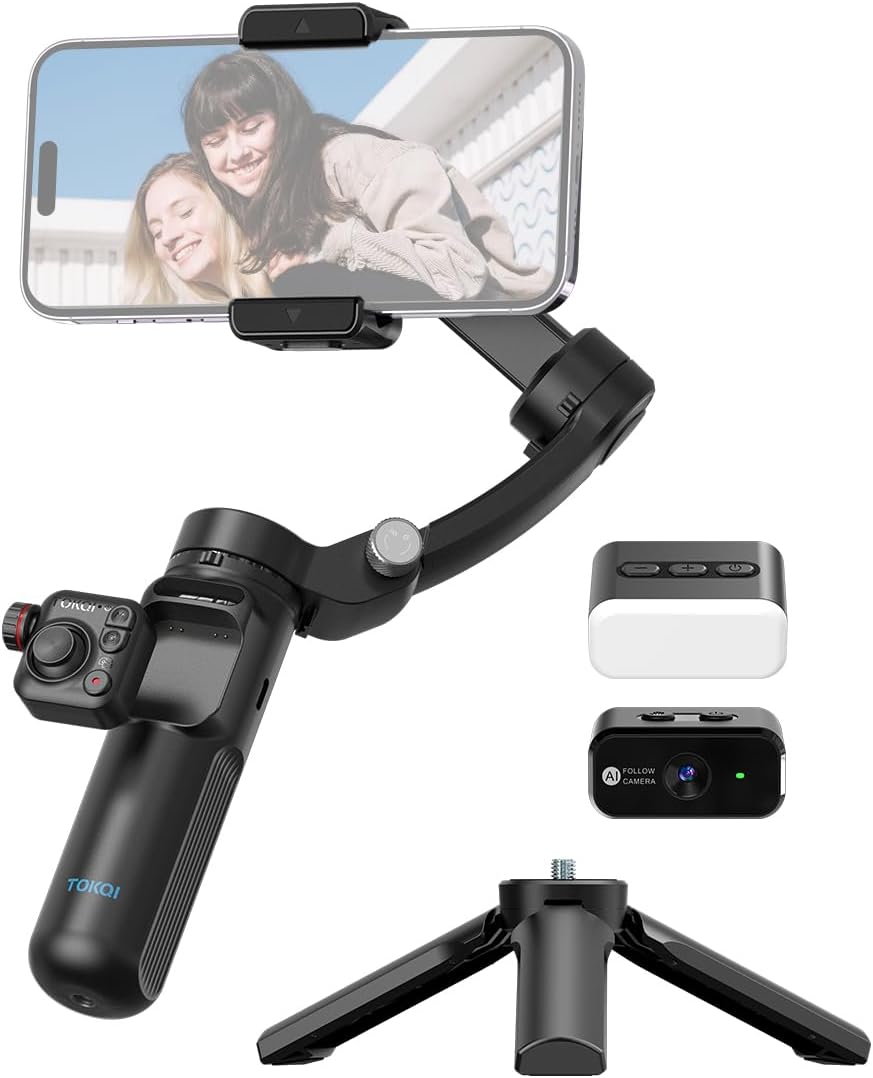
Image: The Qukaim TOKQI M02 AI 3-Axis Handheld Stabilizer Kit, showcasing the main unit with a smartphone mounted, the detachable AI module, the magnetic LED fill light, and the mini tripod.
תוכן החבילה
אנא ודא שכל הפריטים הבאים כלולים בחבילה שלך:
- Qukaim TOKQI M02 AI 3-Axis Handheld Stabilizer
- שלט רחוק ניתן להסרה
- מיני חצובה
- מודול AI
- Magnetic LED Fill Light
- כבל טעינה מסוג C
- מדריך למשתמש
תחילת העבודה
Charging the Stabilizer
Before first use, fully charge the stabilizer. Connect the included Type-C charging cable to the charging port on the stabilizer and a compatible USB power adapter (not included). The indicator light will show charging status and turn off when fully charged.
הרכבת הטלפון החכם שלך
הושיט בעדינות את מכסה הטלפוןamp and securely place your smartphone in the holder. Ensure the phone is centered and balanced to optimize gimbal performance. The holder supports smartphones with a clamping range of 50mm-90mm and a thickness of up to 11mm.

Image: The Qukaim TOKQI M02 AI 3-Axis Handheld Stabilizer with a smartphone securely mounted and the mini tripod attached, ready for use.
הוראות הפעלה
ייצוב 3 צירים
Utilizing three motors for balance, this anti-shake phone stabilizer helps you capture stable images and record smooth videos with ease, compensating for unwanted movements across tilt, roll, and pan axes.
מחזיק טלפון מסתובב 360°
The phone holder supports 360° rotation. Easily switch between horizontal (landscape) and vertical (portrait) modes without manual adjustment, meeting your multi-scene recording needs for various content formats.
Seven Versatile Gimbal Modes
The phone gimbal stabilizer supports seven distinct gimbal modes to adapt to various shooting scenarios and creative requirements:
- Semi-Follow Mode: Pan and tilt axes follow, roll axis is locked.
- מצב מעקב מלא: All three axes (pan, tilt, roll) follow your movements.
- מצב נעילה מלא: All three axes are locked, maintaining a fixed direction.
- מצב נקודת מבט: Provides a first-person perspective, allowing all axes to follow subtle movements.
- מצב חלל התחלה: Creates a spinning effect, rotating the phone 360 degrees along the roll axis.
- Semi-Follow Go Mode: Faster response in semi-follow mode for dynamic shots.
- Full-Follow Go Mode: Faster response in full-follow mode for dynamic shots.

Image: A visual representation of the seven distinct gimbal modes, showing how the stabilizer adjusts to achieve different camera movements and effects.

תמונה: דוגמהamples of Inception Space mode for creative spinning shots and Mad Dog mode for rapid, accurate subject locking during fast-paced action.
מעקב בינה מלאכותית ובקרת מחוות
The included AI module can help you accurately identify and track subjects in real-time without the need for an external app. Simply lock onto the target. The gesture control function allows you to take photos or record videos with simple hand gestures, providing hands-free operation.
Magnetic LED Fill Light
The stabilizer comes with a magnetic LED light that easily attaches to the unit. It features 3 lighting modes and 9 adjustable brightness levels, helping you record clear videos even in low-light conditions.
Detachable Remote Control and Mini Tripod
The detachable remote control allows you to operate the phone gimbal stabilizer remotely with one hand, offering greater flexibility in shooting. The included mini tripod can be attached to the bottom of the stabilizer, providing a stable base for hands-free video recording and live streaming.

Image: The Qukaim TOKQI M02 AI 3-Axis Handheld Stabilizer with the mini tripod attached, highlighting the standard 1/4-inch screw mount for versatile accessory compatibility.
סוללה וטעינה
The stabilizer features a built-in 2600 mAh large capacity battery. It offers a long operating time of approximately 6 hours on a full charge. Recharge the device using the included Type-C charging cable. The charging input is 5V 2A, ensuring relatively fast charging.
טיפול ותחזוקה
- ניקוי: Use a soft, dry cloth to clean the stabilizer. Do not use liquid cleaners or solvents.
- אִחסוּן: Store the stabilizer in a cool, dry place away from direct sunlight and extreme temperatures. When not in use for extended periods, ensure the battery is partially charged (around 50%) to prolong its lifespan.
- טיפול: Avoid dropping or subjecting the stabilizer to strong impacts, as this can damage the internal components and motors.
מדריך פתרון בעיות
| בְּעָיָה | סיבה אפשרית | פִּתָרוֹן |
|---|---|---|
| גימבל לא נדלק | סוללה חלשה; כפתור ההפעלה לא נלחץ נכון | Charge the stabilizer fully; Press and hold the power button for 3 seconds |
| Stabilizer vibrates or shakes | Phone not balanced; Overload (phone too heavy) | Ensure phone is centered in the clamp; Check phone weight against payload range (max 280g) |
| השלט רחוק לא מגיב | Remote battery low; Not paired; Out of range | Replace remote battery; Re-pair remote with stabilizer; Ensure within 10m range |
| מעקב אחר בינה מלאכותית לא עובד | Poor lighting; Subject too far/close; AI module not properly attached | Ensure adequate lighting; Maintain optimal distance from subject; Re-attach AI module securely |
מפרט טכני
| תכונה | מִפרָט |
|---|---|
| מותג | Qukaim |
| זווית סיבוב | Tilt 320°, Roll 345°, Pan 320° |
| קיבולת סוללה | 3.7V 2600 mAh |
| חיי סוללה | 6 שעות |
| כניסת טעינה | 5V 2A |
| מרחק שלט רחוק | 10 מ' |
| טווח מטען | עד 280 גרם |
| Clamping Support Range | 50 מ"מ - 90 מ"מ |
| עובי סמארטפון | עד 11 מ"מ |
| Mobile Phone System Compatibility | אנדרואיד 9.0 ומעלה; iOS 11 ומעלה |
| מידות מוצר (מקופל) | 157 x 106 x 65 מ"מ |
| משקל נטו | 360 גרם |
| מספר דגם | QukaimBLAD13757YYZK-3 |
אחריות ותמיכת לקוחות
Information regarding product warranty and specific customer support contacts is not available in the provided product data. Please refer to the product packaging or the seller's webבאתר לקבלת פרטים על כיסוי האחריות וכיצד ליצור קשר עם תמיכת הלקוחות לקבלת סיוע.
Ask a question about this manual
Ask about setup, troubleshooting, compatibility, parts, safety, or missing instructions. Manuals+ will review the question and use this page’s manual context to help answer it.