
מָבוֹא
Thank you for choosing the WOSPORTS Mini Trail Camera and Trail Camera Viewer. This manual provides detailed instructions for setting up, operating, and maintaining your devices. The Mini Trail Camera is designed for capturing high-quality photos and videos of wildlife with its 24MP camera and 1080P HD video capabilities, featuring motion activation and IR night vision. The accompanying Trail Camera Viewer allows for real-time management of your captured media.
תוכן החבילה
אנא בדקו את החבילה כדי לוודא שכל הפריטים נמצאים:
- WOSPORTS Mini Trail Camera
- WOSPORTS Trail Camera Viewer
- Mounting Strap (for trail camera)
- USB Cable (for data transfer/power)
- מדריך למשתמש
- Note: 4x AAA batteries and an SD card are not included and must be purchased separately.
המוצר נגמרview
Mini Trail Camera Features
- עיצוב קומפקטי: Significantly smaller and lighter than traditional trail cameras, allowing for discreet placement.
- הדמיה ברזולוציה גבוהה: Captures 24 Megapixel still images and Full HD 1080P video.
- תנועה מופעלת: Equipped with a fast trigger speed (0.3-1.1 seconds) to capture movement effectively.
- ראיית לילה אינפרא אדום: Automatic IR filter ensures clear images and videos in low-light conditions or complete darkness.
- צריכת חשמל נמוכה: Operates efficiently on 4 AAA batteries, extending standby time.
- עמיד בפני מזג אוויר: Designed for outdoor use (IP54 rated).

Image: The WOSPORTS Mini Trail Camera, camouflaged and mounted on a tree, demonstrating its discreet design and IP54 weather resistance.

Image: The compact dimensions of the Mini Trail Camera (101mm x 102mm x 63mm) are shown in comparison to a laptop and smartphone, emphasizing its portability.
מצלמת שביל Viewאה תכונות
- בזמן אמת File הַנהָלָה: Allows instant viewing, saving, sharing, and deleting of photos and videos.
- תאימות לריבוי מכשירים: Effortlessly manage data between iPhone, iPad, Android devices, and computers.
- Plug & Play: No application required for operation, offering direct access to media files.
- עיצוב נייד: Small and lightweight, designed for easy transport.
הגדרה
1. Battery Installation (Mini Trail Camera)
- פתח את ג של המצלמהasinז על ידי פתיחת קליפסים הצדדיים.
- אתר את תא הסוללות.
- Insert 4 new AAA batteries (not included) according to the polarity markings (+/-) inside the compartment.
- סגור היטב את מכסה תא הסוללות.

Image: The open trail camera revealing the battery compartment, indicating the placement of 4 AAA batteries for low power consumption.
2. SD Card Insertion (Mini Trail Camera)
- ודא שהמצלמה כבויה.
- Locate the SD card slot, typically on the side or bottom of the camera.
- הכנס כרטיס SD מעוצב (עד 32GB, לא כלול) לחריץ עד שיינעל במקומו בנקישה.
- כדי להוציא, דחפו בעדינות את הכרטיס פנימה עד שייחלץ.
3. Mounting the Trail Camera
- Select a suitable location, such as a tree or post, that provides a clear view של האזור שאתה רוצה לנטר.
- השחילו את רצועת ההרכבה המצורפת דרך החריצים בגב המצלמה.
- Securely fasten the camera to the desired object using the strap. Adjust the camera's angle as needed.
Operating the Mini Trail Camera
הפעלה/כיבוי ובחירת מצב
- אתר את מתג ההפעלה בתוך המצלמה גasing.
- Slide the switch to "ON" to power on the camera. The camera will enter setup mode or monitoring mode.
- Slide the switch to "OFF" to power off the camera.
- The camera typically has modes like "OFF", "SETUP", and "ON" (monitoring). Use "SETUP" to adjust settings and "ON" for active recording.
Basic Settings (in SETUP mode)
While in SETUP mode, use the camera's internal buttons (usually MENU, UP, DOWN, OK) to navigate and adjust settings such as:
- מצב: בחר בין תמונה, וידאו או תמונה+וידאו.
- רזולוציית תמונה: Set image quality (e.g., 24MP, 12MP).
- רזולוציית וידאו: Set video quality (e.g., 1080P, 720P).
- מרווח PIR: Adjust the delay between motion detections.
- רְגִישׁוּת: Set the motion sensor's sensitivity (High, Medium, Low).
- תאריך ושעה: הגדר את התאריך והשעה הנוכחיים לקבלת שעות מדויקותamps בהקלטות.
- פורמט כרטיס SD: It is recommended to format the SD card within the camera before first use and periodically thereafter.
לכידת תמונות וסרטונים
Once settings are configured, switch the camera to "ON" mode. The camera will then automatically detect motion and capture photos or videos according to your settings. The fast trigger speed ensures minimal delay.

Image: The camera's fast trigger speed (0.3-1.1 seconds) is depicted capturing a moving deer, ensuring no moment is missed.
פעולת ראיית לילה
The camera automatically switches to infrared night vision mode in low-light conditions. The built-in IR illuminators provide illumination for clear black and white images and videos without disturbing wildlife.

תמונה: אקסיתample of the camera's Super Night Vision, showing two zebras clearly captured in complete darkness, with timestamp וטמפרטורה.
Using the Trail Camera Viewer
חיבור ה Viewer
- Remove the SD card from the Mini Trail Camera.
- Insert the SD card into the appropriate slot on the Trail Camera Viewאה.
- חבר את viewer to your smartphone (iPhone, Android) or computer using the appropriate connector (USB-C, Lightning, USB-A). The viewer is designed for "Plug & Play" operation, requiring no additional apps.

Image: Illustration of the two-way transfer capability, showing how to connect the card viewer to a smartphone to transfer media from the trail camera.

Image: The Trail Camera Viewer connected to a smartphone, demonstrating its "Plug & Play" functionality for viewביצוע וניהול files without needing an app.
ניהול Files
Once connected, your device's file manager or photo application will recognize the SD card. You can then:
- View: Browse through captured photos and videos.
- לְהַצִיל: Transfer selected files to your smartphone or computer's internal storage.
- לַחֲלוֹק: Easily share media via email, social media, or messaging apps.
- לִמְחוֹק: הסר לא רצוי files from the SD card to free up space.
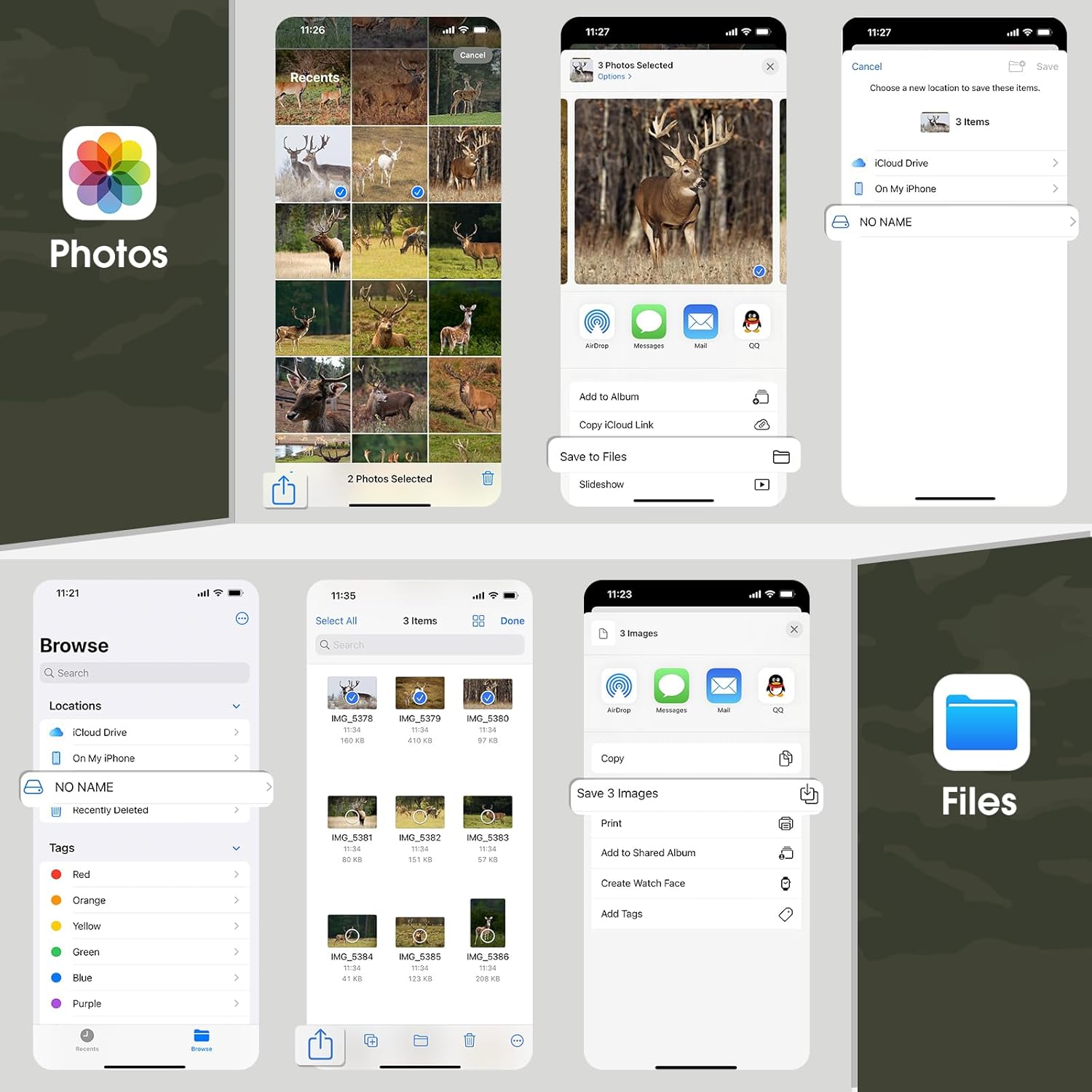
Image: A visual guide demonstrating how to manage files (select, save, share, delete) on a smartphone using the native Photos and Files applications after connecting the viewאה.
תַחזוּקָה
ניקוי
- עדשת מצלמה: נגבו בעדינות את העדשה בעזרת מטלית רכה ונטולת סיבים. עבור לכלוך עיקש, השתמשו בתמיסת ניקוי עדשות המיועדת לאופטיקה.
- גוף המצלמה: נגב את החלק החיצוני עם המודעהamp מטלית. הימנעו מכימיקלים חזקים או מחומרים שוחקים.
- Viewאה: Keep the connectors free of dust and debris. Use a soft, dry cloth for cleaning.
אִחסוּן
- When not in use for extended periods, remove batteries from the trail camera to prevent leakage.
- יש לאחסן את שני המכשירים במקום קריר ויבש, הרחק מאור שמש ישיר וטמפרטורות קיצוניות.
פתרון בעיות
| בְּעָיָה | סיבה אפשרית | פִּתָרוֹן |
|---|---|---|
| המצלמה לא נדלקת | סוללות חלשות או ריקות; קוטביות סוללה שגויה; מתג ההפעלה במצב כבוי. | Replace batteries; check polarity; ensure switch is in ON or SETUP. |
| Camera not capturing images/videos | SD card full or not inserted correctly; incorrect mode selected; PIR sensor blocked; low battery. | Format/replace SD card; check mode settings; clear sensor path; replace batteries. |
| איכות תמונה/וידאו ירודה | Dirty lens; low light conditions (for color images); incorrect resolution settings. | Clean lens; ensure adequate lighting or rely on night vision; adjust resolution settings. |
| Viewer not recognized by phone/computer | Incorrect connection; dirty connector; incompatible device; SD card issue. | Ensure secure connection; clean connectors; try another device; reinsert/format SD card. |
מפרטים
| תכונה | פְּרָט |
|---|---|
| מותג | WOSPORTS |
| דֶגֶם | Mini Trail Camera, Trail Camera Viewer |
| רזולוציית תמונה | עד 24 מגה פיקסל |
| רזולוציית וידאו | Full HD 1080P |
| מהירות טריגר | 0.3 - 1.1 שניות |
| ראיית לילה | אינפרא אדום (IR) |
| ספק כוח | 4x סוללות AAA (לא כלולות) |
| אִחסוּן | כרטיס SD (עד 32GB, לא כלול) |
| עמידות בפני מזג אוויר | IP54 |
| Viewer תאימות | iPhone, iPad, Android, PC (via various connectors) |
אחריות ותמיכה
For warranty information and technical support, please refer to the official WOSPORTS website or contact their customer service directly. Details are typically provided on the product packaging or a separate warranty card.
WOSPORTS Official Webאֲתַר: Visit WOSPORTS Store on Amazon