
1. הקדמה
This manual provides detailed instructions for the installation, operation, and maintenance of your GIGABYTE B550M DS3H AC R2 motherboard. This micro-ATX motherboard is designed to support AMD Ryzen 5000, 4000, and 3000 series CPUs on the AM4 socket, offering a robust platform for various computing needs. Please read this manual thoroughly before beginning installation to ensure proper setup and functionality.
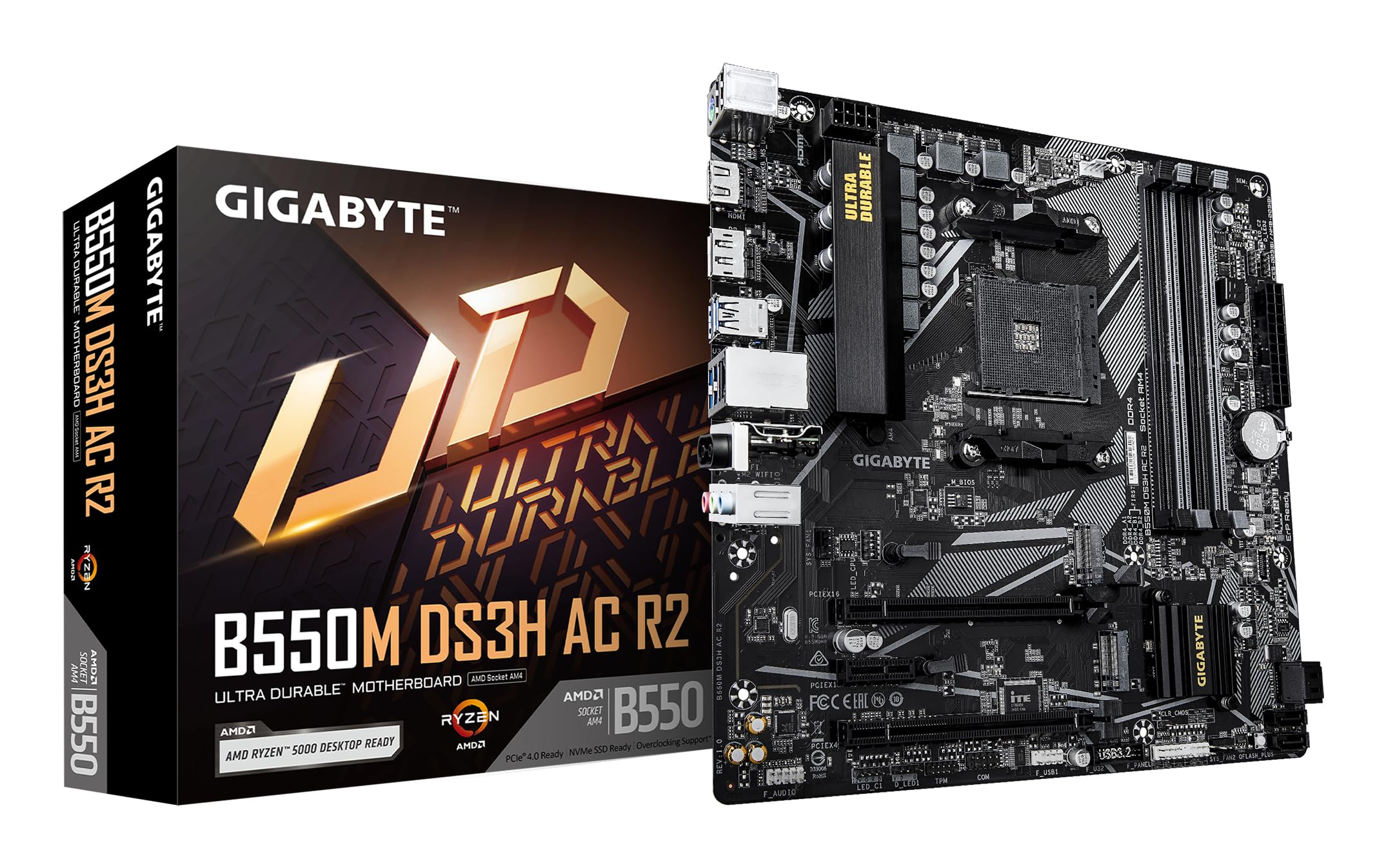
איור 1.1: מלמעלה למטה view of the GIGABYTE B550M DS3H AC R2 Motherboard, showcasing its layout including the CPU socket, DIMM slots, and various connectors.
2. תכונות עיקריות
- ערכת שבבים AMD B550: Supports AMD Ryzen 5000, 4000, and 3000 series CPUs with AM4 socket.
- זיכרון DDR4 במהירות גבוהה: Dual-channel support for up to 4733MHz (O.C.) across 4 DIMM slots.
- Advanced Storage Options: Includes one PCIe 4.0 M.2 slot and one PCIe 3.0 M.2 slot, alongside PCIe slots for graphics and expansion.
- קישוריות משולבת: Features Wi-Fi 5, Bluetooth 5.0, and 1GbE LAN for reliable network connections.
- Flexible Display Outputs: Equipped with HDMI and DisplayPort for multi-monitor configurations.
- מערכת קירור חכמה: Smart Fan 6 with multiple temperature sensors ensures efficient thermal management.
- Q-Flash Plus: Allows BIOS updates without the need for CPU, memory, or graphics card installation.
3. התקנה והתקנה
3.1 התקנת מעבד
- ודא שידית שקע המעבד נמצאת במצב פתוח.
- Carefully align the triangular mark on the AMD Ryzen CPU with the mark on the AM4 socket.
- הכנס בעדינות את המעבד לשקע מבלי ללחוץ עליו בכוח.
- הורד את הידית כדי לאבטח את המעבד למקומו.
- התקן את מקרר המעבד בהתאם להוראות היצרן.
3.2 התקנת זיכרון (RAM)
- פתחו את הקליפסים בשני קצוות חריצי ה-DIMM.
- יישר את החריץ במודול זיכרון DDR4 עם המפתח בחריץ ה-DIMM.
- Insert the memory module firmly until the clips snap into place. For dual-channel operation, refer to the motherboard manual for recommended slot configurations.
3.3 התקנת התקן אחסון
This motherboard supports both M.2 NVMe SSDs and SATA drives.
- SSD M.2: Locate the M.2 slots (one PCIe 4.0, one PCIe 3.0). Insert the M.2 SSD at an angle and secure it with the provided screw.
- כונני SATA: חברו כבלי נתונים מסוג SATA מכונני ה-SSD/HDD שלכם ליציאות ה-SATA בלוח האם. חברו את כבלי החשמל מספק הכוח לכוננים.
3.4 התקנת כרטיס הרחבה
Install your graphics card or other PCIe expansion cards into the appropriate PCIe slots. Ensure they are seated firmly and secured with the case screw.
3.5 חיבורי חשמל
- חבר את מחבר החשמל הראשי של 24 פינים מסוג ATX מספק הכוח ללוח האם.
- חבר את מחבר החשמל של המעבד ATX 12V בעל 8 פינים ללוח האם.
3.6 Rear I/O Panel Overview

Figure 3.1: The rear I/O panel of the GIGABYTE B550M DS3H AC R2 motherboard, showing various ports including USB, HDMI, DisplayPort, LAN, and audio jacks.
The rear I/O panel provides connectivity for external devices. It includes USB 2.0, USB 3.2 Gen 1, HDMI, DisplayPort, 1GbE LAN, Wi-Fi antenna connectors, and audio jacks. Refer to the detailed diagram in the physical manual for specific port identification.
4. הוראות הפעלה
4.1 הגדרת BIOS
The BIOS (Basic Input/Output System) is firmware that initializes hardware during the booting process. To enter BIOS Setup, press the DEL key during the Power-On Self-Test (POST). Here you can configure system settings, boot order, and monitor hardware status.
4.2 Q-Flash Plus
Q-Flash Plus allows you to update the BIOS without installing the CPU, memory, or graphics card. Simply download the latest BIOS file מבית ג'יגהבייט website, rename it to GIGABYTE.bin, save it to a USB flash drive, and insert it into the designated Q-Flash Plus USB port. Press the Q-Flash Plus button to initiate the update.
4.3 התקנת דרייבר
After installing your operating system, install the necessary drivers for the motherboard chipset, audio, LAN, Wi-Fi, and other integrated components. These drivers are typically provided on a support DVD or can be downloaded from the official GIGABYTE webאֲתַר.
5. תחזוקה
5.1 ניקוי
Regularly clean your computer's interior to prevent dust buildup, which can lead to overheating and reduced performance. Use compressed air to remove dust from components, especially heatsinks and fans. Ensure the system is powered off and unplugged before cleaning.
5.2 עדכוני BIOS
בדקו מעת לעת את ה-GIGABYTE website for BIOS updates. Updates can improve system stability, add support for new hardware, or fix known issues. Follow the instructions provided by GIGABYTE carefully when performing a BIOS update.
5.3 מאוורר חכם 6
Utilize the Smart Fan 6 utility in the BIOS or GIGABYTE's software to monitor system temperatures and adjust fan speeds. Proper fan configuration helps maintain optimal operating temperatures and extends component lifespan.
6. פתרון תקלות
- המערכת נכשלת באתחול: Check all power connections (24-pin ATX, 8-pin CPU), ensure RAM modules are properly seated, and verify the CPU is correctly installed. Try clearing the CMOS.
- אין פלט תצוגה: Confirm the graphics card is fully seated in its PCIe slot and connected to power (if required). Ensure your monitor cable is connected to the graphics card, not the motherboard's integrated graphics ports (unless using an APU).
- בעיות היקפיות: If USB devices or other peripherals are not working, ensure drivers are installed and check BIOS settings for port enablement.
- חוסר יציבות/קריסות מערכת: This can be caused by outdated drivers, overheating, or faulty hardware. Update drivers, monitor temperatures, and test components individually if possible.
- כשל בעדכון BIOS: If a BIOS update fails, use the Q-Flash Plus feature to recover the BIOS.
7. מפרטים
| תכונה | מִפרָט |
|---|---|
| מותג | ג'יגאבייט |
| שם הדגם | B550M DS3H AC R2 |
| שקע מעבד | שקע AM4 |
| מעבדים תואמים | סדרת AMD Ryzen 3000, סדרת AMD Ryzen 4000, סדרת AMD Ryzen 5000 |
| סוג ערכת שבבים | AMD B550 |
| טכנולוגיית זיכרון RAM | DDR4 |
| מהירות שעון זיכרון | Up to 4733 MHz (O.C.) |
| חריצי זיכרון זמינים | 4 |
| גודל מקסימלי של זיכרון RAM | 128 ג'יגה-בייט |
| ממשק כרטיס מסך | PCI Express 4.0 |
| Total PCIe Ports | 1 (PCIe 4.0 x16 for GPU) + other PCIe slots |
| M.2 חריצים | 1x PCIe 4.0 M.2, 1x PCIe 3.0 M.2 |
| Total SATA Ports | 4 |
| קישוריות אלחוטית | Wi-Fi 5, Bluetooth 5.0 |
| LAN | 1GbE LAN |
| סך כל יציאות USB | 6 (קלט/פלט אחורי) + ראשים פנימיים |
| תצוגת פלטים | 1x HDMI, 1x DisplayPort |
| גורם צורה | מיקרו ATX |
| מידות פריט L x W x H | 24.4L x 24.4W x 3.5H סנטימטרים |
| משקל פריט | 980 גרם |
8. מידע על אחריות
The GIGABYTE B550M DS3H AC R2 motherboard comes with a 3-YEAR Manufacturer Warranty. Please retain your proof of purchase for warranty claims. For detailed terms and conditions, refer to the official GIGABYTE warranty policy available on their webאֲתַר.
9. תמיכה ויצירת קשר
לתמיכה טכנית, הורדות דרייברים, עדכוני BIOS ומידע נוסף על המוצר, אנא בקרו באתר הרשמי של GIGABYTE. website. You can also contact GIGABYTE customer service for assistance.
מידע ליצירת קשר עם היצרן:
GIGABYTE Technology (India) Pvt. Ltd.
Unit No. 807 & 808, 8th Floor, Naman Midtown B-Wing,
Elphinstone Road, Mumbai – 400013, India
For the most up-to-date contact details and support resources, please refer to the GIGABYTE official webאֲתַר: www.gigabyte.com