
מָבוֹא
Thank you for choosing the Billboard Soul Advance True Wireless Stereo (TWS) Earbuds. These earbuds are designed to provide a superior audio experience with Active Noise Cancellation (ANC), Environmental Noise Cancellation (ENC), and a comfortable, splash-resistant design. This manual will guide you through the setup, operation, and maintenance of your new earbuds.
מידע בטיחות
- Do not expose the earbuds or charging case to extreme temperatures or direct sunlight for extended periods.
- הימנע מנפילה או הפעלת כוח מופרז על המכשיר.
- Keep the earbuds and charging case away from water and liquids, except for light splashes as per IPX4 rating. Do not submerge.
- אין לנסות לפרק או לשנות את המוצר. פעולה זו תגרום לביטול האחריות.
- השתמש רק בכבל הטעינה המצורף או בכבל שווה ערך מאושר.
- Listening at high volumes for prolonged periods can cause hearing damage. Adjust volume to a safe level.
תוכן החבילה
- Billboard Soul Advance TWS Earbuds (Left and Right)
- נרתיק טעינה
- כבל טעינה USB
- מדריך למשתמש
המוצר נגמרview
Familiarize yourself with the components of your Billboard Soul Advance TWS Earbuds and charging case.
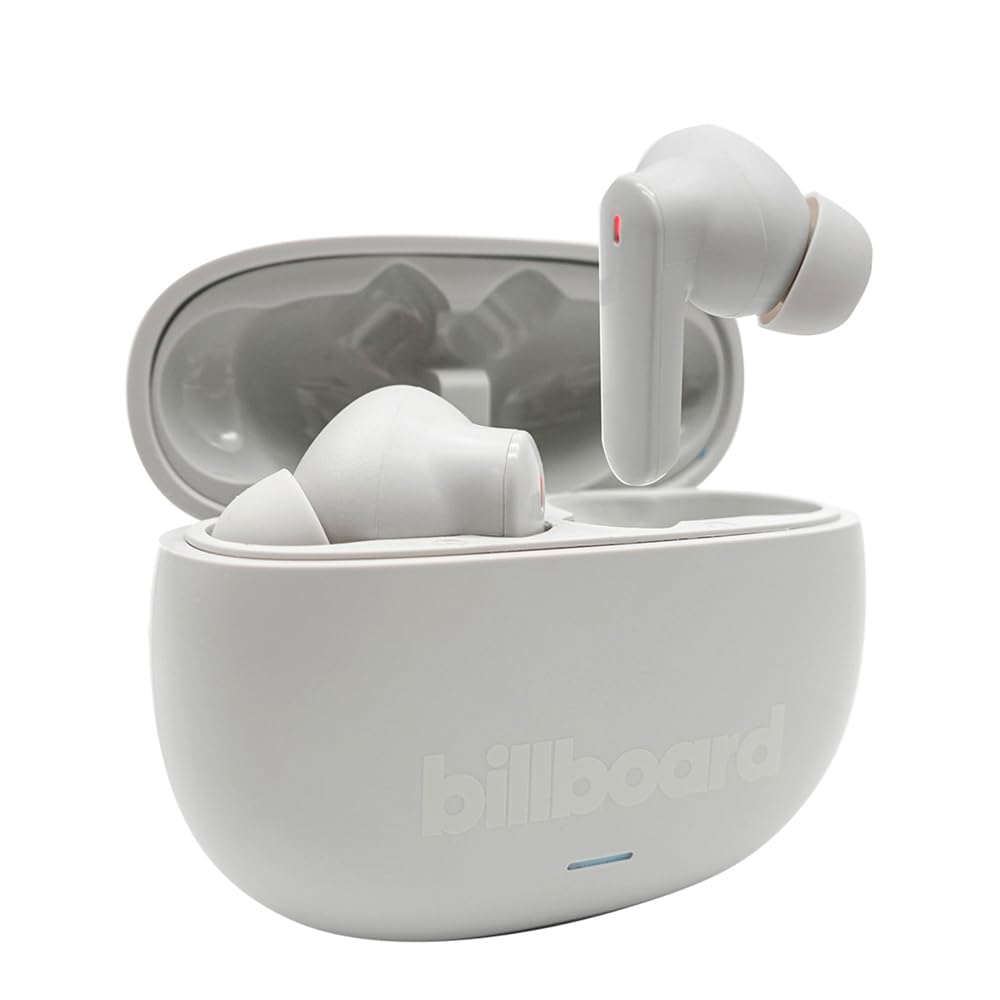
Image: The Billboard Soul Advance TWS Earbuds resting inside their open charging case. The earbuds are grey with red indicator lights visible, and the case is also grey with the 'billboard' logo embossed on the front.

Image: The Billboard Soul Advance TWS Earbuds charging case in a closed position. The case is grey with the 'billboard' logo embossed on the front and a small indicator light at the bottom.
Image: A person holding a single Billboard Soul Advance TWS earbud and the open charging case, demonstrating the compact size and design.
הגדרה
1. טעינת האוזניות והמארז
לפני השימוש הראשון, טען את האוזניות ואת נרתיק הטעינה במלואן.
- הניחו את האוזניות במארז הטעינה. ודאו שהן יושבות כראוי בחריצים המתאימים.
- Connect the USB charging cable to the charging port on the case and to a USB power source (e.g., computer, wall adapter).
- The indicator light on the case will show charging status. Once fully charged, the indicator will change or turn off. A full charge takes approximately 5 hours for the case and earbuds.
2. התאמה עם מכשיר
To connect your earbuds to a smartphone or other Bluetooth-enabled device:
- פתחו את מארז הטעינה. האוזניות ייכנסו אוטומטית למצב צימוד, כפי שיסומן על ידי אורות מהבהבים על האוזניות.
- במכשיר שלך, עבור להגדרות Bluetooth וודא ש-Bluetooth מופעל.
- חפש available devices and select "Billboard Soul Advance" from the list.
- Once connected, the earbud indicator lights will stop flashing.
- האוזניות יתחברו מחדש אוטומטית למכשיר האחרון שצומד לאחר הוצאתן מהמארז, אם Bluetooth מופעל במכשיר.
פועל
מגע בפקדים
The earbuds feature touch-sensitive controls on their outer surface. Specific functions may vary slightly by device or app.
| פְּעוּלָה | פוּנקצִיָה |
|---|---|
| נגיעה אחת (שמאל/ימין) | השמעה/השהה מוזיקה, מענה/סיום שיחה |
| לחיצה כפולה (ימינה) | הרצועה הבאה |
| לחיצה כפולה (שמאלה) | רצועה קודמת |
| לחיצה משולשת (שמאל/ימין) | הפעל את עוזר הקולי |
| לחיצה ארוכה (שמאלה/ימינה) | החלפת מצב ANC/שקיפות |
| Incoming Call Long Press | דחה שיחה |
ביטול רעשים אקטיבי (ANC) וביטול רעשי סביבה (ENC)
The Soul Advance earbuds feature both ANC and ENC for an optimized listening and calling experience.
- ביטול רעשים פעיל (ANC): Reduces external ambient noise, allowing for a more immersive audio experience. Activate/deactivate by long-pressing an earbud.
- ביטול רעש סביבתי (ENC): Utilizes 4 built-in microphones to filter out background noise during calls, ensuring clearer conversations for both you and the listener. This feature is active automatically during calls.

Image: A graphic illustrating the concept of Ultra ANC (Active Noise Cancellation), showing sound waves being blocked by headphones, emphasizing a quiet listening experience.
תַחזוּקָה
ניקוי
- נגבו בעדינות את האוזניות ואת נרתיק הטעינה בעזרת מטלית רכה, יבשה ונטולת סיבים.
- אין להשתמש בחומרי ניקוי שוחקים, אלכוהול או ממסים כימיים.
- ודאו שמגעי הטעינה הן באוזניות והן בנרתיק נקיים ויבשים לטעינה אופטימלית.
אִחסוּן
כאשר אינן בשימוש, אחסנו את האוזניות בנרתיק הטעינה שלהן כדי להגן עליהן ולשמור עליהן טעונות.
פתרון בעיות
| בְּעָיָה | פִּתָרוֹן |
|---|---|
| אוזניות לא מתאימות | ודא שהאוזניות טעונות. כבה והפעל את ה-Bluetooth של המכשיר. שכח את המכשיר בהגדרות ה-Bluetooth ובצע התאמה מחדש. |
| רק אוזניה אחת עובדת | Place both earbuds back in the case, close it, then open again. Ensure both are charged. |
| אין קול | בדוק את עוצמת הקול של המכשיר. ודא שהאוזניות מחוברות. נסה להשמיע אודיו אחר. |
| בעיות טעינה | Ensure charging cable is securely connected. Clean charging contacts. Try a different USB port or cable. |
מפרטים
- שם הדגם: Soul Advance
- טכנולוגיית קישוריות: אַלחוּט
- רכיבים כלולים: תחנת טעינה
- שימושים ספציפיים: Outdoor activities, Sports
- זמן טעינה: בערך 5 שעות
- מכשירים תואמים: Phones, Tablets
- רמת עמידות במים: IPX4 (עמיד בפני התזות)
- חיי סוללה ממוצעים: 27 שעות (עם מארז טעינה)
- מיקום אוזניים: בתוך האוזן
- גורם צורה: בתוך האוזן
- בקרת רעש: ביטול רעשים אקטיבי

Image: A graphic highlighting long battery life, showing headphones with '40H' and earbuds with '42H*' (battery + case), indicating extended usage times.
סרטוני מוצר רשמיים
Video: Product demonstration video (0:49 duration).
Video: Product feature overview (0:44 duration).
Video: Additional product details (0:44 duration).
Video: Short product highlight (0:24 duration).
Video: Product feature showcase (0:24 duration).
Video: Detailed product review/demonstration (1:57 duration).
Video: Quick product overview (0:34 duration).
Video: Comprehensive product guide (2:00 duration).
אחריות ותמיכה
Your Billboard Soul Advance TWS Earbuds come with a standard manufacturer's warranty. For detailed warranty information, please refer to the warranty card included in your package or visit the official Billboard website. For technical support or customer service, please contact the retailer or manufacturer directly.
For returns, a 30-day free return policy is available from the purchase date.