
מָבוֹא
Thank you for choosing the zelotes T80 Ergonomic Gaming Mouse. This wired optical mouse is designed for both gaming and office use, offering adjustable DPI, customizable LED lighting, and a comfortable ergonomic design for extended use. Please read this manual carefully to ensure proper setup and operation of your new mouse.
תכונות המוצר
- 7 Buttons & Quick Fire Button: Includes forward, backward, and a rapid fire (double click) button for enhanced control in gaming and productivity.
- 5 רמות DPI מתכווננות: Easily switch between 1000/1600/2400/3200/7200 DPI to match your speed and precision needs.
- 7 LED Backlit Modes: Personalize your setup with various lighting effects.
- עיצוב ארגונומי: Crafted for comfort with skin-friendly material, sweat-resistant, and anti-slip features to prevent fatigue during long sessions.
- תאימות רחבה: Compatible with Windows 11/10/8/7 and Mac OS, suitable for various applications including MMD, FPS games, and office tasks.
תוכן החבילה
- 1 x zelotes T80 Wired Gaming Mouse
- 1 x מדריך הוראות
הגדרה
- לִפְרוֹק: Carefully remove the mouse and its accessories from the packaging.
- הסר סרט מגן: Before use, please remove the protective film from the mouse's foot pads.
- לְחַבֵּר: Plug the USB cable of the zelotes T80 Gaming Mouse into an available USB port on your computer (PC or Laptop).
- התקנת דרייבר: The mouse is plug-and-play. Your operating system will automatically detect and install the necessary drivers. No additional software installation is typically required for basic functionality.
הוראות הפעלה
הסברי כפתורים
The zelotes T80 mouse features 7 buttons for versatile control:
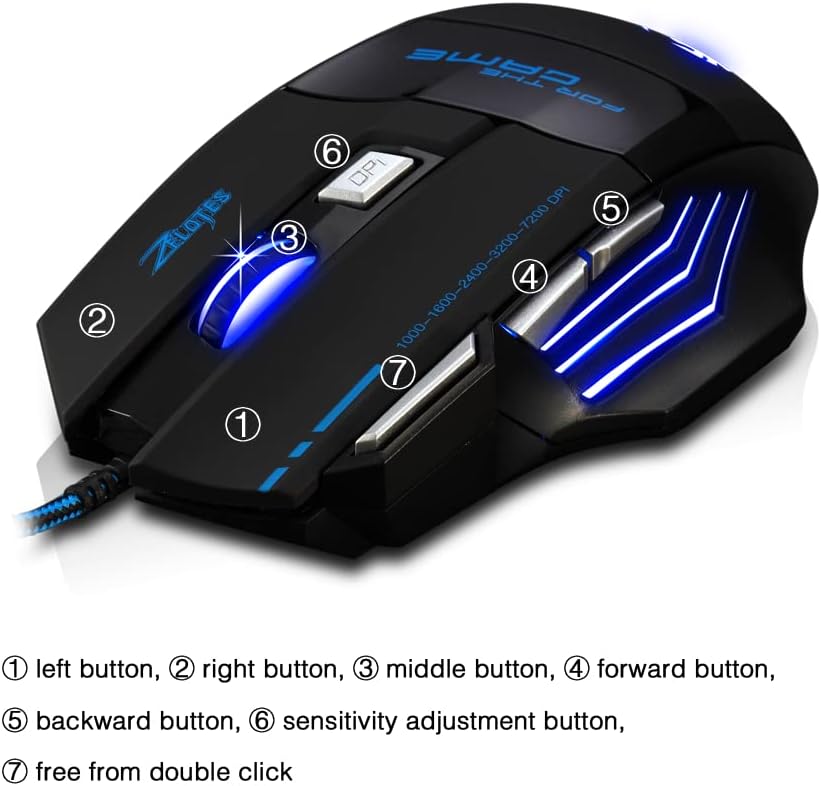
- כפתור שמאלי (1): פונקציית לחיצה שמאלית סטנדרטית.
- כפתור ימני (2): פונקציית לחיצה ימנית סטנדרטית.
- Middle Button / Scroll Wheel (3): Scrolls up/down. Pressing it acts as a middle-click.
- כפתור קדימה (4): מנווט קדימה ב web דפדפנים או file חוקרים.
- כפתור חזרה (5): מנווט אחורה ב web דפדפנים או file חוקרים.
- לחצן DPI (6): Adjusts mouse sensitivity (DPI) and changes LED colors.
- Rapid Fire Button (7): Functions as a double-click of the left button, useful for continuous firing in games.
התאמת DPI
The mouse offers 5 adjustable DPI levels to suit different tasks and preferences:
- 1000 DPI
- 1600 DPI
- 2400 DPI
- 3200 DPI
- 7200 DPI
הקש על לחצן DPI (6) to cycle through these sensitivity levels. Each change will be indicated by a corresponding LED color change.
בקרת תאורת LED
The mouse features 7 LED lighting modes. To change the LED color, long press the DPI button (6). The LED will flash rapidly 7 times and then remain constant on the selected color.

תַחזוּקָה
- ניקוי: השתמשו במטלית רכה ויבשה לניקוי משטח העכבר. במקרה של לכלוך עיקש, שטפו מעטamp ניתן להשתמש במטלית, תוך הקפדה על כך שנוזלים לא ייכנסו לעכבר.
- טיפול בכבלים: הימנע מכיפופים חדים או משיכה מוגזמת של כבל ה-USB כדי למנוע נזק.
- אִחסוּן: יש לאחסן את העכבר במקום יבש וקריר, הרחק מאור שמש ישיר וטמפרטורות קיצוניות.
פתרון בעיות
עכבר לא מגיב
- ודא שכבל ה-USB מחובר היטב ליציאת USB תקינה.
- נסה לחבר את העכבר ליציאת USB אחרת במחשב שלך.
- בדוק את העכבר במחשב אחר כדי לקבוע אם הבעיה היא בעכבר או במחשב.
LED Lights Not Working/Changing
- ודא שהעכבר מחובר כראוי למחשב.
- Ensure you are long-pressing the DPI button to cycle through colors. A short press changes DPI.
DPI לא משתנה
- Ensure you are short-pressing the DPI button to cycle through DPI levels.
- If the issue persists, try reconnecting the mouse.
מפרטים
| תכונה | פְּרָט |
|---|---|
| מספר דגם | T80 |
| כפתורים | 7 (with scroll wheel) |
| DPI מתכוונן | 1000/1600/2400/3200/7200 DPI |
| תאורת לד | 7 מצבי תאורה |
| קישוריות | USB חוטי |
| מערכת מעקב | אוֹפּטִי |
| עיצוב ארגונומי | כֵּן |
| Switch Life | 5 מיליון מחזורים |
| מידות | 130x105x45 מ"מ |
| מִשׁקָל | 160 ± 5 גרם |
| אורך כבל USB | 1.5 מ' |
| תְאִימוּת | Win11, Win10, Win8, Win7, Mac OS |
אחריות ותמיכה
For warranty information and technical support, please refer to the product packaging or contact zelotes customer service through the retailer where the product was purchased. Keep your purchase receipt for warranty claims.