
ASD A-LFM12D20SRGBW-N-4p
ASD 12 Inch Smart RGBW Flush Mount Ceiling Light Instruction Manual
מותג: ASD | דֶגֶם: A-LFM12D20SRGBW-N-4p
1. הקדמה
Thank you for choosing the ASD 12 Inch Smart RGBW Flush Mount Ceiling Light. This fixture combines a stylish minimalist design with efficient, versatile lighting solutions. Featuring multicolor RGBW capabilities, smart app control, and remote operation, it offers a wide range of lighting effects for your space. This manual provides essential information for safe installation, effective operation, and proper maintenance of your new lighting fixture.

Figure 1.1: ASD 12 Inch Smart RGBW Flush Mount Ceiling Light with accessories.
2. מידע בטיחות
אנא קרא בעיון את כל ההוראות לפני ההתקנה והשימוש. שמור מדריך זה לעיון עתידי.
- בטיחות חשמל: Always turn off power at the circuit breaker before installing, cleaning, or servicing the fixture. Consult a qualified electrician if you are unsure about wiring.
- שימוש פנימי בלבד: This fixture is designed for indoor use in dry and damp אין לחשוף לרסס מים ישיר או לטבול במים.
- כרך ידtage: ודא את אספקת החשמל כרךtage matches the fixture's requirements (120V).
- הַרכָּבָה: Mount the fixture securely to a standard electrical outlet box.
- טיפול: יש לטפל במתקן בזהירות כדי למנוע נזק לרכיבים.
3. תכולת החבילה
ודא שכל הרכיבים קיימים לפני תחילת ההתקנה:
- ASD 12 Inch Smart RGBW Flush Mount Ceiling Light Fixture (4 units)
- שְׁלַט רָחוֹק
- חומרת הרכבה (ברגים, אומים חוטים)
- מדריך הוראות
4. מפרטים
| תכונה | פְּרָט |
|---|---|
| מותג | ASD |
| שם הדגם | עֲלִיַת גַג |
| מספר חלק | A-LFM12D20SRGBW-N-4p |
| צֶבַע | 12" | Nickel | RGBW |
| חוֹמֶר | סגסוגת פלדה, אקריליק |
| סִגְנוֹן | מוֹדֶרנִי |
| מידות המוצר | אורך 11.3 אינץ', רוחב 11.3 אינץ', גובה 3.4 אינץ' |
| שימושים ספציפיים | שימוש פנימי בלבד |
| מקור כוח | קשיח |
| סוג מקור אור | LED |
| סוג גימור | צָבוּעַ |
| חומר הצללה | פּלָסטִי |
| כרך ידtage | 120 וולט |
| מהtage | 20 וואט |
| סוג הרכבה | פלאשמונט |
| חיים ממוצעים | 50,000 שעות |
| תכונות מיוחדות | 1064/1220LM, Remote Control, RGBW, Smart App, CCT Adjustable 2700-6500K |

איור 4.1: מידות המוצר ומאפיינים עיקריים.
5. התקנה
Follow these steps to install your ASD Smart RGBW Flush Mount Ceiling Light:
- היכונו להתקנה: Turn off power at the circuit breaker before starting. Ensure the mounting surface is clean and stable.
- Remove the Lens: Gently remove the lens from the fixture by rotating it clockwise. This will expose the mounting holes and wiring connections.
- התקן את המתקן: Attach the fixture's base to the electrical outlet box using the provided screws. Ensure it is securely fastened.
- חיבורי חוטים: Connect the wires: Black to Black (Live), White to White (Neutral), and Ground to Ground. Secure all connections with wire nuts. Carefully tuck all wires back into the outlet box.
- חבר את העדשה: Once wiring is complete and secure, attach the lens by aligning it with the fixture and rotating it counter-clockwise until it locks into place.
- החזר כוח: הפעל מחדש את החשמל במפסק החשמל.
- Download ASD SMART App: For smart control features, download the "ASD SMART" application from your smartphone's app store. Scan the QR codes below or click the links to download.
חנות Google Play (אנדרואיד)
Apple App Store (iOS) - Add Fixture to App: Follow the in-app instructions to add your new ceiling light to the ASD SMART app. This typically involves putting the light into pairing mode and connecting it to your Wi-Fi network.

Figure 5.1: Initial installation steps: removing the lens and wiring.
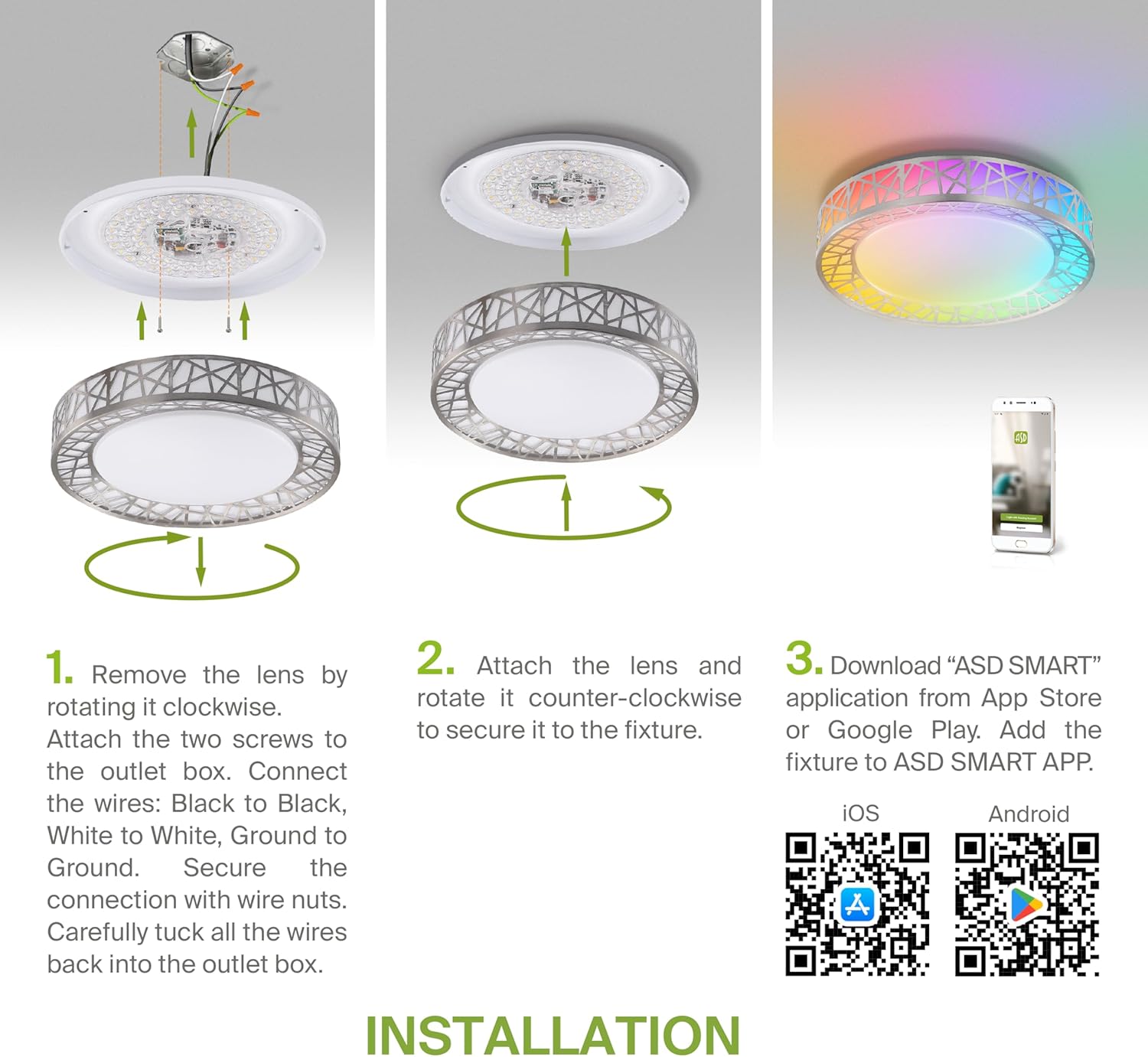
Figure 5.2: Complete installation overview including app download.
6. הוראות הפעלה
Your ASD Smart RGBW Flush Mount Ceiling Light offers multiple control methods:
שלט רחוק 6.1
The included remote control allows for basic functions:
- הפעלה/כיבוי: הדלקה או כבה את האור.
- עמעום: Adjust brightness levels smoothly.
- התאמת CCT: Change color temperature (e.g., from warm white to cool white).
- בחירת צבע RGB: Cycle through or select specific RGB colors.
6.2 ASD SMART App Control
The ASD SMART app provides full control and advanced features:
- 16.7 מיליון צבעים: Choose any color from the full RGBW spectrum.
- Smooth Dimming & CCT: Precisely adjust brightness and color temperature (2700K-6500K).
- Lighting Patterns: Select pre-set or custom lighting scenes and effects.
- הַקבָּצָה: Control multiple fixtures simultaneously.
- תזמון: Set timers for lights to turn on/off or change settings automatically.

Figure 6.1: RGBW color capabilities.

Figure 6.2: Control via remote and smart app.

Figure 6.3: Seamless dimming functionality.
6.3 שליטה קולית (אלקסה ועוזרת גוגל)
The fixture is compatible with Amazon Alexa and Google Assistant for convenient voice commands:
- Ensure your ASD SMART app is linked to your Alexa or Google Home account.
- Use commands such as "Alexa, turn on the living room light" or "Hey Google, set the bedroom light to blue."

Figure 6.4: Compatibility with Alexa and Google Assistant.
7. תחזוקה
כדי להבטיח את אורך החיים והביצועים האופטימליים של מנורת התקרה שלכם:
- ניקוי: נתק את החשמל לפני הניקוי. נגב את גוף המכשיר בעזרת מטלית רכה ויבשה. אין להשתמש בחומרי ניקוי שוחקים או ממסים.
- החלפת נורה: גוף תאורה זה משתמש בטכנולוגיית LED משולבת ואינו דורש החלפת נורה.
8. פתרון תקלות
אם אתם נתקלים בבעיות עם גוף תאורה בתקרה שלכם, עיינו בבעיות הנפוצות ובפתרונות הבאות:
| בְּעָיָה | סיבה אפשרית | פִּתָרוֹן |
|---|---|---|
| האור לא נדלק | אין חשמל, חיווט רופף, מתג פגום | בדוק את מפסק החשמל. ודא שכל חיבורי החוטים מאובטחים. בדוק את מתג הקיר. |
| השלט רחוק לא עובד | Dead battery, out of range, interference | Replace remote battery. Ensure you are within range. Remove any obstructions. |
| App cannot connect to light | Incorrect Wi-Fi password, light not in pairing mode, 5GHz Wi-Fi network | Verify Wi-Fi password. Reset light to pairing mode (refer to app instructions). Ensure you are on a 2.4GHz Wi-Fi network. |
| בקרת קול לא מגיבה | App not linked to voice assistant, incorrect device name | Check linking in ASD SMART app and voice assistant app. Verify device name in voice assistant app. |
9. אחריות ותמיכה
ASD מספקת אחריות מוגבלת לשנה for this product, guaranteeing top quality and safety. The fixture is ETL certified, ensuring compliance with North American safety standards.
For technical support, warranty claims, or any questions not covered in this manual, please contact ASD customer service. Refer to the product packaging or the official ASD webאתר ליצירת קשר.
Ask a question about this manual
Ask about setup, troubleshooting, compatibility, parts, safety, or missing instructions. Manuals+ will review the question and use this page’s manual context to help answer it.