
1. הקדמה
The ACwO DwOTS Zing Wireless Earbuds are designed to provide a high-quality audio experience with advanced features. This manual will guide you through the setup, operation, and maintenance of your new earbuds.
Video 1: ACwO DwOTS Zing Wireless Earbuds Overview. This video provides a brief introduction to the product and its key features.
2. מה בקופסה
Carefully unpack your ACwO DwOTS Zing Wireless Earbuds. The package should contain the following items:
- ACwO DwOTS Zing Wireless Earbuds (Left and Right)
- נרתיק טעינה
- כבל טעינה USB
- אוזניים (בגדלים שונים)
- Scan Me Card (for digital manual/app access)
- תעודת אחריות
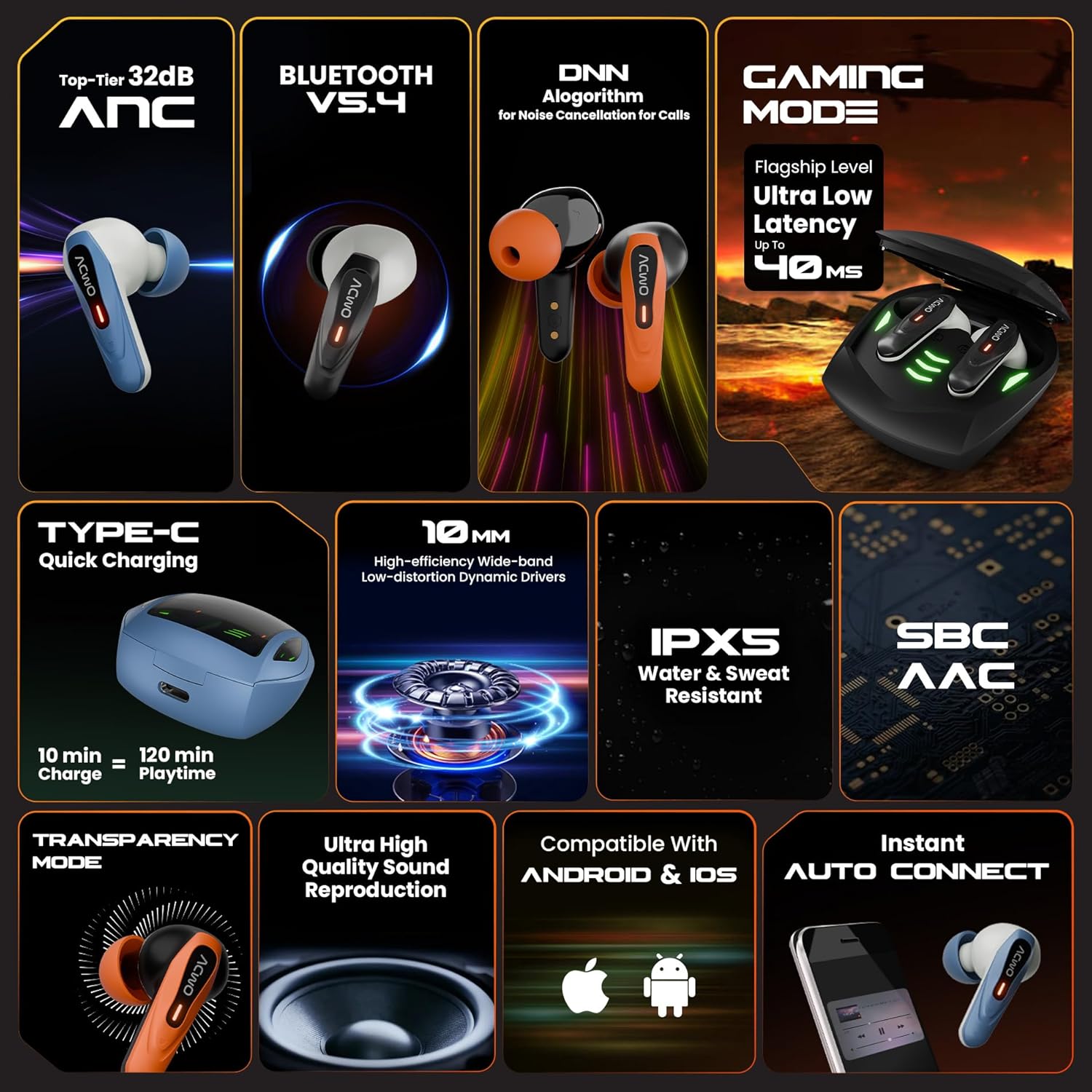
Image 1: Contents of the ACwO DwOTS Zing package, showing the earbuds, charging case, and accessories.
3. תכונות מוצר
The ACwO DwOTS Zing Wireless Earbuds incorporate several features for an enhanced audio experience:
- ביטול רעשים פעיל (ANC): Up to 32dB ANC for immersive listening.
- Bluetooth V5.4: לקישוריות אלחוטית יציבה ויעילה.
- זמן משחק ארוך: עד 55 שעות של זמן נגינה כולל עם מארז הטעינה.
- אחזור נמוך: 40ms low latency for gaming and video synchronization.
- HYPERBOOST™ Charging: 10 minutes of charge provides up to 120 minutes of playtime.
- דרייברים דינמיים בגודל 10 מ"מ: High-efficiency, wide-band, low-distortion drivers for powerful bass.
- עמידות למים וזיעה בתקן IPX5: מתאים לאימונים ופעילויות חוץ.
- Codec אודיו: Supports SBC and AAC for quality audio streaming.
- מצב שקיפות: Allows ambient sounds to be heard for situational awareness.
- Quad ENC Microphones: For clear call quality with environmental noise cancellation.
- Instant Auto Connect: Earbuds automatically connect to paired devices upon opening the case.
- תְאִימוּת: עובד גם עם מכשירי אנדרואיד וגם עם iOS.

Image 2: Visual representation of key features such as 32dB ANC, Bluetooth V5.4, 40ms low latency gaming mode, and HYPERBOOST charging.

תמונה 3: תקריב view of the earbuds highlighting the four ENC microphones for clear calls.
4. התקנה
4.1 טעינה ראשונית
- הכנס את שני האוזניות לתוך מארז הטעינה.
- Connect the USB charging cable to the Type-C port on the charging case and to a power source.
- The LED indicators on the case will show charging status. Ensure the earbuds and case are fully charged before first use.

Image 4: The charging case connected via a Type-C cable, illustrating the charging process.
4.2 זיווג בלוטות '
- פתחו את מארז הטעינה. האוזניות ייכנסו אוטומטית למצב צימוד, כפי שיסומן על ידי נוריות LED מהבהבות.
- במכשיר שלך (סמארטפון, טאבלט וכו'), הפעל את Bluetooth.
- חפש "ACwO DwOTS Zing" in the list of available Bluetooth devices.
- Select "ACwO DwOTS Zing" to connect. Once connected, the LED indicators on the earbuds will stop flashing.
- האוזניות יתחברו מחדש אוטומטית למכשיר האחרון שצומד לאחר הוצאתן מהמארז.
4.3 ענידת האוזניות
- Choose the eartips that provide the most comfortable and secure fit for optimal sound quality and ANC performance.
- הכנס את האוזניות לאוזניים שלך וסובב אותן בעדינות עד שיתאימו היטב.
5. הוראות הפעלה
The ACwO DwOTS Zing Earbuds feature touch controls for various functions. Refer to the "Scan Me Card" included in your package for detailed touch control gestures, as these may vary.
5.1 Basic Controls (Typical)
- הפעל/השהה: הקשה אחת על אחת האוזניות.
- הרצועה הבאה: הקש פעמיים על האוזניה הימנית.
- רצועה קודמת: הקש פעמיים על האוזניה השמאלית.
- מענה/סיום שיחה: הקשה אחת על אחת האוזניות.
- דחה שיחה: לחיצה ארוכה על כל אחת מהאוזניות.
- הפעל את Assistant Voice: הקש שלוש פעמים על כל אחת מהאוזניות.
5.2 ANC ומצב שקיפות
The earbuds support Active Noise Cancellation (ANC) and Transparency Mode. A long press (e.g., 2 seconds) on a specific earbud (refer to your "Scan Me Card" for exact configuration) typically cycles through these modes:
- ANC פועל: חוסם רעשי סביבה.
- מצב שקיפות: מאפשר לך לשמוע את הסביבה שלך תוך כדי האזנה לשמע.
- מצב רגיל: Neither ANC nor Transparency is active.
5.3 מצב משחקים
To activate the low latency Gaming Mode, perform the specific touch gesture indicated on your "Scan Me Card". This mode reduces audio delay, which is beneficial for gaming and video playback.

Image 5: User engaged in mobile gaming with the earbuds, demonstrating the low latency feature.
6. תחזוקה
6.1 ניקוי
- נקו באופן קבוע את האוזניות ואת נרתיק הטעינה בעזרת מטלית רכה, יבשה ונטולת סיבים.
- הסירו את קצות האוזניים ונקו אותם עם סבון עדין ומים, ולאחר מכן יבשו היטב לפני חיבורם מחדש.
- ודאו שמגעי הטעינה הן באוזניות והן בנרתיק נקיים וללא לכלוך.
6.2 אחסון
- אחסן את האוזניות בתיק הטעינה שלהן כאשר אינן בשימוש כדי להגן עליהן ולשמור עליהן טעונות.
- הימנעו מחשיפת האוזניות לטמפרטורות קיצוניות, לחות או נוזלים קורוזיביים.
7. פתרון תקלות
If you encounter issues with your ACwO DwOTS Zing Earbuds, refer to the following common solutions:
| בְּעָיָה | פתרון אפשרי |
|---|---|
| אוזניות לא מתאימות |
|
| אין צליל מאוזניה אחת |
|
| בעיות טעינה |
|
| איכות שיחה ירודה |
|
8. מפרטים
| תכונה | פְּרָט |
|---|---|
| מספר דגם | DWOTSZING-BLK |
| גרסת בלוטות' | V5.4 |
| ביטול רעש פעיל (ANC) | עד 32dB |
| זמן משחק כולל | עד 55 שעות (עם מארז טעינה) |
| חביון נמוך | 40ms (מצב משחקים) |
| טכנולוגיית טעינה | HYPERBOOST™ (10 min charge = 120 min playtime) |
| גודל דרייבר | דרייברים דינמיים 10 מ"מ |
| עמידות במים | IPX5 (עמיד במים וזיעה) |
| מיקרופונים | Quad ENC Microphones |
| קישוריות | אלחוטי (Bluetooth) |
| מידות המוצר | 61.5 x 54.5 x 32.5 ס"מ |
| משקל פריט | 42 גרם |
| יַצרָן | ACwO Lifestyle Pvt Ltd |
9. אחריות ותמיכה
Your ACwO DwOTS Zing Wireless Earbuds come with a standard brand warranty. Please refer to the included Warranty Card for details on warranty coverage and terms.
For further assistance, product registration, or to access the full digital manual, please use the "Scan Me Card" provided in the box or visit the official ACwO support webאֲתַר.
You can also find more information on the product detail page on Amazon.in.