
מָבוֹא
הדסview A5 is a versatile 5.5-inch touch screen camera field monitor designed to enhance your filmmaking and photography experience. It features a vibrant Full HD 1920x1080 IPS panel with 600nits brightness, ensuring clear and color-accurate visuals in various lighting conditions. Supporting 4K/60Hz HDMI 2.0 input and output, this monitor provides real-time monitoring and advanced tools like HDR, waveform, histogram, and custom 3D LUT support for precise exposure and color control. Its lightweight design and flexible power options make it suitable for both studio and on-location use.
מה יש בקופסה
Upon unboxing your Desview A5 monitor, please ensure all the following items are present:
- 1x Desview צג A5
- 1x תושבת צג
- 1x שמשיה
- 1x כבל HDMI
- 1x Micro HDMI Cable
- 1x U disk (for LUTs)
- כלי התקנה אחד
- 1x Dust Cloth
- 1x מדריך למשתמש
- 1x תיק נשיאה

הגדרה
הרכבת המוניטור
Attach the included monitor mount to the 1/4" screw hole located on the bottom or side of the Desview A5 monitor. Secure the mount firmly using the installation tool. Then, attach the monitor to your camera's cold shoe mount or any compatible rig.

Connecting HDMI Cables
Connect your camera's HDMI output to the HDMI-IN port on the Desview A5 monitor using the provided HDMI or Micro HDMI cable. If you need to output the video signal to another monitor, use the HDMI-OUT port.
הפעלת המוניטור
הדסview A5 offers multiple power options:
- סוללות סדרת NP-F: Insert a compatible NP-F series battery (NP-F550/F750/F970) into the battery compartment on the back of the monitor. (Battery not included).
- קלט מסוג C: Connect a Type-C cable to the Type-C port for power.
- כניסת DC 12V: Use a DC 12V power adapter (not included) with the DC-IN port.

הפעלת הצג
Touch Screen & Control Knob
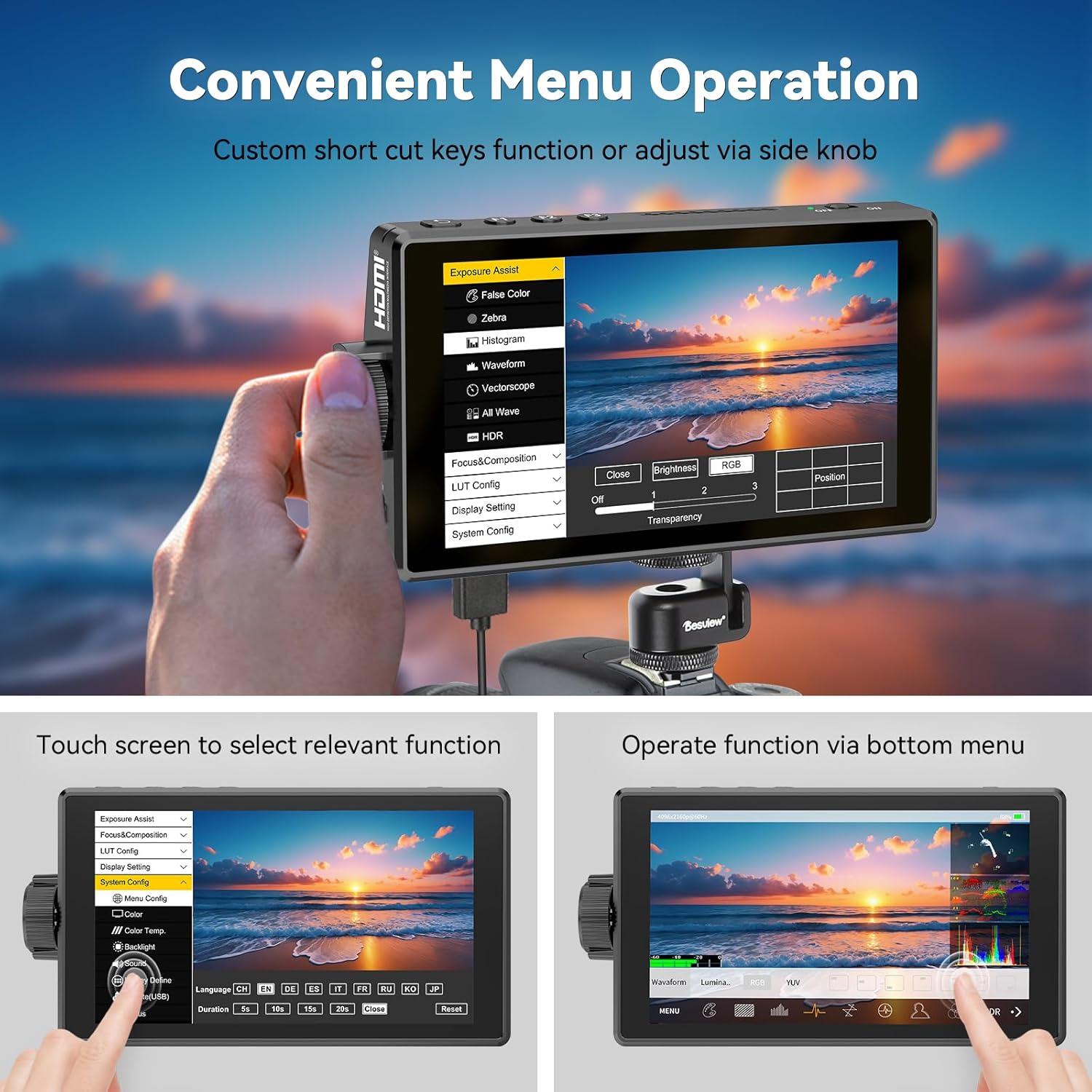
הדסview A5 features a responsive touch screen for intuitive menu navigation. You can also use the side scroll knob to adjust settings. User-customizable shortcut keys (F1, F2, F3) are available for quick access to frequently used functions. A touch-lock key prevents accidental changes during filming.

Advanced Monitoring Tools
The monitor includes a suite of professional tools to assist with accurate exposure and focus:
- HDR: High Dynamic Range support for improved contrast and color.
- צורת גל: Visual representation of video signal luminance.
- היסטוגרמה: מציג את פיזור הגוונים של התמונה שלך.
- שיא מיקוד: מדגיש אזורים בפוקוס למיקוד ידני מדויק.
- צבע מזויף: מסייע בקביעת רמות חשיפה נכונות.
- זֶבּרָה: מצביע על אזורים שנחשפו יתר על המידה.
- וקטורסקופ: מנתח רוויה וגוון צבע.
- קווי רשת: Assists with composition.
- מדי אודיו: מנטר את רמות קלט השמע.
- Safe Area & Mark Ratio: Ensures content is within broadcast-safe zones.

Custom 3D LUT Support
הדסview A5 allows you to upload custom 3D LUTs (Look Up Tables) via the included U disk. This feature is invaluable for on-set color grading, enabling you to preview פו שלךtage with desired color profiles for a cinematic look.

הגדרות תצוגה
Adjust various display settings to suit your needs, including aspect ratio, display flip, zoom, pixel-to-pixel mapping, HV delay, freeze frame, and anamorphic de-squeeze.
תַחזוּקָה
To ensure the longevity and optimal performance of your Desview A5 monitor, follow these maintenance guidelines:
- ניקוי: Use the provided dust cloth to gently wipe the screen and body of the monitor. Avoid using harsh chemicals or abrasive materials.
- אִחסוּן: When not in use, store the monitor in its carry case to protect it from dust, scratches, and impacts.
- שִׁמשִׁיָה: Utilize the detachable sunshade to protect the screen from direct sunlight and reduce glare, especially during outdoor shoots.

פתרון בעיות
If you encounter any issues with your Desview A5 monitor, please refer to the following common troubleshooting steps:
- אין קליטה: Ensure all HDMI cables are securely connected to both the camera and the monitor. Verify that your camera's HDMI output is enabled and configured correctly.
- אין כוח: Check the battery level or power connection. Ensure the power source is providing adequate voltage (e.g., fully charged NP-F battery, correct DC adapter).
- ריצוד/עיוות מסך: Try a different HDMI cable or adjust the resolution settings on your camera. Ensure the monitor's firmware is up to date.
- מסך המגע לא מגיב: Check if the touch-lock function is enabled. Disable it if necessary. Restart the monitor.
For persistent issues, please consult the detailed user manual or contact Desview תמיכת לקוחות.
מפרטים
| תכונה | מִפרָט |
|---|---|
| מותג | דסview |
| מספר דגם | A5 |
| גודל מסך | 5.5 אינץ' |
| הַחְלָטָה | FHD 1080p (1920x1080 פיקסלים) |
| בְּהִירוּת | 600 קנדלה למטר מרובע |
| יחס ניגודיות | 1400:1 |
| Viewזווית | 178 מעלות |
| סוג תצוגה | IPS |
| כניסת/פלט HDMI | 4K/60Hz HDMI 2.0 |
| אפשרויות חשמל | Type-C, NP-F Series Batteries, DC 12V Input |
| מידות פריט (D x W x H) | 1" D x 5.7" W x 3.2" H |
| מִשׁקָל | 340 גרם (בקירוב) |
| תכונות נוספות | Touchscreen, Side Knob Navigation, User-customizable shortcut keys, HDR, 3D LUT Support, Waveform, Histogram, Focus Peaking |
אחריות ותמיכה
הדסview A5 Touch Screen Camera Field Monitor comes with a אחריות לשנה. For technical support, warranty claims, or any product-related inquiries, please contact Desview customer service through their official webהאתר או הקמעונאי בו נרכש המוצר. אנא שמור את הוכחת הרכישה שלך לצורך אימות האחריות.