
Alarm.com ADC-AC-ET10
Alarm.com ADC-AC-ET25 Keypad Reader User Manual
Model: ADC-AC-ET10
1. הקדמה
This manual provides comprehensive instructions for the installation, operation, and maintenance of the Alarm.com ADC-AC-ET25 Keypad Reader. Designed for Smarter Access Control, this reader integrates multiple credential technologies to enhance security and flexibility for businesses.
תכונות עיקריות:
- Multiple Technologies: Supports Proximity, NFC, and Bluetooth Low Energy (BLE) credentials in a single device.
- Mobile Credentials: Enables the use of smartphones to unlock doors, reducing reliance on physical badges.
- OSDP Auto-Detect & Secure Channel: Ensures secure communication and automatic detection of OSDP devices.
- יכולת שדרוג קושחה: Supports remote firmware updates for continuous improvement and security enhancements.
- Credential Support: Compatible with I-FARE DESFire EV1 & EV2, and LEAF credentials for secure, open interoperability. Also supports FSK and ASK legacy proximity credentials for seamless transitions.
- Tampזיהוי er: Features accelerometer-based tamper detection for enhanced security.
- Visual & Audible Indicators: Equipped with a tri-state LED light bar (red, green, amber) and an audible beeper for status feedback.
- התקנה רב-תכליתית: מתאים לסביבות פנים וחוץ כאחד.
2. מידע בטיחות
Please read all safety instructions carefully before installing or operating the device. Failure to follow these instructions may result in damage to the device, property, or personal injury.
- ודאו שכל החיבורים החשמליים מבוצעים על ידי איש מקצוע מוסמך ועומדים בתקנות החשמל המקומיות.
- נתק את החשמל לפני ביצוע כל התקנה או תחזוקה.
- Do not expose the device to extreme temperatures, humidity, or direct water immersion beyond its specified environmental ratings.
- הימנעו מהצבת המכשיר בקרבת שדות אלקטרומגנטיים חזקים, אשר עלולים להפריע לפעולתו.
- אל תנסה לפרק או לתקן את המכשיר בעצמך. יש לפנות לכל מטפל מוסמך בתחום התחזוקה.
3. תכולת החבילה
ודא שכל הפריטים נמצאים באריזה לפני שתמשיך בהתקנה:
- Alarm.com ADC-AC-ET25 Keypad Reader
- חומרת הרכבה (ברגים, עוגנים)
- תבנית התקנה (אם רלוונטי)
- מדריך התחלה מהירה (עיין במדריך זה לקבלת פרטים מלאים)
4. המוצר נגמרview
The ADC-AC-ET25 Keypad Reader is a robust access control device featuring a numeric keypad and multi-technology credential reading capabilities. Its design allows for seamless integration into various security systems.
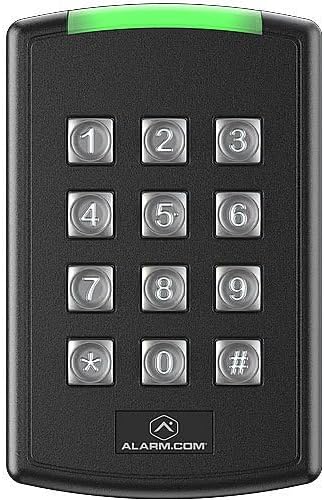
איור 4.1: חֲזִית view of the Alarm.com ADC-AC-ET25 Keypad Reader. The device is black with a prominent numeric keypad (0-9, *, #) in the center. A green LED light bar is visible at the top, indicating operational status. The "ALARM.COM" logo is located at the bottom.
רכיבים:
- לוח מקשים: Numeric keys (0-9), asterisk (*), and hash (#) for PIN entry.
- בר אור LED: Tri-state (red, green, amber) indicator for status feedback.
- Credential Reader Area: Integrated area for Proximity, NFC, and BLE mobile credential scanning.
- Tampחיישן: Accelerometer-based sensor to detect unauthorized removal or tampארינג.
5. התקנה והתקנה
The ADC-AC-ET25 Keypad Reader is designed for flexible installation in both indoor and outdoor environments. Proper installation is crucial for optimal performance and security.
5.1. רשימת בדיקה לפני התקנה:
- Verify the mounting surface is suitable and secure.
- Ensure proper wiring and power supply are available at the installation site.
- Confirm compatibility with your existing access control panel (supports OSDP).
5.2. הרכבה:
- בחר מיקום הרכבה מתאים, תוך התחשבות בנגישות ובגורמים סביבתיים.
- השתמש בתבנית ההרכבה המצורפת כדי לסמן נקודות קידוח על הקיר.
- קדחו חורים והכנסו עוגנים במידת הצורך.
- Secure the reader's backplate to the wall using the provided screws.
5.3. חיווט:
Connect the reader to your access control panel according to the wiring diagram provided with your panel and the reader's specific wiring instructions (typically found on the back of the reader or in a dedicated wiring guide). The reader supports OSDP Auto-Detect and Secure Channel for enhanced communication security.
5.4. הפעל:
Once wiring is complete and verified, apply power to the access control system. The reader's LED light bar will indicate its power-up sequence and operational status.
6. הוראות הפעלה
The ADC-AC-ET25 Keypad Reader offers multiple methods for access, providing flexibility for users.
6.1. Using Credentials:
- Proximity/NFC Cards/Fobs: Present your compatible card or fob within close proximity to the reader's front surface. The reader will emit an audible beep and the LED will change color (typically green) upon successful read.
- Bluetooth Low Energy (BLE) Mobile Credentials: Ensure your smartphone has the Alarm.com mobile access app installed and BLE is enabled. Approach the reader with your phone. The app will communicate with the reader to grant access.
6.2. Using the Keypad (PIN Entry):
- הזן את מספר הזיהוי האישי (PIN) שהוקצה לך באמצעות לוח המקשים המספרי.
- Press the hash (#) key to confirm your entry.
- Upon successful PIN entry, the reader will provide an audible and visual confirmation (e.g., green LED).
6.3. LED Indicator Meanings:
- יָרוֹק: Access granted, successful credential read, or system ready.
- אָדוֹם: Access denied, error, or system fault.
- עַנבָּר: Standby, processing, or specific system status (refer to your access control system documentation for detailed amber indications).
7. תחזוקה
Regular maintenance ensures the longevity and optimal performance of your ADC-AC-ET25 Keypad Reader.
- ניקוי: השתמש רך, דamp cloth to clean the exterior of the reader. Do not use abrasive cleaners, solvents, or excessive moisture.
- עדכוני קושחה: The reader supports remote firmware upgradability. Your access control system administrator will manage these updates to ensure the device has the latest features and security patches.
- בְּדִיקָה: Periodically inspect the reader for any signs of physical damage or loose connections.
8. פתרון תקלות
This section addresses common issues you might encounter with the ADC-AC-ET25 Keypad Reader.
- Reader is unresponsive (no lights, no sound):
- Check power supply to the reader and access control panel.
- ודא שחיבורי החיווט מאובטחים ונכונים.
- Credential not granting access (red LED):
- Ensure the credential is valid and active in the access control system.
- Confirm the credential type is supported by the reader (Proximity, NFC, BLE).
- Try presenting the credential again, ensuring proper alignment.
- Keypad entry not working:
- Verify the PIN is correct and active.
- Ensure the hash (#) key is pressed after entering the PIN.
- Tamper alarm triggered:
- Check if the reader has been dislodged or moved from its mounting.
- Securely re-mount the reader if necessary.
For persistent issues, contact your system administrator or technical support.
9. מפרטים
| תְכוּנָה | פְּרָט |
|---|---|
| מספר דגם | ADC-AC-ET10 |
| יַצרָן | Alarm.com |
| מידות (L x W x H) | 8.38 x 1.78 x 12.95 ס"מ |
| טכנולוגיות נתמכות | Proximity, NFC, Bluetooth Low Energy (BLE) |
| תמיכה באישורים | I-FARE DESFire EV1 & EV2, LEAF, FSK, ASK |
| פרוטוקול תקשורת | OSDP (Open Supervised Device Protocol) with Secure Channel |
| אינדיקטורים | Tri-state LED (Red, Green, Amber), Audible Beeper |
| Tampזיהוי | Accelerometer-based |
| סביבת התקנה | בפנים ובחוץ |
| ארץ מוצא | קנדה |
10. מידע על אחריות
Specific warranty terms and conditions for the Alarm.com ADC-AC-ET25 Keypad Reader are typically provided at the point of purchase or by the manufacturer. Please refer to the documentation included with your purchase or contact your seller/installer for detailed warranty information. Keep your proof of purchase for warranty claims.
11. תמיכת לקוחות
For technical assistance, troubleshooting beyond this manual, or service inquiries, please contact your authorized Alarm.com dealer or the seller from whom you purchased the product. Provide your product model number (ADC-AC-ET10) and a detailed description of the issue when seeking support.
יַצרָן: Alarm.com
Ask a question about this manual
Ask about setup, troubleshooting, compatibility, parts, safety, or missing instructions. Manuals+ will review the question and use this page’s manual context to help answer it.