
1. המוצר נגמרview
The zelotes C-12 Professional Wired Gaming Mouse is designed for high-performance gaming and office use. It features an ergonomic design, 12 programmable buttons, adjustable DPI settings, multi-modes RGB backlighting, and a customizable weight system.

Image 1.1: The zelotes C-12 Professional Wired Gaming Mouse, showcasing its ergonomic shape and customizable RGB lighting.
תכולת החבילה:
- 1 x zelotes C-12 Gaming Mouse
- 1 x מדריך הוראות
- 1 x תקליטור תוכנה
- 1 x Foot Pad Set
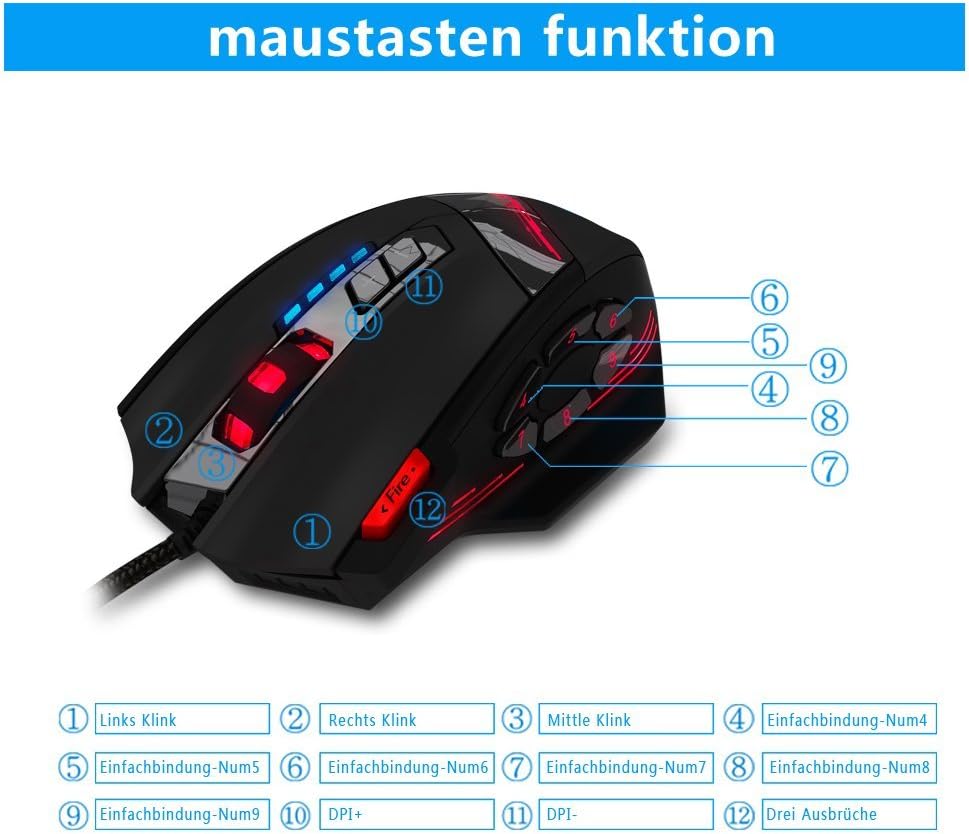
Image 1.2: The complete package contents of the zelotes C-12 Gaming Mouse.
2. התקנה
2.1 חיבור העכבר
Connect the USB cable of the zelotes C-12 Gaming Mouse to an available USB port on your computer. The mouse is plug-and-play for basic functionality.
2.2 התקנת תוכנה (אופציונלי)
For full customization of buttons, DPI, and lighting, install the provided software from the included CD. Insert the CD into your computer's optical drive and follow the on-screen instructions. If your computer does not have an optical drive, please visit the official zelotes website to download the latest software driver.
Note: The programming software is not fully compatible with Mac operating systems.
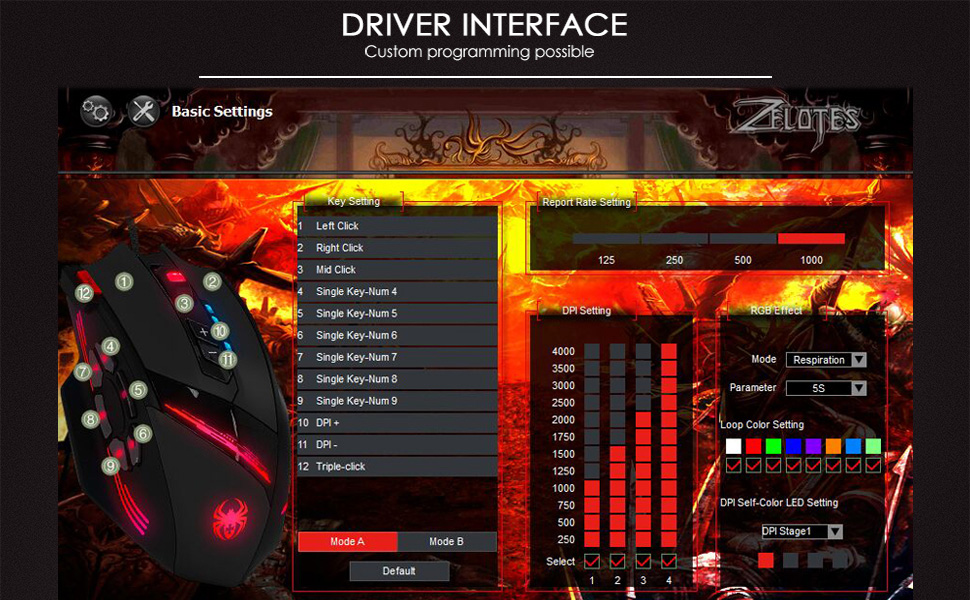
Image 2.1: The software interface for customizing the zelotes C-12 Gaming Mouse.
2.3 Weight Tuning
The mouse includes 8 removable weight blocks, each weighing 2.5 grams, located in a compartment on the underside of the mouse. To adjust the mouse's weight:
- סובב בעדינות והסר את הכיסוי העגול בתחתית העכבר.
- Add or remove the 2.5g weight blocks as desired to achieve your preferred mouse feel.
- Replace the circular cover by twisting it back into place.
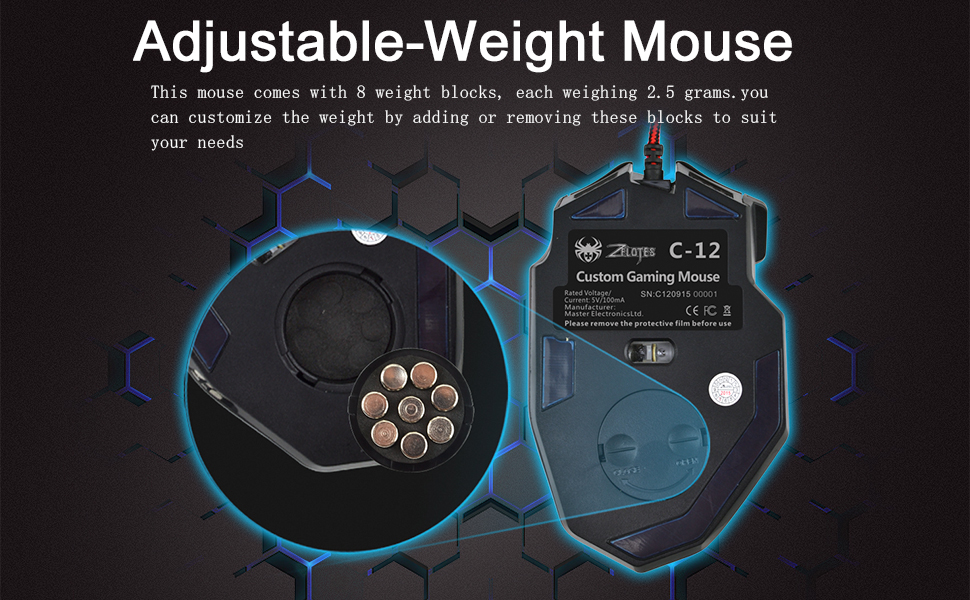
Image 2.2: Adjusting the weight of the zelotes C-12 mouse by adding or removing the 2.5g blocks.
Video 2.1: A demonstration of the weight tuning feature and programmable buttons on the zelotes C-12 Gaming Mouse.
3. הוראות הפעלה
3.1 פונקציות כפתורים
The zelotes C-12 mouse features 12 programmable buttons. The default functions are:
- קליק שמאלי (כפתור 1)
- קליק ימני (כפתור 2)
- קליק אמצעי / גלגל גלילה (כפתור 3)
- כפתורי צד (Buttons 4-9): Default to various functions, customizable via software.
- DPI+ (Button 10): Increases DPI sensitivity.
- DPI- (Button 11): Decreases DPI sensitivity.
- כפתור אש (Button 12): Default to triple-click, customizable via software.

Image 3.1: Labeled diagram of the zelotes C-12 mouse buttons.
התאמת 3.2 DPI
The mouse offers 4 default DPI levels: 1000/1500/2000/4000 DPI. You can cycle through these levels using the dedicated DPI+ and DPI- buttons. For finer control and to reach up to 8000 DPI, use the included software.
תאורת RGB 3.3
The mouse features multi-modes RGB backlighting, including 7-color cycle breathing and monochromatic constant bright modes. Lighting effects can be customized through the software to match your preferences.
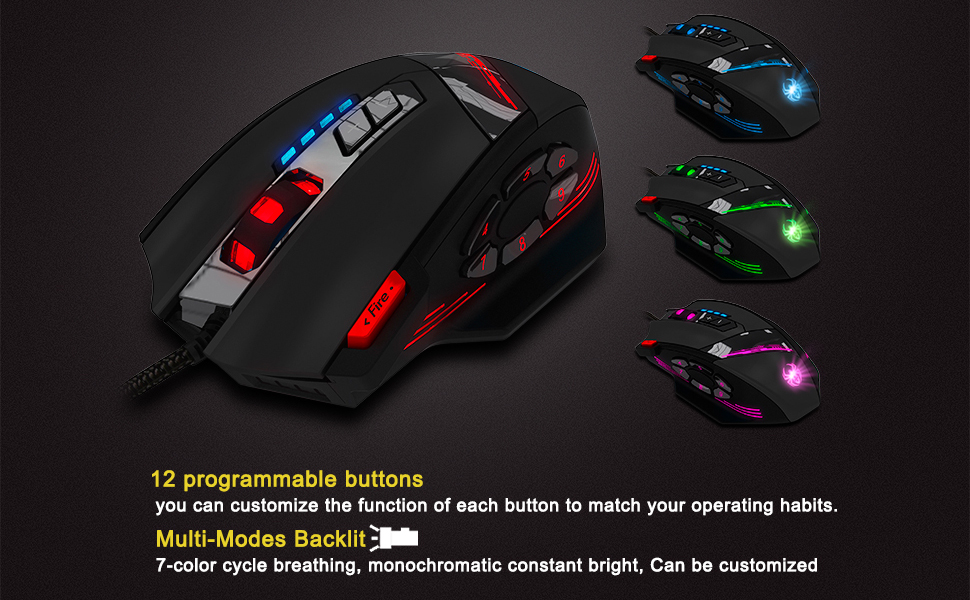
Image 3.2: The zelotes C-12 mouse showcasing its multi-color RGB lighting options.
3.4 עיצוב ארגונומי
The mouse is designed for comfort during extended use, featuring a sweat-resistant and anti-slip rubber surface. Its ergonomic shape helps prevent wrist fatigue.

Image 3.3: The ergonomic design of the zelotes C-12 mouse provides a comfortable grip.
4. תחזוקה
To ensure the longevity and optimal performance of your zelotes C-12 Gaming Mouse, follow these maintenance guidelines:
- ניקוי: השתמשו במטלית רכה ויבשה כדי לנגב את פני השטח של העכבר. במקרה של לכלוך עיקש, נגבו מעטampשטפו את המטלית במים או בתמיסת ניקוי עדינה. הימנעו מכימיקלים חזקים או מחומרים שוחקים.
- טיפול בחיישנים: שמרו על ניקיון החיישן האופטי בחלקו התחתון של העכבר, ללא אבק או פסולת. השתמשו בצמר גפן או באוויר דחוס במידת הצורך.
- ניהול כבלים: הימנע מכיפופים חדים או משיכה מוגזמת של כבל ה-USB כדי למנוע נזק.
- אִחסוּן: כאשר אינו בשימוש, יש לאחסן את העכבר בסביבה נקייה ויבשה הרחק מטמפרטורות קיצוניות.
5. פתרון תקלות
5.1 עכבר לא מגיב
- ודא שכבל ה-USB מחובר היטב למחשב שלך.
- נסה לחבר את העכבר ליציאת USB אחרת.
- Test the mouse on another computer to rule out a computer-specific issue.
- הפעל מחדש את המחשב.
5.2 DPI or Button Settings Not Changing
- Ensure the zelotes C-12 software is correctly installed and running.
- Check if the settings are saved within the software after making changes.
- For Mac users, note that the programming software has limited compatibility. Basic DPI changes via mouse buttons should still function.
5.3 תאורת RGB לא עובדת או שגויה
- Verify lighting settings within the zelotes C-12 software.
- ודא שהעכבר מחובר כראוי ומקבל חשמל.
5.4 Mouse Movement Is Erratic
- נקו את החיישן האופטי בתחתית העכבר.
- ודא שאתה משתמש בעכבר על משטח מתאים (למשל, משטח עכבר). הימנע ממשטחים מחזירי אור או שקופים.
6. מפרטים
| תכונה | תֵאוּר |
|---|---|
| מותג | zelotes |
| שם הדגם | C-12 |
| טכנולוגיית קישוריות | USB חוטי |
| טכנולוגיית זיהוי תנועה | Optical (A3050 Gaming Chip) |
| הגדרות DPI | 1000/1500/2000/4000 (Adjustable up to 8000 DPI via software) |
| כמות הכפתורים | 12 לחצנים ניתנים לתכנות |
| כוונון משקל | 8 x 2.5g removable weights |
| כיוון יד | ימני |
| תאימות מערכת הפעלה | Win11, Win10, Win8, Win7, Mac OS (limited software compatibility for Mac) |
| מידות (L x W x H) | 130 מ"מ x 81.5 מ"מ x 39.8 מ"מ |
| שיעור סקרים | 125-1000 הרץ |
| אורך כבל | 1.8 מ' |
| חוֹמֶר | פלסטיק (גימור מט) |

Image 6.1: Detailed technical specifications and dimensions of the zelotes C-12 Gaming Mouse.
7. מידע על אחריות
The zelotes C-12 Professional Wired Gaming Mouse comes with a אחריות יצרן לשנתיים ממועד הרכישה. אחריות זו מכסה פגמים בחומרים ובביצוע בשימוש רגיל. היא אינה מכסה נזק שנגרם כתוצאה משימוש לרעה, תאונה, שינוי לא מורשה או סיבות חיצוניות.
אנא שמור את הוכחת הרכישה שלך עבור תביעות אחריות.
8. תמיכה
For further assistance, technical support, or warranty inquiries, please refer to the contact information provided with your product packaging or visit the official zelotes webאֲתַר.