
1. הקדמה
The Wingtech Celero 5G smartphone is designed to provide reliable performance and connectivity. This manual offers comprehensive guidance on its features, setup, operation, and maintenance to ensure optimal use of your device.
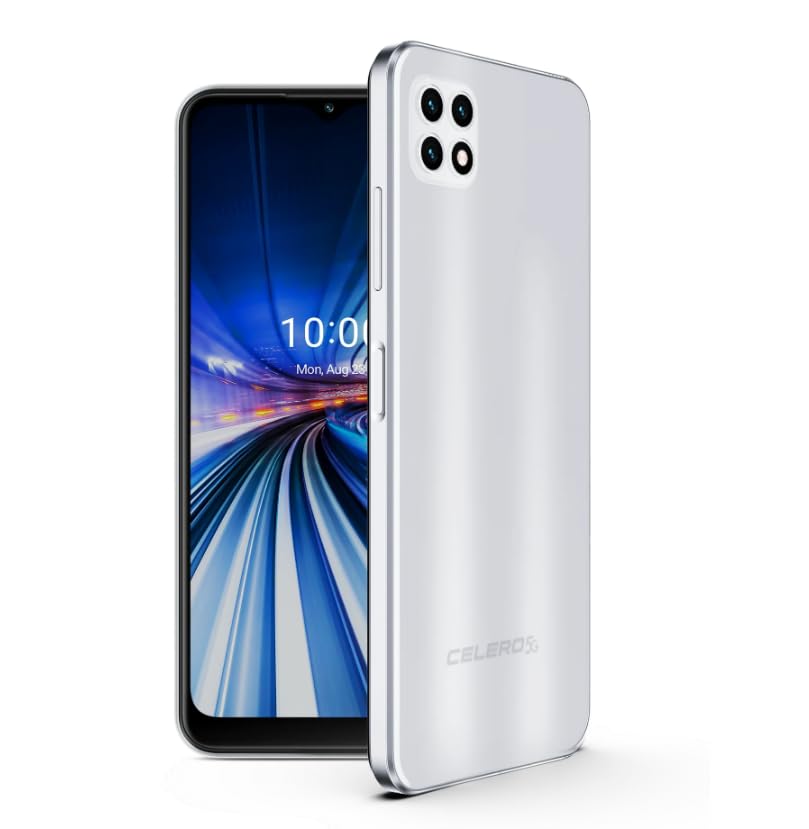
Figure 1: Wingtech Celero 5G Smartphone (Silver)
2. מה בקופסה
ודא שכל הפריטים נמצאים באריזת המוצר:
- Wingtech Celero 5G Smartphone
- כבל USB
- מוציא מגש SIM
- מדריך התחלה מהירה (ייתכן שייכלל בנפרד)
3. התקנה
3.1. הכנסת כרטיס ה-SIM
- אתר את מגש כרטיס ה-SIM בצד המכשיר.
- הכנס את כלי חילוץ מגש ה-SIM לחור הקטן שליד המגש ודחף בעדינות עד שהמגש ייצא החוצה.
- הנח את כרטיס/י הננו-SIM ו/או כרטיס ה-microSD במגש כאשר המגעים הזהובים פונים כלפי מטה.
- הכנס את המגש מחדש בזהירות לתוך המכשיר.
3.2. הפעלה והתקנה ראשוניים
- לחץ והחזק את לחצן ההפעלה עד שהמכשיר ירטוט והמסך יידלק.
- פעל לפי ההנחיות שעל המסך כדי לבחור את השפה שלך, להתחבר לרשת Wi-Fi ולהגדיר את חשבון Google שלך.
- השלם את אשף ההגדרה כדי להתאים אישית את הגדרות המכשיר שלך.
4. הפעלה
4.1. ניווט בסיסי
- מסך הבית: החלק שמאלה או ימינה כדי לגשת ללוחות שונים של מסך הבית.
- מגירת אפליקציות: החלק למעלה ממסך הבית אל view כל האפליקציות המותקנות.
- לוח התראות: החלק מטה מראש המסך כדי לגשת להתראות ולהגדרות מהירות.
4.2. ביצוע שיחות ושליחת הודעות
- הקש על טֵלֵפוֹן icon to open the dialer and make calls.
- הקש על הודעות icon to send and receive text messages.
4.3. שימוש במצלמה
- הקש על מַצלֵמָה icon to launch the camera application.
- Select different modes (Photo, Video, Portrait, etc.) by swiping across the screen.
- הקש על כפתור הצילום כדי לצלם תמונות או להתחיל/להפסיק הקלטת וידאו.
5. מפרטים
| תכונה | פְּרָט |
|---|---|
| שם הדגם | סלרו 5G |
| מספר דגם של פריט | DSH98123 |
| מַעֲרֶכֶת הַפעָלָה | אנדרואיד 11.0 |
| גודל מסך | 6.52 אינץ' |
| הַחְלָטָה | 1920 x 1080 |
| קיבולת אחסון זיכרון | 4 ג'יגה-בייט (זיכרון RAM) |
| אחסון פנימי | 64GB (as per product title, though description mentions 64GB built-in memory) |
| קיבולת סוללה | 4000 מיליamp שעות |
| טכנולוגיית קישוריות | 5G |
| צֶבַע | כֶּסֶף |
| יַצרָן | Wingtech |
6. תחזוקה
- שמרו על ניקיון המכשיר באמצעות מטלית רכה ויבשה.
- הימנעו מחשיפת המכשיר לטמפרטורות קיצוניות, לאור שמש ישיר או לנוזלים.
- גבה את הנתונים שלך באופן קבוע כדי למנוע אובדן.
- Install software updates as they become available to ensure optimal performance and security.
7. פתרון תקלות
7.1. המכשיר לא נדלק
- Ensure the battery is charged. Connect the device to a charger and wait a few minutes before attempting to power on.
- לחץ והחזק את לחצן ההפעלה למשך 10-15 שניות לפחות כדי לבצע הפעלה מחדש כפויה.
7.2. קישוריות רשת לקויה
- בדוק אם כרטיס ה-SIM שלך מוכנס כראוי.
- Verify that mobile data is enabled in your device settings.
- Restart your device or toggle Airplane Mode on and off.
- Contact your wireless carrier to confirm service availability in your area.
7.3. אפליקציות קורסות או קופאות
- Clear the cache and data for the problematic app via Settings > Apps.
- הסר את האפליקציה והתקן אותה מחדש.
- ודא שהתוכנה של המכשיר שלך מעודכנת.
8. אחריות ותמיכה
This product is offered as an Amazon Renewed device. Amazon Renewed products are inspected, tested, and refurbished as necessary to be fully functional. Your purchase is eligible for Amazon Renewed coverage in conjunction with Amazon's Return Policy and the A-to-z Guarantee.
For specific warranty details, return policies, or technical support, please refer to the documentation provided with your purchase or visit the Amazon Renewed support page.