
1. הקדמה
The 3 Legged Thing Roxie QD L-Bracket is engineered for Canon EOS R5, R5C, R6, and R6 II mirrorless cameras. This L-bracket enhances camera stability and versatility, providing Arca-type compatibility on both horizontal and vertical axes, an integrated Quick Detach (QD) socket, and compatibility with Peak Design Capture Clips. Its design ensures full access to camera ports, battery compartments, and the rear screen's range of motion.
תכונות עיקריות:
- תאימות מדויקת: Custom-designed for Canon EOS R5, R5C, R6, and R6 II cameras.
- QD (Quick Detach) Socket: Integrated for quick attachment of QD-compatible straps and accessories.
- Peak Design Capture Compatibility: Includes an adapter and screw for full compatibility with Peak Design Capture Clip (v3).
- Unobstructed Camera Operation: Maintains full access to battery doors, side ports, and allows free movement of the rear screen.
- Enhanced Stability and Versatility: Features a locator pin and custom front-side shaping to prevent twisting. Multiple 1/4"-20 threads on the upright allow attachment of various accessories.
2. מה בקופסה
ודא שכל הפריטים נמצאים בחבילה:
- 3 Legged Thing Roxie QD L-Bracket (ROXIEQD-B)
- Peak Design Capture Clip adapter and screw
- Mini tool
- Reusable cable tie
- Microfiber carry bag
3. התקנה
Attaching the L-Bracket to Your Camera
Identify the Mounting Screw: Locate the main mounting screw on the base of the L-bracket. This screw will attach to your camera's tripod socket.

Image: The Roxie QD L-Bracket, showing its base plate and vertical upright. The central screw for camera attachment is visible.
Align the L-Bracket: Carefully align the L-bracket's base with the tripod socket on the bottom of your Canon EOS R5, R5C, R6, or R6 II camera. Ensure the locator pin on the L-bracket engages with the corresponding hole on your camera body to prevent twisting.
Secure the L-Bracket: Use the provided mini tool to tighten the main mounting screw firmly into the camera's tripod socket. Do not overtighten, but ensure it is secure to prevent movement.

Image: A Canon R5 camera with the Roxie QD L-Bracket attached, demonstrating that the battery compartment remains fully accessible.
אימות גישה: After attachment, confirm that the battery compartment door opens freely and all side ports (e.g., USB, HDMI, microphone) are accessible. The cut-out in the vertical section of the L-bracket is designed to allow full articulation of the camera's rear screen.

Image: A Canon R5 camera with the Roxie QD L-Bracket attached, viewed from the side, illustrating clear access to the camera's side ports.

Image: A Canon R5 camera mounted on a tripod with the Roxie QD L-Bracket, demonstrating the camera's articulated screen fully extended and unobstructed.
4. תפעול
Using the L-Bracket
4.1 Arca-Type Compatibility
The Roxie QD L-Bracket features Arca-type compatible dovetails on both its horizontal base and vertical upright sections. This allows for quick and secure mounting onto any Arca-Swiss compatible tripod head or clamp, enabling seamless transitions between landscape and portrait orientations without re-centering your camera.
Image: A Canon R5 camera with the Roxie QD L-Bracket attached, viewed from the side, illustrating clear access to the camera's side ports while mounted vertically.
4.2 Quick Detach (QD) Socket
An integrated QD socket is located on the base of the L-bracket. This allows for rapid attachment and detachment of QD-compatible camera straps or other accessories, providing a secure and convenient carrying solution.

Image: A Canon R5 camera equipped with the Roxie QD L-Bracket, suspended by a camera strap attached to the integrated QD socket.
4.3 Peak Design Capture Clip Compatibility
The Roxie QD L-Bracket includes a dedicated adapter and a long stainless steel camera screw to ensure full compatibility with the Peak Design Capture Clip (v3). This allows you to securely carry your camera on a belt or strap, providing quick access.
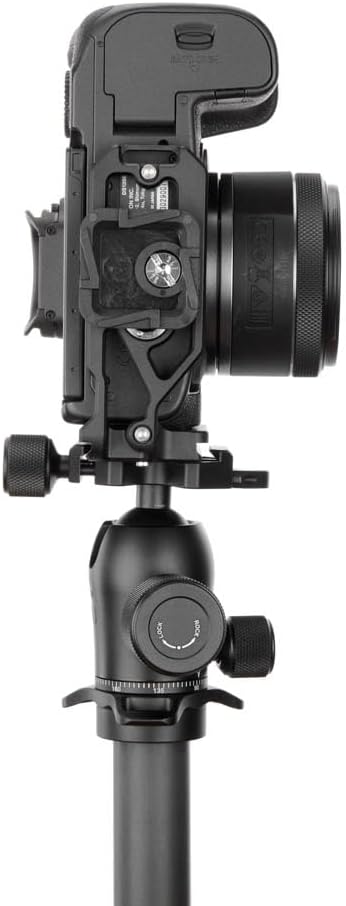
Image: A Canon R5 camera with the Roxie QD L-Bracket, showing the attachment point for a Peak Design Capture Clip adapter.

Image: A Canon R5 camera with the Roxie QD L-Bracket securely attached to a user's belt using a Peak Design Capture Clip.
4.4 Accessory Mounting Points
The vertical section of the L-bracket features two 1/4"-20 accessory mounts. These threads allow you to attach various accessories such as microphones, LED lights, or articulating arms directly to the L-bracket, expanding your camera's capabilities.
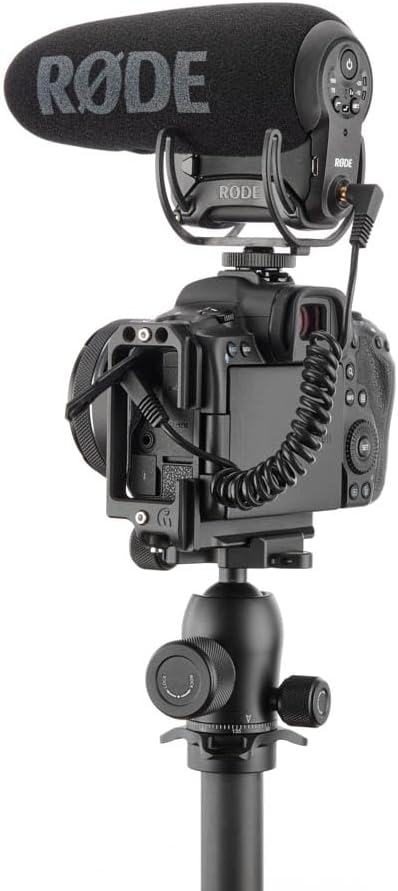
Image: A Canon R5 camera with the Roxie QD L-Bracket, demonstrating a microphone attached to one of the 1/4"-20 accessory mounts.
4.5 סרטון מוצר רשמי
Video: This official video from 3 Legged Thing USA demonstrates the fast and flexible mounting capabilities of the Roxie QD L-Bracket, showcasing its various features and how it integrates with a camera setup.
5. תחזוקה
- ניקוי: Wipe the L-bracket with a soft, dry cloth to remove dust and fingerprints. For stubborn dirt, use a slightly damp מטלית ולאחר מכן יבשו היטב. הימנעו מחומרי ניקוי שוחקים או ממסים.
- אִחסוּן: When not in use, store the L-bracket in its microfiber carry bag to protect it from scratches and dust.
- בדיקת בורג: Periodically check all screws, especially the main camera mounting screw, to ensure they are securely tightened.
6. פתרון תקלות
Issue: L-Bracket does not fit my camera.
פִּתָרוֹן: The Roxie QD L-Bracket is specifically designed for Canon EOS R5, R5C, R6, and R6 II cameras. It is not compatible with other camera models, such as the Canon EOS 600D. Please ensure your camera model is listed as compatible.
Issue: Difficulty accessing battery or ports.
פִּתָרוֹן: Ensure the L-bracket is correctly aligned and fully tightened. The design allows for full access to battery doors and side ports. If access is obstructed, the bracket may be misaligned or not fully seated. Re-attach the bracket, ensuring the locator pin is engaged.
Issue: L-Bracket is not compatible with my Peak Design tripod in portrait orientation.
פִּתָרוֹן: While the L-bracket is Arca-type compatible and includes an adapter for the Peak Design Capture Clip, some specific Peak Design tripod clamps may have unique designs that affect portrait orientation mounting. Ensure your tripod head's clamp is fully open and properly adjusted for standard Arca-Swiss plates. If issues persist, consult your Peak Design tripod's manual or contact their support for specific compatibility details.
Issue: Camera twisting on the L-bracket.
פִּתָרוֹן: Ensure the main mounting screw is securely tightened using the provided mini tool. Also, verify that the locator pin on the L-bracket's base is correctly engaged with the corresponding hole on your camera body. This pin is crucial for preventing camera rotation.
7. מפרטים
| תכונה | פְּרָט |
|---|---|
| מספר דגם | ROXIEQD-B |
| מותג | דבר 3 רגליים |
| צֶבַע | שָׁחוֹר |
| מכשירים תואמים | Canon EOS R5, Canon EOS R5c, Canon EOS R6, Canon EOS R6 II |
| משקל פריט | 3.2 פאונד |
| תקן הרכבה | Arca-type compatible (horizontal and vertical) |
| תושבות אביזרים | 2 x 1/4"-20 threads on vertical section |
| תכונות מיוחדות | Integrated QD socket, Peak Design Capture Clip (v3) compatibility |
| GTIN | 05060244887794 |
8. אחריות ותמיכה
The 3 Legged Thing Roxie QD L-Bracket comes with a אחריות מוגבלת לשנה against manufacturing defects. For warranty claims or technical support, please contact 3 Legged Thing customer service directly or visit their official webאתר למידע נוסף.
לתמיכה ומשאבים נוספים, ניתן לבקר באתר 3 Legged Thing Store on Amazon.