
מָבוֹא
Thank you for choosing the SOAR NBA Wireless Mouse and Mouse Pad. This product combines reliable wireless technology with ergonomic design and your favorite NBA team's spirit, providing a comfortable and efficient experience for work or leisure. This manual provides essential information for setting up, operating, maintaining, and troubleshooting your new device.

Image: The SOAR NBA Wireless Mouse and Mouse Pad featuring the Philadelphia 76ers logo and colors, shown together on a white background.
תוכן החבילה
אנא ודא שכל הפריטים נמצאים בחבילה שלך:
- 1 x עכבר אלחוטי SOAR
- 1 x משטח עכבר SOAR עם משענת יד
- 1 x USB Wireless Receiver (stored inside the mouse battery compartment)
- Note: 1 AA battery required for the mouse (not included).

Image: The SOAR NBA Wireless Mouse and Mouse Pad displayed in its clear retail packaging, showing both components.
הגדרה
-
התקן סוללה: Locate the battery compartment on the underside of the wireless mouse. Slide open the cover. Insert one AA battery (not included) ensuring correct polarity (+/-). Close the battery compartment cover.
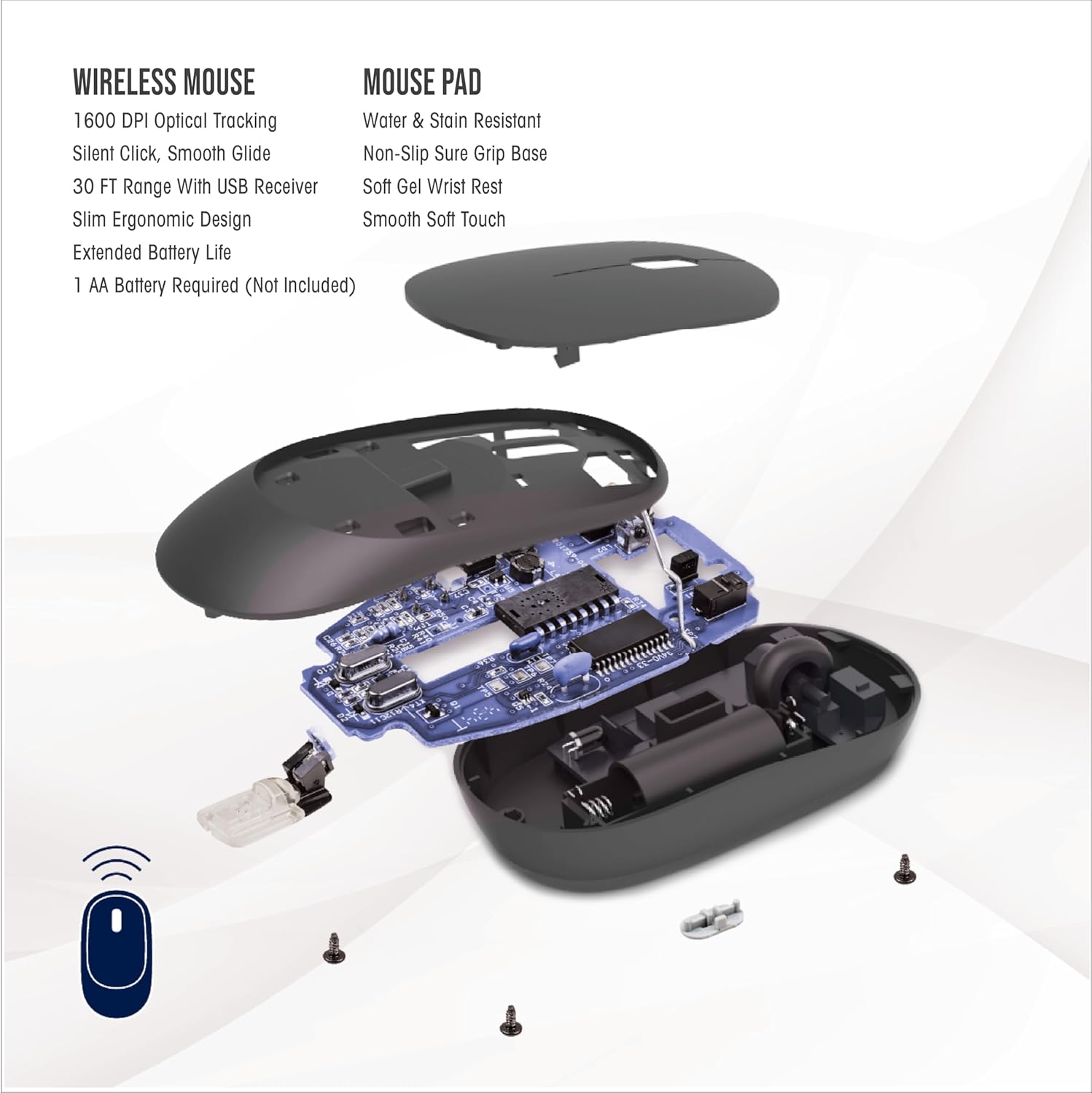
Image: An exploded diagram of the wireless mouse, illustrating the internal components, including the battery slot and the location of the USB receiver.
- אחזור מקלט USB: The small USB wireless receiver is typically stored inside the mouse's battery compartment for safe keeping during transit. Gently remove it.
- חיבור מקלט: Plug the USB wireless receiver into an available USB-A port on your computer (desktop, laptop, etc.). Your computer should automatically detect and install the necessary drivers. No special software installation is required.
-
מיקום משטח העכבר: Place the mouse pad on a flat, stable surface. The anti-slip base will help keep it firmly in place during use. Position the wrist rest to comfortably support your wrist.

Image: A hand positioned on the wireless mouse, with the wrist comfortably supported by the mouse pad's gel wrist rest, illustrating optimal wrist alignment.
הוראות הפעלה
Wireless Mouse Functionality:
- ניווט בסיסי: The mouse features standard left-click and right-click buttons for primary and secondary functions.
- גלגל גלילה: Use the scroll wheel for vertical scrolling through documents and web pages. Pressing down on the scroll wheel can activate an auto-scroll function in some applications.
- התאמת DPI: The "DPI" button, located near the scroll wheel, allows you to cycle through three different sensitivity settings (low, medium, high). This adjusts the cursor speed to suit your preference and task.
- קליק שקט: The mouse is designed with silent click technology, reducing noise during use.
- טווח אלחוטי: The mouse operates using advanced 2.4GHz technology, providing a stable and reliable connection within a 30-foot range from the USB receiver.
Mouse Pad Benefits:
- תמיכה ארגונומית: The soft gel wrist rest provides ergonomic support, helping to reduce wrist fatigue and discomfort during extended use.
- משטח יציב: The anti-slip base ensures the mouse pad remains securely in place on your desk, providing a consistent and smooth gliding surface for the mouse.

Image: A user's hands operating the wireless mouse and mouse pad alongside a laptop, demonstrating a typical desk setup.
תַחזוּקָה
- החלפת סוללה: When the mouse performance degrades or stops responding, it is likely time to replace the AA battery. Follow the steps in the "Setup" section to open the battery compartment and insert a new AA battery.
- ניקוי העכבר: השתמשו במטלית רכה ויבשה כדי לנגב את החלק החיצוני של העכבר. במקרה של לכלוך עיקש, נגבו מעטamp ניתן להשתמש בבד, אך יש לוודא שלא תיכנס לחות למכשיר. יש להימנע מכימיקלים חזקים או חומרי ניקוי שוחקים.
- ניקוי משטח העכבר: The mouse pad is water and stain resistant. For minor spills, wipe immediately with a damp cloth. For general cleaning, a mild soap solution and a soft cloth can be used. Allow the mouse pad to air dry completely before reuse.
פתרון בעיות
-
עכבר לא מגיב:
- ודא שסוללת ה-AA מותקנת כהלכה ושהיא טעונה מספיק. החלף אותה במידת הצורך.
- ודא שמקלט ה-USB האלחוטי מחובר היטב ליציאת USB תקינה במחשב שלך. נסה יציאת USB אחרת.
- Move the mouse closer to the USB receiver to rule out range issues or interference.
- הפעל מחדש את המחשב.
-
חיבור לסירוגין או השהיה:
- Ensure there are no large metallic objects or other wireless devices (like Wi-Fi routers, cordless phones) directly between the mouse and the receiver that could cause interference.
- The effective range is 30 feet; operating beyond this distance may cause connection issues.
-
Cursor Movement is Erratic or Too Slow/Fast:
- Press the "DPI" button on the mouse to cycle through the sensitivity settings.
- Ensure the optical sensor on the bottom of the mouse is clean and free from debris.
- Ensure the mouse pad surface is clean and free from obstructions.
-
USB Receiver Hard to Remove:
- Grip the receiver firmly and pull straight out. Avoid twisting or bending.
מפרטים
| תכונה | פְּרָט |
|---|---|
| שם הדגם | עכבר אלחוטי ומשטח עכבר |
| מספר חלק | NBA-MMP-PHI |
| מותג | לְהַמרִיא |
| צֶבַע | Team Color (Philadelphia 76ers) |
| חוֹמֶר | Neoprene (Mouse Pad) |
| קישוריות | אלחוטי 2.4GHz (מקלט USB) |
| טווח אלחוטי | עד 30 רגל |
| תכונות עכבר | 1600 DPI Optical Tracking, Silent Click, Smooth Glide, Ergonomic Design |
| תכונות משטח עכבר | Water & Stain Resistant, Non-Slip Sure Grip Base, Soft Gel Wrist Rest, Smooth Soft Touch |
| מקור כוח | 1 x סוללת AA (לא כלול) |
| מידות חבילת פריט | 11.69 x 8.98 x 3.5 אינץ' |
| משקל החבילה | 0.2 קילוגרם |
| יַצרָן | קבוצת פריים ברנדס בע"מ |
| UPC | 192129180531 |
אחריות ותמיכה
This SOAR product comes with a 1 שנות אחריות מוגבלת from the date of purchase. This warranty covers defects in materials and workmanship under normal use. It does not cover damage caused by accident, misuse, abuse, neglect, improper installation, or unauthorized repair.
For warranty claims or technical support, please contact the manufacturer, Prime Brands Group Inc., through their official support channels. Please retain your proof of purchase for warranty validation.