
1. הקדמה
This manual provides detailed instructions for the operation and maintenance of your TKOWTB 4K CCD Digital Camera. Please read this manual thoroughly before using the camera to ensure proper function and to maximize your user experience. This camera is designed for capturing high-quality photos and videos with advanced features such as 4K video recording, 64MP photos, IR night vision, and a 3-inch touch screen.
2. המוצר נגמרview
The TKOWTB 4K CCD Digital Camera combines advanced imaging technology with user-friendly features. It includes a triple-lens system (CCD main, CMOS telephoto, CCD 120° wide-angle), a built-in flash, and IR night vision for versatile shooting conditions.

איור 2.1: חזית ואחורה view of the TKOWTB 4K CCD Digital Camera.
תכונות עיקריות:
- וידאו 4K ותמונות 64MP: Record videos at 4K 30FPS and capture stunning 64MP images.
- מסך מגע OLED בגודל 3 אינץ': ממשק אינטואיטיבי לניווט ובקרה קלים.
- מערכת עדשות משולשת: Includes a CCD main lens, CMOS telephoto lens, and CCD 120° wide-angle lens for diverse shooting needs.
- Built-in Flash & IR Night Vision: Enhances image quality in low-light conditions and enables clear night photography.
- OTG Transmission: Easily transfer photos and videos to your smartphone for sharing.
- פונקציות מולטימדיה: Supports music playback, movie mode (offline), audio recording, mini-games, and can function as a PC webפִּקָה.
- סוללה עמידה לאורך זמן: Equipped with a 3600mAh battery and supports multiple charging methods.
זיהוי רכיב:

Figure 2.2: Location diagram showing TYPE-C charging port, on/off/lock screen key, shooting button, sound receiving hole, earphone hole, hanging rope hole, 1/4 bracket interface, and memory card slot.
3. התקנה
3.1. התקנה וטעינה של הסוללה
The camera comes with a built-in 3600mAh battery. To charge, connect the camera to a power source using the provided Type-C USB cable. The camera supports various charging methods including power banks, car chargers, and wall chargers.
3.2. התקנת כרטיס זיכרון
Insert a TF card (up to 128GB, not included) into the memory card slot located on the side of the camera. Ensure the card is inserted correctly until it clicks into place.
3.3. הפעלה/כיבוי
To power on the camera, long press the power button. To power off, long press the power button again. The screen will display 'hello' upon startup.
Video 3.1: This video demonstrates the initial power-on sequence and basic navigation of the camera's interface.
4. הוראות הפעלה
4.1. Photo and Video Mode
From the main screen, tap the camera icon to enter photo and video mode. You can switch between photo and video recording by tapping the respective icons on the screen.
4.1.1. Adjusting Settings in Photo/Video Mode:
- Folding Menu: Tap the menu icon to reveal options like beauty function, photo grid, fill light, single shot/continuous shot, shutter sound, and date/time display.
- מוֹקֵד: Tap the screen to autofocus. For manual focus, use the on-screen controls. Short press the camera button to autofocus.
- מסננים: Swipe left or right on the screen to switch between multiple color filters.
- עדשות: The camera features a CCD main lens, CMOS telephoto lens, and CCD 120° wide-angle lens. Switch between these for different shooting perspectives.
- Flash & IR Night Vision: The built-in flash and infrared night vision lamp can be activated to improve lighting in dark environments.
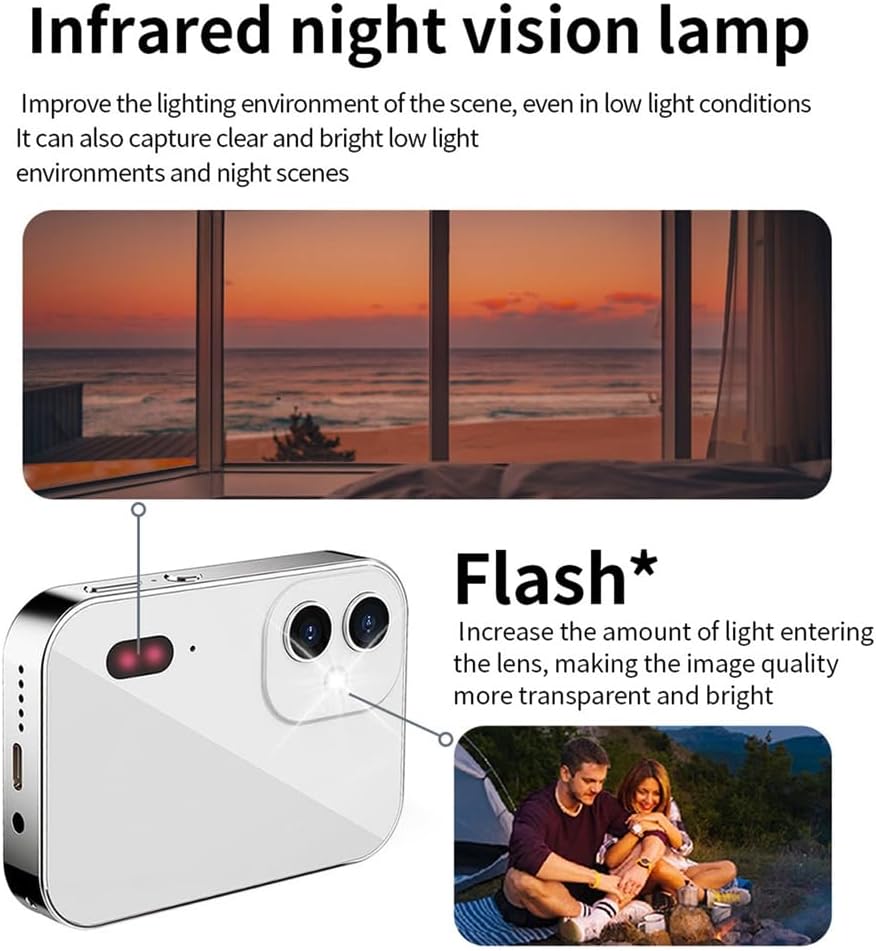
Figure 4.1: Explanation of the Infrared Night Vision Lamp and Flash, which enhance visibility in low-light conditions.
4.1.2. Taking Photos and Recording Videos:
- תמונות: In photo mode, press the shooting button to capture an image.
- סרטונים: In video mode, press the shooting button to start recording. Press again to stop.
4.2. השמעה ו File הַנהָלָה
From the main screen, tap the album icon to view your captured photos and videos. You can zoom in/out of photos using pinch gestures and swipe left/right to navigate through them. Long press on a photo to access options like deletion.
4.3. השמעת מוזיקה
Tap the music icon on the main screen to enter the music interface. You can play, pause, and skip songs. Adjust the volume by sliding up and down on the screen. The camera supports 3.5mm headphones for private listening.
4.4. הקלטת שמע
Tap the audio recording icon on the main screen to start recording. Tap again to pause or stop. Recorded audio fileזה יכול להיות viewed in the sound list.
4.5. מיני-משחקים
The camera includes pre-installed mini-games. Tap the game icon on the main screen to access and play them.
4.6. הגדרות מערכת
Tap the settings icon on the main screen to access various camera settings:
- שָׂפָה: בחר את השפה המועדפת עליך.
- תאריך ושעה: הגדר את התאריך והשעה הנוכחיים.
- טָפֵּט: Change the desktop wallpaper.
- כֶּרֶך: התאם את עוצמת הקול של המערכת.
- צליל מפתח: הפעלה או השבתה של צלילי לחיצת מקשים.
- Boot Music: Enable or disable startup music.
- כיול מגע: Calibrate the touch screen for optimal responsiveness.
- הגדרות תמונה: Adjust photo resolution, quality, and other parameters.
- הגדרות הקלטה: Configure video resolution and other recording options.
Video 4.2: This video provides a detailed tutorial on various camera functions, including photo/video mode, settings adjustments, and multimedia features.
Video 4.3: This video demonstrates the camera's vlogging capabilities and 3-inch touchscreen interface.
4.7. PC Camera Function (Webפִּקָה)
Connect the camera to your computer using the USB cable. The camera can be used as a PC camera for live streaming or video conferencing, providing a high-quality video feed.
4.8. OTG Transmission
Utilize the OTG transmission feature to directly connect the camera to your smartphone. This allows for easy viewing and sharing of photos and videos on social media platforms without needing a computer.
5. תחזוקה
- שמרו על ניקיון המצלמה על ידי ניגובה במטלית רכה ויבשה.
- הימנעו מחשיפת המצלמה לטמפרטורות קיצוניות, לחות או אור שמש ישיר.
- Do not attempt to disassemble the camera, as this will void the warranty.
- Store the camera in a protective case when not in use to prevent scratches and damage.
6. פתרון תקלות
- המצלמה לא נדלקת: ודא שהסוללה טעונה. חבר את המצלמה למקור חשמל ונסה שוב.
- לא ניתן לצלם תמונות/להקליט סרטונים: Check if a memory card is inserted and has sufficient storage space.
- איכות תמונה ירודה: Ensure the lens is clean. Check lighting conditions and adjust flash or IR night vision settings as needed.
- מסך מגע לא מגיב: Try calibrating the touch screen in the settings menu. If the issue persists, power cycle the camera.
- Fileלא מעביר: Ensure the OTG connection is secure and your smartphone supports OTG.
7. מפרטים
| תכונה | מִפרָט |
|---|---|
| מותג | TKOWTB |
| שם הדגם | 500740777A2 |
| מַקסִימוּם Webמצלמה רזולוציית תמונה | 64 מגה פיקסל |
| טכנולוגיית חיישן צילום | CCD, CMOS |
| נתמך File פוּרמָט | JPEG, Video (MP4) |
| זום אופטי | 16 x |
| גודל מסך | 3 אינץ' |
| רזולוציית תצוגה מקסימלית | 64 מגה פיקסל |
| קיבולת אחסון זיכרון | 128 GB (TF card, not included) |
| רזולוציית וידאו | 4K (3840 x 2160 פיקסלים) |
| קצב פריימים | 30, 60 FPS |
| סוג סוללה | ליתיום יון |
| קיבולת סוללה | 3600 מיליamp שעות |
| יציאת טעינה | סוג-C |
| שקע אוזניות | 3.5 מ"מ |
| מהירות תריס | 1/10 שניות - 1/2650 שניות |
| סוג בקרת חשיפה | יָדָנִי |
| צֶבַע | לָבָן |
| משקל פריט | 240 גרם |
| חוֹמֶר | פּלָסטִי |
8. אחריות ותמיכה
For warranty information and technical support, please refer to the product packaging or contact the manufacturer directly. Keep your purchase receipt as proof of purchase for warranty claims.