
1. הקדמה
תודה על הרכישהasing the Urageuxy Wireless Indoor/Outdoor Thermometer with 3 Sensors. This device provides accurate, real-time temperature and humidity readings for up to four locations simultaneously (one indoor, three outdoor/remote). It features a clear LCD display with backlight, comfort indicators, and records of daily maximum and minimum values. This manual will guide you through the setup, operation, and maintenance of your new thermometer.
2. מידע בטיחות
- Do not expose the main unit or sensors to extreme force, shock, dust, temperature, or humidity.
- Do not immerse the main unit in water. The remote sensors are splash-proof but should not be submerged.
- Do not attempt to open the main unit or sensors. This will void the warranty.
- Use only fresh batteries of the specified type. Do not mix old and new batteries.
- השלך סוללות משומשות בצורה אחראית, בהתאם לתקנות המקומיות.
- הרחק מהישג ידם של ילדים.
3. תכולת החבילה
אנא בדקו את תוכן החבילה כדי לוודא שכל הפריטים נמצאים:
- 1 x Main Display Unit (Indoor Console)
- 3 x חיישנים אלחוטיים מרחוק
- 1 x מדריך הוראות
4. המוצר נגמרview
יחידת תצוגה ראשית
The main display unit shows indoor temperature and humidity, along with readings from up to three remote sensors. It features a large LCD screen with a backlight for easy viewing.


Wireless Remote Sensors
Each remote sensor measures temperature and humidity and transmits data wirelessly to the main unit. They are designed for outdoor use but should be placed in a sheltered location to avoid direct rain or prolonged sun exposure.
5. התקנה
5.1 התקנת סוללה
For the Main Display Unit:
- פתחו את מכסה תא הסוללות בגב היחידה הראשית.
- Insert 3 AAA batteries (not included) according to the polarity markings (+ and -).
- סגור את מכסה תא הסוללות.
For the Wireless Remote Sensors:
- Open the battery compartment cover on the back of each sensor.
- Insert 2 AAA batteries (not included) according to the polarity markings (+ and -).
- סגור את מכסה תא הסוללות.

5.2 צימוד חיישנים
The main unit will automatically search for and connect to the remote sensors once batteries are installed. Ensure both the main unit and sensors are within range during initial setup.
- Place the main unit and sensors close to each other during the initial pairing process.
- The main unit will display readings for each connected sensor (CH1, CH2, CH3).
- If a sensor does not connect, press the 'CHANNEL' button on the main unit to cycle through channels or press the 'RESET' button on the sensor to re-initiate pairing.
5.3 הנחיות למיקום חיישנים
לקבלת ביצועים אופטימליים וקריאות מדויקות, יש לקחת בחשבון את הדברים הבאים:
- טווח שידור: The wireless sensors have a transmission range of up to 328 feet (100 meters) in open areas. Walls, metal structures, and other electronic devices can reduce this range.
- מיקום חיצוני: While splash-proof, place outdoor sensors under a roof or in a sheltered area to protect them from direct rain and prolonged direct sunlight.
- הימנע ממקורות חום: Do not place sensors near heat sources (e.g., vents, appliances) or in direct sunlight, as this can lead to inaccurate temperature readings.
- מספר מיקומים: Utilize the three sensors to monitor different areas such as a greenhouse, baby room, wine cellar, kitchen, or garage.


6. הוראות הפעלה
6.1 קריאות תצוגה
מסך ה-LCD מציג את המידע הבא:
- טמפרטורה ולחות פנימיים: מוצג בחלק העליון של התצוגה.
- Remote Sensor Readings: Temperature and humidity for each connected sensor (CH1, CH2, CH3) are displayed below the indoor readings.
- Comfort Icons: Indicates the current humidity level (DRY, COMFORT, WET).
- אינדיקטורים של מגמה: Arrows next to temperature and humidity values show if they are rising, falling, or stable.
6.2 °C/°F Switcher
To switch between Celsius (°C) and Fahrenheit (°F), press the '°C/°F' button located on the back of the main unit.
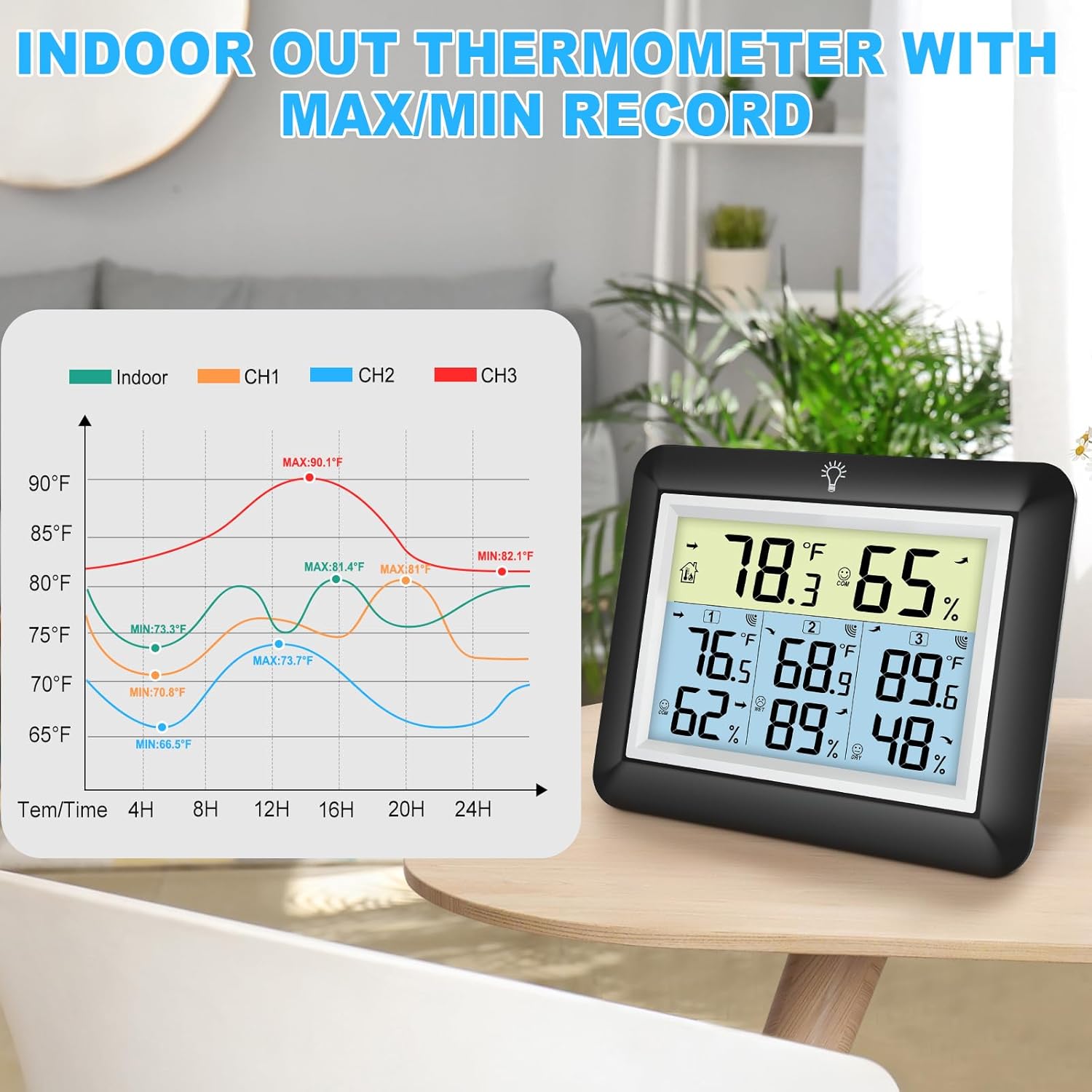
6.3 רישומי מקסימום/מינימום
The device automatically records the daily maximum and minimum temperature and humidity values for both indoor and all remote sensors. These records reset every 24 hours.
- Press the 'MIN/MAX' button on the back of the main unit to view the maximum recorded values.
- Press the 'MIN/MAX' button again to view the minimum recorded values.
- לחץ פעם שלישית כדי לחזור לקריאות הנוכחיות.

6.4 הפעלת תאורה אחורית
The main unit features an adjustable backlight for improved visibility in low-light conditions.
- Touch the light bulb icon on the top of the main unit to activate the backlight for 5 seconds.
- Press and hold the light bulb icon for more than 5 seconds to keep the backlight on for 30 minutes.


6.5 מחוון נוחות
The comfort indicator provides a quick visual reference for the current humidity level, helping you maintain an ideal environment.
- יָבֵשׁ: לחות < 45%
- נוֹחוּת: 45% ≤ לחות ≤ 65%
- רָטוֹב: לחות > 65%


7. תחזוקה
7.1 ניקוי
נגבו את היחידה הראשית והחיישנים בעזרת מטלית רכהamp cloth. Do not use abrasive cleaners or solvents, as they may damage the plastic components and electronic circuits.
7.2 החלפת סוללה
Replace batteries when the low battery indicator appears on the display. Always replace all batteries in a unit at the same time with new ones of the same type.
7.3 אחסון
If the device will not be used for an extended period, remove the batteries from both the main unit and sensors to prevent leakage and damage.
8. פתרון תקלות
| בְּעָיָה | סיבה אפשרית | פִּתָרוֹן |
|---|---|---|
| אין תצוגה ביחידה הראשית. | הסוללות מתות או מותקנות בצורה לא נכונה. | החלף סוללות בחדשות, תוך הקפדה על קוטביות נכונה. |
| Remote sensor not displaying readings or showing '---'. | 1. Sensor out of range. 2. Batteries are dead. 3. הפרעה. 4. Sensor not paired. | 1. קרב את החיישן ליחידה הראשית. 2. החלף את סוללות החיישן. 3. Move away from other electronic devices. 4. Press the 'RESET' button on the sensor and then cycle channels on the main unit. |
| קריאות לא מדויקות. | 1. חיישן חשוף לאור שמש ישיר או למקור חום. 2. Poor ventilation around sensor. | 1. העבר את החיישן לאזור מוצל ומאוורר היטב. 2. Ensure proper airflow around the sensor. |
| תאורה אחורית לא עובדת. | סוללה חלשה או תקלה. | Replace main unit batteries. If issue persists, contact support. |
9. מפרטים
- מותג: אוראג'וקסי
- דֶגֶם: WS0170BKY
- טווח טמפרטורות פנימיות: 32°F עד 140°F (0°C עד 60°C)
- טווח טמפרטורות חיצוני: -40°F עד 140°F (-40°C עד 60°C)
- דיוק טמפרטורה: ±2°F / ±1°C
- טווח לחות: 10% עד 99% RH
- דיוק לחות: ±5% RH
- טווח שידור אלחוטי: עד 100 מטרים (328 רגל) בשטחים פתוחים
- מקור כוח (יחידה ראשית): 3 x AAA סוללות (לא כלול)
- Power Source (Remote Sensor): 2 x AAA סוללות (לא כלול)
- מאפיינים מיוחדים: Backlit LCD, Comfort Indicator, Min/Max Record, Fast Refresh
- חוֹמֶר: אקרילוניטריל בוטאדיאן סטירן (ABS)
- מידות מוצר (יחידה ראשית): מידות: 0.78 אינץ' עומק x 4.33 אינץ' רוחב x 0.78 אינץ' גובה (בקירוב)
- משקל פריט: 9.9 אונקיות (0.28 קילוגרם)
10. אחריות ותמיכה
10.1 מידע אחריות
Urageuxy products are manufactured to high-quality standards. This product is covered by a limited warranty against defects in materials and workmanship for a period of one year from the original purchase date. This warranty does not cover damage caused by misuse, accident, unauthorized modification, or improper installation.
10.2 תמיכת לקוחות
If you encounter any issues or have questions regarding your Urageuxy Wireless Indoor/Outdoor Thermometer, please contact our customer support team. For the quickest assistance, please refer to the contact information provided on the product packaging or the official Urageuxy webאֲתַר.
תמיכה מקוונת: בקר ב Urageuxy Store on Amazon לשאלות נפוצות ומידע על המוצר.
סרטון זה מספק הצצה חזותיתview of the Urageuxy Indoor Outdoor Thermometer with 3 Remote Sensors, demonstrating its features and functionality.