
מָבוֹא
The GeeekPi DeskPi RackMate T2 is a 12U server cabinet designed for organizing network, server, audio, and video equipment. Constructed from durable aluminum alloy and translucent acrylic panels, this 10-inch wide rack provides a compact and efficient solution for home labs, small offices, or enterprise environments where space optimization is key. Its open design ensures easy access for installation and maintenance, while promoting optimal airflow for device cooling. The 12U height corresponds to approximately 21 inches, accommodating a variety of standard rack-mountable equipment.
התקנה והרכבה
Follow these steps for the proper assembly of your GeeekPi DeskPi RackMate T2 12U Server Cabinet. Ensure all components listed in the accessory list are present before beginning.

Figure 1: Accessory List. מעלview of all components and hardware included with the server cabinet, such as aluminum rods, handles, blank panels, shelves, patch panel, screws, screwdrivers, and anti-vibration feet.
The cabinet is designed for straightforward assembly. Refer to the visual guide below for detailed installation steps. It is recommended to lay out all parts and identify them according to the accessory list before starting.

Figure 2: Installation Steps. Visual instructions detailing the assembly process of the server cabinet, from attaching side panels to installing the top cover and handles.
For a comprehensive visual guide on unboxing and assembly, please watch the official product video:
Video 1: GeeekPi DeskPi RackMate T2 Assembly. This official video demonstrates the features and assembly process of the GeeekPi DeskPi RackMate T2 12U Server Cabinet.
הוראות הפעלה
The DeskPi RackMate T2 is designed for modular expansion and efficient organization of your equipment. Its open design allows for easy integration of various devices, from mini PCs and network switches to audio/video components. The 10-inch width and 12U height provide ample space for a compact yet powerful setup.

Figure 3: Modular Expansion. אקסample setup demonstrating the modular expansion capabilities of the server cabinet, showcasing multiple devices like mini PCs, switches, and other network equipment neatly organized.
The translucent acrylic side panels allow for direct observation of the cabinet's interior, which can be enhanced with ambient lighting for aesthetic purposes. The handles can be removed to save space, making the cabinet suitable for various scenarios and placements.

איור 4: מיקום רב-תכליתי. Images illustrating the versatility of the server cabinet, showing it placed under a desk, next to a monitor, and in various home or office settings.
For optimal cooling, the bottom panel supports the installation of two 120mm fans or four 80mm fans (optional accessories).
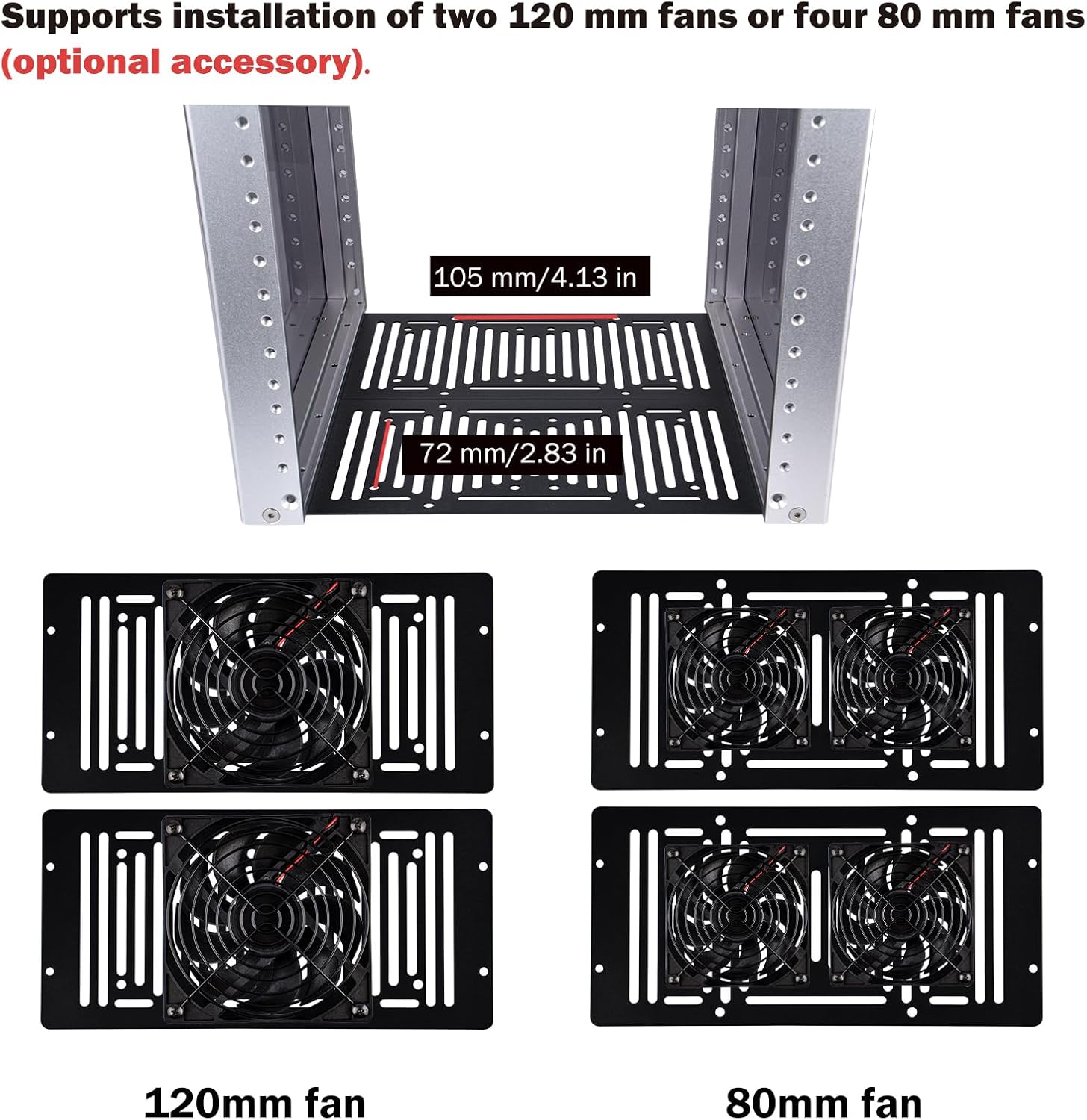
Figure 5: Fan Installation Options. Diagram showing the bottom panel of the server cabinet with options for installing two 120mm fans or four 80mm fans for enhanced cooling (fans are optional accessories).
תַחזוּקָה
To ensure the longevity and optimal performance of your GeeekPi DeskPi RackMate T2 server cabinet, regular maintenance is recommended.
- ניקוי: The aluminum alloy frame and acrylic panels can be cleaned with a soft, damp cloth. Avoid abrasive cleaners or solvents that may damage the finish or acrylic.
- ניהול אבק: The translucent acrylic panels offer dust resistance. Periodically inspect the interior for dust accumulation, especially around installed equipment and optional fan areas. Use compressed air or a soft brush to remove dust.
- בדיקת רכיבים: Due to the open design, it is easy to visually inspect all installed components and cabling. Ensure all connections are secure and cables are neatly managed to prevent interference with airflow.
פתרון בעיות
This section provides general guidance for common issues that may arise with server rack setups. The open design of the DeskPi RackMate T2 facilitates easy access for inspection and resolution.
- Overheating Equipment: If equipment inside the rack is running hot, verify that there is adequate space around each device for airflow. Consider installing optional cooling fans in the designated areas at the bottom of the cabinet. Ensure no cables are obstructing ventilation paths.
- מתלה לא יציב: Ensure all screws and fasteners used during assembly are tightened securely. Check that the anti-vibration rubber feet are properly installed on a flat, stable surface.
- קושי בהתקנת רכיבים: Verify that your equipment is compatible with 10-inch rack standards. Ensure you are using the correct mounting hardware (e.g., M4 screws for rack units). If a component does not fit, double-check its dimensions against the rack specifications.
- חלקים חסרים: If any parts were missing upon unboxing, refer to the accessory list (Figure 1) and contact GeeekPi customer support for assistance.
מפרטים
Detailed technical specifications for the GeeekPi DeskPi RackMate T2 12U Server Cabinet.
| תכונה | פְּרָט |
|---|---|
| מותג | GeeekPi |
| מספר דגם | DP-0048 |
| צֶבַע | כֶּסֶף |
| מידות המוצר (D x W x H) | 10.24 אינץ' x 11.06 אינץ' x 23.46 אינץ' (260 מ"מ x 281 מ"מ x 596 מ"מ) |
| חוֹמֶר | אקריליק, אלומיניום |
| משקל פריט | 6.96 קילוגרם |
| מכשירים תואמים | Server, Network Equipment, Audio/Video Equipment |
| סוג הרכבה | להרים את הארון |
| נדרשת הרכבה | כֵּן |
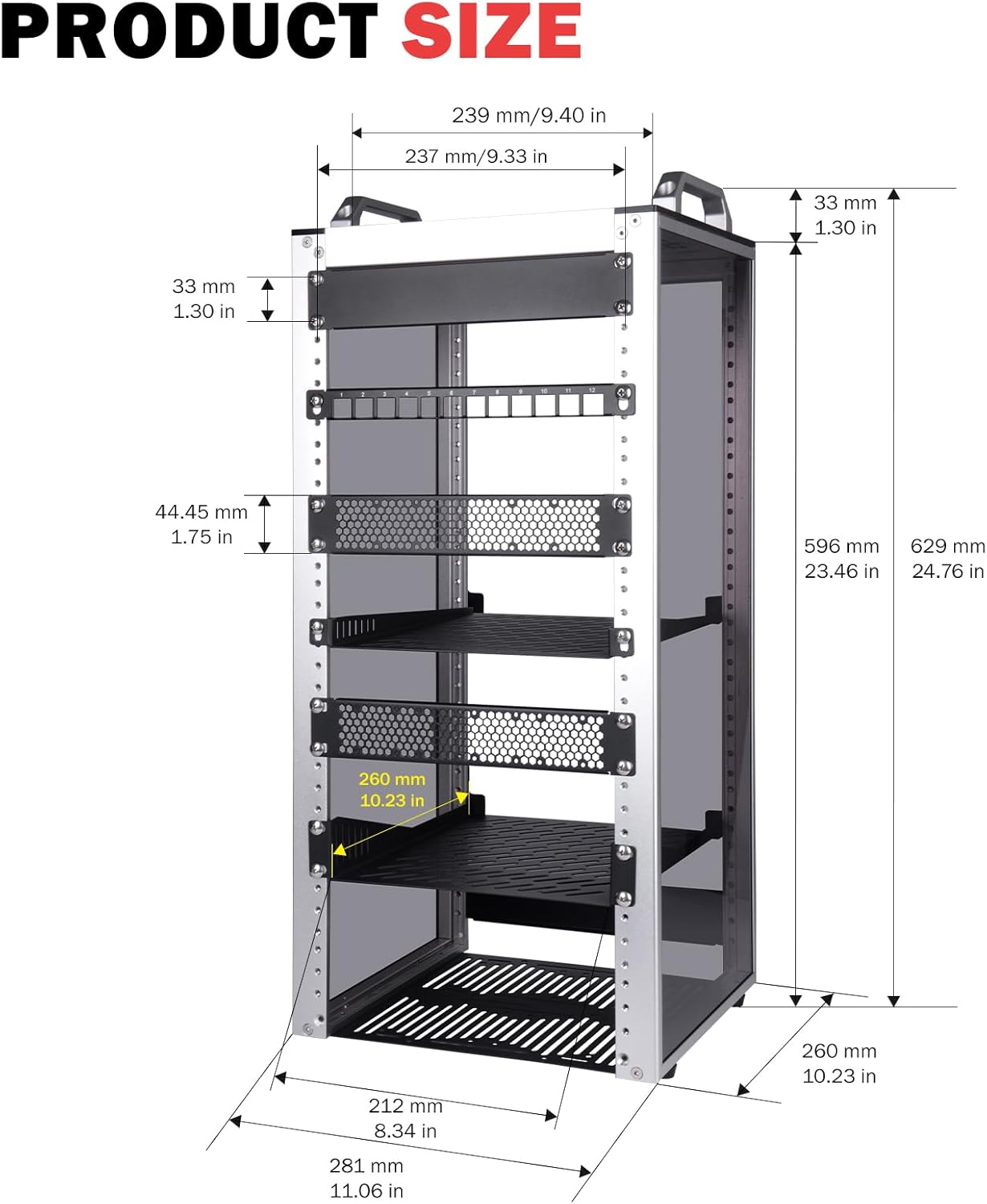
איור 6: מידות המוצר. Diagram illustrating the precise dimensions of the GeeekPi DeskPi RackMate T2 12U Server Cabinet, including height, width, and depth in both millimeters and inches.
מידע על אחריות
The GeeekPi DeskPi RackMate T2 12U Server Cabinet comes with a אחריות ל-6 חודשים from the date of purchase. This warranty covers manufacturing defects and material flaws under normal use. Please retain your proof of purchase for any warranty claims. For specific terms and conditions, or to initiate a warranty claim, please contact GeeekPi customer support.
תְמִיכָה
For further assistance, technical support, or inquiries regarding your GeeekPi DeskPi RackMate T2 12U Server Cabinet, please contact GeeekPi customer service. You can often find additional resources, FAQs, and contact information on the official GeeekPi webבאתר או דרך הקמעונאי בו נרכש המוצר.
בקר ב GeeekPi Store on Amazon למוצרים ומידע נוסף.