
מָבוֹא
This manual provides essential information for the setup, operation, maintenance, and troubleshooting of your Onn 22 inch 1080P 100 Hz FHD LED Monitor. Please read this guide thoroughly before using the product to ensure optimal performance and safety.
The Onn 22 inch FHD LED Monitor is designed for a variety of applications, offering a vivid 1920x1080 resolution, a 100Hz refresh rate, and a 6.5ms response time for efficient performance. Its slim profile and T-shaped base are ideal for saving desk space.
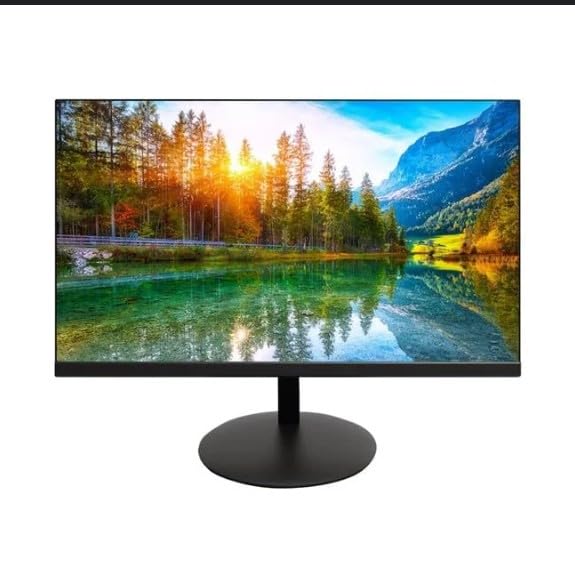
The image shows the Onn 22 inch FHD LED Monitor, highlighting its 100Hz refresh rate and 1080p resolution. The monitor features a slim design and a T-shaped base.
הוראות התקנה
- פריקת אריזה: Carefully remove the monitor and all accessories from the packaging. Ensure all components are present: monitor, T-shaped base, HDMI cable, and power adapter.
- הרכבת המעמד: Attach the T-shaped base to the monitor. The design is screw-less for easy assembly. Ensure it is securely fastened.
- חיבור למכשיר:
The monitor supports both HDMI and VGA inputs. Connect the provided HDMI cable from your computer's HDMI output to the HDMI IN port on the monitor. Alternatively, use a VGA cable for VGA input.

This image displays the rear panel of the Onn monitor, illustrating the available input ports: HDMI IN, VGA IN, and the DC 12V power input. These ports are essential for connecting the monitor to a computer or other devices.
- חיבור חשמל: Connect the power adapter to the DC 12V input port on the monitor, then plug the adapter into a power outlet.
- התאמת הצג: The monitor is capable of swivel, tilt, rotation, and height adjustment. Adjust the screen to your preferred viewזווית לנוחות ארגונומית.
- הגדרת צג כפול: This monitor is suitable for a fully functioning dual monitor setup. Connect a second monitor using the appropriate cables and configure your operating system's display settings.
הוראות הפעלה
- הפעלה/כיבוי: Press the power button, usually located on the bottom or back of the monitor, to turn it on or off.
- בחירת קלט: If the monitor does not automatically detect the input source, use the On-Screen Display (OSD) menu buttons to manually select between HDMI and VGA inputs.
- ניווט בתפריט OSD: Use the physical buttons on the monitor (typically on the back or bottom edge) to navigate the OSD menu. This allows you to adjust settings such as brightness, contrast, color temperature, and input source.
- רזולוציה וקצב רענון: The monitor supports a native resolution of 1920x1080 at a 100Hz refresh rate. Ensure your computer's display settings are configured to these specifications for the best visual experience.
- סנכרון אדפטיבי: The monitor features Adaptive Sync for gaming, which helps to reduce screen tearing and stuttering. Ensure this feature is enabled in your graphics card settings if supported.
תַחזוּקָה
- ניקוי המסך: נגבו בעדינות את המסך בעזרת מטלית רכה ונטולת סיבים. במקרה של סימנים עקשניים, נגבו קלותampen the cloth with water or a non-abrasive, monitor-specific cleaning solution. Avoid spraying liquids directly onto the screen.
- ניקוי ה-Casing: השתמשו במטלית רכה ויבשה לניקוי הצגasing. Do not use strong detergents or solvents, as they may damage the finish.
- אוורור: ודא שפתחי האוורור של הצג אינם חסומים כדי למנוע התחממות יתר.
- אִחסוּן: כאשר הצג אינו בשימוש למשך תקופות ממושכות, יש לאחסן אותו במקום קריר ויבש, הרחק מאור שמש ישיר וטמפרטורות קיצוניות.
פתרון בעיות
- אין כוח:
- בדוק אם כבל החשמל מחובר היטב הן לצג והן לשקע החשמל.
- ודא ששקע החשמל פועל כהלכה.
- אין קליטה:
- ודא שכבל הווידאו (HDMI או VGA) מחובר היטב גם לצג וגם למחשב.
- בחר את מקור הקלט הנכון באמצעות תפריט המסך של הצג.
- בדוק אם המחשב שלך דלוק ואינו במצב שינה.
- Flickering Screen or Poor Image Quality:
- בדוק את כבל הווידאו לאיתור נזקים או חיבורים רופפים.
- Adjust the resolution and refresh rate settings on your computer to match the monitor's specifications (1920x1080, 100Hz).
- אפס את הגדרות הצג להגדרות ברירת המחדל של היצרן דרך תפריט המסך.
- כפתורים לא מגיבים:
- Unplug the monitor from the power outlet, wait for 30 seconds, and then plug it back in.
If problems persist, please refer to the support information provided in the "Support and Warranty" section.
מפרטים
| מותג | און |
| מספר דגם | 100140681 |
| שם הדגם | אוטו |
| גודל מסך | 21.5 אינץ' |
| סוג תצוגה | לד, LCD |
| הַחְלָטָה | 1920 x 1080 (FHD 1080p) |
| קצב רענון | 100 הרץ |
| זמן תגובה | 6.5 אלפיות שניות |
| ממשק חומרה | HDMI, VGA |
| תכונות מיוחדות | התאמת גובה |
| Viewזווית | 160 מעלות |
| יחס גובה-רוחב | 16:9 |
| מידות המוצר | 49.2 x 20 x 37.2 ס"מ; 3.24 ק"ג |
תמיכה ואחריות
For technical support, product inquiries, or warranty information, please visit the official Onn support webלאתר או לפנות לשירות הלקוחות שלהם.
- תמיכה רשמית Webאֲתַר: onnsupport.ca
- אַחֲרָיוּת: Specific warranty details may vary by region and purchase date. Please refer to the documentation included with your product or visit the support webאתר לקבלת מידע עדכני על האחריות.