
1. המוצר נגמרview
The Tomzn TOMPD-63SW is a WiFi-enabled smart energy meter and leakage current protection relay designed to provide reliable protection and monitoring for your electrical installation. This 63A capacity device offers remote monitoring and control capabilities via a smartphone application. Its integrated LCD screen displays instantaneous voltage, current, and power consumption values. Featuring DIN rail mounting, it ensures easy installation within electrical panels. The device automatically disconnects the circuit in cases of over-voltagה, תחת כרךtage, or leakage current, safeguarding connected appliances. Through the mobile application, users can track energy consumption data and review historical records. It is an ideal solution for ensuring the safety of electrical devices in both residential and commercial environments, offering a compact design and user-friendly interface.
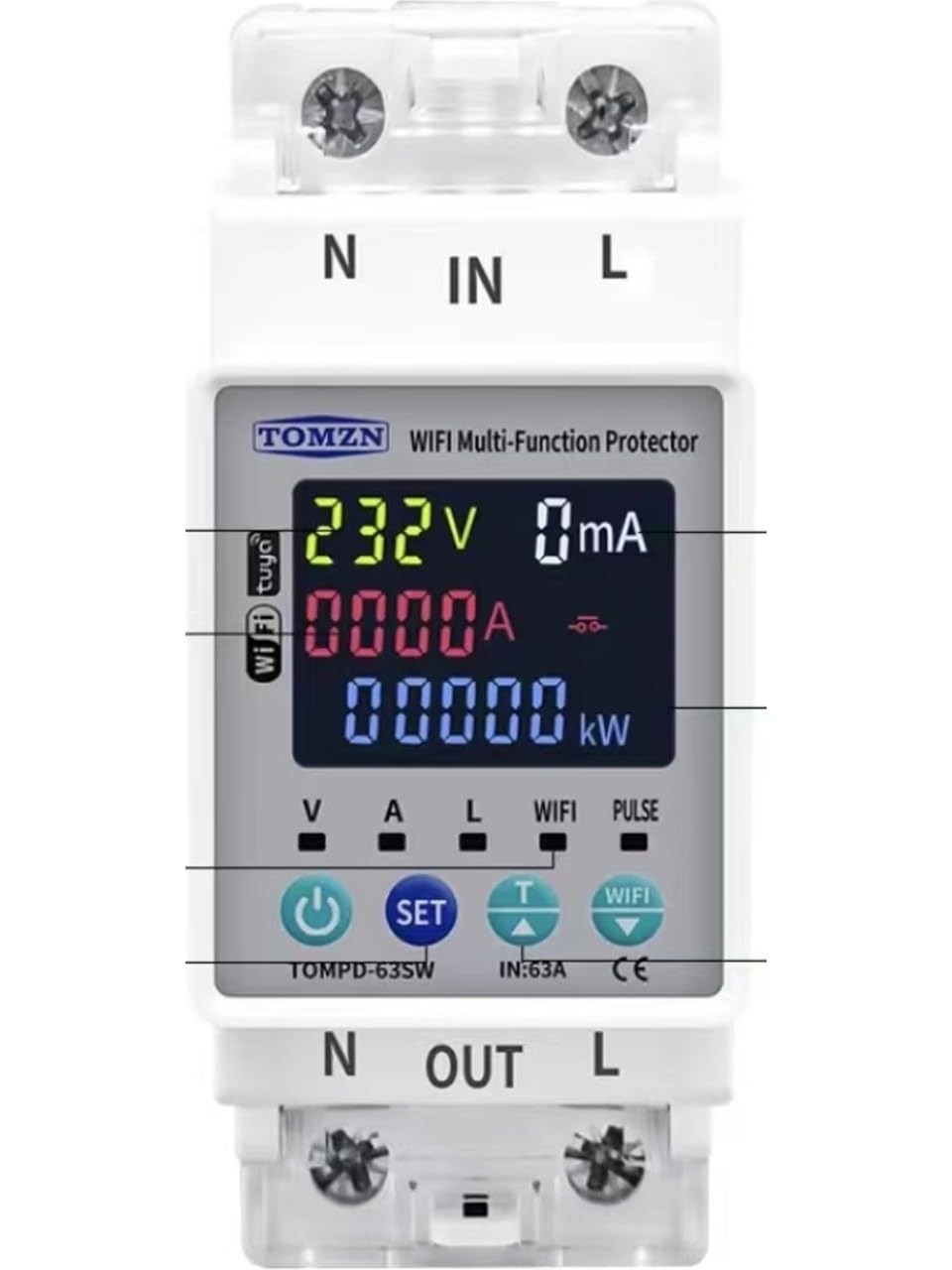
תמונה המציגה את החלק הקדמי view of the Tomzn WiFi Smart Energy Meter, highlighting its LCD display and compact design for DIN rail mounting.
2. מידע בטיחות
- התקנה מקצועית מומלצת: Installation should be performed by a qualified electrician to ensure safety and compliance with local electrical codes.
- נתק חשמל: Always ensure the main power supply is disconnected before installing, maintaining, or servicing the device.
- כרך ידtage ודירוגים נוכחיים: אין לחרוג מהכרך המצויןtage and current ratings (63A) of the device.
- חיווט נכון: Ensure all wiring connections are secure and correctly terminated according to the wiring diagram. Loose connections can cause overheating or malfunction.
- תנאים סביבתיים: אין לחשוף את המכשיר ללחות, לטמפרטורות קיצוניות או לסביבות קורוזיביות.
3. תכולת החבילה
אנא בדקו את החבילה עבור הפריטים הבאים:
- Tomzn WiFi Smart Energy Meter and Leakage Current Protection Relay (Model TOMPD-63SW)
- מדריך למשתמש
4. תכונות מוצר
- ניטור חכם: Wi-Fi connectivity for remote tracking of energy consumption and voltage values via a mobile application.
- מפרט טכני: 63A capacity, suitable for single-phase electrical systems, DIN rail mountable.
- פונקציות הגנה: Automatic protection against over-voltagה, תחת כרךtage, and leakage current.
- תצוגת LCD: Digital screen showing instantaneous voltage, current, and energy consumption values.
- הַתקָנָה: Easy and secure mounting onto electrical panels.
5. מפרטים
| מִפרָט | עֵרֶך |
|---|---|
| יַצרָן | Tomzn |
| הפניה ליצרן | TMZN01 |
| מידות המוצר | 4.5 x 4.5 x 8.5 ס"מ |
| מִשׁקָל | 150 גרם |
| סוג מחבר | חור דרך |
| דירוג נוכחי | 63 Ampארס |
| סוג הרכבה | מסילת DIN |
| מותג | טומזן |
| מצב הפעלה | אוֹטוֹמָטִי |
6. התקנה (הגדרה)
אַזהָרָה: Installation must be performed by a qualified electrician. Ensure all power is disconnected before proceeding.
- ניתוק חשמל: Turn off the main power supply at the circuit breaker before starting any installation work. Verify that no voltage is present using a suitable testing device.
- הַרכָּבָה: Mount the TOMPD-63SW device onto a standard 35mm DIN rail within your electrical panel. Ensure it is securely fastened.
- חיבורי חיווט:
- Connect the incoming live (phase) wire to the L-IN מָסוֹף.
- Connect the incoming neutral wire to the N-IN מָסוֹף.
- Connect the outgoing live (phase) wire to the L-OUT terminal, leading to your load.
- Connect the outgoing neutral wire to the N-OUT terminal, leading to your load.
- Ensure all connections are tight and correct according to the wiring diagram provided with the product.
- שחזור חשמל: Once all connections are verified, restore the main power supply. The device's LCD screen should illuminate.
- הגדרת אפליקציה: Download the designated mobile application (e.g., Tuya Smart or Smart Life, as commonly used for such devices) from your smartphone's app store. Follow the in-app instructions to add and configure the TOMPD-63SW device to your Wi-Fi network. This typically involves putting the device into pairing mode (refer to the device's specific button sequence for pairing).
7. תפעול
The TOMPD-63SW offers both local display and remote control/monitoring capabilities.
7.1. תצוגת LCD
מסך ה-LCD המשולב מספק מידע בזמן אמת:
- כרך ידtagה (V): Displays the instantaneous line voltage.
- נוכחי (א): Shows the instantaneous current flowing through the circuit.
- Power (W/kW): Indicates the instantaneous active power consumption.
- אנרגיה (קוט"ש): Accumulates total energy consumption.
- מחווני סטטוס: May show indicators for Wi-Fi connectivity, protection status (e.g., over-voltagה, תחת כרךtage, leakage current trip).
7.2. בקרת אפליקציות מובייל
After successful app setup, you can:
- ניטור מרחוק: View כרך זמן אמתtage, current, power, and energy consumption from anywhere.
- שְׁלַט רָחוֹק: Turn the connected circuit ON or OFF remotely (if this feature is enabled for the specific model).
- הגדרות הגנה: Adjust parameters for over-voltagה, תחת כרךtage, and leakage current protection thresholds.
- נתונים היסטוריים: Access and analyze historical energy consumption data and event logs (e.g., protection trips).
- תזמון: Set schedules or timers for the device to turn ON/OFF automatically.
8. תחזוקה
The Tomzn TOMPD-63SW is designed for minimal maintenance. However, regular checks can ensure optimal performance and safety:
- ניקוי: Periodically clean the device's exterior with a dry, soft cloth. Do not use abrasive cleaners or solvents.
- בדיקת חיבור: Annually, or as needed, verify that all wiring connections are secure and free from corrosion. Ensure power is disconnected before performing this check.
- עדכוני קושחה: Check the mobile application periodically for any available firmware updates for the device. Updates can improve performance and add new features.
9. פתרון תקלות
If you encounter issues with your TOMPD-63SW, refer to the following common problems and solutions:
- המכשיר לא מופעל:
- בדוק את ספק הכוח הראשי ואת מפסק החשמל.
- Verify all wiring connections (L-IN, N-IN) are correct and secure.
- אין חיבור Wi-Fi:
- Ensure your Wi-Fi network is 2.4GHz (5GHz networks are typically not supported by these devices).
- Check the Wi-Fi signal strength at the device's location.
- הפעל מחדש את נתב ה-Wi-Fi שלך.
- Attempt to re-pair the device with the mobile application (refer to app instructions for pairing mode).
- Device Trips Frequently:
- Check the load connected to the device; it might be drawing excessive current or experiencing a fault.
- Review ה-over-voltagה, תחת כרךtage, and leakage current protection settings in the mobile application. They might be set too sensitively.
- Inspect the electrical system for actual faults (e.g., ground fault, short circuit).
- קריאות לא מדויקות:
- Ensure wiring connections are correct and tight.
- Compare readings with a calibrated multimeter if possible.
If the problem persists, contact customer support or a qualified electrician.
10. אחריות ותמיכה
אַחֲרָיוּת: Please refer to your purchase documentation, retailer, or the manufacturer's official website for detailed warranty information regarding the Tomzn TOMPD-63SW device.
תמיכה טכנית: For technical assistance, troubleshooting beyond this manual, or inquiries about your device, please contact your point of purchase or the official Tomzn customer support channels. Ensure you have your product model number (TOMPD-63SW) and purchase details ready when contacting support.