
1. מבוא ותאימות
This manual provides detailed instructions for the installation, operation, and maintenance of your Surakey Android 13 Car Stereo Radio. Please read this manual thoroughly before installation and use to ensure proper function and safety.
הערת תאימות חשובה: This car stereo is designed for Dodge Ram 1500 and 3500 models from 2013 to 2019. Before purchasing or installing, it is crucial to verify compatibility with your specific vehicle's year and model. We recommend carefully measuring your dashboard and comparing it with the product dimensions. If uncertain, please provide a complete image of the plugs on the back of your center console and the on-board main unit to your supplier for confirmation and to determine if any additional wiring harnesses or adapters are required.

Figure 1.1: Dashboard compatibility examples. Ensure your vehicle's dashboard matches the compatible design for proper fitment.
2. המוצר נגמרview ורכיבים כלולים
The Surakey Android 13 Car Stereo Radio features a 9.7-inch touch screen, offering advanced navigation, entertainment, and connectivity options for your vehicle.
2.1 תכונות עיקריות:
- 9.7-inch HD 2.5D Tempered Glass Mirror Touch Screen
- מערכת הפעלה אנדרואיד 13
- Wireless & Wired Apple CarPlay and Android Auto
- ניווט GPS מובנה
- Integrated Wi-Fi Connectivity
- Bluetooth with A2DP, Hands-Free Calling, and Phone Book
- מקלט רדיו FM/RDS
- DSP Function for High-Fidelity Audio
- Support for AHD Backup Camera Input
- תאימות בקרת הגה
- Double USB Interface
- Multi-language Support (up to 40 national languages)
2.2 תכולת החבילה:
אנא ודא שכל הרכיבים הבאים כלולים בחבילה שלך:
- Surakey Android Car Stereo Unit
- כבל חשמל
- כבלי קלט/פלט RCA
- כבלי USB (x2)
- כבל כניסת מצלמה
- כבל מתאם רדיו
- אנטנת GPS
- מדריך הוראות
- External Microphone ('Wheat head')
- קופסת קנבוס
- Car Compass

איור 2.1: מידות המוצר ואביזרים כלולים.
3. התקנה והתקנה
Professional installation is highly recommended for this product. Incorrect wiring or installation can damage the unit or your vehicle's electrical system. Always disconnect the vehicle's battery before beginning installation.
3.1 בדיקה לפני ההתקנה:
- ודא שההצתה של הרכב כבויה והמצבר מנותק.
- Confirm dashboard compatibility and dimensions.
- Identify all existing wiring harnesses in your vehicle.
3.2 חיבורי חיווט:
Refer to the wiring diagram provided in the included instruction manual for specific connections. General connections include:
- כבל חשמל: חבר לחוטים של החשמל, הארקה ואביזרים של הרכב.
- קלט/פלט RCA: עבור חיצוני amplifiers, subwoofers, or video output.
- כבלי USB: Connect to the unit for media playback, phone charging, and CarPlay/Android Auto (wired).
- קלט מצלמה: Connect your AHD backup camera here.
- Radio Adapter Cable: Connect to the vehicle's antenna.
- אנטנת GPS: התקן במקום עם שקט רוח view של השמיים לקבלת קליטת אות אופטימלית.
- מיקרופון חיצוני: Plug in for improved hands-free call quality.
- תיבת קנבוס: Connect as per vehicle-specific instructions for steering wheel controls and other vehicle data integration.

איור 3.1: אחורי view of the car stereo unit with wiring connections.
3.3 לאחר ההתקנה:
- חבר מחדש את מצבר הרכב.
- Turn on the ignition and power on the stereo.
- Perform initial setup and test all functions (radio, Bluetooth, GPS, etc.).
4. הוראות הפעלה
This section details the primary functions and how to operate your Surakey Android 13 Car Stereo.
4.1 Power On/Off and Basic Interface:
- לחץ על לחצן ההפעלה כדי להפעיל או לכבות את היחידה.
- The 9.7-inch capacitive touch screen allows for easy navigation through the Android interface.
4.2 Apple CarPlay & Android Auto:
The unit supports both wireless and wired Apple CarPlay (for iOS devices) and Android Auto (for Android devices).
- עבור אפל קארפליי: Connect your iPhone via Bluetooth for wireless connection or via USB for wired connection. Use the ZLINK APP on the stereo. This integrates your iOS device for navigation, calls, messages, and music.
- עבור אנדרואיד אוטו: Connect your Android phone via Bluetooth for wireless connection or via USB for wired connection. Ensure the Android Auto APP is installed on your phone. This integrates your Android device for navigation, calls, messages, and music.

Figure 4.1: Apple CarPlay connection example.
4.3 ניווט GPS:
The unit comes with built-in offline maps. For online navigation, connect to Wi-Fi to use Google Maps or other navigation applications downloaded from the Play Store.
4.4 Wi-Fi Connectivity:
Connect the stereo to a Wi-Fi hotspot (e.g., from your smartphone) to access online features, download apps, and use online maps.
4.5 פונקציונליות בלוטות':
Pair your smartphone via Bluetooth for hands-free calling, Bluetooth music streaming (A2DP), and automatic phonebook loading.
4.6 FM/RDS Radio:
Access the FM radio tuner. The RDS function displays station information where available. You can save up to 18 preset stations.
4.7 בקרות הגה:
If properly connected via the Canbus box, you can control various functions of the stereo directly from your vehicle's steering wheel controls for convenience and safety.
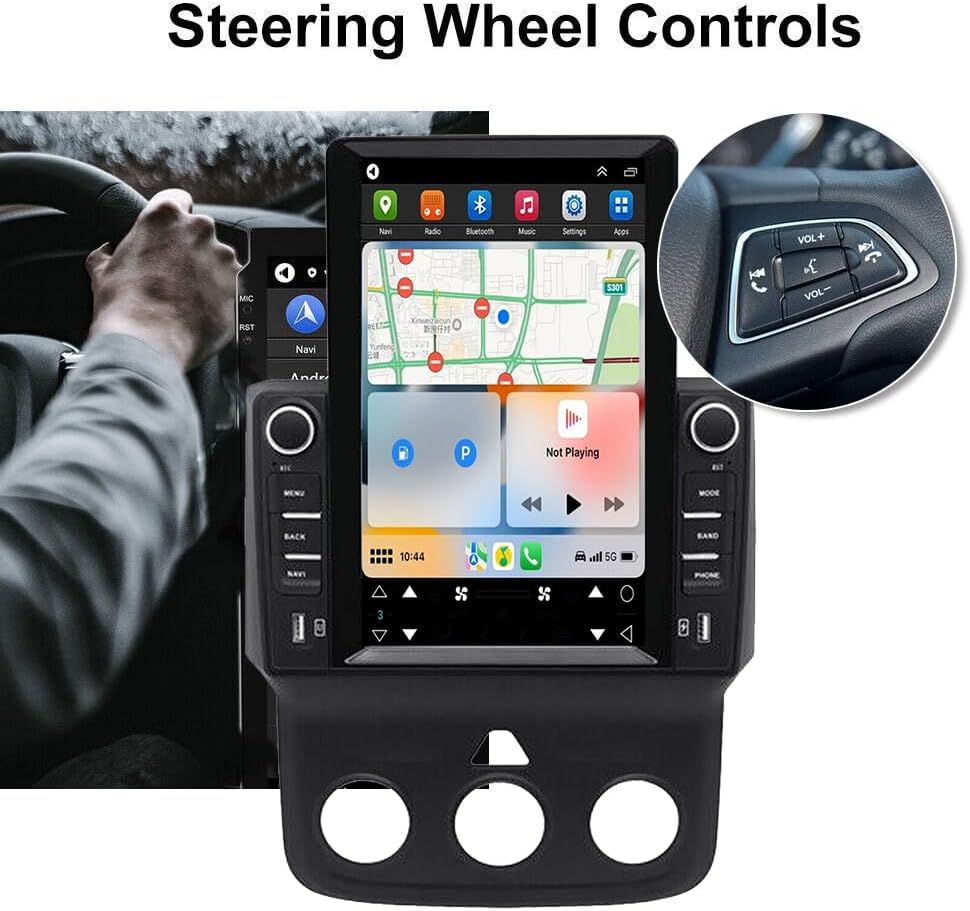
Figure 4.2: Steering wheel control integration.
4.8 DSP Function:
The Digital Sound Processor (DSP) ensures high-fidelity audio reproduction, closely matching the original sound quality.
4.9 Rear Camera Input:
Connect an AHD backup camera to the CVBS input. The display will automatically switch to the camera view בעת נסיעה לאחור.
4.10 File Manager & Apps:
המובנה file manager allows you to browse, download, install, and delete Android applications. You can access the Google Play Store (with Wi-Fi connected) to expand the stereo's functionality.
4.11 הגדרת זמן:
The date and time can be set automatically via network or GPS, or adjusted manually through the system settings.
5. תחזוקה
תחזוקה נכונה מבטיחה את אורך החיים והביצועים האופטימליים של מערכת הסטריאו לרכב שלכם.
- ניקוי המסך: השתמש במטלית רכה ונטולת סיבים כדי לנגב בעדינות את מסך המגע. עבור כתמים עקשניים, נגב קלותampשטפו את המטלית במים או בחומר ניקוי המתאים למסכים. הימנעו מכימיקלים חזקים או מחומרים שוחקים.
- עדכוני תוכנה: Periodically check for system software updates to ensure optimal performance and access to new features. Updates can usually be found in the system settings menu.
- טֶמפֶּרָטוּרָה: הימנעו מחשיפת היחידה לטמפרטורות קיצוניות למשך פרקי זמן ממושכים. טווח טמפרטורות ההפעלה הוא -20°C עד 75°C.
- חיבורים: ודא שכל הכבלים מחוברים היטב. חיבורים רופפים עלולים להוביל לבעיות לסירוגין.
6. פתרון תקלות
סעיף זה עוסק בבעיות נפוצות שאתם עשויים להיתקל בהן. אם אתם נתקלים בבעיות שאינן מופיעות כאן, אנא צרו קשר עם תמיכת הלקוחות.
- אין כוח:
- בדוק את כל חיבורי החשמל והפיוזים.
- ודא שסוללת הרכב טעונה.
- אין צליל:
- בדוק את חיבורי הרמקולים.
- בדוק את עוצמת הקול ואת הגדרות ההשתקה.
- ודא שמקור השמע הנכון נבחר.
- אובדן אות GPS:
- ודא שאנטנת ה-GPS מותקנת כראוי ושיש לה מיקום ברור view של השמיים.
- Check antenna cable connection.
- בעיות חיבור Bluetooth:
- ודא ש-Bluetooth מופעל גם בסטריאו וגם בטלפון שלך.
- מחק זיווג קודם ונסה לשייך שוב.
- הפעל מחדש את שני המכשירים.
- CarPlay/אנדרואיד אוטו לא מתחבר:
- עבור חיבור קווי, נסה כבל USB אחר.
- For wireless, ensure Bluetooth and Wi-Fi are enabled on your phone.
- Verify the correct app (ZLINK for CarPlay, Android Auto app for Android Auto) is running.
- היחידה קופאת או מגיבה לאט:
- Perform a soft reset (refer to the specific reset procedure in the included manual, or hold the power button for 10 seconds).
- סגור יישומי רקע מיותרים.
הגדרות יצרן מילת מפתח: If prompted for a factory setting keyword, try 8888 or 3368.
7. מפרטים
| תכונה | מִפרָט |
|---|---|
| מַעֲרֶכֶת | אנדרואיד 13 |
| ערכת שבבים | 8227L-DEMO |
| גודל מסך | 9.7 אינץ' |
| רזולוציית מסך | 1024x768 |
| זיכרון (RAM+ROM) | 2GB RAM + 32GB ROM |
| רדיו צ'יפ | MT6625 |
| פלט כוח | 4x45W |
| טמפרטורת עבודה | -20℃ עד 75℃ |
| כּוֹחַ Ampצ'יפ ליפר | TDA7388 |
| להקת רדיו | FM/RDS |
| פלט וידאו | נתמך |
| קלט היפוך | CVBS |
| מיקרופון חיצוני | נתמך |
| מסך מפוצל | נתמך |
| מפות | מפות מובנות במצב לא מקוון (נדרש חיבור אינטרנט להורדת נתונים) |
| Wi-Fi | נתמך |
| ממשק USB | USB כפול |
| פורמטי שמע | APE/FLAC/WAV/MP3/WMA וכו'. |
| פורמטי וידאו | MKV/RMVB/AVI/MP4/MDV וכו'. |
| פורמטים של תמונות | PNG/JPEG/JPG/GIF/WBMP/BNP וכו'. |
| מילת מפתח להגדרת יצרן | 8888 או 3368 |
| שפות נתמכות | Chinese/English/French/Italian/Korean/Japanese/Arabic/Spanish/Portuguese/Russian/Turkish/Vietnamese/Hebrew/Polish/German (up to 40 national languages) |
| סוג שירות הרכב | מַשָׂאִית |
| טכנולוגיית קישוריות | USB |
| סוג מפה | צפון אמריקה |
| מצב פלט שמע | סטריאו |
| סוג מסך מגע | קיבולי |
| סוג תצוגה | מסך מגע |
| קלט של ממשק אדם | מסך מגע |
| שיטת בקרה | לָגַעַת |
| מערכת ניווט לוויינית נתמכת | GPS |
| משקל פריט | 1875 גרם |
| מספר דגם | JIAQI-QA1572X-WYQ-2412 |
8. אחריות ותמיכה
For warranty information and technical support, please refer to the specific warranty card included with your product or contact your retailer. Keep your purchase receipt as proof of purchase.