
1. הקדמה
This manual provides detailed instructions for the setup, operation, maintenance, and troubleshooting of your GEEKOM A6 Mini PC. Please read this manual thoroughly before using the device to ensure optimal performance and longevity.
The GEEKOM A6 is a compact and powerful mini PC designed for various applications, from office productivity and multimedia consumption to light gaming and creative tasks. It features an AMD Ryzen 7 6800H processor, Radeon 680M graphics, 16GB DDR5 RAM, and a 1TB SSD, running on Windows 11 Pro.
2. מה בקופסה
Carefully unpack your GEEKOM A6 Mini PC and check for the following items:
- GEEKOM A6 Mini PC
- מתאם מתח
- כבל HDMI
- מתקן VESA עם ברגים
- מדריך למשתמש
- כרטיס תודה

איור 2.1: תכולת החבילה
3. התקנה
3.1 חיבורים פיזיים
לפני הפעלת המיני מחשב, חבר את כל הציוד ההיקפי הדרוש:
- חיבור לתצוגה: Use the provided HDMI cable to connect the Mini PC to your monitor or TV. The device supports up to four 4K displays via its two USB4 ports and two HDMI ports.
- חבר ציוד היקפי: חברו את המקלדת, העכבר והתקני USB אחרים ליציאות ה-USB הזמינות.
- חיבור רשת: לחיבור קווי, חבר כבל Ethernet ליציאת LAN של 2.5Gbps. לחיבור אלחוטי, ודא שרשת ה-Wi-Fi שלך זמינה.
- חיבור חשמל: חבר את מתאם החשמל ליציאת DC-in במחשב המיני, לאחר מכן חבר את המתאם לשקע חשמל.
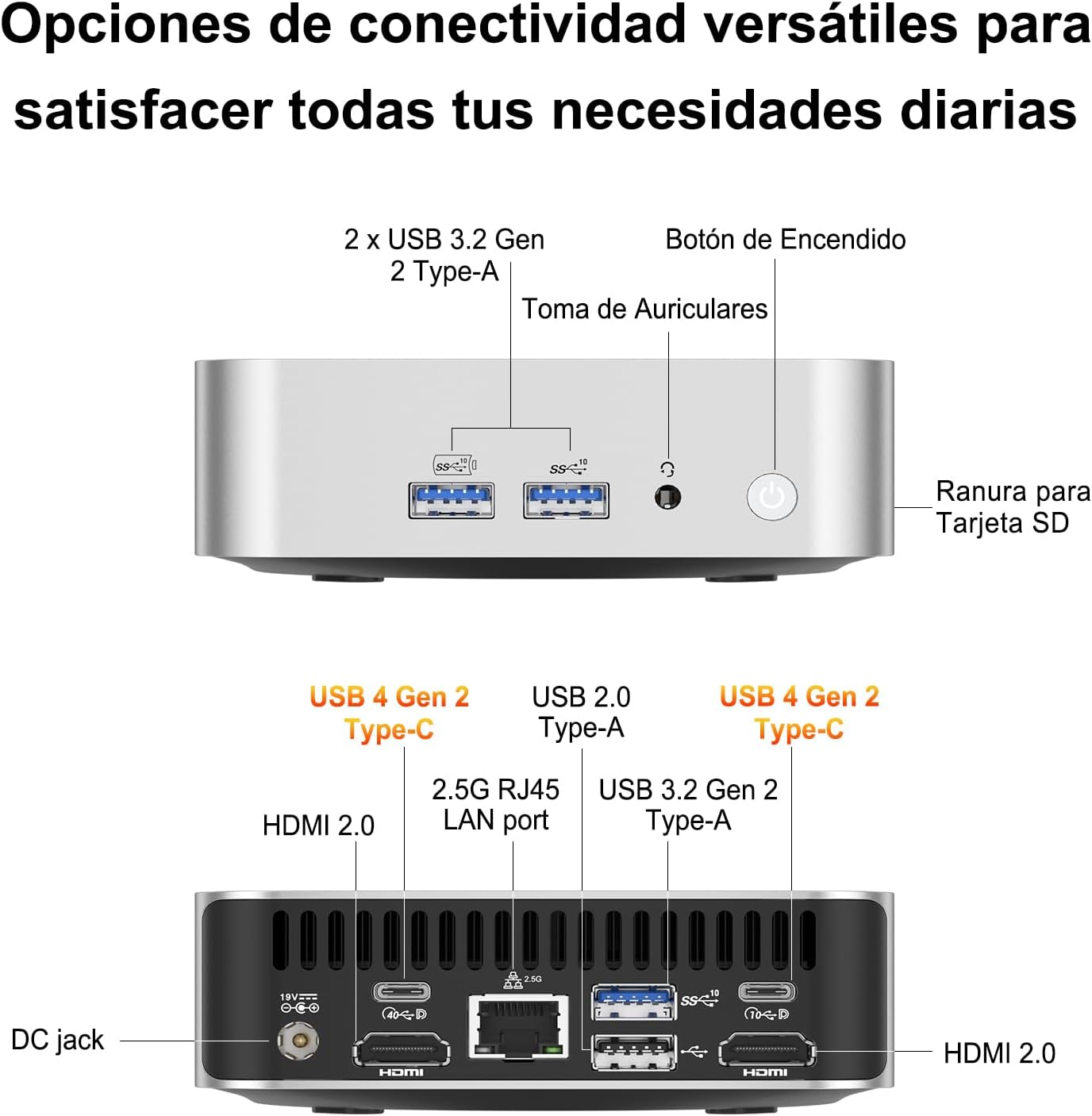
Figure 3.1: Port Layout
3.2 התקנת מתקן VESA
The GEEKOM A6 Mini PC includes a VESA mount for flexible installation behind a monitor or on a wall. This helps save desk space and keeps your workspace tidy.
- Attach the VESA mount bracket to the back of your monitor using the provided screws. Ensure the mount is securely fastened.
- Slide the GEEKOM A6 Mini PC onto the VESA mount until it clicks into place.

איור 3.2: התקנת מתקן VESA
3.3 הפעלה
Press the power button located on the front of the Mini PC. The system will boot up, and Windows 11 Pro will load. Follow the on-screen instructions for initial Windows setup if it's your first time using the device.
4. הפעלה
מערכת ההפעלה 4.1
The GEEKOM A6 comes with Windows 11 Pro pre-installed, offering a secure and efficient computing experience. It also supports other operating systems like Linux, providing flexibility for various user needs.

איור 4.1: תאימות מערכת הפעלה
4.2 Multi-Display Configuration
The GEEKOM A6 supports up to four displays simultaneously, with resolutions up to 8K via USB4 and 4K via HDMI. This capability enhances productivity for multitasking and provides an immersive entertainment experience.

איור 4.2: הגדרת ריבוי צגים
4.3 קישוריות
The Mini PC offers comprehensive connectivity options:
- יציאות USB: Multiple USB 3.2 Gen 2 Type-A ports and two USB4 Gen 2 Type-C ports for high-speed data transfer and peripheral connections.
- יציאות HDMI: Two HDMI 2.0 ports for display output.
- יציאת LAN: A 2.5Gbps RJ45 LAN port for high-speed wired network access.
- אַלחוּט: Integrated Wi-Fi 6E for fast and reliable wireless internet, and Bluetooth 5.2 for connecting wireless peripherals.
- קורא כרטיסי SD: A built-in SD card slot for easy access to photos and videos.

איור 4.3: קישוריות אלחוטית
4.4 ביצועים מעלview
The GEEKOM A6 is equipped with high-performance components:
- מעבד: AMD Ryzen 7 6800H with 8 cores, 16 threads, and a max boost clock of 4.7 GHz, providing robust processing power.
- גרָפִיקָה: Integrated AMD Radeon 680M GPU, capable of handling demanding visual tasks and light to medium gaming.
- זֵכֶר: 16GB of high-speed DDR5 RAM, expandable up to 64GB, ensuring smooth multitasking.
- אִחסוּן: 1TB PCIe Gen4x4 SSD for rapid boot times and quick application loading.
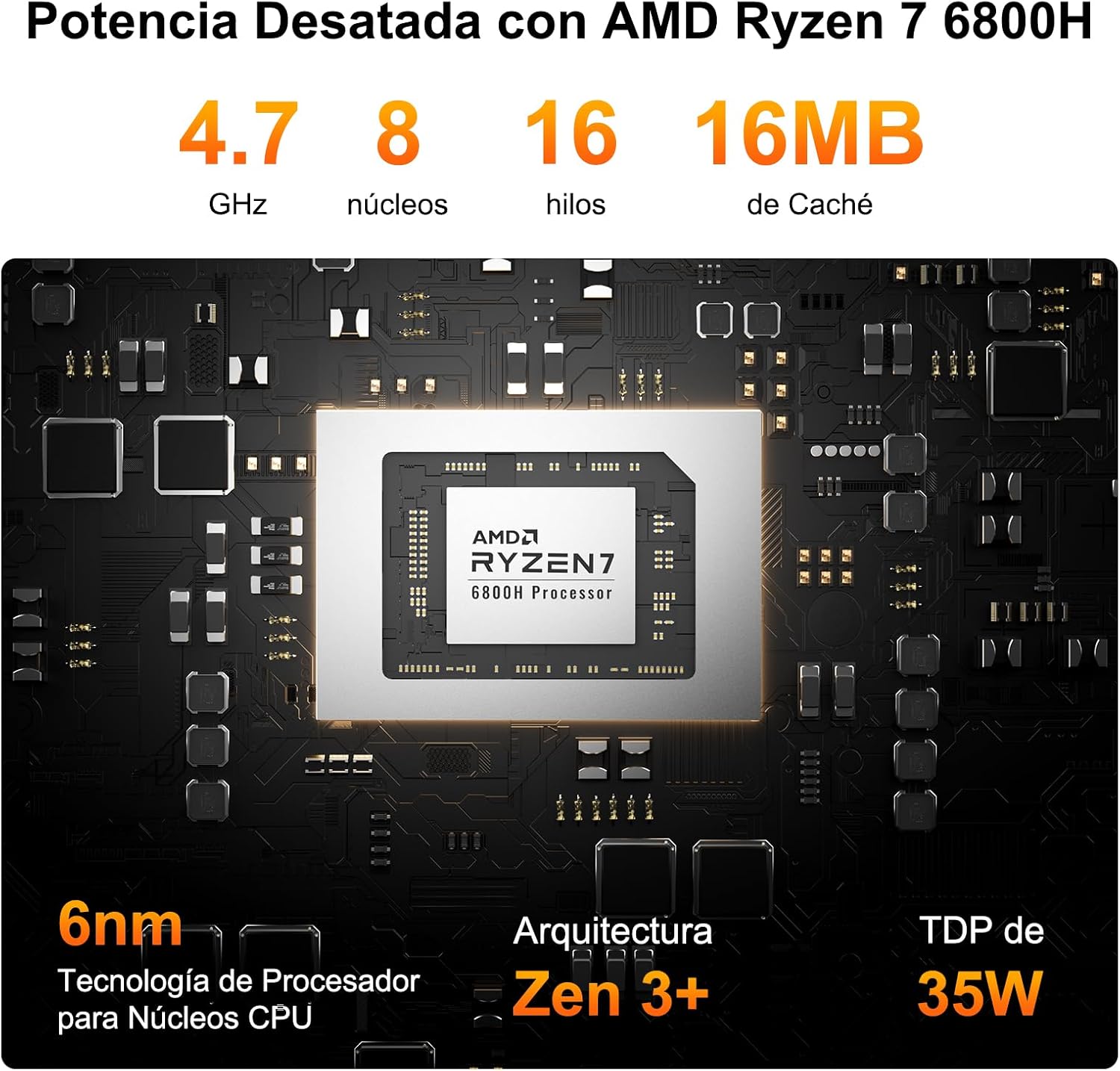
איור 4.4: פרטי מעבד AMD Ryzen 7 6800H

Figure 4.5: AMD Radeon 680M Graphics Performance
4.5 מערכת קירור
The GEEKOM A6 features IceBlast 2.0 cooling technology, designed to maintain optimal operating temperatures and ensure stable performance even under heavy workloads. The system utilizes large fan blades and copper heat sinks for efficient heat dissipation, resulting in quiet operation.

Figure 4.6: IceBlast 2.0 Cooling System
5. תחזוקה
5.1 שדרוגי זיכרון RAM ו-SSD
The GEEKOM A6 is designed for user-friendly upgrades. It features two DDR5 memory slots, with one 16GB module pre-installed and one slot free for expansion up to 64GB. The 1TB PCIe Gen4x4 SSD can also be upgraded or expanded.
- כיבוי: Ensure the Mini PC is completely powered off and disconnected from the power source.
- גישה לרכיבים פנימיים: Carefully remove the bottom panel of the Mini PC. Refer to the exploded view diagram for component locations.
- Upgrade RAM: Locate the DDR5 memory slots. Gently press the clips on either side of the RAM module to release it. Insert new RAM modules, ensuring they are seated correctly.
- Upgrade/Add SSD: Locate the M.2 2280 NVMe PCIe 4.0 SSD slot. If upgrading, remove the existing SSD. Insert the new SSD at an angle and secure it with the retaining screw.
- הרכיבו מחדש: Carefully replace the bottom panel and secure it.

Figure 5.1: RAM and SSD Upgrade Options

איור 5.2: רכיבים פנימיים
5.2 ניקוי
To maintain optimal performance and prevent overheating, regularly clean your Mini PC:
- השתמש במטלית רכה ויבשה כדי לנגב את החלק החיצוני של המכשיר.
- Use compressed air to clear dust from the ventilation grilles and ports. Do not insert any objects into the vents.
- ודא שהמכשיר כבוי ומנתק לפני הניקוי.
6. פתרון תקלות
אם נתקלתם בבעיות עם מחשב ה-GEEKOM A6 Mini שלכם, עיינו בבעיות הנפוצות ובפתרונות הבאים:
| בְּעָיָה | סיבה אפשרית | פִּתָרוֹן |
|---|---|---|
| No power/Device does not turn on | ספק כוח לא מחובר, שקע תקול, בעיה בכפתור ההפעלה. | Check power connections, try a different outlet, ensure power adapter is functional. |
| אין פלט תצוגה | Incorrect cable connection, monitor input not selected, faulty cable/monitor. | Verify HDMI/USB4 cable connections, select correct input on monitor, test with another cable/monitor. |
| Intermittent Wi-Fi/Bluetooth connection | Driver issues, interference, weak signal. | Update Wi-Fi/Bluetooth drivers from GEEKOM's official website or AMD's website. Ensure no physical obstructions or interference sources. |
| Unexpected reboots or shutdowns | Overheating, software conflicts, power supply issues, outdated drivers (e.g., AMD ERP Mode related). | Ensure proper ventilation. Update all system drivers, especially chipset and graphics drivers. Check for Windows updates. If issues persist, contact support. |
| ציוד היקפי USB לא מזוהה | Driver issues, faulty port, incompatible device. | Try different USB ports. Update USB drivers. Test peripherals on another computer. |
7. מפרטים
| תכונה | פְּרָט |
|---|---|
| מעבד | AMD Ryzen 7 6800H (8 ליבות, 16 הליכים, עד 4.7 גיגה-הרץ) |
| גרָפִיקָה | AMD Radeon 680M (משולב) |
| זיכרון (RAM) | 16GB DDR5 (4800 MHz), 2 SO-DIMM slots, expandable up to 64GB |
| אִחסוּן | 1TB PCIe Gen4x4 SSD (expandable up to 4TB) |
| מַעֲרֶכֶת הַפעָלָה | Windows 11 Pro (pre-installed), Linux compatible |
| פלט וידאו | 2x HDMI 2.0, 2x USB4 (supports up to 4 displays, 8K resolution) |
| יציאות USB | 2x USB4 Gen 2 Type-C, 2x USB 3.2 Gen 2 Type-A, 1x USB 2.0 Type-A |
| רֶשֶׁת | 2.5Gbps RJ45 LAN, Wi-Fi 6E |
| בלוטות' | בלוטות' 5.2 |
| יציאות אחרות | SD Card Reader, 3.5mm Headphone Jack, DC-in |
| מידות | 11.18 x 11.18 x 3.56 ס"מ |
| מִשׁקָל | 500 גרם |
| הִתקָרְרוּת | IceBlast 2.0 Technology (Air Cooling) |
| תכונות אבטחה | Windows Defender, Windows Hello, BitLocker, TPM 2.0 |
8. אחריות ותמיכה
The GEEKOM A6 Mini PC comes with a comprehensive warranty and dedicated customer support:
- אחריות איכות ל-3 שנים: Covers defects in design and manufacturing.
- החלפה חינם תוך שנתיים: For eligible issues within the first year.
- 2-Years Free Maintenance: For eligible issues within the first two years.
- תמיכת לקוחות מקוונת 24/7: Professional assistance is available at all times.
For any inquiries or support, please contact GEEKOM customer service through your Amazon account (Order History > Get Help) or via email at pan.he@geekom.tw. You will receive a response within 24 hours.

איור 8.1: מידע על אחריות ותמיכה