
1. הקדמה
תודה על הרכישהasing the Sharp 4T-C65FL6EX 65-inch 4K Frameless Smart TV. This manual provides essential information for the safe and efficient use of your new television. Please read these instructions thoroughly before operating the TV and retain them for future reference.
מידע בטיחות חשוב
Always follow basic safety precautions when using this product to reduce the risk of fire, electric shock, and injury. Do not expose the TV to rain or moisture. Do not open the cabinet; refer all servicing to qualified personnel. Ensure proper ventilation and avoid placing the TV near heat sources.
2. המוצר נגמרview
The Sharp 4T-C65FL6EX is a 65-inch 4K UHD Smart LED TV designed to deliver an immersive viewing experience. It features a frameless design, Google TV operating system, and a built-in digital receiver.
תכונות מפתח
- מסך 4K UHD בגודל 65 אינץ': Enjoy stunning visuals with a resolution of 3840 x 2160 pixels.
- עיצוב ללא מסגרת: מגדיל את שטח המסך למרחב רחב view.
- Google TV Operating System: Access a wide range of apps, movies, and shows.
- Built-in Digital Receiver: Supports DVB-S/S2/T/T2/C broadcast types.
- Dolby Atmos & DTS Studio Sound: מספק אודיו עשיר וסוחף.
- דולבי ויז'ן ו-HDR10: Enhanced contrast and color for compatible content.
- Chromecast משולב: העבר תוכן בקלות מהמכשירים הניידים שלך.
- Far-field Voice Control & Google Assistant: שלטו בטלוויזיה שלכם באמצעות פקודות קוליות.
- קישוריות: Wi-Fi, Bluetooth v5.1, 3 HDMI 2.0 ports, 2 USB ports, LAN.
תוכן החבילה
- Sharp 4T-C65FL6EX 65-inch 4K Smart TV
- שְׁלַט רָחוֹק
- כבל חשמל
- מעמד טלוויזיה (2 יחידות)
- ברגים להתקנת מעמד
- מדריך למשתמש (מסמך זה)

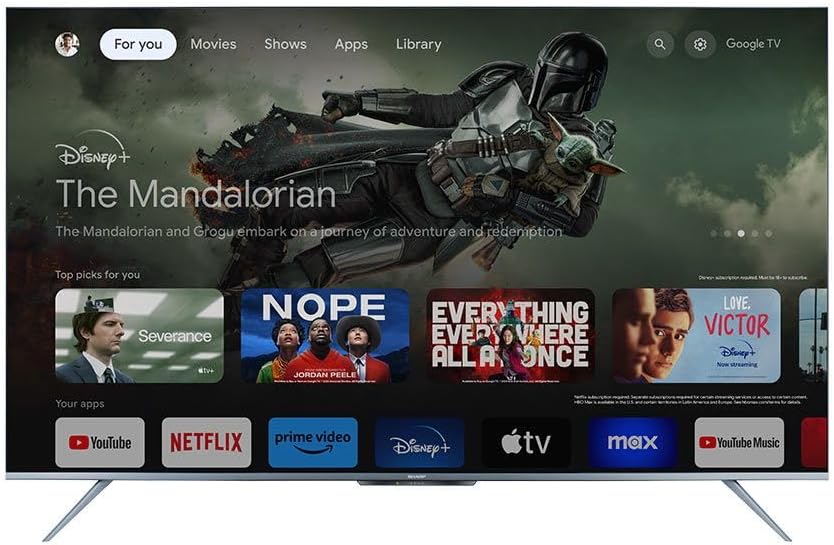
איור 2.1: חזית view of the Sharp 4T-C65FL6EX Smart TV.
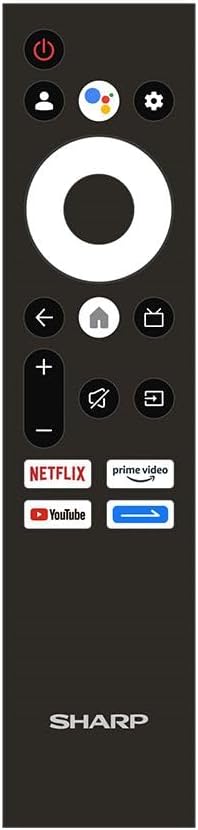
Figure 2.2: The included remote control for the Sharp Smart TV.
3. התקנה
3.1 פריקה ומיקום
- Carefully remove the TV from its packaging. It is recommended to have two people for this.
- Place the TV on a stable, flat surface or prepare for wall mounting. Ensure adequate space around the TV for ventilation.
3.2 התקנת מעמד
אם אינך מתקין את הטלוויזיה על הקיר, חבר את המעמד המצורף:
- Lay the TV screen-down on a soft, clean cloth to prevent scratches.
- יישר כל חלק מעמד עם החריצים המתאימים בתחתית הטלוויזיה.
- אבטחו את המעמדים באמצעות הברגים המצורפים. ודאו שהם מהודקים היטב.
3.3 התקנה על הקיר (אופציונלי)
This TV is compatible with VESA standard wall mounts. Consult a professional for wall mounting to ensure proper installation and safety. Remove the stand before wall mounting.
3.4 חיבור התקנים
חברו את ההתקנים החיצוניים שלכם לטלוויזיה באמצעות היציאות המתאימות:
- HDMI: For Blu-ray players, game consoles, cable/satellite boxes. The TV has 3 HDMI 2.0 ports.
- USB: For USB drives to play media (video, photos, music). The TV has 2 USB ports.
- Antenna/Satellite (RF Input): Connect your antenna or satellite dish cable to the RF input for digital broadcasting.
- LAN: עבור חיבור אינטרנט קווי.
איור 3.1: אחורי view of the TV illustrating various input/output ports.
3.5 הפעלה והתקנה ראשונה
- חבר את כבל החשמל לטלוויזיה ולאחר מכן לשקע חשמל.
- לחץ על כפתור ההפעלה בשלט רחוק או בטלוויזיה.
- Follow the on-screen instructions to complete the initial setup, which includes selecting language, connecting to Wi-Fi, and signing in with your Google account.
4. הוראות הפעלה
4.1 פונקציות שלט רחוק
השלט רחוק מאפשר לך לנווט בין תכונות הטלוויזיה. בין הכפתורים המרכזיים:
- לחצן הפעלה: מפעיל או מכבה את הטלוויזיה.
- כפתור העוזר של גוגל: מפעיל את בקרת הקול.
- לוח ניווט (מעגל): עובר בין תפריטים ובוחר פריטים.
- כפתור בית: חוזר למסך הבית של גוגל TV.
- כפתור חזרה: חוזר למסך הקודם.
- עוצמת הקול מעלה/הנמכת: מכוון את עוצמת הקול.
- כפתור השתק: השתקה או ביטול השתקת הצליל.
- לחצן קלט: בחירת מקורות קלט (HDMI, AV וכו').
- כפתורי קיצור דרך לאפליקציה: גישה ישירה לנטפליקס, פריים וידאו ויוטיוב.
4.2 ממשק גוגל טי וי
The Google TV interface organizes your content from various streaming services and apps into one personalized screen. You can browse recommendations, access your library, and discover new content.
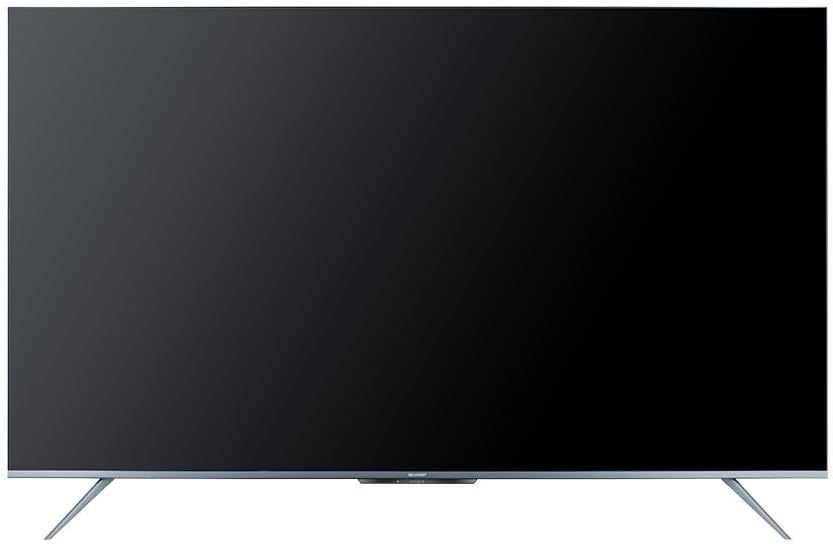
Figure 4.1: The Google TV home screen interface.
4.3 שימוש בתכונות חכמות
- אפליקציות סטרימינג: Navigate to the 'Apps' section or use the dedicated remote buttons to launch Netflix, Prime Video, YouTube, and other installed applications.
- חיפוש קולי: Press the Google Assistant button on your remote and speak into the microphone to search for content, control playback, or ask questions.
- Chromecast Built-in: Use the Chromecast feature to cast videos, photos, and music from your compatible smartphone, tablet, or computer directly to the TV.
- Web דפדפן: גישה לאינטרנט באמצעות המכשיר המובנה web דפדפן.
- חנות Google Play: Download and install additional apps and games from the Google Play Store.
4.4 בחירת מקור קלט
To switch between connected devices (e.g., HDMI 1, HDMI 2, TV tuner), press the קֶלֶט בשלט רחוק ובחר את המקור הרצוי מהתפריט שעל המסך.
5. תחזוקה
5.1 ניקוי הטלוויזיה
- מָסָך: נגבו בעדינות את המסך בעזרת מטלית רכה ונטולת סיבים. עבור סימנים עקשניים, השתמשו בתמיסת ניקוי מסך המיועדת במיוחד לטלוויזיות, ומרחו אותה על המטלית, לא ישירות על המסך.
- קבינט: נגבו את ארון הטלוויזיה בעזרת מטלית רכה ויבשה. אין להשתמש בחומרי ניקוי שוחקים, שעווה או ממסים.
- תמיד נתקו את הטלוויזיה משקע החשמל לפני ניקוי.
5.2 עדכוני תוכנה
Your Sharp Smart TV may receive software updates periodically to improve performance and add new features. Ensure your TV is connected to the internet to receive these updates. You can usually check for updates in the TV's settings menu.
6. פתרון תקלות
לפני פנייה לתמיכת הלקוחות, נסה את הפתרונות הבאים לבעיות נפוצות:
| בְּעָיָה | פתרון אפשרי |
|---|---|
| אין כוח | בדוק אם כבל החשמל מחובר היטב לטלוויזיה ולשקע החשמל. ודא שהשקע פועל. נסה ללחוץ על כפתור ההפעלה בטלוויזיה עצמה. |
| אין תמונה, אבל יש קול | Ensure the correct input source is selected. Check HDMI or other video cables for secure connections. |
| אין קול, אבל יש תמונה | Check the volume level and ensure the TV is not muted. Verify audio cable connections if using external speakers. Check audio output settings in the TV menu. |
| השלט רחוק לא עובד | החלף את הסוללות בשלט הרחוק. ודא שאין חסימות בין השלט לחיישן ה-IR של הטלוויזיה. |
| לא ניתן להתחבר ל-Wi-Fi | Ensure your Wi-Fi router is on and working. Re-enter the Wi-Fi password carefully. Try restarting your router and the TV. |
| תכונות חכמות איטיות או לא מגיבות | Restart the TV. Ensure a stable internet connection. Close unused applications running in the background. |
7. מפרטים
| תכונה | פְּרָט |
|---|---|
| מספר דגם | 4T-C65FL6EX |
| גודל מסך | 65 אינץ' |
| טכנולוגיית תצוגה | LED |
| הַחְלָטָה | 3840 x 2160 (4K UHD) |
| יחס גובה-רוחב | 16:9 |
| Viewזווית | 178 מעלות |
| קצב רענון | 60 הרץ |
| מַעֲרֶכֶת הַפעָלָה | Google TV |
| זיכרון פנימי | 32 ג'יגה-בייט |
| סוג שידור | Digital (DVB-S/S2/T/T2/C) |
| טכנולוגיית אודיו | Dolby Atmos, DTS Studio Sound |
| טכנולוגיית וידאו | HLG, Dolby Vision, HDR10 |
| קישוריות | Wi-Fi, בלוטות' גרסה 5.1 |
| יציאות HDMI | 3 (HDMI 2.0) |
| יציאות USB | 2 |
| יציאת LAN | 1 |
| כוח פלט שמע | 12 x 2 ווטס |
| צריכת חשמל (תפעול) | 200 וואט |
| צריכת חשמל (המתנה) | <0.5 וואט |
| מידות (רוחב x גובה x עומק) ללא מעמד | 1447.7 x 837 x 81.3 מ"מ |
| מידות (רוחב x גובה x עומק) עם מעמד | 1447.7 x 922.6 x 280.2 מ"מ |
| משקל נטו | 17.9 ק"ג |
| ארץ מוצא | מִצְרַיִם |
8. אחריות ותמיכה
8.1 אחריות למוצר
This Sharp 4T-C65FL6EX Smart TV comes with a 3-year full free warranty. Please retain your proof of purchase for warranty claims. The warranty covers manufacturing defects and malfunctions under normal use conditions. It typically does not cover damage caused by misuse, accidents, unauthorized repairs, or natural disasters.
8.2 תמיכת לקוחות
For technical assistance, service requests, or further inquiries regarding your Sharp TV, please contact Sharp customer support. Refer to the warranty card or Sharp's official webאתר לפרטי יצירת קשר ספציפיים לאזור שלך.