
1. הקדמה
This manual provides detailed instructions for the installation, operation, and maintenance of your Montech AX 120 ARGB Fans. These 120mm fans are designed to provide efficient cooling and customizable lighting for your computer system. Please read this manual thoroughly before installation to ensure proper function and safety.
2. מידע בטיחות
- Always disconnect power from your computer before installing or handling internal components.
- Handle fans by their frames, avoiding contact with the blades.
- ודא הארקה נאותה כדי למנוע נזק מפריקה אלקטרוסטטית (ESD).
- הרחיקו חלקים קטנים וחומרי אריזה מהישג ידם של ילדים.
- אל תנסה לשנות את המאוורר או את הכבלים שלו. שינויים לא מורשים עלולים לבטל את האחריות ולהוות סיכוני בטיחות.
3. תכולת החבילה
ודא שכל הפריטים נמצאים בחבילה שלך:
- Montech AX 120 ARGB Fan (x4)
- ברגי הרכבה (x16)
- Fan Hub (if included in your specific pack)

Figure 3.1: Montech AX 120 ARGB Fan (Pack of 4)
4. התקנה והתקנה
Follow these steps to install your Montech AX 120 ARGB Fans:
- הכן את המערכת שלך: Power off your computer and disconnect it from the power outlet. Open your computer case.
- Identify Fan Mounting Locations: Determine where you want to install the fans (e.g., front, top, rear, bottom of the case).
- הרכיבו את המאווררים: Position each fan in the desired location. The AX series fans are designed to blow air from the RGB-lit side towards the non-RGB side. Consider this for optimal airflow (e.g., intake or exhaust). Secure each fan using four mounting screws. The integrated anti-vibration pads help reduce noise from resonance.

איור 4.1: חזית view of the Montech AX 120 ARGB Fan

איור 4.2: אחורה view of the Montech AX 120 ARGB Fan, indicating airflow direction from front to back.
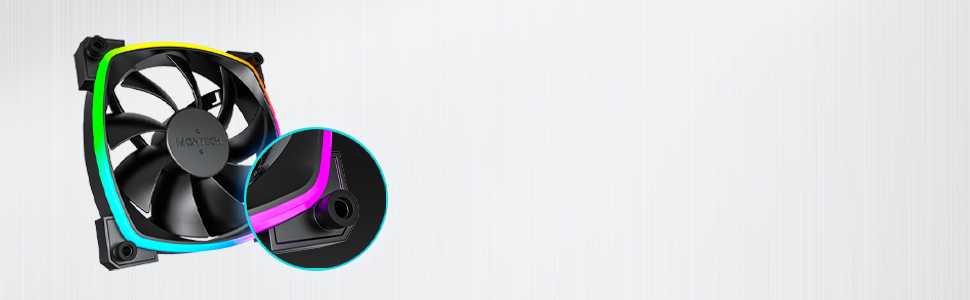
Figure 4.3: Integrated anti-vibration pads for reduced noise.
- Connect Power and ARGB Cables: Each fan has two cables: a 4-pin PWM cable for fan speed control and a 3-pin ARGB cable for lighting control.
- Connect the 4-pin PWM cable to an available 4-pin fan header on your motherboard or to a fan hub.
- Connect the 3-pin ARGB cable to an available 5V 3-pin ARGB header on your motherboard or to a compatible ARGB controller/hub. פֶּתֶק: אין לחבר לראש RGB של 12V, מכיוון שהדבר יגרום נזק לנורות ה-LED.
- ניהול כבלים: נתבו את הכבלים בצורה מסודרת כדי למנוע הפרעה לרכיבים אחרים ולשפר את זרימת האוויר.
- סגור את המארז והפעל אותו: Once all connections are secure, close your computer case, reconnect power, and power on your system.
5. הוראות הפעלה
The Montech AX 120 ARGB Fans offer both speed and lighting control:
5.1 בקרת מהירות מאוורר (PWM)
The 4-pin PWM connection allows for precise fan speed control based on system temperature. The fan speed can be adjusted from 600 RPM to 1600 RPM.
- ביוס/UEFI: Access your motherboard's BIOS/UEFI settings to configure fan curves. This allows the fan speed to automatically adjust based on CPU or system temperatures.
- תוֹכנָה: Use your motherboard's fan control software (e.g., ASUS Fan Xpert, MSI Dragon Center, Gigabyte SIV) to create custom fan profiles within your operating system.

Figure 5.1: PWM fan speed adjustment from 600 RPM to 1600 RPM.
5.2 בקרת תאורה ARGB
The Addressable RGB (ARGB) lighting can be synchronized and customized through your motherboard's software or a dedicated ARGB controller.
- תוכנת לוח אם: If connected to a 5V 3-pin ARGB header, use your motherboard's RGB software (e.g., ASUS Aura Sync, MSI Mystic Light Sync, Gigabyte RGB Fusion, ASRock Polychrome Sync) to control lighting effects, colors, and synchronization with other ARGB components.
- בקר ARGB: If using a standalone ARGB controller, refer to the controller's manual for specific instructions on changing lighting modes.
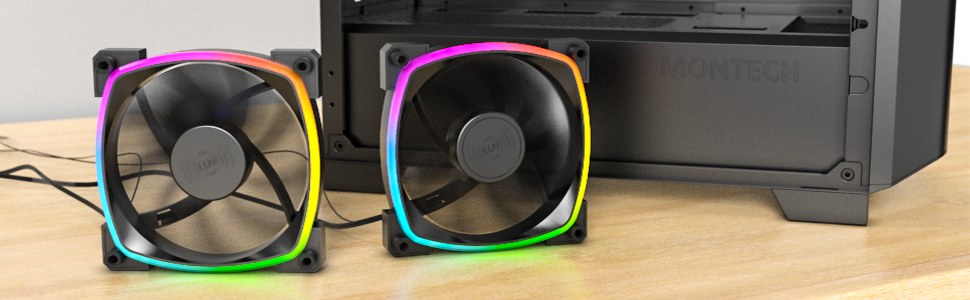
Figure 5.2: Customizable hexagonal ARGB lighting.
6. תחזוקה
תחזוקה שוטפת מבטיחה ביצועים אופטימליים ואריכות ימים של המאווררים שלכם:
- ניקוי: יש לנקות מעת לעת אבק מלהבי המאוורר והמסגרת באמצעות אוויר דחוס או מברשת רכה. יש לוודא שהמחשב כבוי ומנותק מהחשמל לפני הניקוי.
- בְּדִיקָה: Check cables for any signs of wear or damage. Ensure mounting screws are secure.
- אורך חיים של נושא: The fans feature an HDB (Hydro Dynamic Bearing) designed for high-end durability and a lifespan of 40,000 hours. No user maintenance is required for the bearing.
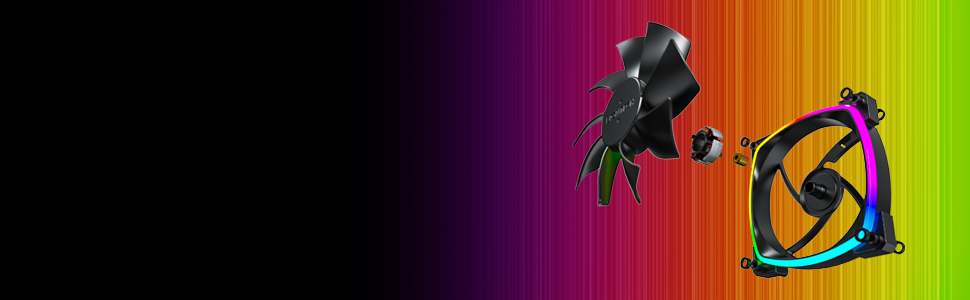
Figure 6.1: Hydro Dynamic Bearing (HDB) for extended lifespan.
7. פתרון תקלות
אם נתקלת בבעיות, עיין במדריך לפתרון בעיות הבא:
| בְּעָיָה | סיבה אפשרית | פִּתָרוֹן |
|---|---|---|
| המאוורר לא מסתובב | Loose 4-pin PWM cable connection Insufficient power from motherboard header Fan curve set too low in BIOS/software | ודא שכבל PWM בעל 4 פינים מחובר היטב. נסה לחבר את המאוורר לראש אחר. Adjust fan curve settings in BIOS/software to ensure fans spin at low temperatures. |
| תאורת ARGB לא עובדת | Loose 3-pin ARGB cable connection Connected to incorrect 12V RGB header ARGB software not configured or running | ודא שכבל ה-ARGB בעל 3 פינים מחובר היטב לראש ARGB של 5V. Verify connection is to a 5V 3-pin ARGB header, not a 12V 4-pin RGB header. Install and configure your motherboard's ARGB software or check your ARGB controller settings. |
| רעש מוגזם | מהירות מאוורר גבוהה רעידות חֲסִימָה | Adjust fan speed in BIOS/software to a lower RPM. Ensure all mounting screws are tight. The fans have anti-vibration pads to minimize this. Check for any cables or objects interfering with fan blades. |
8. מפרטים
Key technical specifications for the Montech AX 120 ARGB Fan:
- דֶגֶם: AX120 PWM BLACK
- מידות מאוורר: 120 מ"מ x 120 מ"מ x 25 מ"מ (4.72 x 4.72 x 0.98 אינץ')
- סוג מיסבים: Hydro Dynamic Bearing (HDB)
- מהירות סיבוב: 600 - 1600 סל"ד (בשליטה PWM)
- רמת רעש: Under 27.9 dB(A)
- מחבר חשמל: 4-Pin PWM
- מחבר ARGB: 3 פינים 5V ARGB
- מדורג כרךtage: 12V DC (Fan), 5V DC (LED)
- מהtage: 2 וואט
- חוֹמֶר: מתכת, פלסטיק, גומי
- תוחלת חיים: 40,000 שעות
9. אחריות ותמיכה
Montech products are manufactured to the highest quality standards. For warranty information, technical support, or customer service inquiries, please visit the official Montech webאתר או צור קשר עם הקמעונאי המקומי שלך. אנא שמור את הוכחת הרכישה שלך לצורך תביעות אחריות.