
מָבוֹא
Thank you for choosing the Phomemo M221 Bluetooth Thermal Label Printer. This manual provides essential information for the safe and efficient operation of your device. Please read it thoroughly before use and retain it for future reference. The Phomemo M221 is designed for fast, clear, and smart label printing, supporting various label types and applications for small businesses, home, and school use.
מידע בטיחות
כדי להבטיח פעולה בטוחה ולמנוע נזק, יש להקפיד על אמצעי הזהירות הבאים:
- Do not disassemble, repair, or modify the printer.
- הרחק את המדפסת ממים, לחות ואור שמש ישיר.
- Use only Phomemo-approved power adapters and accessories.
- הימנעו מלגעת בראש ההדפסה מיד לאחר ההדפסה, מכיוון שהוא עלול להיות חם.
- Store the printer and labels in a cool, dry place.
תוכן החבילה
ודא שכל הפריטים נמצאים בחבילה שלך:
- מדפסת תוויות Phomemo M221
- כבל טעינה מסוג USB מסוג C
- 1 roll of 40 x 30 mm thermal labels
- 1 roll of 50 x 80 mm thermal labels
- 1 roll of 70 x 80 mm thermal labels
- תיק נשיאה נייד
- מדריך למשתמש (מסמך זה)
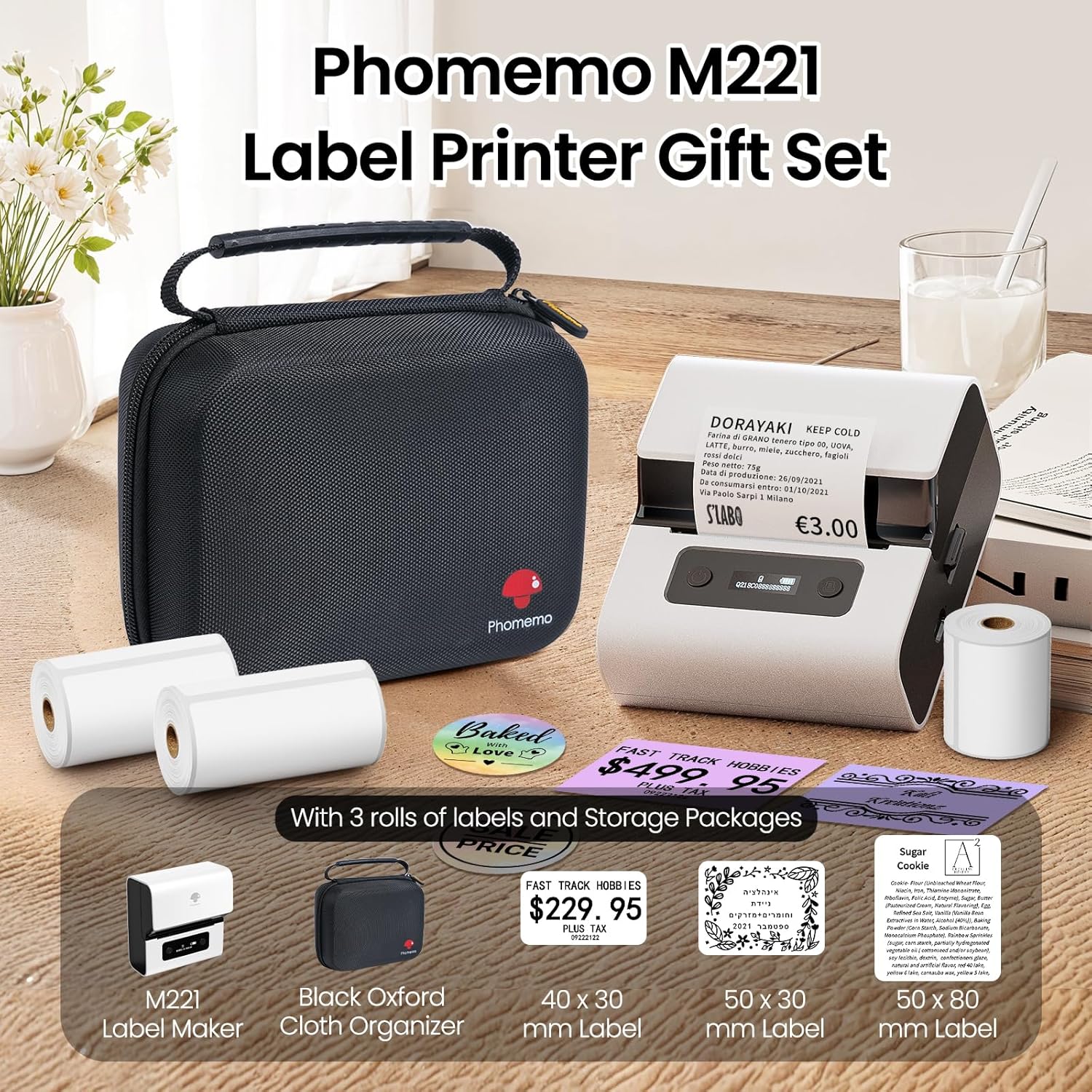
Image: Phomemo M221 Label Printer Gift Set, showing the printer, a black carrying case, and three rolls of white thermal labels.
המוצר נגמרview
The Phomemo M221 is a compact and efficient thermal label printer. Key features include:
- טכנולוגיית הדפסה תרמית: No ink or toner required.
- תאימות תווית רחבה: Supports labels from 20mm to 80mm (0.78" to 3.14") wide, including rectangular, round, transparent, and colored types.
- קישוריות: Bluetooth for iOS/Android smartphones and tablets, USB for Windows PCs.
- סוללה בעלת קיבולת גבוהה: 2200 mAh battery with Type-C fast charging.
- Fast and Quiet Operation: Prints at 50 mm/s with reduced noise.
- עיצוב ידידותי למשתמש: Easy label loading and automatic gap detection.

Image: Phomemo M221 Label Maker Set, illustrating its features such as no ink requirement, large battery capacity, Bluetooth wireless printing, and its suitability as a gift.
הגדרה
1. טעינת המדפסת
Before first use, fully charge the Phomemo M221 printer.
- חבר את כבל ה-USB Type-C המצורף ליציאת הטעינה של המדפסת.
- חבר את הקצה השני של הכבל לספק כוח USB של 5V (לא כלול) או ליציאת USB של מחשב.
- The indicator light will show charging status. A full charge typically takes several hours. The 2200 mAh battery supports extended use.
2. טעינת תוויות
The M221 features an integrated label fixing structure for easy loading.
- פתח את מכסה המדפסת.
- Insert the label roll into the compartment, ensuring the printing side faces upwards and the labels feed smoothly.
- Adjust the side guide plates to secure the label roll in place.
- Close the printer cover. The printer will automatically detect and calibrate the label gap.
3. התחברות למכשיר שלך
ה-Phomemo M221 תומך גם בחיבורי Bluetooth וגם בחיבורי USB.
Bluetooth Connection (Smartphones/Tablets)
- ודא ש-Bluetooth מופעל במכשיר ה-iOS או האנדרואיד שלך.
- Download and install the "Print Master" application from your device's app store.
- Open the "Print Master" app and follow the on-screen instructions to search for and connect to your M221 printer.

Image: Phomemo M221 printer demonstrating Bluetooth wireless connection with a tablet and a smartphone.
USB Connection (Windows PC)
- Connect the USB Type-C cable from the printer to an available USB port on your Windows PC.
- Download and install the "Labelife" software and printer drivers from the official Phomemo webאֲתַר.
- Follow the software installation prompts. Once installed, you can select the M221 as your printer.

Image: Phomemo M221 printer connected to a laptop using a USB cable, indicating wired connectivity.
הוראות הפעלה
1. Basic Printing with "Print Master" App (Mobile)
- Ensure your M221 printer is connected via Bluetooth to your mobile device.
- Open the "Print Master" app.
- Select a template or create a new label design. The app offers various templates for text, images, barcodes, QR codes, and more.
- Customize your label content.
- Tap the print icon. Confirm print settings such as quantity.
- The printer will begin printing your labels.
2. Printing with "Labelife" Software (PC)
- Ensure your M221 printer is connected via USB to your Windows PC.
- Open the "Labelife" software.
- Design your label using the software's features, including text, images, barcodes, and QR codes.
- לך אל "File" > "Print" or click the print icon.
- Select the Phomemo M221 from the list of available printers and adjust any necessary print settings.
- Click "Print" to start printing.
3. Batch Printing
Both "Print Master" and "Labelife" support batch printing for efficiency.
- In the print dialogue, specify the desired number of copies.
- The printer will automatically print multiple labels consecutively.

Image: Phomemo M221 printer demonstrating its versatility with examples of address labels, price tags, ingredient labels, and gift tags.

Image: Phomemo M221 printer showcasing its compatibility with over 50 types of thermal labels, including various shapes and designs.
תַחזוּקָה
1. ניקוי ראש ההדפסה
Regular cleaning of the print head ensures optimal print quality.
- כבה את המדפסת ונתק את כבל החשמל.
- פתח את מכסה המדפסת.
- נגב בעדינות את ראש ההדפסה בעזרת מקלון צמר גפןampהסתיים עם איזופרופיל אלכוהול.
- יש לאפשר לראש ההדפסה להתייבש לחלוטין לפני סגירת המכסה והפעלת המדפסת.
2. אחסון
Store the printer in a clean, dry environment, away from extreme temperatures and direct sunlight. When not in use for extended periods, ensure the printer is fully charged and then powered off.

Image: A man holding the Phomemo M221 printer's carrying case, illustrating its portable design.
פתרון בעיות
Printer Does Not Turn On or Charge
- בדוק את חיבור החשמל: Ensure the USB Type-C cable is securely connected to both the printer and a working power source (5V adapter or PC USB port).
- בדוק את מתאם החשמל: Use a reliable 5V USB power adapter.
- משך טעינה: Allow sufficient time for charging. The battery indicator should show charging status.
No Printing or Blank Output
- בדיקת כיוון התווית: Ensure the thermal labels are loaded correctly with the printing side facing upwards.
- סוג תווית: Confirm you are using thermal labels. The M221 does not use ink.
- ניקיון ראש ההדפסה: A dirty print head can cause blank lines or poor print quality. Refer to the Maintenance section for cleaning instructions.
- Label Alignment: Ensure the label roll is properly seated and aligned by the side guide plates to prevent misalignment errors.
בעיות חיבור בלוטות'
- Printer On: Ensure the printer is powered on and within Bluetooth range of your device.
- Bluetooth מופעל: Verify Bluetooth is active on your smartphone or tablet.
- חיבור לאפליקציה: Connect through the "Print Master" app, not directly through your device's Bluetooth settings.
- הפעל מחדש מכשירים: Try restarting both the printer and your mobile device.
איכות הדפסה ירודה
- ניקיון ראש ההדפסה: נקו את ראש ההדפסה כמתואר בסעיף התחזוקה.
- איכות תווית: Use high-quality thermal labels.
- הגדרות צפיפות הדפסה: Adjust print density settings within the "Print Master" app or "Labelife" software if available.
מפרטים
| תכונה | פְּרָט |
|---|---|
| מספר דגם | M221 |
| מותג | פומומו |
| טכנולוגיית קישוריות | בלוטות', USB מסוג C |
| טכנולוגיית הדפסה | תֶרמִי |
| פלט הדפסה | מונוכרום |
| מהירות הדפסה מרבית (מונוכרום) | 15.0 pages per minute (50 mm/s) |
| רזולוציית הדפסה מקסימלית (מונוכרום) | 203 dpi |
| רוחב תווית נתמך | 20 מ"מ - 80 מ"מ (0.78 אינץ' - 3.14 אינץ') |
| סוֹלְלָה | 2200 mAh (1 D - included) |
| משקל פריט | 820 גרם |
| מידות המוצר (L x W x H) | 12.9 x 6.7 x 11.9 סנטימטרים |
| Control Device Type | Smartphone/PC |
| סוג מדיה | תוויות |
אחריות ותמיכה
למידע על אחריות ותמיכה טכנית, אנא עיינו באתר הרשמי של Phomemo webאתר או צרו קשר ישירות עם שירות הלקוחות שלהם. שמרו את קבלת הרכישה כהוכחת קנייה.
משאבים מקוונים: בקר ב חנות Phomemo באמזון for product updates and FAQs.