
1. הקדמה
Welcome to the user manual for your new XIAOMI Redmi Note 14 Pro+ 5G Smartphone. This guide provides essential information on setting up, operating, and maintaining your device. Please read it carefully to ensure optimal performance and longevity of your smartphone.
2. תכולת החבילה
ודא שהחבילה שלך מכילה את הפריטים הבאים:
- סמארטפון שיאומי רדמי נוט 14 פרו+ 5G
- כבל USB
- מדריך התחלה מהירה (עשוי להשתנות בהתאם לאזור)
- כלי הוצאת כרטיס SIM (עשוי להשתנות בהתאם לאזור)
Note: A charger is not included in the package. Please use a compatible 120W HyperCharge adapter for optimal charging.
3. המכשיר נגמרview
Familiarize yourself with the physical components of your Redmi Note 14 Pro+ 5G.
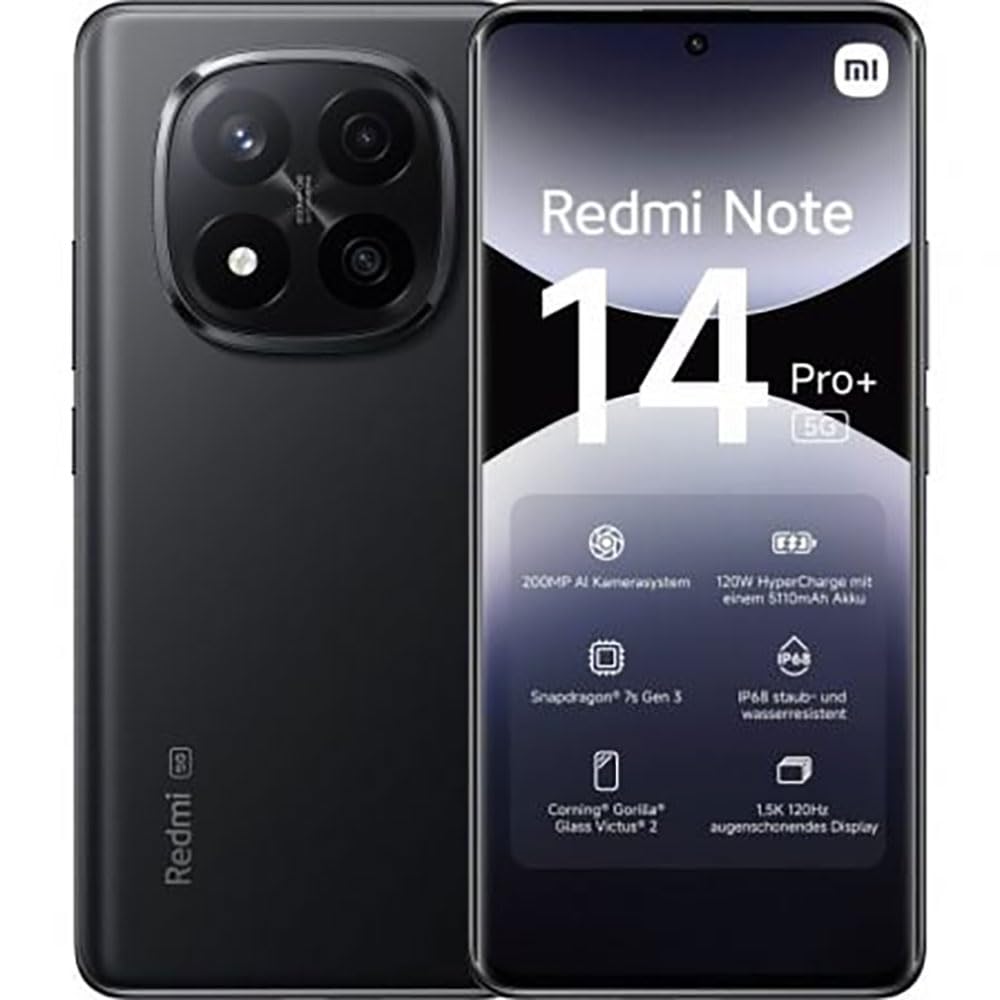
The image displays the front and back of the XIAOMI Redmi Note 14 Pro+ 5G smartphone. The front shows the display with 'Redmi Note 14 Pro+ 5G', '200 Megapixels', and '256 GB' text. The back features a prominent camera module with multiple lenses and the 'Redmi 5G' branding.
מרכיבי מפתח:
- תצוגה קדמית: 6.67-inch 1.5K 120Hz AMOLED display with Corning Gorilla Glass Victus 2.
- מודול מצלמה אחורית: Houses the 200MP Pro-Grade AI Camera system.
- לחצן הפעלה: ממוקם בצד, משמש להפעלה/כיבוי ולהעיר/לשינה של המכשיר.
- לחצני עוצמת הקול: ממוקם בצד, משמש לכוונון עוצמת הקול של המדיה והשיחות.
- יציאת USB Type-C: לטעינה והעברת נתונים.
- חריץ לכרטיס SIM: Supports Dual SIM Nano SIM cards.
- רמקולים: רמקולים סטריאו לפלט שמע.
4. התקנה
4.1. הכנסת כרטיס ה-SIM
- אתר את מגש כרטיס ה-SIM בצד המכשיר.
- הכנס את כלי הוצאת ה-SIM לחור הקטן שליד המגש ולחץ בחוזקה עד שהמגש ייצא החוצה.
- Place your Nano SIM card(s) into the tray with the gold contacts facing down. Ensure proper orientation.
- דחפו בעדינות את המגש בחזרה לתוך החריץ עד שיינעל במקומו בנקישה.
4.2. הפעלת המכשיר
לחץ והחזק את כפתור הפעלה on the side of the phone until the XIAOMI logo appears on the screen. Follow the on-screen instructions to complete the initial setup, including connecting to Wi-Fi, setting up your Google account, and configuring security features like fingerprint recognition.
4.3. חיוב ראשוני
It is recommended to fully charge your device before first use. Connect the USB Type-C cable to the phone and a compatible 120W HyperCharge adapter (not included) to a power outlet.
5. הפעלת הטלפון החכם שלך
5.1. ניווט בסיסי
- מסך מגע: הקש כדי לבחור, החלק כדי לגלול, צביט כדי להגדיל.
- מסך הבית: המרכז המרכזי שלך לאפליקציות ווידג'טים.
- לוח הודעות: החלק מטה מראש המסך כדי לגשת להתראות ולהגדרות מהירות.
- מגירת אפליקציות: החלק למעלה מתחתית המסך (או הקש על סמל מגירת האפליקציות) כדי view כל האפליקציות המותקנות.
5.2. הפעלה/כיבוי והפעלה מחדש
- אֶל כיבוי: Press and hold the Power Button until the power menu appears, then select "Power off."
- אֶל הפעל מחדש: Press and hold the Power Button until the power menu appears, then select "Restart."
5.3. תכונות אבטחה
Your device supports various security options:
- זיהוי טביעת אצבע: רשום את טביעות האצבע שלך לפתיחה מהירה ומאובטחת.
- ביטול נעילת פנים: השתמש בפנים שלך כדי לפתוח את נעילת המכשיר.
- קוד סודי/תבנית/סיסמה: Standard security methods.
גישה להגדרות אלו דרך הגדרות > אבטחה ופרטיות.
6. תכונות המצלמה
The Redmi Note 14 Pro+ 5G features a powerful 200MP Pro-Grade AI Camera system designed to enhance your photography experience.
- מצלמה ראשית 200MP: Capture highly detailed images with optical image stabilization (OIS).
- Multiple Camera Modes: Includes automatic, scene, portrait, and manual modes for versatile shooting.
- Dual LED Flash: Provides enhanced lighting in low-light conditions.
- מצלמה קדמית: A 20MP front sensor for high-quality selfies and video calls.
- הקלטת וידאו: Supports up to 8K video capture at 120 fps.
7. תכונות בינה מלאכותית
Leverage the integrated AI functionalities for a smarter user experience:
- AI Erase Pro: Intelligently remove unwanted objects or people from your photos.
- הרחבת תמונה של בינה מלאכותית: Expand the boundaries of your images using AI.
- הערות בינה מלאכותית: Smart note-taking capabilities.
- כתוביות בינה מלאכותית: Generate subtitles for videos or audio in real-time.
- מקליט בינה מלאכותית: Enhanced voice recording with AI features.
- מתורגמן בינה מלאכותית: תרגום שפות בזמן אמת.
- מַזַל תְאוּמִים: Integrated AI assistant.
- הקף בעיגול כדי לחפש באמצעות גוגל: חפש מידע במהירות על ידי הקפת אובייקטים על המסך.
8. טעינה
Your Redmi Note 14 Pro+ 5G supports 120W HyperCharge technology for rapid charging.
- קיבולת סוללה: 5110mAh Lithium-polymer battery.
- טְעִינָה: Use the provided USB Type-C cable with a compatible 120W power adapter (sold separately) for optimal charging speeds.
- חיי סוללה: Expect up to 20 hours of talk time. Actual battery life may vary based on usage.
Always use certified charging accessories to prevent damage to your device.
9. תחזוקה
9.1. עמידות בפני מים ואבק
המכשיר כולל דירוג IP68 for dust and water resistance. This means it is protected against dust ingress and can withstand immersion in water up to 1.5 meters for 30 minutes. However, this resistance is not permanent and may decrease over time with normal wear. Avoid exposing the device to hot water, saltwater, or other liquids.
9.2. ניקוי המכשיר
- השתמש במטלית רכה ונטולת סיבים כדי לנקות את המסך והגוף.
- הימנעו משימוש בחומרי ניקוי שוחקים, ממסים או תרסיסים.
- If the device gets wet, wipe it thoroughly with a clean, dry cloth before charging or using ports.
9.3. עדכוני תוכנה
בדוק באופן קבוע אם קיימים עדכוני תוכנה והתקן אותם כדי לוודא שהמכשיר שלך כולל את התכונות, תיקוני האבטחה ושיפורי הביצועים העדכניים ביותר. עבור אל הגדרות > אודות הטלפון > גרסת MIUI כדי לבדוק אם יש עדכונים.
10. פתרון תקלות
אם נתקלת בבעיות עם המכשיר שלך, נסה את הפתרונות הנפוצים הבאים:
- המכשיר לא נדלק: ודא שהסוללה טעונה. חבר למטען למשך 15 דקות לפחות, ולאחר מכן נסה להפעיל.
- אפליקציות קורסות או קופאות: סגור את האפליקציה הבעייתית ופתח אותה מחדש. אם הבעיה נמשכת, הפעל מחדש את הטלפון.
- חיבור רשת לקוי: Check your SIM card is correctly inserted. Try toggling Airplane Mode on and off. If the issue persists, contact your network provider.
- הסוללה מתרוקנת במהירות: הפחת את בהירות המסך, סגור אפליקציות שאינן בשימוש והשבת תכונות מיותרות כמו GPS או Bluetooth כאשר אינן בשימוש.
- המסך לא מגיב: Force restart your device by holding the Power Button for approximately 10-15 seconds.
לבעיות מורכבות יותר, עיינו בתמיכה הרשמית של שיאומי webאתר או צור קשר עם שירות הלקוחות.
11. מפרטים
| תכונה | מִפרָט |
|---|---|
| מותג | שיאומי |
| שם הדגם | Redmi Note 14 Pro+ 5G |
| מַעֲרֶכֶת הַפעָלָה | אנדרואיד 14 |
| דגם מעבד | Snapdragon 7 Gen 3 |
| אַיִל | 8 ג'יגה-בייט |
| קיבולת אחסון | 256 ג'יגה-בייט |
| גודל מסך | 6.67 אינץ' |
| רזולוציית תצוגה | 2712 x 1220 פיקסלים |
| קצב רענון | 120 הרץ |
| רזולוציית מצלמה אחורית | 200 Megapixels (with OIS) |
| רזולוציית מצלמה קדמית | 20 מגה פיקסל |
| קיבולת סוללה | 5110 מיליאמפר/שעה |
| טכנולוגיית טעינה | 120W היפר-טעינה |
| עמידות במים | IP68 |
| טכנולוגיה סלולרית | 5G |
| סוג כרטיס SIM | Nano SIM (Dual SIM) |
| קישוריות | USB Type-C |
12. אחריות ותמיכה
12.1. אחריות יצרן
Your XIAOMI Redmi Note 14 Pro+ 5G Smartphone comes with a אחריות יצרן לשנהאחריות זו מכסה פגמים בחומרים ובביצוע בשימוש רגיל. אנא שמור את הוכחת הרכישה שלך לצורך תביעות אחריות.
The warranty does not cover damage caused by accidents, misuse, unauthorized modifications, or normal wear and tear.
12.2. תמיכת לקוחות
For technical assistance, warranty claims, or further information, please visit the official XIAOMI support website or contact their customer service department. Contact details can typically be found on the XIAOMI webבאתר או בתעודת האחריות המצורפת למוצר שלך.