
HETP HX160Q2
מדריך למשתמש בסוללת גיבוי אלחוטית HETP
דגם: HX160Q2
מָבוֹא
Thank you for choosing the HETP Wireless Power Bank. This 40800mAh portable charger is designed to provide versatile and efficient power for your electronic devices. Featuring 7-in-1 charging capabilities, including built-in cables, multiple output ports, and wireless charging, it ensures your devices remain powered on the go. Please read this manual carefully before use to ensure proper operation and maintenance.

תמונה: חזית view of the HETP Wireless Power Bank, displaying its LCD screen with 100% charge and the wireless charging pad. The side shows the built-in cables.
תכונות המוצר
- קיבולת גבוהה: 40800mAh premium Li-polymer battery for multiple device charges.
- טעינה 7 ב-1: Simultaneously charge up to 7 devices.
- כבלים מובנים: Includes iOS, USB-C, and Micro USB cables for convenience.
- יציאות פלט מרובות: Two USB-A ports and one USB-C port.
- טעינה אלחוטית: 15W wireless charging compatible with all wireless-enabled devices.
- טעינה מהירה: 25W PD 3.0 and QC 4.0 fast charging technology.
- תצוגת LCD: Clear digital display showing battery percentage.
- תכונות בטיחות: Multi-security protection for safe charging.

Image: Diagram illustrating the wide compatibility of the power bank with various electronic devices, including smartphones, tablets, smartwatches, and earbuds.
תוכן החבילה
- 1 x HETP Wireless Portable Charger Power Bank (40800mAh)
- 1 x Product Instruction Manual (this document)
אמצעי בטיחות
- אין לחשוף את סוללת הסוללה לטמפרטורות קיצוניות (חמות או קור), לאור שמש ישיר או לאש.
- אין לפרק, לשנות או לתקן את המכשיר בעצמך.
- הרחק ממים ומנוזלים אחרים.
- הימנע מהפלה או הכפיפה של בנק הכוח לפגיעות חזקות.
- אחסן במקום קריר ויבש כאשר אינו בשימוש.
- הרחק מהישג ידם של ילדים.
הגדרה ושימוש ראשוני
טעינת בנק הכוח
Before first use, fully charge the power bank. The LCD display will show the charging progress and battery percentage.
- שימוש בכבל USB-C המובנה: Connect the built-in USB-C cable from the power bank to a USB wall adapter (not included).
- שימוש ביציאת הקלט USB-C: Connect a USB-C cable (not included) from a USB wall adapter to the USB-C input port on the power bank.
The LCD screen will illuminate and display the charging percentage. Once it reaches 100%, the power bank is fully charged.

Image: Illustration demonstrating two methods to recharge the power bank: via its integrated USB-C cable or by connecting an external USB-C cable to the dedicated input port.
הוראות הפעלה
התקני טעינה
The HETP Wireless Power Bank offers multiple ways to charge your devices simultaneously.
1. Wired Charging (Using Built-in Cables)
- Pull out the appropriate built-in cable (iOS, USB-C, or Micro USB) from its slot.
- חבר את הכבל לשקע הטעינה של המכשיר שלך.
- The power bank will automatically begin charging your device. The LCD display will show "OUT" indicating output.
2. Wired Charging (Using Output Ports)
- Use your device's original charging cable or a compatible cable.
- Connect one end of the cable to one of the power bank's output ports (USB-A1, USB-A2, or USB-C).
- חבר את הקצה השני למכשיר שלך.
- הטעינה תחל אוטומטית.
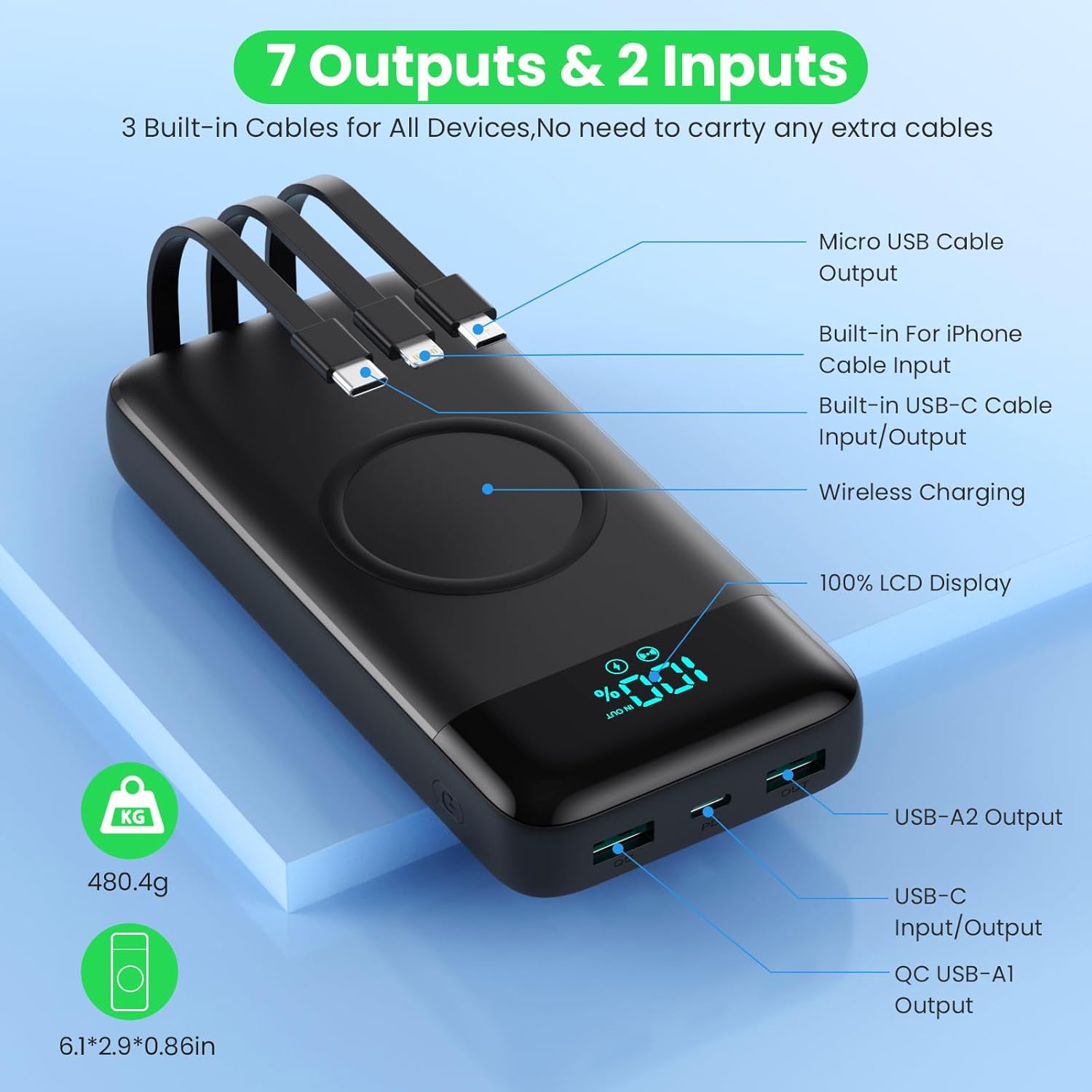
Image: Detailed diagram highlighting all 7 output options (3 built-in cables, 3 USB ports, 1 wireless) and 2 input options (built-in USB-C cable, USB-C port) on the power bank, along with the LCD display.
3. טעינה אלחוטית
- ודא שהמכשיר שלך תומך בטעינה אלחוטית.
- Place your wireless-enabled device directly onto the wireless charging pad located on the top surface of the power bank.
- Align the device centrally on the pad for optimal charging.
- The power bank will automatically detect and begin wireless charging.

Image: A smartphone being wirelessly charged on the power bank, illustrating the fast wireless charging feature and supported wattages.
טעינה סימולטנית
The HETP Wireless Power Bank is designed to charge multiple devices concurrently using a combination of its built-in cables, output ports, and wireless charging pad.

תמונה: תקורה view showing the power bank simultaneously charging a tablet, multiple smartphones, and a smartwatch using its various charging methods.
תַחזוּקָה
- ניקוי: Use a soft, dry cloth to clean the surface of the power bank. Do not use abrasive cleaners or solvents.
- אִחסוּן: If storing for an extended period, charge the power bank to approximately 50-70% capacity. Recharge every 3-6 months to maintain battery health.
- טיפול בכבלים: When retracting built-in cables, do so gently to avoid damage.
פתרון בעיות
| בְּעָיָה | סיבה אפשרית | פִּתָרוֹן |
|---|---|---|
| בנק הכוח לא נטען | Charging cable or adapter faulty; power bank fully discharged; input port issue. | Try a different charging cable and wall adapter. Ensure the power bank is connected correctly. Allow a few minutes for the LCD to activate if fully discharged. |
| המכשיר לא נטען מבנק הכוח | Power bank low on charge; device cable faulty; device not compatible; incorrect port used; wireless charging misalignment. | Check power bank's charge level. Try a different cable. Ensure device is compatible. For wireless charging, reposition device on the pad. |
| טעינה איטית | הכבל אינו תומך בטעינה מהירה; המכשיר אינו תומך בטעינה מהירה; מספר מכשירים נטענים בו זמנית. | השתמש בכבל תואם לטעינה מהירה. ודא שהמכשיר שלך תומך בטעינה מהירה. טעינת מספר מכשירים עשויה להפחית את מהירויות הטעינה של כל אחד בנפרד. |
| תצוגת LCD לא עובדת | סוללת גיבוי כבויה; בעיה פנימית. | Press the power button to activate the display. If problem persists, contact customer support. |
מפרטים
| תכונה | פְּרָט |
|---|---|
| מספר דגם | HX160Q2 |
| קיבולת סוללה | 40800mAh |
| סוג סוללה | לי-פולימר |
| מידות המוצר | 10.58 x 6.78 x 1.31 ס"מ |
| משקל פריט | 100 גרם |
| קלט (USB-C) | טעינה מהירה של 25W PD |
| פלט (USB-C) | טעינה מהירה של 25W PD |
| פלט (USB-A) | QC 4.0 Fast Charging |
| פלט אלחוטי | 15W (5W, 7.5W, 10W, 15W compatible) |
| כבלים מובנים | iOS, USB-C, Micro USB |
| לְהַצִיג | צג דיגיטלי LCD |
| צֶבַע | שָׁחוֹר |
אחריות ותמיכה
Each HETP product is safety certified. If you encounter any problems or have questions regarding your Wireless Power Bank, please do not hesitate to contact our customer support team. We are committed to providing professional after-sales service and satisfactory solutions within 12 hours.
אנא עיין במסמכי הרכישה שלך לקבלת תנאי אחריות ספציפיים ופרטי יצירת קשר.
Ask a question about this manual
Ask about setup, troubleshooting, compatibility, parts, safety, or missing instructions. Manuals+ will review the question and use this page’s manual context to help answer it.