
1. הקדמה
תודה על הרכישהasing the Kaiser MSA-2073M Professional One Body Speaker. This powerful and versatile audio system is designed to deliver clear, robust sound for various events, both indoors and outdoors. Featuring dual 8-inch woofers, 70W RMS power, Bluetooth connectivity, a wireless microphone, and dynamic Infinity Light effects, the MSA-2073M is built to enhance your audio experience. Please read this manual carefully to ensure proper setup, operation, and maintenance of your speaker.
2. הוראות בטיחות
- אין לחשוף את הרמקול לגשם או לחות כדי למנוע שריפה או התחשמלות.
- אל תפתח את הרמקול גasinז. הפנה את כל הטיפולים לצוות מוסמך.
- הרחק את הרמקול ממקורות חום כגון רדיאטורים, אוגרי חום, תנורים או מכשירים אחרים המייצרים חום.
- השתמש רק בתוספות/אביזרים שצוינו על ידי היצרן.
- נתק את הרמקול מהחשמל במהלך סופות ברקים או כאשר אינו בשימוש למשך תקופות ארוכות.
- יש לוודא אוורור נאות. אין לחסום פתחי אוורור.
- אין להניח חפצים כבדים על גבי הרמקול.
- Avoid placing the speaker in unstable positions where it might fall.
3. תכולת החבילה
אנא בדוק את תוכן החבילה. אם חסרים פריטים או פגומים, צור קשר עם הקמעונאי שלך.
- Kaiser MSA-2073M Professional One Body Speaker
- מיקרופון אלחוטי
- כבל טעינה USB
- כבל אודיו (AUX 3.5 מ"מ)
- מדריך למשתמש
4. המוצר נגמרview
Familiarize yourself with the different parts and controls of your Kaiser MSA-2073M speaker.

איור 4.1: חזית View. Shows the speaker's front panel with dual 8-inch woofers and the dynamic Infinity Light display.

איור 4.2: אחורי View. Displays the speaker's rear, including the integrated handle and transport wheels for easy mobility.
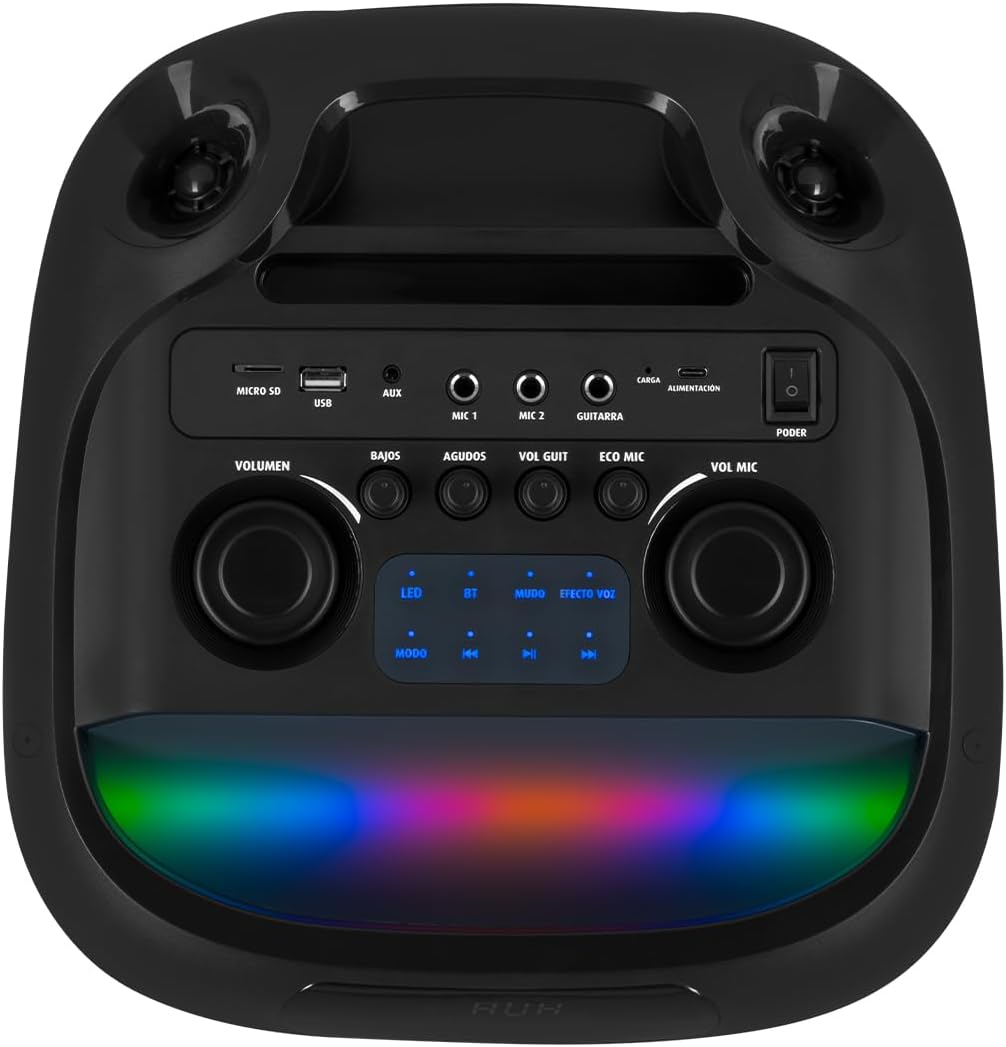
איור 4.3: לוח בקרה. Details the top-mounted control panel with inputs for USB, Micro SD, AUX, two microphones, and a guitar, along with volume, bass, treble, and effect controls.

Figure 4.4: Wireless Microphone. The included wireless microphone for vocal performances and announcements.
5. התקנה
5.1 פירוק
- הוציאו בזהירות את הרמקול ואת כל האביזרים מהאריזה.
- שמור את האריזה להובלה או אחסון עתידיים.
5.2 טעינה ראשונית
Before first use, it is recommended to fully charge the speaker's internal battery.
- Connect the provided USB charging cable to the speaker's charging port (labeled 'CARGA' or 'ALIMENTACIÓN' on the control panel).
- חבר את הקצה השני של כבל ה-USB למתאם חשמל USB תואם (לא כלול) או ליציאת USB המחוברת לחשמל.
- נורית חיווי הטעינה תידלק. המתן מספר שעות לטעינה מלאה.
- לאחר טעינה מלאה, נורית החיווי עשויה להשתנות או להיכבות. נתק את כבל הטעינה.
5.3 הפעלה/כיבוי
To power on the speaker, locate the 'PODER' (Power) switch on the control panel and slide it to the 'ON' position. To power off, slide it to 'OFF'.
6. הוראות הפעלה
6.1 חיבור בלוטות'
Connect your mobile device wirelessly to the speaker.
- Turn on the speaker. The 'BT' indicator on the control panel should blink, indicating it's in pairing mode.
- במכשיר הנייד שלך, הפעל את Bluetooth וחפש מכשירים זמינים.
- Select "Kaiser MSA-2073M" from the list of devices.
- Once paired, the 'BT' indicator will stop blinking and remain solid. You can now play audio from your device through the speaker.
- טווח ה-Bluetooth הוא עד 10 מטרים.
6.2 כניסת AUX
חברו התקני שמע חיצוניים באמצעות כבל AUX בגודל 3.5 מ"מ.
- Connect one end of the 3.5mm audio cable to the 'AUX' port on the speaker.
- חבר את הקצה השני לשקע האוזניות או ליציאת השמע של המכשיר החיצוני שלך.
- לחץ על כפתור 'MODE' ברמקול עד שייבחר מצב 'AUX'.
- הפעלת אודיו מהמכשיר החיצוני שלך.
6.3 USB/מיקרו SD ניגון
Play music directly from a USB flash drive or Micro SD card.
- Insert a USB flash drive into the 'USB' port or a Micro SD card into the 'MICRO SD' slot.
- The speaker will automatically switch to USB/Micro SD mode and begin playing compatible audio fileאם לא, לחץ על כפתור 'MODE' כדי לבחור את הקלט הנכון.
- Use the playback controls (play/pause, next/previous track) on the speaker to manage your music.
6.4 שימוש במיקרופון
Use the included wireless microphone for karaoke or announcements.
- ודא שהמיקרופון האלחוטי מופעל.
- The microphone will automatically connect to the speaker.
- Adjust the microphone volume using the 'VOL MIC' knob on the control panel.
- Use the 'ECO MIC' knob to adjust the echo effect for the microphone.
- The speaker also features five voice effects for the microphone, accessible via the 'EFECTOS VOZ' button.
6.5 Guitar Input
Connect an electric guitar to the speaker.
- Connect your guitar to the 'GUITARRA' input jack on the control panel.
- Adjust the guitar volume using the 'VOL GUIT' knob.
6.6 התאמות סאונד
Customize your audio output.
- נפח: Adjusts the overall master volume of the speaker.
- BAJOS (Bass): מכוונן את פלט התדרים הנמוכים.
- AGUDOS (Treble): מכוונן את פלט התדר הגבוה.
6.7 Infinity Light Effects
Enhance your listening experience with dynamic LED lighting.
- Press the 'LED' button on the control panel to cycle through different light modes or turn the lights off.
- The lights synchronize with the music for an immersive effect.
6.8 KSR-LINK (True Wireless Stereo)
Connect two MSA-2073M speakers for a true wireless stereo experience.
- ודא ששני הרמקולים דולקים ונמצאים במצב Bluetooth, אך אינם מחוברים לאף מכשיר.
- On one speaker, press and hold the 'MUDO' (Mute) button (which also functions as the KSR-LINK pairing button). You will hear a confirmation tone.
- The two speakers will automatically pair with each other.
- Once paired, connect your mobile device to one of the speakers via Bluetooth as described in section 6.1. Audio will now play in stereo through both speakers.
7. טעינה
The speaker features a rechargeable battery for portable use. A full charge allows for prolonged use.
- Connect the USB charging cable to the speaker's charging port and a power source.
- מחוון הטעינה יראה את מצב הטעינה.
- Avoid overcharging the battery. Disconnect the charger once the battery is full.
8. תחזוקה
8.1 ניקוי
- נגבו את הרמקול בעזרת מטלית רכה ויבשה.
- אין להשתמש בחומרי ניקוי שוחקים, שעווה או ממיסים.
8.2 אחסון
- יש לאחסן את הרמקול במקום קריר ויבש, הרחק מאור שמש ישיר וטמפרטורות קיצוניות.
- אם מאחסנים את הסוללה לתקופה ממושכת, יש לטעון אותה מעת לעת כדי לשמור על אורך חייה.
9. פתרון תקלות
| בְּעָיָה | סיבה אפשרית | פִּתָרוֹן |
|---|---|---|
| אין כוח | הסוללה התרוקנה; מתג ההפעלה כבוי. | Charge the speaker; Turn the power switch to 'ON'. |
| אין קול | עוצמת הקול נמוכה מדי; נבחר מצב קלט שגוי; המכשיר אינו מחובר כראוי. | Increase volume; Press 'MODE' to select correct input; Reconnect device/Bluetooth. |
| בלוטות' לא מתחבר | Speaker not in pairing mode; Device too far; Already connected to another device. | Ensure 'BT' indicator is blinking; Move device closer; Disconnect from other devices and try again. |
| המיקרופון לא עובד | Microphone is off; Microphone volume is low; Microphone battery is low. | Turn on microphone; Increase 'VOL MIC' knob; Charge/replace microphone battery. |
10. מפרטים
| תכונה | מִפרָט |
|---|---|
| מותג | קֵיסָר |
| דֶגֶם | MSA-2073M |
| גודל רמקול | 2 על 8 אינץ' |
| תפוקת חשמל RMS | 70 וואט |
| PMPO Power Output | 28000 וואט |
| טכנולוגיית קישוריות | אלחוטי (Bluetooth) |
| טווח בלוטות' | עד 10 מטר |
| מצב פלט שמע | סטריאו |
| עַכָּבָּה | 3 אוהם |
| תגובת תדר | 60 הרץ |
| שיטת בקרה | Push Button, Rotary Knobs |
| מקור כוח | סוֹלְלָה |
| מידות (DxWxH) | 37.4 x 36.2 x 80 ס"מ |
| משקל פריט | 10.8 קילוגרם |
| אביזרים כלולים | מיקרופון אלחוטי |
11. סרטון מוצר נגמרview
Video 11.1: Product Features and Unboxing. סרטון זה מספק סקירה מהירהview of the Kaiser MSA-2073M speaker, showcasing its unboxing, key features like 70W RMS power, 10m Bluetooth range, included cables, and detailed views of the control panel with independent volume, bass, treble, microphone, guitar, and echo controls. It also highlights the five voice effects for the microphone, 3 Ohm impedance, and convenient transport wheels. The video also mentions the KSR-LINK technology for connecting two speakers.
12. אחריות ותמיכה
Your Kaiser MSA-2073M speaker comes with a 90-day factory warrantyאנא שמור את הוכחת הרכישה שלך לצורך תביעות אחריות.
For technical support, troubleshooting assistance, or warranty inquiries, please contact Kaiser customer service through their official website or the retailer where you purchased the product. Do not attempt to repair the device yourself, as this may void your warranty.