
1. המוצר נגמרview
The Marantz AV10 is a high-performance AV Receiver designed to deliver an exceptional home theater experience. It features 15.4 channels, advanced HDMI connectivity, USB, Ethernet, multiroom capabilities, and support for immersive audio formats like Dolby Atmos and DTS:X. The unit is engineered for superior audio quality and seamless integration into modern home entertainment systems.
תכונות עיקריות:
- איכות שמע יוצאת דופן: Immerse in rich, detailed sound with advanced processing.
- אינטגרציה חלקה: Connect all audio and video components effortlessly.
- Cutting-Edge Processing: Experience immersive sound with advanced technologies.
- שליטה אינטואיטיבית: Fine-tune your audio experience with ease.
- עיצוב מלוטש: Elegant and robust, complementing modern home theater setups.
- טכנולוגיה עתידנית: Stay ahead with support for upcoming audio advancements.
2. התקנה
2.1 פריקה ומיקום
Carefully remove the Marantz AV10 from its packaging. Ensure all accessories are present. Place the receiver on a stable, level surface with adequate ventilation to prevent overheating. Avoid placing it near heat sources or in enclosed cabinets without proper airflow.
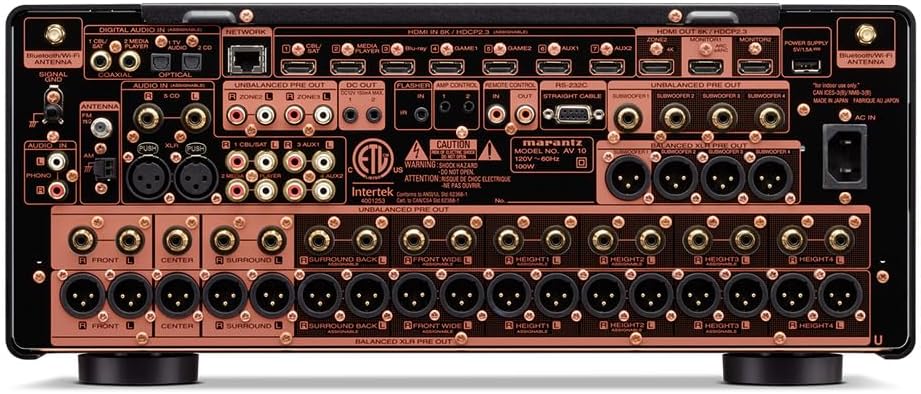
חֲזִית view of the Marantz AV10 AV Receiver, showcasing its sleek design with input and volume knobs, and a central display.
2.2 חיבורים
Before making any connections, ensure the AV10 receiver and all connected devices are powered off and unplugged from the wall outlet.
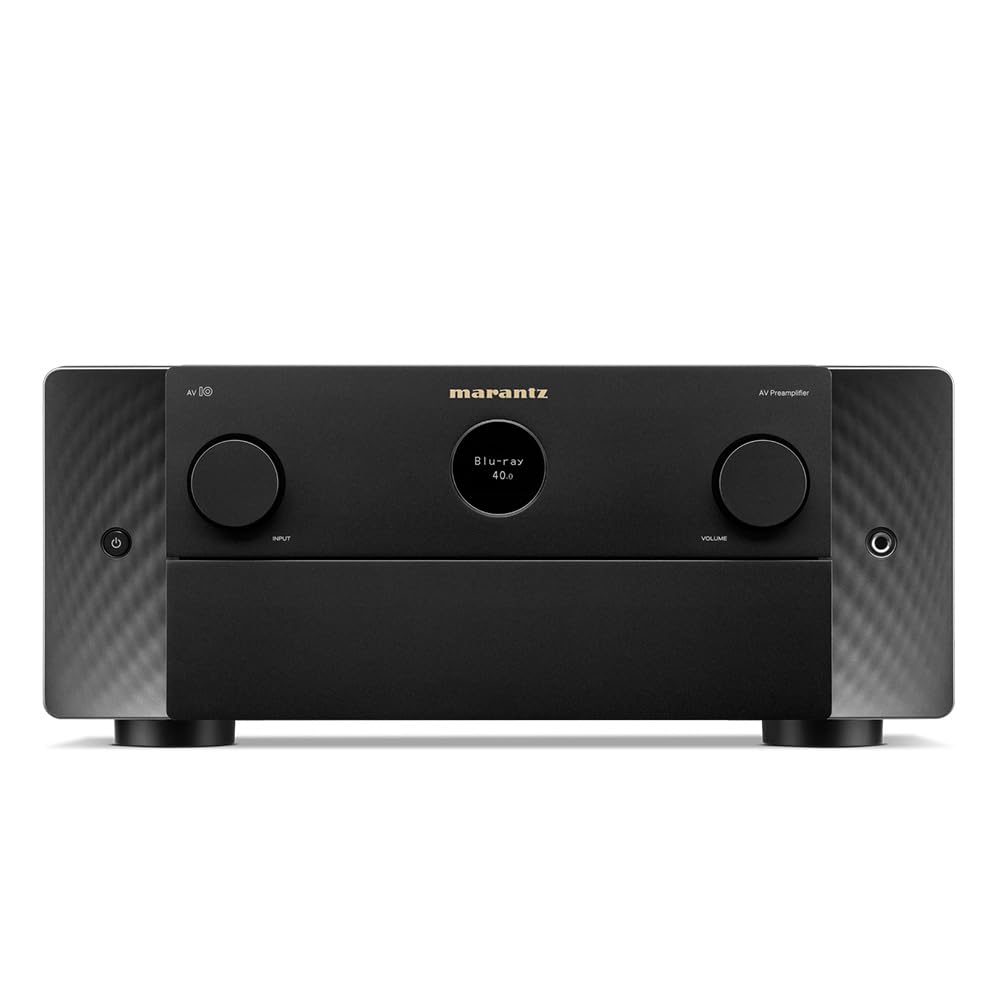
Rear panel of the Marantz AV10 AV Receiver, illustrating the comprehensive array of input and output ports including HDMI, XLR, RCA, Ethernet, and speaker terminals.
- חיבורי HDMI: Connect your video sources (Blu-ray player, game console, streaming device) to the HDMI IN ports. Connect your TV or projector to the HDMI OUT (MONITOR) port. The AV10 supports 8K/60Hz and 4K/120Hz with eARC.
- חיבורי שמע: Use the appropriate analog or digital audio inputs for devices without HDMI. For high-quality audio, utilize the balanced XLR pre-outs for connecting to external power ampבעלי חיים.
- חיבור רשת: Connect an Ethernet cable to the NETWORK port for wired internet access, or attach the included Wi-Fi antennas for wireless connectivity.
- USB: Use the USB port for media playback from compatible storage devices.
- חיבורי רמקולים: Connect your speakers to the corresponding speaker terminals. Ensure correct polarity (+ to + and - to -) for optimal sound. The AV10 supports up to 15.4 channels.
2.3 Speaker Configuration
The Marantz AV10 offers flexible speaker configuration options. Use the on-screen setup assistant (accessible via your TV connected to the HDMI OUT) to guide you through the process. This includes assigning channels, setting speaker sizes, and configuring crossover frequencies.
For optimal sound, utilize the Audyssey MultEQ XT32 room correction system. Connect the supplied setup microphone to the front panel's SETUP MIC jack and follow the on-screen instructions to calibrate your speakers to your room's acoustics.
3. תפעול
3.1 בקרות בסיסיות
The front panel of the AV10 provides essential controls for daily operation:

Close-up of the input selector knob on the Marantz AV10, used to switch between various audio and video sources.
- לחצן הפעלה: מפעיל או מכבה את היחידה.
- בורר קלט: Rotates to select the desired input source (e.g., Blu-ray, Game, Media Player).
- ידית עוצמת הקול: כוונון עוצמת הקול הראשית.
- לְהַצִיג: Shows current input, volume level, audio format, and other status information.
The included remote control provides full access to all functions and settings, including menu navigation, sound modes, and zone control.
3.2 אודיו מרובה חדרים
The AV10 supports multi-room audio playback, allowing you to enjoy different audio sources in various zones of your home. Utilize the built-in HEOS technology, Wi-Fi, Bluetooth, or Apple AirPlay 2 to stream music from popular services like Spotify, Pandora, and Amazon Music throughout your home.
3.3 שליטה קולית
Control your Marantz AV10 effortlessly using voice commands. The receiver is compatible with major voice assistants, allowing you to adjust volume, change tracks, switch inputs, and more, hands-free.
4. תחזוקה
- ניקוי: נגבו את היחידה באופן קבוע במטלית רכה ויבשה. אין להשתמש בחומרי ניקוי שוחקים או ממסים.
- אוורור: ודאו שפתחי האוורור בחלק העליון ובצדדי היחידה אינם חסומים כדי למנוע התחממות יתר.
- עדכוני קושחה: Periodically check for firmware updates via the network connection to ensure optimal performance and access to new features.
5. פתרון תקלות
If you encounter issues with your Marantz AV10, refer to the following common troubleshooting steps:
- אין כוח: Ensure the power cord is securely connected and the power outlet is functional.
- אין צליל: Check all audio cable connections, ensure the correct input source is selected, and verify speaker connections and volume levels.
- אין סרטון: Verify HDMI cable connections, ensure the correct input source is selected, and check your TV/projector input settings.
- בעיות חיבור לרשת: Confirm your Ethernet cable is connected or Wi-Fi antennas are properly attached. Check your router and internet connection.
- השלט הרחוק לא עובד: החלף את הסוללות בשלט הרחוק. ודא שאין חסימות בין השלט לחיישן ה-IR של המקלט.
For more detailed troubleshooting, consult the full online manual or contact Marantz customer support.
6. מפרטים
| תכונה | מִפרָט |
|---|---|
| מותג | מרנץ |
| מספר דגם | AV10 |
| ערוצים | 15.4 |
| טכנולוגיית קישוריות | HDMI |
| סך כל יציאות HDMI | 10 |
| מצב פלט שמע | סטריאו, סראונד |
| תצורת ערוץ סאונד סראונד | 5.1 (Supports up to 15.4 with external ampהרחקה) |
| קידוד וידאו | H.264, H.265/HEVC |
| תכונה מיוחדת | Multiroom |
| סוג בקר | שְׁלַט רָחוֹק |
| מכשירים תואמים | Speaker, Tablet, PC, Smartphone, Television, Personal Computer, Game Console |
| משקל פריט | 37 פאונד |
| מידות חבילה | 23 x 22 x 13 אינץ' |
7. אחריות ותמיכה
The Marantz AV10 AV Receiver comes with a manufacturer's warranty. Please refer to the warranty card included in your product packaging for specific terms and conditions. For technical support, product registration, or service inquiries, visit the official Marantz webלאתר או לפנות למחלקת שירות הלקוחות שלהם.
Online resources, including a comprehensive user manual and FAQs, are available on the Marantz support page.