
1. הקדמה
This manual provides essential instructions for the safe and efficient operation, installation, and maintenance of your G21 Osmo 2200 W Reverse Osmosis System. Please read this manual thoroughly before using the appliance and retain it for future reference. This system is designed to provide purified and remineralized water with adjustable temperature settings.
2. הוראות בטיחות
- ודאו שהמכשיר ממוקם על משטח יציב וישר, הרחק מאור שמש ישיר וממקורות חום.
- אין לטבול את המכשיר, כבל החשמל או התקע במים או בנוזלים אחרים.
- Keep out of reach of children. The appliance features a child safety lock, but supervision is always recommended.
- Use only potable water with this system.
- נתקו את המכשיר מהחשמל לפני ניקוי או ביצוע כל תחזוקה.
- אין להפעיל את המכשיר אם כבל החשמל או התקע פגומים. פנו לאנשי שירות מוסמכים לצורך תיקונים.
- ודא אוורור נאות סביב היחידה.
3. המוצר נגמרview
The G21 Osmo 2200 W Reverse Osmosis System is a countertop water purification unit featuring advanced filtration and instant heating capabilities.
תכונות עיקריות:
- Removes up to 99% of impurities from water.
- Provides clean, healthy, and great-tasting water.
- Filtration capacity of 7.8 liters per hour (LPH).
- Rapid 3-second heating function.
- Six adjustable temperature levels from 25°C to 95°C.
- תצוגת מסך מגע ידידותית למשתמש.
- Integrated child safety lock.
- Automatic filter change indicator.
- Reduces limescale, extending the lifespan of other appliances.
רכיבים:


4. התקנה
4.1 פירוק והרכבה:
- הסר בזהירות את כל הרכיבים מהאריזה.
- Place the main unit on a clean, dry, and stable countertop. Ensure there is adequate space around the unit for ventilation.
- Insert the drip tray into its designated slot at the front base of the unit.
4.2 Filter Installation:
- Open the filter compartment cover, usually located on the side or back of the unit.
- Identify the PAC, RO, and CF filters. Each filter is typically labeled.
- Insert each filter into its corresponding slot, twisting gently until securely locked. Refer to the markings on the unit for correct filter placement.
- סגור את מכסה תא המסנן.
4.3 Initial Water Filling and Flushing:
- הסר את מיכל המים מהיחידה.
- Fill the water tank with clean, potable tap water up to the 'MAX' line.
- Place the filled water tank back into the unit.
- חבר את כבל החשמל לשקע חשמל מוארק.
- The system will automatically begin an initial flushing cycle to prepare the filters. This process may take several minutes. Follow any on-screen prompts.
- Discard the water from the first few cycles as recommended by the system's display or until the water quality indicator shows optimal levels.
5. הוראות הפעלה
5.1 הפעלה/כיבוי:
Press the 'Power' button on the touchscreen to turn the unit on or off.
5.2 Using the Touchscreen:
The intuitive touchscreen allows you to select desired water temperatures and dispense water.
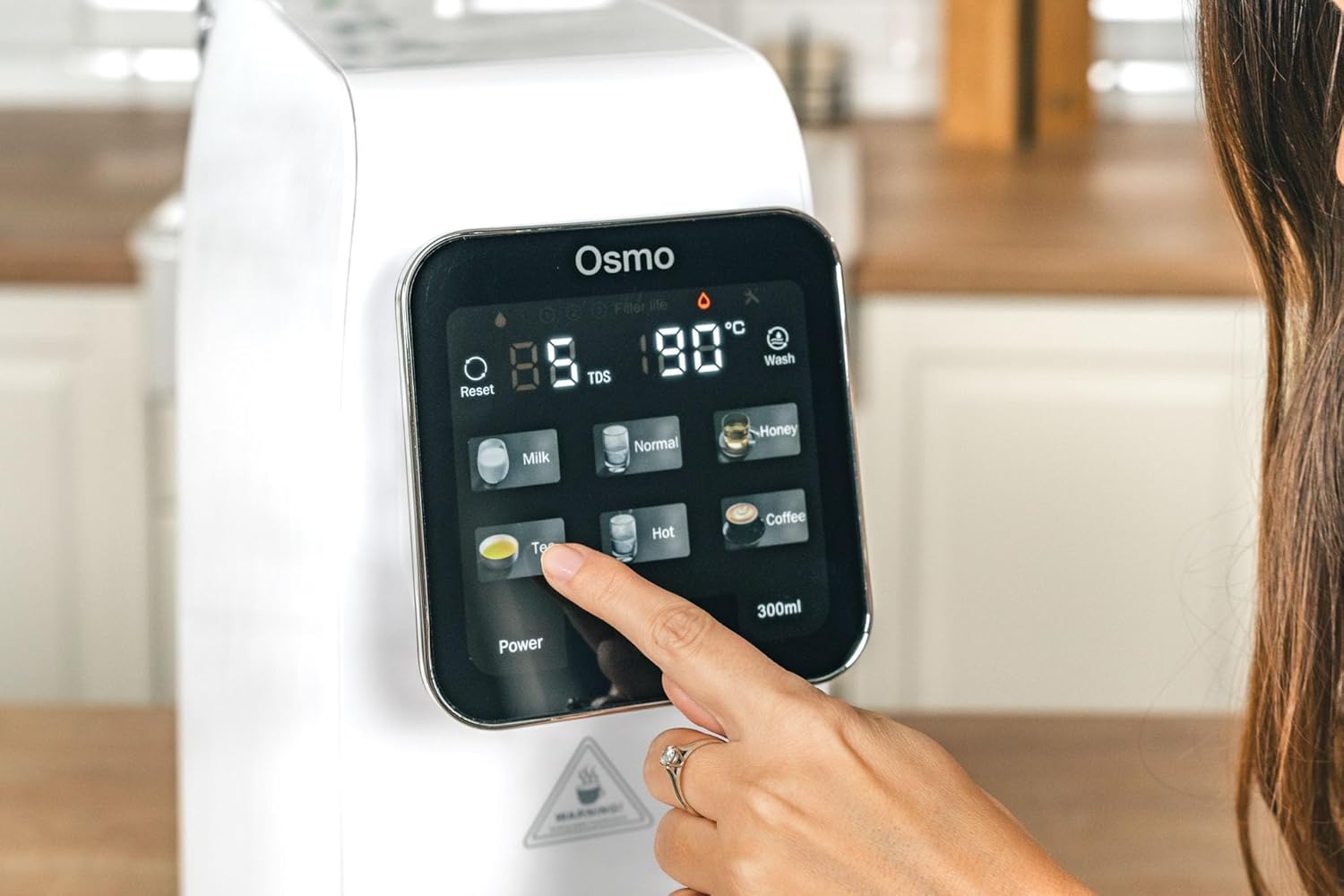
5.3 Selecting Temperature Levels:
The system offers six temperature presets:
- נוֹרמָלִי: Room temperature purified water.
- 25 מעלות צלזיוס: Ideal for specific beverages or cooling.
- 45 מעלות צלזיוס: Suitable for baby formula or warm drinks.
- 60 מעלות צלזיוס: For certain teas or warm water needs.
- 80 מעלות צלזיוס: Optimal for green tea.
- 95 מעלות צלזיוס: Perfect for black tea, coffee, or instant noodles.
Tap the desired temperature icon on the touchscreen. The system will rapidly heat the water to the selected temperature.
5.4 Dispensing Water:
After selecting the temperature, place your cup or container under the dispenser nozzle. Press the dispense button (often labeled with a water drop icon or a volume, e.g., '300ml') to start dispensing. Press again to stop, or it will stop automatically after dispensing the preset volume.
5.5 Child Safety Lock:
To activate or deactivate the child safety lock, press and hold the designated lock icon on the touchscreen for a few seconds. This prevents accidental dispensing of hot water.
5.6 Filter Change Indicator:
The touchscreen display will show an indicator when a filter needs replacement. Refer to the maintenance section for filter replacement procedures.
6. תחזוקה
6.1 ניקוי היחידה:
- נתק את המכשיר משקע החשמל.
- נגב את החלק החיצוני של היחידה בעזרת חומר רך, דamp בַּד. אין להשתמש בחומרי ניקוי שוחקים או ממסים.
- Remove and empty the drip tray regularly. Clean it with mild soap and water, then rinse thoroughly and dry before reinserting.
- Clean the water tank with mild soap and water. Rinse thoroughly to remove all soap residue before refilling.
6.2 החלפת מסנן:
The system will indicate when filters need replacement. Typically, PAC and CF filters require more frequent replacement than the RO filter. Always use genuine G21 replacement filters.
- נתק את המכשיר מהחשמל.
- פתח את מכסה תא המסנן.
- Twist the old filter counter-clockwise to unlock and remove it.
- Insert the new filter into the slot, aligning the markings, and twist clockwise to lock it in place.
- סגור את מכסה תא המסנן.
- Plug in the appliance and perform a flushing cycle as per initial setup instructions to prime the new filter.
7. פתרון תקלות
- אין כוח: ודא שכבל החשמל מחובר היטב לשקע תקין. בדוק את מפסק החשמל.
- אין חלוקת מים: Check if the water tank is properly installed and filled. Ensure the child safety lock is not activated.
- זרימת מים איטית: This may indicate clogged filters. Check the filter change indicator and replace filters if necessary.
- טעם/ריח יוצא דופן: Perform a flushing cycle. If the issue persists, replace the filters.
- קודי שגיאה: Refer to the specific error code displayed on the touchscreen and consult the G21 support webאתר או צור קשר עם שירות הלקוחות לקבלת סיוע.
8. מפרטים
| תכונה | מִפרָט |
|---|---|
| שם הדגם | CISV-G21-RO |
| מותג | G21 |
| מידות (L x W x H) | 39 x 20 x 45 ס"מ |
| מִשׁקָל | 9.5 קילוגרם |
| חוֹמֶר | פּוֹלִימֵר |
| שיטת טיהור | אוסמוזה הפוכה |
| יְכוֹלֶת | 7.8 ליטר לשעה (LPH) |
| רמות טמפרטורה | 25°C, 45°C, 60°C, 80°C, 95°C, Normal |
| מקור כוח | כבל חשמלי |
| סוג התקנה | משטח עבודה |
| תכונות מיוחדות | Remineralization, Touchscreen, Child Safety, PAC/RO/CF Filters |
9. אחריות ותמיכה
For warranty information, technical support, or to purchase replacement parts and filters, please refer to the documentation included with your product or visit the official G21 webאתר. שמור את קבלת הרכישה כהוכחת קנייה לתביעות אחריות.