
1. הקדמה
The Audizio Avola is a comprehensive audio system designed to provide a wide range of listening options. It integrates Internet Radio, DAB+, FM radio, a CD player, and Bluetooth connectivity into a single, elegant unit. This manual will guide you through the setup, operation, and maintenance of your Avola system, ensuring you can fully utilize its features for an optimal audio experience.
2. הוראות בטיחות
- ספק כוח: השתמשו רק במתאם החשמל המצורף. ודאו שהעוצמהtage תואם את הדרישות של האזור שלך.
- מים ולחות: אין לחשוף את היחידה לגשם, לחות או נוזלים. יש להימנע מהנחת חפצים מלאים בנוזלים, כגון אגרטלים, על היחידה.
- אוורור: יש לוודא אוורור נאות סביב היחידה. אין לחסום פתחי אוורור.
- מקורות חום: הרחק את היחידה ממקורות חום כגון רדיאטורים, אוגרי חום, תנורים או מכשירים אחרים המייצרים חום.
- ניקוי: Disconnect the unit from the power supply before cleaning. Use a soft, dry cloth. Do not use liquid cleaners or aerosol cleaners.
- שֵׁרוּת: אל תנסה לטפל ביחידה בעצמך. הפנה את כל הטיפולים לאנשי שירות מוסמכים.
- נגן תקליטורים: Do not insert foreign objects into the CD tray. Handle CDs by their edges to avoid scratches.
3. תכולת החבילה
ודא שכל הפריטים נמצאים באריזה:
- 1x Audizio Avola Internet Radio
- 1x שלט רחוק
- 1x מתאם חשמל
- מדריך למשתמש אחד (מדריך התחלה מהירה)

Image: Audizio Avola unit shown with its remote control and power adapter.
4. המוצר נגמרview
4.1 לוח קדמי

תמונה: חזית view of the Audizio Avola with the CD tray closed.
The front panel features the main display, control buttons, a CD tray, and input ports.
- לְהַצִיג: Color display for navigation and information.
- לחצני שליטה: MENU, INFO, REC/DEL, PRESET/REPEAT, STANDBY, I/R, Play/Pause, Stop, Skip/Fast Forward/Rewind.
- מגש תקליטורים: להכנסת תקליטורי שמע.
- TUNE/SELECT Knob: Rotate to navigate menus, press to select.
- ידית VOLUME: מכוונן את רמת פלט השמע.
- יציאת USB: לחיבור התקני אחסון USB.
- חריץ לכרטיס SD: להכנסת כרטיסי זיכרון SD.
- כניסת AUX: שקע 3.5 מ"מ למקורות שמע חיצוניים.
- שקע אוזניות: שקע 3.5 מ"מ להאזנה פרטית.

Image: Close-up of the Audizio Avola front panel showing USB, SD, AUX, and headphone ports.
4.2 פאנל אחורי
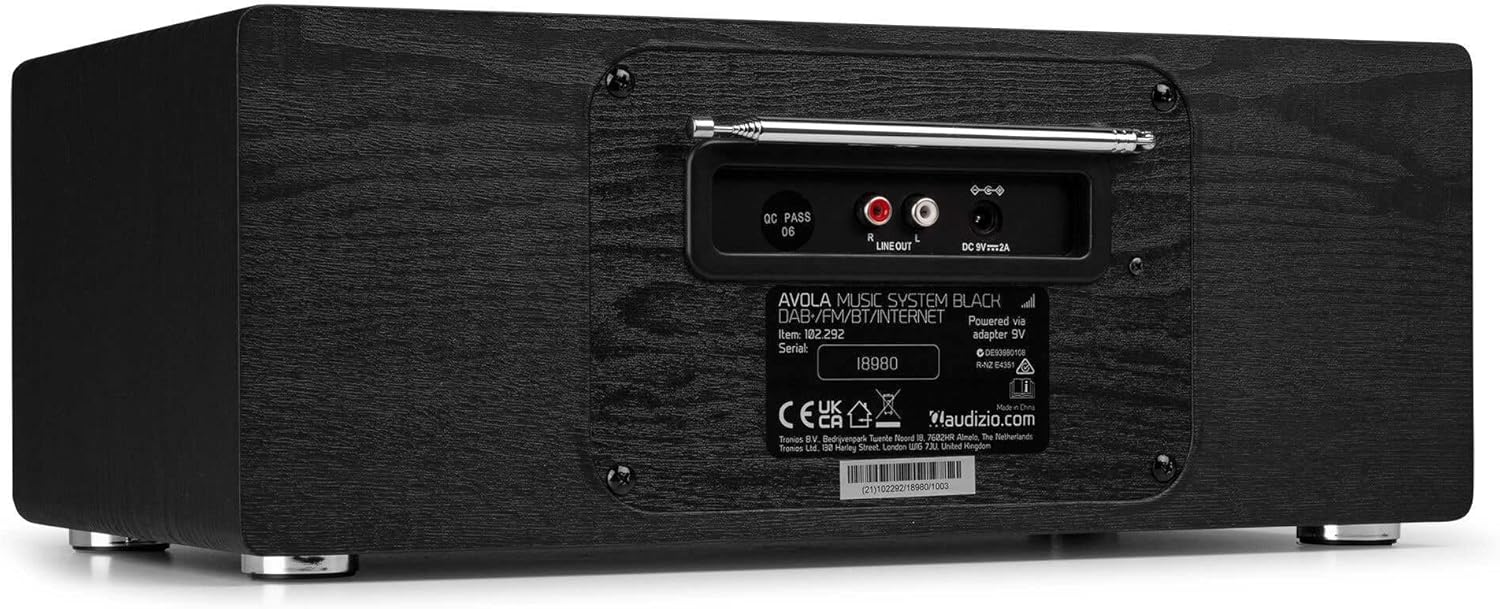
תמונה: אחורי view of the Audizio Avola, highlighting the antenna and connection ports.
The rear panel houses essential connections:
- אנטנה טלסקופית: For DAB+ and FM radio reception. Extend fully for best signal.
- יציאת קו (RCA): לחיבור לרשת חיצונית ampמחצבים או רמקולים.
- קלט חשמל DC 9V 2A: לחיבור מתאם החשמל.
5. התקנה
5.1 חיבור מתח
- Connect the power adapter to the DC 9V 2A input on the rear of the Avola unit.
- חברו את מתאם החשמל לשקע קיר מתאים.
- The unit will enter standby mode. Press the STANDBY button on the unit or remote control to power on.
5.2 הגדרת אנטנה
לקבלת קליטת רדיו DAB+ ו-FM אופטימלית, פרשו את האנטנה הטלסקופית הממוקמת בפאנל האחורי במלואה. כוונו את מיקומה לקבלת איכות האות הטובה ביותר.
5.3 Initial Setup (WLAN Connection)
To access Internet Radio features, the Avola must be connected to a Wi-Fi network.
- Upon first power-on, the unit may prompt you to set up the network connection. If not, press MENU, navigate to 'System Settings' and then 'Network'.
- Select 'Wi-Fi Network' and choose 'Scan' to find available networks.
- בחר את רשת ה- Wi-Fi שלך מהרשימה.
- Enter your Wi-Fi password using the TUNE/SELECT knob to navigate characters and press to confirm each character.
- Once connected, the display will show a Wi-Fi icon.
6. מצבי הפעלה
6.1 רדיו אינטרנט
גישה לאלפי תחנות רדיו ברחבי העולם דרך חיבור ה-Wi-Fi שלך.
- Press the MENU button and select 'Internet Radio'.
- ניתן לדפדף בין תחנות לפי מיקום, ז'אנר או לחפש תחנות ספציפיות.
- Use the TUNE/SELECT knob to navigate and select.
- To save a station as a preset, press and hold the PRESET/REPEAT button until the preset menu appears, then select a preset number.

Image: The Audizio Avola display showing the Internet Radio interface.
רדיו 6.2 DAB+
Digital Audio Broadcasting Plus offers high-quality digital radio.
- Press the MENU button and select 'DAB Radio'.
- היחידה תסרוק באופן אוטומטי אחר תחנות DAB+ זמינות.
- Use the TUNE/SELECT knob to browse and select stations.
- שמור הגדרות קבועות מראש כמתואר עבור רדיו אינטרנט.
6.3 רדיו FM
Listen to traditional analog FM radio broadcasts.
- Press the MENU button and select 'FM Radio'.
- Use the TUNE/SELECT knob to manually tune or press and hold to auto-scan for stations.
- שמור הגדרות קבועות מראש כמתואר עבור רדיו אינטרנט.
נגן תקליטורים 6.4
נגן את תקליטורי האודיו האהובים עליך.
- Press the MENU button and select 'CD Player'.
- Press the 'Open' button next to the CD tray to open it.
- Carefully place an audio CD onto the tray with the label side facing up.
- Press the 'Open' button again to close the tray. The unit will begin playing the CD automatically.
- Use the Play/Pause, Stop, and Skip buttons for playback control.
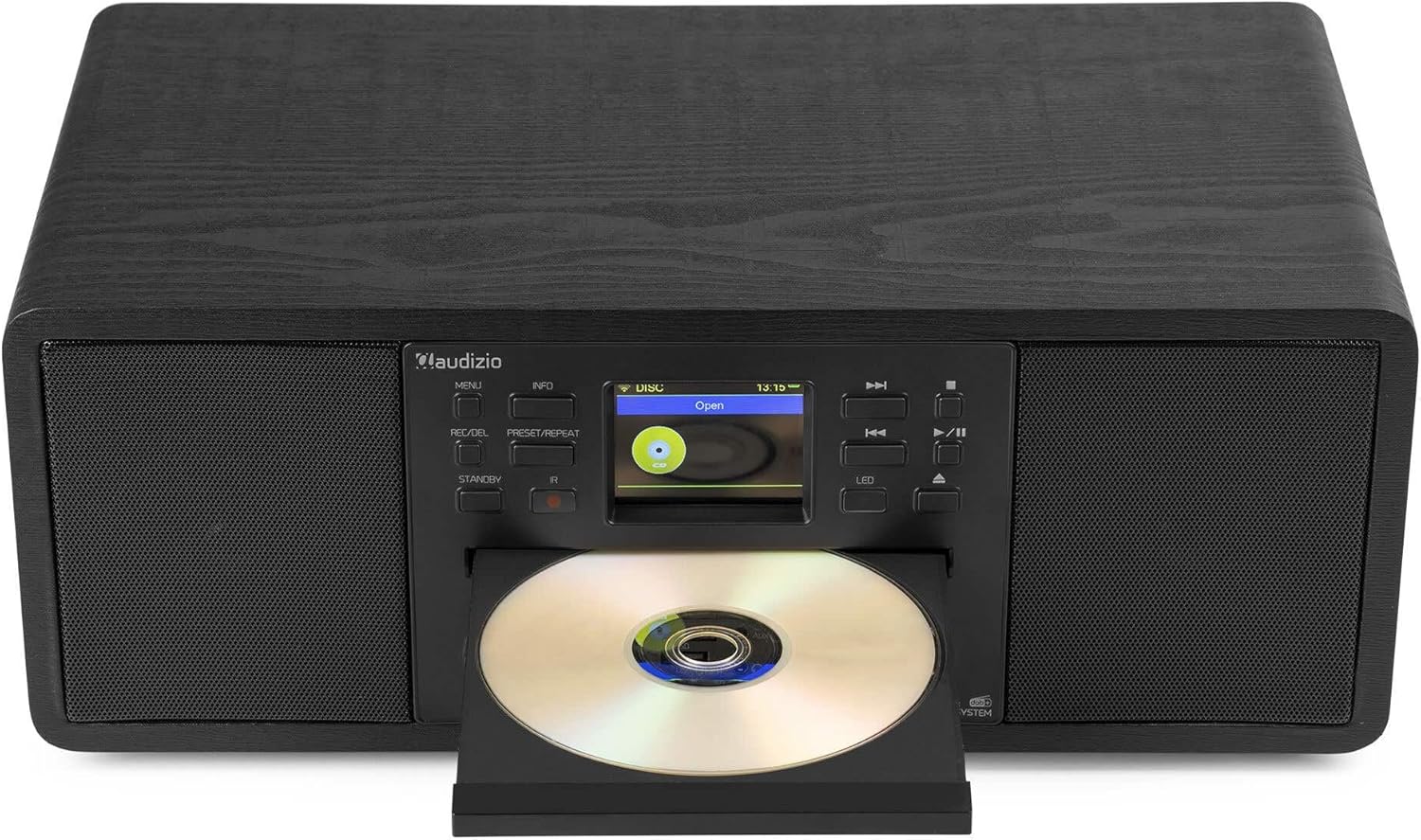
Image: The Audizio Avola with its CD tray open, ready for disc insertion.
6.5 קישוריות בלוטות'
הזרם אודיו באופן אלחוטי מהסמארטפון, הטאבלט או מכשירים אחרים התומכים ב-Bluetooth.
- Press the MENU button and select 'Bluetooth'.
- The Avola will enter pairing mode and become discoverable.
- On your Bluetooth device, search for 'Audizio Avola' in the Bluetooth settings and select it to pair.
- Once connected, the display will show 'BT Connected'. You can now play audio from your device through the Avola.

Image: The Audizio Avola display indicating a successful Bluetooth connection.
6.6 השמעת USB/SD
הפעל אודיו fileמכונני USB או כרטיסי SD.
- Insert a USB drive into the USB port or an SD card into the SD card slot on the front panel.
- Press the MENU button and select 'USB' or 'SD' (the unit may automatically switch to the correct mode).
- נווט דרך files and folders using the TUNE/SELECT knob.
- Press the TUNE/SELECT knob to play a selected track.
7. תחזוקה
- ניקוי היחידה: Use a soft, dry, lint-free cloth to clean the exterior of the unit. Do not use abrasive cleaners, waxes, or solvents.
- ניקוי עדשות תקליטורים: אם ניגון התקליטור הופך להיות לא יציב, השתמשו בתקליטור ניקוי עדשות התקליטורים הזמין מסחרית כדי לנקות את עדשת הלייזר.
- אִחסוּן: אם מאחסנים את המכשיר לתקופה ממושכת, יש לנתק אותו מאספקת החשמל ולאחסן אותו במקום קריר ויבש.
8. פתרון תקלות
| בְּעָיָה | סיבה אפשרית | פִּתָרוֹן |
|---|---|---|
| אין כוח | מתאם החשמל לא מחובר או ששקע פגום. | בדוק את חיבורי החשמל. נסה שקע אחר. |
| אין קול | עוצמת קול נמוכה מדי, השתקה מופעלת, או שנבחר מקור שגוי. | Increase volume. Check if mute is active. Ensure correct input source is selected. |
| Internet Radio not connecting | Incorrect Wi-Fi password, weak signal, or network issue. | Re-enter Wi-Fi password. Move unit closer to router. Check router status. |
| DAB+/FM reception poor | האנטנה לא מורחבת או שאזור הקליטה חלש. | פרש וכוונן את האנטנה הטלסקופית במלואה. נסה למקם מחדש את היחידה. |
| תקליטור לא מתנגן | CD inserted incorrectly, dirty/scratched CD, or unsupported format. | Ensure CD is inserted label-side up. Clean or replace CD. Verify CD format (supports CD-DA, MP3). |
| בלוטות' לא מתאמת | Device not in pairing mode, or Avola not discoverable. | Ensure both devices are in pairing mode. Check Bluetooth settings on your device. |
9. מפרטים
| תכונה | מִפרָט |
|---|---|
| שם הדגם | Avola |
| מספר פריט | 102.292 |
| מידות (LxWxH) | 45.8 x 25.8 x 19.7 ס"מ |
| מִשׁקָל | 4 ק"ג |
| קלט כוח | 220 Volt (via power adapter) |
| Speaker Output Power (Max) | 60 וואט |
| מצב פלט שמע | סטריאו |
| פורמטי שמע נתמכים | CD-DA, MP3 |
| טכנולוגיית קישוריות | WLAN, Bluetooth, AUX, RCA |
| מכשירים תואמים | MP3 Player, PC, Smartphone, Tablet |
| צֶבַע | שָׁחוֹר |
10. אחריות ותמיכה
Audizio products are designed and manufactured to the highest standards. In the unlikely event of a problem with your product, please contact your retailer for assistance. Keep your proof of purchase for warranty claims. For further support or inquiries, please refer to the official Audizio webלאתר או לפנות לשירות הלקוחות שלהם.