
1. הקדמה
This manual provides detailed instructions for the installation, operation, and maintenance of the ADVANTECH PCIE-1612C-AE 4-Port RS-232/422/485 PCIe Communication Card. This interface module is designed to expand your system's serial communication capabilities, offering robust and reliable data transfer for industrial and commercial applications. Please read this manual thoroughly before attempting to install or operate the device.
2. מידע בטיחות
יש להקפיד על אמצעי הזהירות הבאים כדי למנוע נזק למכשיר ולהבטיח את בטיחותך האישית:
- Always disconnect power from your computer system before installing or removing any internal components.
- Wear an anti-static wrist strap and work on an anti-static mat to prevent electrostatic discharge (ESD) damage to the card and other components.
- טפחו על הכרטיס בקצוותיו כדי להימנע ממגע עם רכיבים רגישים.
- ודא אוורור נאות בתוך מארז המחשב כדי למנוע התחממות יתר.
- Do not expose the card to moisture or extreme temperatures.
3. תכולת החבילה
Verify that all items are present in the package. If any item is missing or damaged, contact your vendor immediately.
- 1 x ADVANTECH PCIE-1612C-AE 4-Port RS-232/422/485 PCIe Communication Card
- Documentation (e.g., Quick Start Guide, Driver CD/USB - may vary by package)
4. המוצר נגמרview
The ADVANTECH PCIE-1612C-AE is a high-performance PCIe communication card designed for reliable serial data transmission. It features four independent serial ports, configurable for RS-232, RS-422, or RS-485 standards, making it versatile for various industrial and embedded applications.
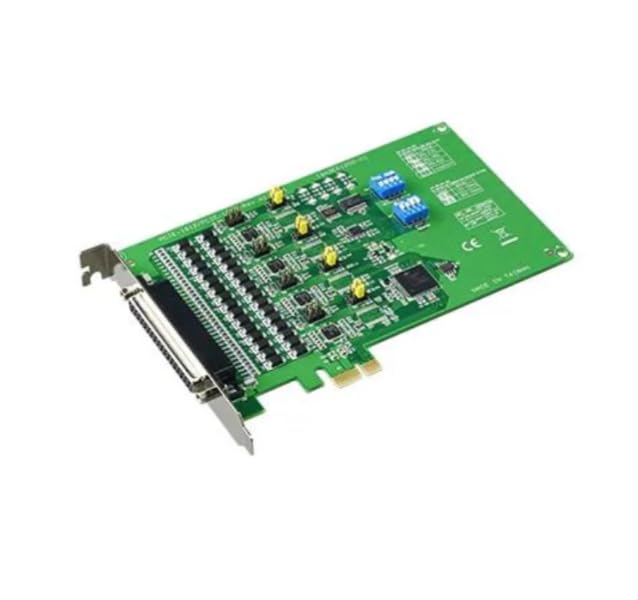
Figure 1: ADVANTECH PCIE-1612C-AE 4-Port RS-232/422/485 PCIe Communication Card. This image shows the physical card with its PCIe connector and four serial port connectors.
תכונות עיקריות:
- Number of Channels / Ports: 4 יציאה
- קצב נתונים מרבי: 921.6 קילו-ביט לשנייה
- סוג ממשק: PCIe, RS-232/422/485
- אספקה תפעולית כרךtage: 3.3 וולט
- טווח טמפרטורות עבודה: -10 מעלות צלזיוס עד +60 מעלות צלזיוס
5. התקנה
Follow these steps to properly install the PCIE-1612C-AE card into your computer system:
- הכן את המערכת שלך: Power off your computer and disconnect the power cord from the wall outlet. Disconnect all peripheral devices.
- פתח את מארז המחשב: הסר את הפאנל הצדדי של מארז המחשב כדי לגשת ללוח האם ולחריצי ההרחבה.
- אתר חריץ PCIe זמין: Identify an empty PCI Express (PCIe) slot on your motherboard. The PCIE-1612C-AE requires a standard PCIe slot.
- הסר את מכסה החריץ: Remove the metal slot cover corresponding to the chosen PCIe slot from the back of your computer case.
- Install the Card: Carefully align the PCIE-1612C-AE card with the PCIe slot. Apply even pressure to both ends of the card until it is firmly seated in the slot. Ensure the card's bracket is flush with the back of the computer case.
- אבטח את הכרטיס: Secure the card's bracket to the computer case using the screw or latch mechanism provided by your case.
- סגור את התיק: Replace the computer's side panel and secure it.
- חבר מחדש את החשמל: Reconnect the power cord and all peripheral devices. Power on your computer.
- התקן דרייברים: Once the operating system boots, it may automatically detect the new hardware. Install the necessary drivers from the provided media or download them from the ADVANTECH webאתר. פעל לפי ההוראות שעל המסך להתקנת מנהל ההתקן.
6. הפעלה
After successful installation and driver setup, the PCIE-1612C-AE card's serial ports will be available in your operating system's Device Manager (Windows) or equivalent system information utility (Linux). Each port can be configured for its specific communication parameters (baud rate, data bits, parity, stop bits, flow control) through your operating system's settings or application software.
- חיבור התקנים: Connect your RS-232, RS-422, or RS-485 compatible devices to the corresponding ports on the PCIE-1612C-AE card using appropriate serial cables.
- תצורת תוכנה: Use your serial communication software or application to select the correct COM port number assigned to each physical port on the card and configure the communication parameters to match your connected device.
- RS-422/485 Mode: For RS-422/485 modes, ensure proper termination and biasing are applied if required by your network topology. Refer to your device's documentation for specific requirements.
7. תחזוקה
The PCIE-1612C-AE card is designed for long-term reliability with minimal maintenance. However, adhering to general computer maintenance practices will help ensure optimal performance:
- הסרת אבק: Periodically open your computer case (after disconnecting power) and use compressed air to gently remove dust buildup from the card and surrounding components. Dust can impede heat dissipation and lead to component failure.
- בקרת סביבה: ודא שסביבת ההפעלה נשארת בטווחי הטמפרטורה והלחות שצוינו.
- ניהול כבלים: Keep internal cables tidy to maintain good airflow within the case.
8. פתרון תקלות
If you encounter issues with your PCIE-1612C-AE card, consider the following troubleshooting steps:
- כרטיס לא זוהה:
- ודא שהכרטיס יושב במלואו בחריץ ה-PCIe.
- נסה להתקין את הכרטיס בחריץ PCIe אחר.
- Check your computer's BIOS/UEFI settings to ensure PCIe slots are enabled.
- דרייברים לא מותקנים/לא עובדים:
- Verify you have downloaded the correct drivers for your operating system and card model from the ADVANTECH webאֲתַר.
- Uninstall any previous serial port drivers before installing new ones.
- Check Device Manager for any error codes related to the serial ports.
- שגיאות תקשורת:
- Confirm that the serial cable is correctly connected and not damaged.
- Verify that the communication parameters (baud rate, data bits, parity, stop bits, flow control) in your software match those of the connected device.
- For RS-485, check for proper wiring (A/B lines) and termination.
- Test with a known working serial device or loopback test if possible.
9. מפרטים
| תכונה | מִפרָט |
|---|---|
| מספר דגם | PCIE-1612C-AE |
| יַצרָן | ADVANTECH |
| סוג מוצר | מודולי ממשק |
| Number of Channels / Ports | 4 יציאה |
| סוג ממשק | PCIe, RS-232/422/485 |
| קצב נתונים מקסימאלי | 921.6 קילו-ביט לשנייה |
| אספקה תפעולית כרךtage | 3.3 וולט |
| טמפרטורת עבודה מינימלית | -10 מעלות צלזיוס |
| טמפרטורת פעולה מקסימלית | +60 מעלות צלזיוס |
| משקל פריט | 7 פאונד |
10. אחריות ותמיכה
For warranty information, please refer to the documentation included with your purchase or contact your reseller or ADVANTECH directly. Warranty terms and conditions may vary by region and purchase agreement.
For technical support, driver downloads, or further assistance, please visit the official ADVANTECH website or contact their customer support services. Provide your product model number (PCIE-1612C-AE) and any relevant system information when seeking support.