1. המוצר נגמרview
The Dardoo Sim Racing Triple Monitor Stand is designed to enhance your racing simulator experience by providing a stable and adjustable mounting solution for multiple displays. It supports three smaller screens (24-32 inches) or one large screen (24-65 inches) and is specifically compatible with Dardoo round tube racing cockpits.
תכונות עיקריות:
- Versatile Triple Monitor Support: Accommodates three 24-32 inch monitors or a single 24-65 inch display.
- גובה וזווית מתכווננים: Allows for precise positioning of monitors to achieve optimal viewing comfort and reduce eye strain during extended use.
- Wide VESA Compatibility: Supports VESA mounting patterns from 75x75 mm to 400x200 mm, ensuring compatibility with a broad range of monitors.
- Robust Flange Structure: Engineered for stability and durability, providing a secure foundation for your displays in a dynamic racing environment.
- עיצוב מונע החלקה: Equipped with non-slip pads to prevent movement and protect floor surfaces from scratches, ensuring a stable and secure setup.
2. הוראות בטיחות חשובות
Please read all instructions carefully before assembly and use. Failure to follow these instructions may result in injury or damage to the product or connected equipment.
- ודא שכל הרכיבים קיימים ולא ניזוקו לפני תחילת ההרכבה.
- Do not exceed the maximum weight capacity of 50 kg (110 lbs) for the stand.
- Assemble the stand on a flat, stable, and level surface to prevent tipping.
- Keep children and pets away from the assembly area. Small parts could be a choking hazard.
- הדקו היטב את כל הברגים והברגים, אך אל תחזקו אותם יתר על המידה.
- בדקו באופן קבוע את כל החיבורים כדי לוודא שהם נשארים מהודקים ומאובטחים.
- Use caution when adjusting the height or angle of the monitors to prevent pinching or dropping.
3. התקנה והתקנה
This section provides a general guide for assembling your Dardoo Sim Racing Triple Monitor Stand. For detailed, step-by-step instructions and diagrams, please refer to the official Installation Manual PDF.
Download the Installation Manual (PDF): לחץ כאן
3.1. פריקה ובדיקת רכיבים
Carefully unpack all contents from the box. Verify that all parts listed in the installation manual are present and undamaged. If any parts are missing or damaged, do not proceed with assembly and contact customer support.
3.2. שלבי הרכבה
- להרכיב את הבסיס: Connect the horizontal support beams to the vertical uprights, ensuring a stable foundation.
- חבר זרועות הצג: Secure the monitor mounting arms to the main frame. These arms are designed to hold your displays.
- התקנת צגים: Attach your monitors to the VESA-compatible plates on the monitor arms. Ensure the VESA pattern on your monitor matches the stand's compatibility (75x75 mm to 400x200 mm).
- התאם מיקום: Once monitors are mounted, adjust their height, angle, and horizontal position for optimal alignment and viewing.
- Secure to Cockpit (Optional): If using with a compatible Dardoo round tube racing cockpit, follow the specific instructions in the manual to securely attach the stand to the cockpit frame.

Figure 3.2.1: The Dardoo Sim Racing Triple Monitor Stand fully assembled with three monitors, showcasing its robust design and multi-display capability.

Figure 3.2.2: A diagram illustrating the overall dimensions of the monitor stand, including its height (51.8 inches), width (67 inches), and depth (20 inches).
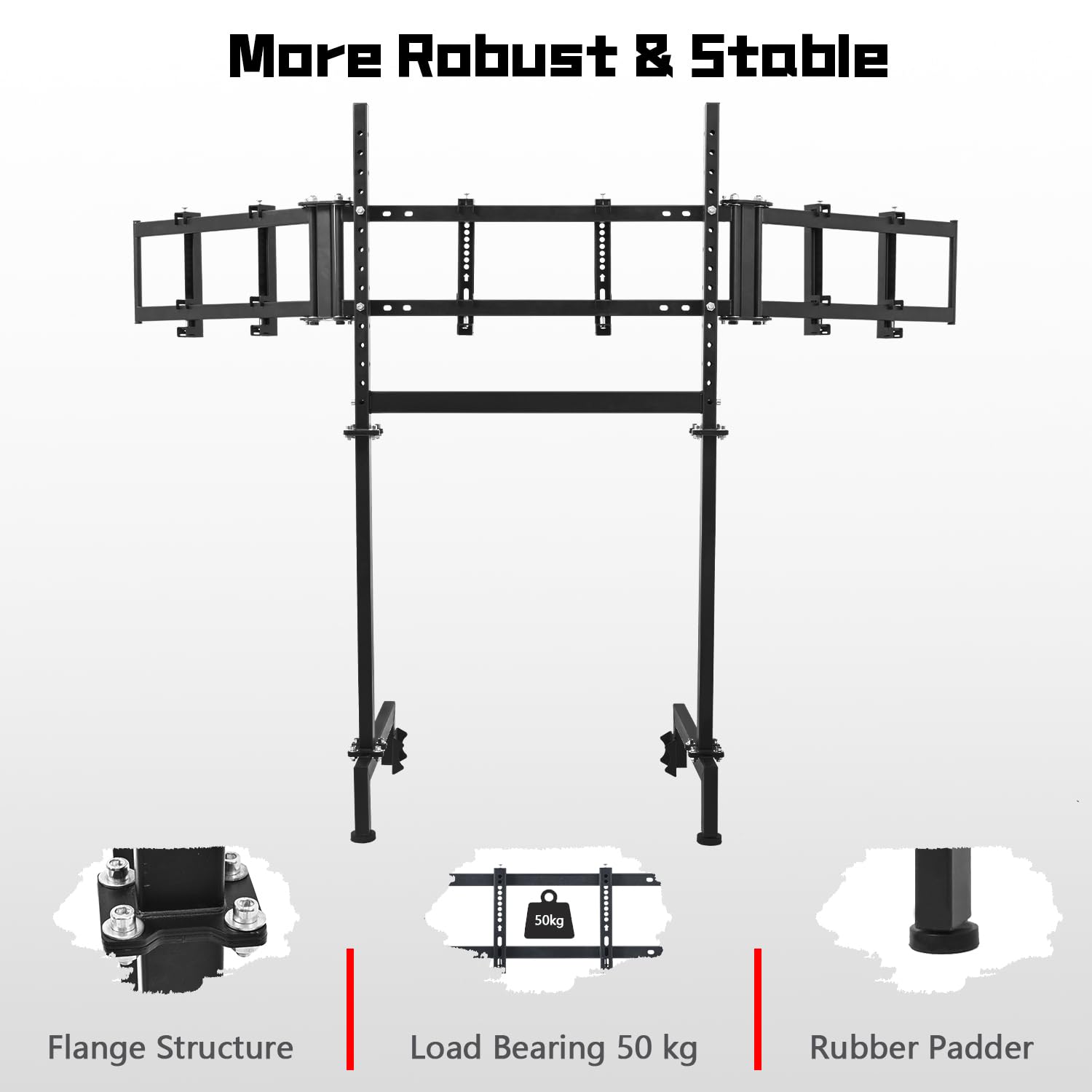
איור 3.2.3: תקריב view of the stand's components, emphasizing the robust flange structure, the 50 kg load bearing capacity, and the non-slip rubber padders for enhanced stability.

Figure 3.2.4: An illustration detailing the various VESA mounting patterns compatible with the stand, including 75x75mm, 100x100mm, 150x150mm, 200x100mm, 200x150mm, 200x200mm, and 400x200mm.

Figure 3.2.5: The monitor stand shown in conjunction with a racing simulation cockpit (electronic devices not included), demonstrating its intended use and compatibility with Dardoo's round tube cockpits.

Figure 3.2.6: A rear perspective of the monitor stand, highlighting the secure mounting points for the displays and the overall structural integrity.
4. תפעול והתאמות
The Dardoo Sim Racing Triple Monitor Stand offers various adjustment options to customize your viewניסיון.
4.1. התאמת גובה
The vertical uprights of the stand allow for height adjustment. Loosen the securing bolts on the vertical posts, slide the monitor assembly to your desired height, and then re-tighten the bolts firmly to secure the position.
4.2. כוונון זווית
The side monitor arms can be angled inwards to create an immersive wrap-around effect. Loosen the pivot bolts on the side arms, adjust the angle of the monitors to your preference, and then re-tighten the bolts to lock them in place. The main monitor mount also allows for slight tilt adjustments.
4.3. הרכבת צג
Ensure your monitors are securely attached to the VESA plates using the appropriate screws provided. Double-check that the VESA pattern on your monitor aligns with the stand's supported patterns (75x75 mm to 400x200 mm) for a safe and stable mount.

Figure 4.3.1: A visual representation of the stand's adjustable features, including height and angle modifications for optimal monitor positioning.
5. טיפול ותחזוקה
Proper care and maintenance will ensure the longevity and optimal performance of your monitor stand.
- ניקוי: השתמשו במטלית רכה ויבשה כדי לנגב את המעמד. במקרה של סימנים עקשניים, השתמשו במטלית רכה ויבשה.amp ניתן להשתמש במטלית עם סבון עדין, ולאחר מכן לייבש היטב. יש להימנע מחומרי ניקוי שוחקים או ממסים.
- בדיקה רגילה: Periodically check all bolts, screws, and connections to ensure they are tight. Vibrations from racing simulators can sometimes loosen fasteners over time.
- חלוקת משקל: Ensure monitors are evenly distributed on the stand to maintain balance and prevent undue stress on any single point.
- תנאים סביבתיים: Store and use the stand in a dry environment. Avoid extreme temperatures or high humidity, which can affect the material integrity.
6. מדריך לפתרון בעיות
סעיף זה מטפל בבעיות נפוצות שאתה עשוי להיתקל בהן עם מעמד הצג שלך.
6.1. חוסר יציבות בעמידה
- לְהַנפִּיק: The stand wobbles or feels unstable.
פִּתָרוֹן: Ensure all assembly bolts are fully tightened. Verify the stand is placed on a flat, level surface. Check that the non-slip pads are properly positioned.
6.2. Monitors Not Level or Aligned
- לְהַנפִּיק: Monitors are not at the same height or have uneven gaps.
פִּתָרוֹן: Loosen the height adjustment bolts slightly, adjust each monitor individually to achieve perfect alignment, then re-tighten. For side monitors, adjust the angle pivot bolts.
6.3. Difficulty Mounting Monitors
- לְהַנפִּיק: Monitors do not fit the mounting plates.
פִּתָרוֹן: Confirm your monitor's VESA pattern matches one of the supported patterns (75x75 mm, 100x100 mm, 150x150 mm, 200x100 mm, 200x150 mm, 200x200 mm, 400x200 mm). Ensure you are using the correct screws for your monitor's VESA holes.
7. מפרט מוצר
| תְכוּנָה | פְּרָט |
|---|---|
| מספר דגם | MON3-FIT-R50MM-00D0 |
| מידות המוצר | 67 x 20 x 51.8 אינץ' |
| משקל פריט | 39 פאונד |
| Monitor Compatibility (Triple) | 24-32 inches (each) |
| Monitor Compatibility (Single) | 24-65 אינץ' |
| תאימות VESA | 75x75 mm, 100x100 mm, 150x150 mm, 200x100 mm, 200x150 mm, 200x200 mm, 400x200 mm |
| נשיאת עומס מקסימלית | 50 ק"ג (110 פאונד) |
| יַצרָן | דרדו |
| ארץ מוצא | סִין |
| תאריך ראשון זמין | 11 בנובמבר 2024 |
8. אחריות ותמיכת לקוחות
Dardoo is committed to providing high-quality products. For information regarding warranty coverage, terms, and conditions, please refer to the documentation included with your purchase or visit the official Dardoo webאֲתַר.
If you encounter any issues with your Dardoo Sim Racing Triple Monitor Stand or require technical assistance, please contact Dardoo customer support. Have your model number (MON3-FIT-R50MM-00D0) and purchase information ready when contacting support.
יַצרָן: דרדו
לקבלת מידע התמיכה העדכני ביותר, אנא בקרו באתר Dardoo Brand Store on Amazon.