
1. הקדמה
Thank you for choosing the BoyKeep Ease Life Light Bulb Security Camera D115. This manual provides essential information for the safe and effective installation, operation, and maintenance of your security camera. Please read this manual thoroughly before use and retain it for future reference.
מה יש בקופסה
- BoyKeep Ease Life Light Bulb Security Camera (D115)
- Mounting Base (if applicable, for E27 socket)
- מדריך למשתמש
Note: The D115 camera is designed to fit standard E27 light bulb sockets.
2. מידע בטיחות
- Ensure the power supply is disconnected before installing or removing the camera.
- מכשיר זה מיועד ל שימוש פנימי בלבדאין לחשוף אותו לגשם, לחות או טמפרטורות קיצוניות.
- Do not attempt to disassemble or modify the camera. This may void the warranty and pose safety risks.
- Keep the camera away from strong magnetic fields or sources of interference.
- Use only the specified power source (E27 light socket).
- הרחק מהישג ידם של ילדים.
3. המוצר נגמרview
The BoyKeep Ease Life D115 is a 1080P light bulb security camera featuring 360° pan and 95° tilt capabilities, color night vision, motion detection, two-way talk, and easy Wi-Fi connectivity.
רכיבי מצלמה

תְמוּנָה: מְפוֹרָט view of the BoyKeep D115 camera, highlighting its E27 light socket, microphone, array LEDs, HD lens, white LEDs, light sensor, memory card slot, and reset button.
- E27 Light Socket: Standard screw-in base for power and installation.
- עדשת HD: Captures 1080P video resolution.
- Array LEDs & White LEDs: Provide enhanced night vision, including color night vision.
- Mic & Speaker: אפשר תקשורת שמע דו-כיוונית.
- חיישן אור: מזהה אור סביבתי להפעלה אוטומטית של ראיית לילה.
- חריץ לכרטיס זיכרון: Supports local storage (MicroSD card not included).
- לחצן איפוס: Used for factory reset or pairing mode.
פונקציונליות פאן והטיה

תְמוּנָה: The camera demonstrates its ability to pan 355 degrees horizontally and tilt 95 degrees vertically, allowing it to cover a wide area without blind spots.
The camera offers a 355° horizontal pan and 95° vertical tilt, allowing you to remotely adjust the viewing angle via the mobile application to monitor almost every corner of your space.
4. התקנה
שלב 1: הכנה להתקנה
- Ensure the power to the light socket is turned OFF at the circuit breaker.
- Locate a standard E27 light bulb socket where you wish to install the camera.
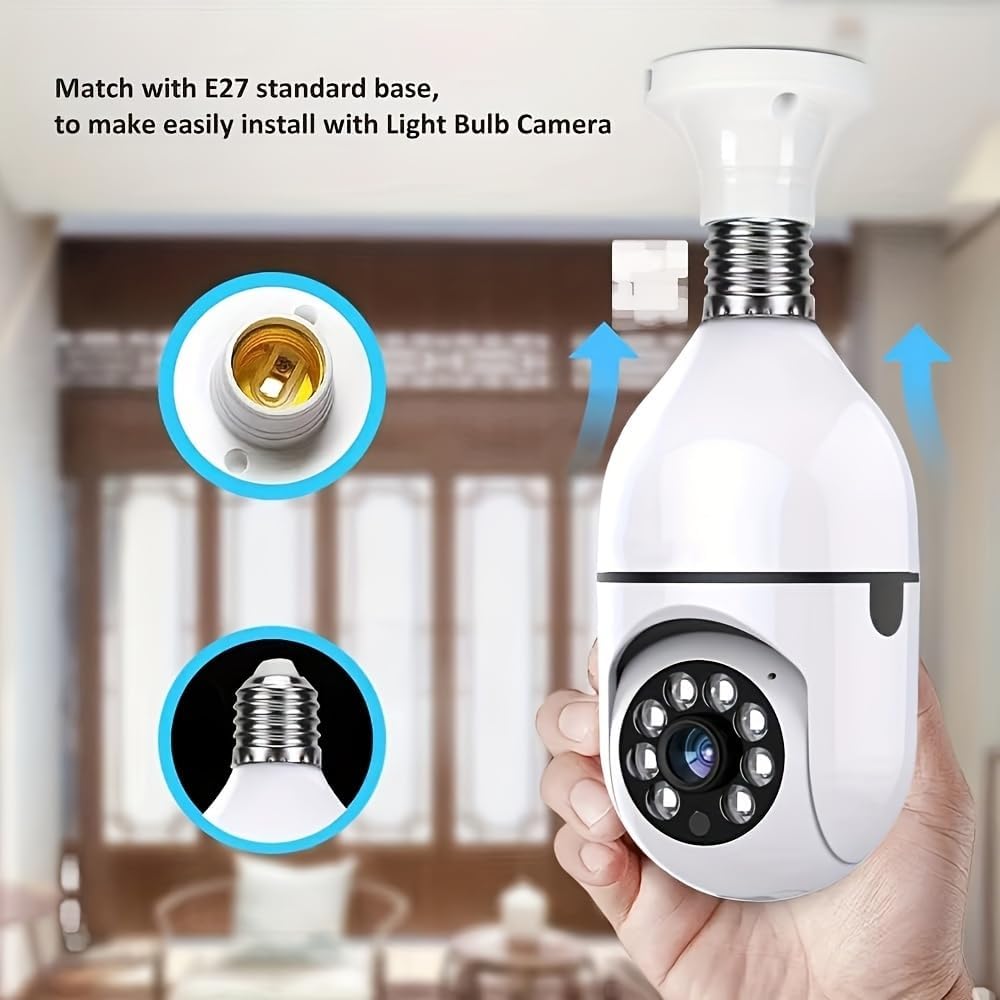
תְמוּנָה: The camera's E27 base is shown, illustrating how it screws into a standard light bulb socket for easy installation.
שלב 2: התקן את המצלמה
- Carefully screw the BoyKeep D115 camera into the E27 light socket until it is secure. Do not overtighten.
- Turn ON the power to the light socket at the circuit breaker. The camera will power on and initiate its startup sequence.

תְמוּנָה: The camera is shown installed in a lamp, emphasizing its E27 compatibility and dual-band (2.4G/5G) Wi-Fi connectivity for easy setup.
שלב 3: הורד את האפליקציה לנייד
חפש the designated BoyKeep security camera application on your smartphone's app store (iOS App Store or Google Play Store) and install it.
Step 4: Connect to Wi-Fi and Pair
- Open the BoyKeep application and create an account or log in.
- Follow the in-app instructions to add a new device. This typically involves scanning a QR code on the camera or selecting the camera model from a list.
- Connect the camera to your home Wi-Fi network. The D115 supports both 2.4GHz and 5GHz Wi-Fi bands. Ensure your phone is connected to the same Wi-Fi network during the pairing process.
- לאחר החיבור, תוכלו לתת שם למצלמה ולהתחיל לנטר.
5. הוראות הפעלה
לִחיוֹת View ובקרת סיבוב/הטיה
- Open the BoyKeep app and select your camera to view הפיד החי.
- Use the on-screen controls to pan (rotate horizontally) and tilt (rotate vertically) the camera lens to adjust your viewאזור ing.
קליק אחד View of Preset Locations

תְמוּנָה: The camera's ability to quickly switch between pre-defined monitoring points (1, 2, 3, 4, 5) in a room, offering a one-click view of specific areas.
The app allows you to set specific preset viewing positions. With a single tap, the camera will automatically move to a pre-configured location, enabling quick monitoring of key areas.
זיהוי תנועה והתראות
- The camera is equipped with motion detection capabilities. When motion is detected, the camera can send push notifications to your smartphone.
- Adjust motion detection sensitivity and alert settings within the app to suit your environment.
- An audible alarm can be triggered upon motion detection, configurable through the app.
שיחה דו סטרית
- השתמש במיקרופון וברמקול המובנים לתקשורת אודיו דו-כיוונית.
- Press and hold the microphone icon in the app to speak, and release to listen.
- The camera also features a one-touch call button for immediate communication from the camera's side.
הקלטה ואחסון

תְמוּנָה: The camera highlights its dual storage options: a memory card slot for local recording and an optional cloud recording service.
- אחסון כרטיס זיכרון: Insert a MicroSD card (not included) into the designated slot for continuous 24/7 recording or event-triggered recordings.
- אחסון בענן: The camera supports cloud storage services (subscription may be required after a trial period) for secure off-site video backup.
- גישה foo מוקלטtage through the playback feature in the mobile application.
רב-מכשיר Viewשיתוף ושיתוף
The BoyKeep app allows you to add multiple cameras and view up to four real-time video feeds simultaneously. You can also share camera access with family members on up to 10 devices.
6. תחזוקה
- ניקוי: נגבו בעדינות את עדשת המצלמה ואת גוף המצלמה בעזרת מטלית רכה ויבשה. אין להשתמש בחומרי ניקוי נוזליים או בחומרים שוחקים.
- עדכוני קושחה: Regularly check the mobile application for available firmware updates to ensure optimal performance and security.
- אִחסוּן: אם מאחסנים את המצלמה לתקופה ממושכת, נתקו אותה מהחשמל ואחסנו אותה במקום קריר ויבש.
7. פתרון תקלות
- המצלמה לא נדלקת: Ensure the E27 socket has power and the camera is screwed in correctly. Check the circuit breaker.
- לא ניתן להתחבר לרשת Wi-Fi:
- Ensure your Wi-Fi network is 2.4GHz or 5GHz and has a strong signal where the camera is installed.
- ודא שסיסמת ה-Wi-Fi שהוזנה נכונה.
- Try resetting the camera using the reset button and re-pairing.
- איכות תמונה ירודה:
- בדוק את עוצמת אות ה-Wi-Fi שלך.
- ודא שעדשת המצלמה נקייה.
- זיהוי תנועה לא עובד:
- ודא שזיהוי תנועה מופעל בהגדרות האפליקציה.
- התאם את רמות הרגישות.
- Two-way talk issues:
- Ensure microphone and speaker permissions are granted to the app on your phone.
- Check volume settings on both the app and your phone.
- מצלמה במצב לא מקוון: Check Wi-Fi connection and power supply. Restart the camera by turning off and on the power to the socket.
8. מפרטים
| תכונה | פְּרָט |
|---|---|
| שם הדגם | D115 |
| רזולוציית לכידת וידאו | 1080p |
| טכנולוגיית קישוריות | אלחוטי (Wi-Fi) |
| פרוטוקול קישוריות | Wi-Fi (2.4GHz/5GHz Dual Band) |
| שימוש בפנים/חוץ | מקורה |
| תכונה מיוחדת | Adjustable (Pan/Tilt), Color Night Vision, Motion Detection, Two-Way Talk, Audible Alarm |
| סוג בקר | אפליקציה (סמארטפון) |
| סוג הר | Ceiling Mount (E27 Light Socket) |
| מקור כוח | Corded Electric (via E27 socket) |
| מידות פריט | 3.11 x 11.8 x 6.73 אינץ' (בקירוב, אריזה) |
| פורמט לכידת וידאו | H264 |
9. אחריות ותמיכה
BoyKeep products are designed for reliability and performance. For warranty information, technical support, or customer service inquiries, please refer to the contact information provided on the product packaging or the official BoyKeep webאֲתַר.
אנא שמור את הוכחת הרכישה שלך עבור תביעות אחריות.