
1. הקדמה
This manual provides essential information for the installation, operation, and maintenance of your new Vetroo 850W 80 Plus Gold Full Modular ATX 3.1 Power Supply. Please read this manual thoroughly before installation and keep it for future reference.

Figure 1: Vetroo 850W Power Supply (White)
2. תכונות מוצר
- מוכן ל-PCIe דור 5.1: Meets the latest PCIE 5.1 standards for improved performance and efficiency. Backward compatible with both PCIE 4.0 and 3.0.
- Fully ATX 3.1 Compliant: Designed to meet the newest, most advanced power supply standards.
- Premium 105°C Capacitors: High-quality materials and construction ensure stable, low-temperature operation.
- 80 פלוס זהב מוסמך: Meets high standards for quality and efficiency, ensuring reliable performance and energy savings.
- עיצוב מודולרי לחלוטין: Allows for easy cable management and customization, reducing cable clutter by only installing necessary cables.
- פעולה שקטה: Features a 120mm FDB (Fluid Dynamic Bearing) fan for quiet cooling.
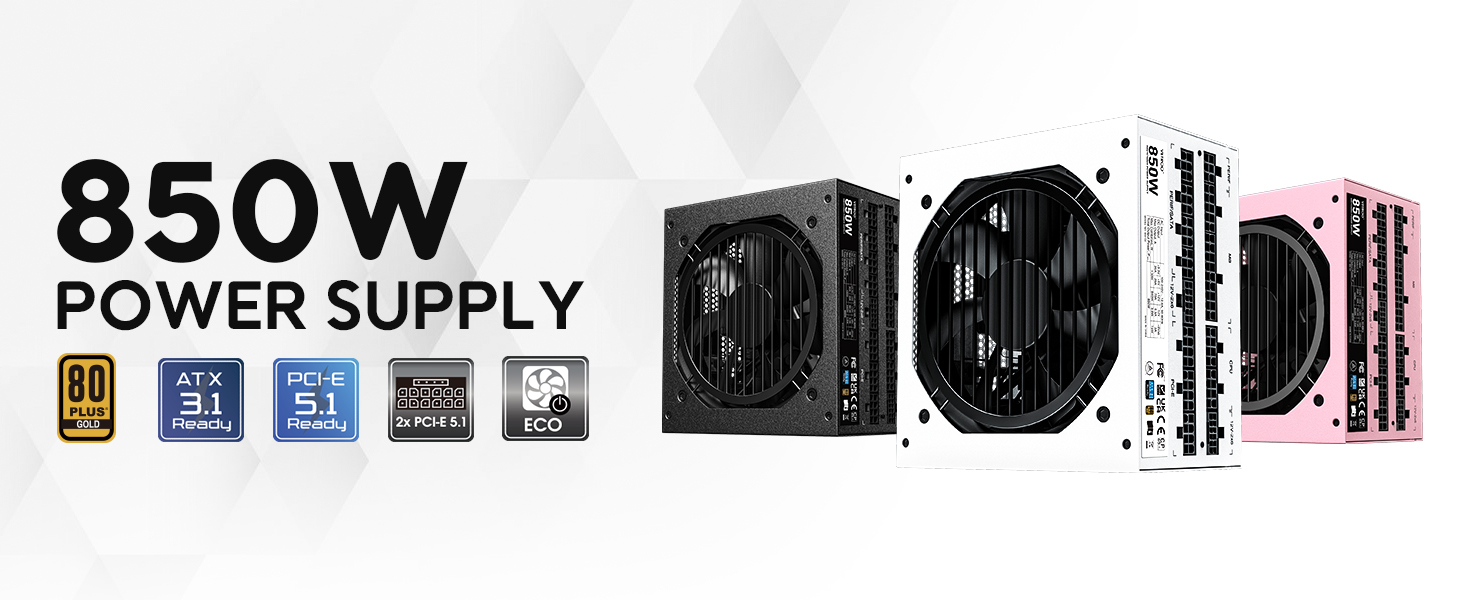
איור 2: מעלview of Vetroo 850W Power Supply features
3. תכולת החבילה
ודא שכל הרכיבים נמצאים בחבילה:
- Vetroo 850W Power Supply Unit
- Modular Cable Set (including 24-pin ATX, CPU, PCIe, SATA, Molex, FDD connectors)
- כבל מתח AC
- ברגי הרכבה
- קשרי ניהול כבלים
- Storage Bag for Unused Cables
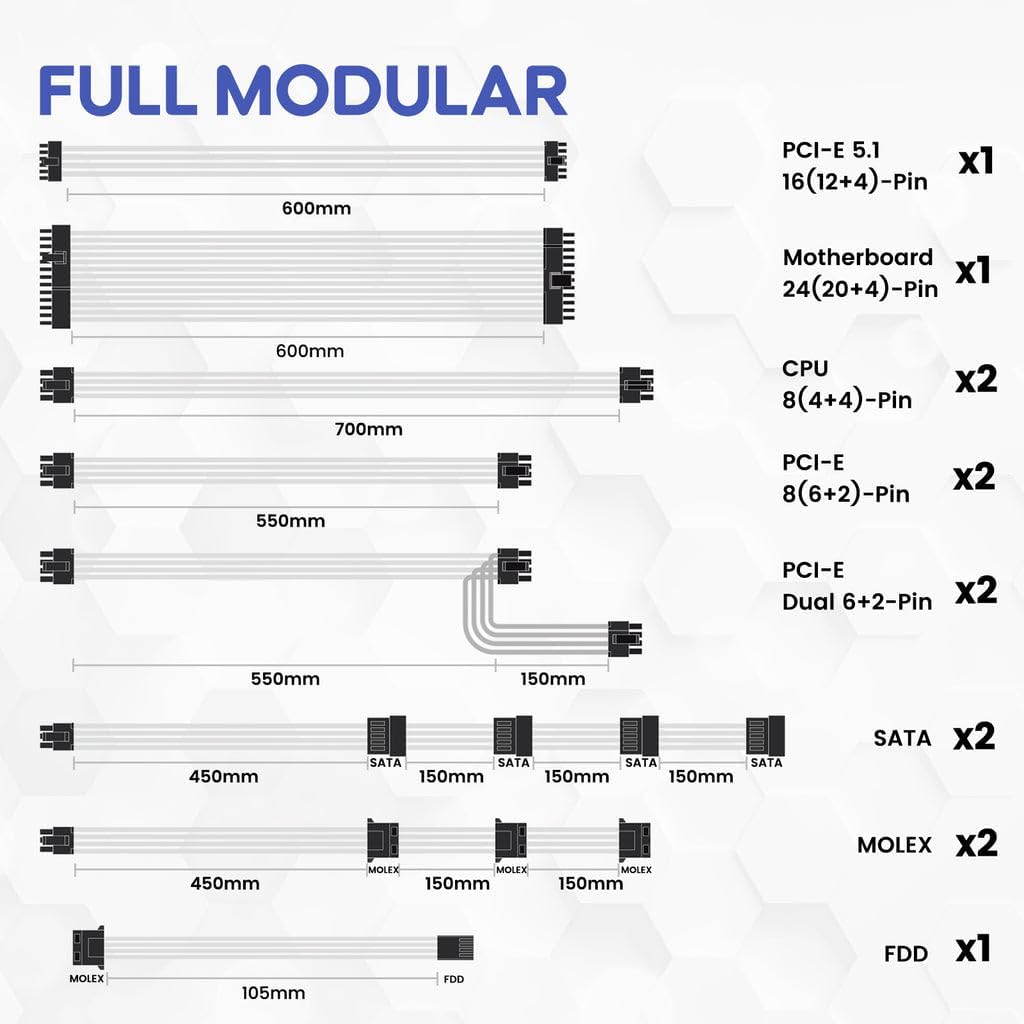
איור 3: כבלים מודולריים כלולים
4. מידע בטיחות
WARNING: Improper installation or use can result in serious injury or damage to your system.
- Always disconnect the AC power cord from the wall outlet before installing or removing the power supply.
- אין לפתוח את יחידת ספק הכוח. עוצמת קול גבוההtages נמצאים בפנים, גם כשהם מנותקים.
- Ensure all cables are securely plugged into their respective ports. Loose connections can cause damage.
- Use only the modular cables provided with this power supply. Third-party cables may not be compatible and could cause serious damage.
- Install the power supply in a well-ventilated area, away from high humidity and extreme temperatures.
5. התקנה והתקנה
Follow these general steps for installing your power supply. Refer to your PC case and motherboard manuals for specific instructions.
- הכן את המערכת שלך: ודא שהמחשב שלך כבוי ומנותק משקע החשמל בקיר.
- התקן את ספק הכוח: Secure the power supply unit into the designated bay in your PC case using the provided mounting screws.
- חיבור כבלי חשמל ראשיים: חבר את כבל ה-ATX בעל 24 פינים ללוח האם שלך.
- חברו את כבלי החשמל של המעבד: חבר את כבל/י החשמל של המעבד בעל 8 הפינים (4+4) ללוח האם שלך.
- חיבור כבלי חשמל PCIe: Connect the necessary PCIe power cables (e.g., 12V-2x6 for PCIe 5.1 GPUs, or 8-pin (6+2) for older GPUs) to your graphics card(s).

Figure 4: Dual PCIe 5.1 Connectors
- חיבור כבלי ציוד היקפי: Connect SATA, Molex, and FDD cables to your storage drives and other peripherals as needed.
- ניהול כבלים: Utilize the fully modular design and included cable ties to route cables neatly, improving airflow and aesthetics.
- בדיקה סופית: Double-check all connections to ensure they are secure before closing your PC case.
Video 1: Vetroo Power Supply Installation Guide. This video demonstrates the process of installing a Vetroo power supply into a PC case, including cable connections.
6. הוראות הפעלה
After successful installation, you can power on your system.
- הפעלה: Connect the AC power cord to the power supply and a wall outlet. Flip the main power switch on the power supply to the 'ON' position.
- מצב לסביבה: The power supply features an ECO mode switch. When 'ON', the fan will stop spinning unless the load is above approximately 50% of the rated capacity, ensuring silent operation at low loads. When 'OFF', the fan will spin continuously.

Figure 5: Power Switch and ECO Mode
7. תחזוקה
תחזוקה נאותה מבטיחה את אורך החיים והביצועים האופטימליים של ספק הכוח שלך.
- ניקוי: Periodically clean the exterior of the power supply and the fan grille to prevent dust buildup, which can impede airflow and cooling. Use compressed air or a soft brush. Ensure the power supply is off and unplugged before cleaning.
- מבצע מעריצים: The 120mm Fluid Dynamic Bearing fan is designed for durability and quiet operation. In ECO mode, the fan may not spin at low loads; this is normal.
8. פתרון תקלות
אם אתם נתקלים בבעיות עם ספק הכוח שלכם, שקלו את הדברים הבאים:
- אין כוח: Ensure the AC power cord is securely connected to both the power supply and the wall outlet. Verify the main power switch on the power supply is in the 'ON' position. Check your wall outlet with another device.
- System Instability/Shutdowns: This power supply includes multiple protection features (OVP, OCP, OPP, SCP, UVP, OTP) to safeguard your components. If your system is unstable or shuts down unexpectedly, it could indicate an issue with power delivery or another component. Ensure all power connections are firm.
- המאוורר לא מסתובב: If the ECO mode is enabled, the fan will not spin until the power supply reaches approximately 50% load. This is normal operation for quiet performance. If the fan does not spin under heavy load, contact support.
- רעשים חריגים: If you hear unusual noises (e.g., coil whine, grinding), power down your system immediately and contact support.
9. מפרטים
| תכונה | פְּרָט |
|---|---|
| שם הדגם | 850 G5 |
| פלט וואטtage | 850 וואט |
| הסמכת יעילות | 80 פלוס זהב |
| תקן ATX | תואם ל-ATX 3.1 |
| תקן PCIe | PCIe Gen 5.1 Ready |
| גורם צורה | ATX |
| שיטת קירור | Air (120mm FDB Fan) |
| סוג מודולרי | מודולרי מלא |
| קבלים | Premium 105°C |
| מידות המוצר (L x W x H) | 5.9 x 5.5 x 3.4 אינץ' |
| משקל פריט | 5.7 פאונד (2.59 קילוגרם) |
| מכשירים תואמים | מחשב אישי |
| תכונות הגנה | OVP (Over Voltage Protection), OCP (Over Current Protection), OPP (Over Power Protection), SCP (Short Circuit Protection), UVP (Under Voltage Protection), OTP (Over Temperature Protection) |
10. אחריות ותמיכה
The Vetroo 850W Power Supply comes with a אחריות לשנה, ensuring long-term reliability and peace of mind. For technical support, warranty claims, or any questions regarding your product, please visit the official Vetroo webלאתר או לפנות למחלקת שירות הלקוחות שלהם.
Video 2: Vetroo 850W Power Supply - White Product Overviewסרטון זה מספק הצצה חזותיתview of the white Vetroo 850W Power Supply.