
1. הקדמה
This manual provides detailed instructions for the installation, operation, and maintenance of your SAMA V50 Mid Tower Gaming PC Case. Please read this manual thoroughly before beginning your PC build to ensure proper assembly and optimal performance. Keep this manual for future reference.

Image 1.1: SAMA V50 Mid Tower Gaming PC Case in a typical setup.
2. תכונות מוצר
The SAMA V50 Mid Tower Gaming PC Case is designed for high-performance systems, offering a blend of aesthetics, cooling efficiency, and user-friendly features.
- פנורמי 270 מעלות View: Dual-layer tempered glass panels and a removable front column provide an unobstructed view of internal components. Includes a display compartment for collectibles.
- קירור יוצא דופן: Comes with 4 pre-installed ARGB PWM fans. Supports 360mm radiators on the top and side, with CPU cooler clearance up to 181mm.
- פנים מרווח: Accommodates GPUs up to 410mm, features 7 PCIe expansion slots, and 4 storage bays. Supports a reverse-ATX layout.
- תאימות רחבה: Compatible with ATX, Micro-ATX, Mini-ITX, and reverse-ATX motherboards. Supports ATX PSUs up to 265mm.
- Solid Build Quality & Smart Cable Management: Constructed from durable SPCC steel, tempered glass, and ABS. Features magnetic dust filters, a tool-free design, and a dual-chamber layout for clean cable routing. Includes a perforated removable top panel and front USB-C port.
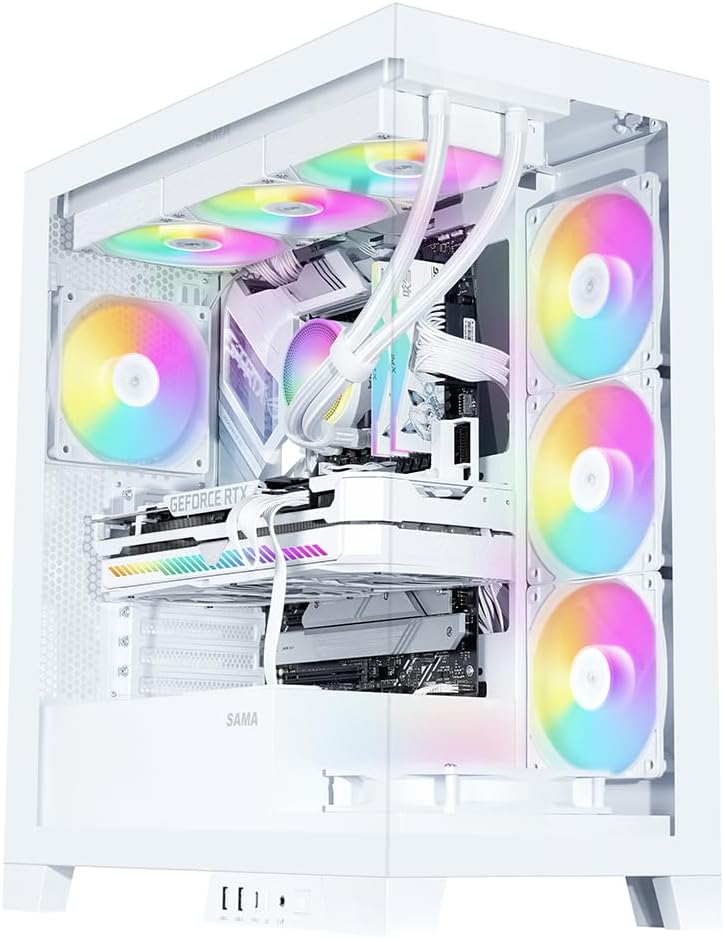
Image 2.1: Fully assembled SAMA V50 case highlighting internal components and RGB lighting.
3. תכולת החבילה
אנא ודא שכל הפריטים נמצאים בחבילה:
- SAMA V50 Mid Tower PC Case
- 4 x Pre-installed ARGB PWM Fans
- Accessory Box (containing screws, standoffs, zip ties, etc.)
- מדריך למשתמש (מסמך זה)
4. מפרטים
| תכונה | מִפרָט |
|---|---|
| שם הדגם | SAMA Case V50 |
| מידות (L x W x H) | 17.36 x 9.25 x 19.72 אינץ' (441 x 235 x 501 מ"מ) |
| סוג מקרה | מגדל אמצע |
| חוֹמֶר | SPCC Steel, Tempered Glass, ABS Plastic |
| תאימות לוח אם | ATX, Micro-ATX, Mini-ITX, Reverse-ATX |
| מרווח גובה של מקרר המעבד | עד 181 מ"מ |
| תמיכה באורך ה-GPU | עד 410 מ"מ |
| PSU Length Support | Up to 265mm (ATX) |
| חריצי הרחבה | 7 חריצי PCIe |
| דרייב בייס | 3 x 3.5" HDD, 3 x 2.5" SSD (combined with 3.5" mounts) |
| תמיכת מעריצים | עליון: 3 x 120 מ"מ / 2 x 140 מ"מ צד: 3 x 120 מ"מ אחורי: 1 x 120 מ"מ / 1 x 140 מ"מ תחתית: 3 x 120 מ"מ |
| תמיכת רדיאטור | עליון: 360 מ"מ / 280 מ"מ / 240 מ"מ / 140 מ"מ / 120 מ"מ Side: 360mm / 280mm / 240mm / 140mm / 120mm אחורי: 140 מ"מ / 120 מ"מ |
| יציאות קלט / פלט קדמיות | 2 x USB 3.0, 1 x USB 3.1 Type-C, HD Audio/Mic, Power Button, LED Control Button |

Image 4.1: Motherboard and cooling compatibility overview.
5. התקנה והתקנה
Follow these steps for assembling your PC components within the SAMA V50 case.
5.1. הכנת התיק
- הסר לוחות צד: Carefully remove the tempered glass side panels. The V50 features an easy-to-disassemble design.
- הסרת הפאנל העליון: The top panel is mounted with pressure mounts. It can be completely removed for easier hardware installation.
- Detachable Column: The internal column can be optionally disassembled for a cleaner aesthetic without affecting stability.

Image 5.1: Easy-to-disassemble design for convenient access.

Image 5.2: Detachable column for aesthetic customization.
5.2. התקנת לוח אם
- Install the necessary standoffs for your motherboard form factor (ATX, Micro-ATX, Mini-ITX) onto the motherboard tray.
- הנח בזהירות את לוח האם שלך על המעמדים, תוך יישור חורי הברגים.
- אבטחו את לוח האם באמצעות הברגים המצורפים.
5.3. GPU and PCIe Card Installation
- Remove the appropriate PCIe slot covers from the rear of the case.
- Insert your graphics card or other PCIe expansion cards into the motherboard's PCIe slots.
- Secure the cards with screws. The V50 supports bulky GPUs with its 7-slot PCIe design.
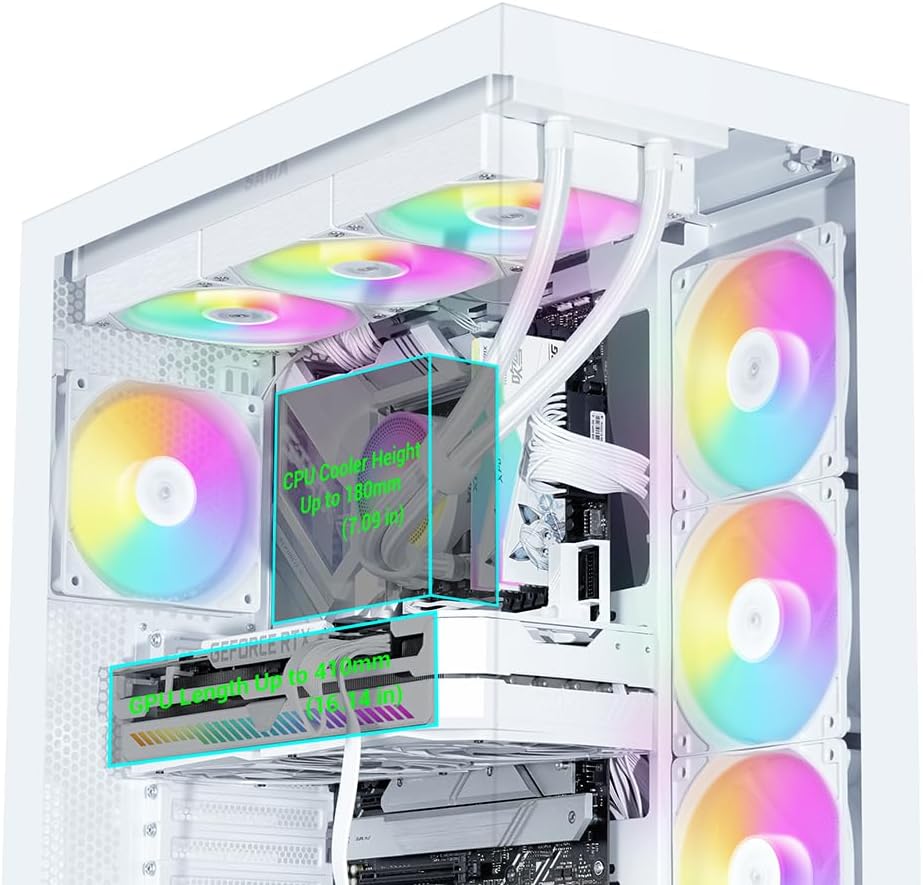
Image 5.3: Clearance for CPU cooler and GPU length.
5.4. התקנת התקן אחסון
The V50 offers multiple drive bays for 3.5" HDDs and 2.5" SSDs, primarily located behind the motherboard tray and near the PSU shroud.
- Mount your 2.5" SSDs or 3.5" HDDs into the designated drive trays/mounts.
- Secure the drives with the provided screws.

Image 5.4: Drive bay locations for SSDs and HDDs.
5.5. התקנת יחידת ספק כוח (PSU)
- Slide your ATX power supply into the dedicated compartment at the bottom rear of the case.
- אבטחו את ספק הכוח באמצעות ברגים מחלקו האחורי של המארז.
5.6. התקנת מאוורר ורדיאטור
The SAMA V50 comes with 4 pre-installed ARGB PWM fans. Additional fans or radiators can be installed as follows:
- רֹאשׁ: Supports up to 3 x 120mm fans or a 360mm radiator.
- צַד: Supports up to 3 x 120mm fans or a 360mm radiator.
- אֲחוֹרִי: Supports 1 x 120mm or 1 x 140mm fan.
- תַחתִית: Supports up to 3 x 120mm fans.

Image 5.5: Detailed fan and radiator support.
5.7. ניהול כבלים
The V50 features a dual-chamber layout and ample space behind the motherboard tray for effective cable management.
- Route all power cables and data cables through the designated cutouts to the rear of the motherboard tray.
- Use the included zip ties to bundle and secure cables, ensuring optimal airflow and a clean aesthetic.

Image 5.6: Airflow channel for efficient cooling.
5.8. חיבורי לוח קדמי
Connect the front panel cables (USB, Audio, Power, Reset, LED) to the corresponding headers on your motherboard. The I/O module is relocatable to two locations.

Image 5.7: Relocatable Front I/O Module.
5.9. ARGB Fan Hub Connection
The pre-installed ARGB fans connect to an included ARGB hub. To power the hub, connect a SATA power cable from your PSU to the SATA connector on the hub. Then, connect the ARGB cable from the hub to one of the 3-pin ARGB connectors on your motherboard. This allows for motherboard control of the fan lighting.

Image 5.8: Connecting the fan control board.
6. הוראות הפעלה
6.1. בקרת מאוורר ARGB
The pre-installed ARGB fans offer flexible lighting control:
- שליטה ידנית: Use the dedicated LED button on the front control panel to cycle through various lighting modes and colors.
- סנכרון לוח אם: To allow your motherboard to control the fan colors, press and hold the LED button on the front panel for approximately 7-8 seconds. This will switch control to your motherboard's ARGB software (e.g., ASUS Aura Sync, MSI Mystic Light, Gigabyte RGB Fusion).
Note: The included fan hub does not provide fan speed control. Fan speed is controlled via PWM connection to the motherboard.
7. תחזוקה
Regular maintenance helps ensure the longevity and optimal performance of your PC case.
- מסנני אבק: The V50 features magnetic dust filters. Regularly remove and clean these filters to prevent dust buildup and maintain good airflow.
- ניקוי מארז: השתמש רך, דamp cloth to clean the exterior surfaces of the case. For tempered glass panels, use a glass cleaner and a microfiber cloth. Avoid abrasive cleaners.
- אבק פנימי: השתמשו מעת לעת באוויר דחוס כדי לנקות אבק מרכיבים פנימיים ומאווררים. ודאו שהמערכת כבויה ומנותקת מהחשמל לפני הניקוי.
8. פתרון תקלות
If you encounter issues with your SAMA V50 case, refer to the following common solutions:
- מאווררים לא מסתובבים/אין RGB:
- Ensure the ARGB fan hub is correctly connected to your PSU via a SATA power cable.
- Verify that the ARGB cable from the hub is securely connected to a 3-pin ARGB header on your motherboard.
- If using motherboard software for RGB control, ensure the LED button on the front panel has been held for 7-8 seconds to transfer control.
- Check all fan PWM cables are connected to appropriate fan headers on the motherboard.
- Front Panel I/O Not Working:
- Confirm that all front panel cables (USB, Audio, Power, Reset, LED) are correctly connected to their respective headers on the motherboard. Refer to your motherboard manual for header locations.
- זרימת אוויר לקויה/טמפרטורות גבוהות:
- נקו את כל מסנני האבק והרכיבים הפנימיים.
- Ensure fans are oriented correctly for optimal airflow (intake vs. exhaust).
- Verify that all fans are spinning.
9. אחריות ותמיכה
SAMA products are manufactured to high-quality standards. For warranty information and technical support, please refer to the official SAMA webאתר או צור קשר עם הספק המקומי שלך. שמור את הוכחת הרכישה שלך לצורך תביעות אחריות.
לסיוע נוסף, ניתן לבקר ב החנות הרשמית של SAMA באמזון.