1. הקדמה
This manual provides detailed instructions for the setup, operation, maintenance, and troubleshooting of your MelGeek MADE68 Ultra Wired Gaming Keyboard. Please read this guide thoroughly to ensure optimal performance and longevity of your device.
2. המוצר נגמרview
The MelGeek MADE68 Ultra is a high-performance wired gaming keyboard designed for precision and customization. It features advanced Hall Effect magnetic switches and a durable aluminum construction.
תכונות עיקריות:
- מתגי אפקט הול מגנטיים: Utilizes TTC Magneto switches, eliminating physical contact wear. Offers adjustable actuation from 0.1-4.0mm and rapid trigger responses, ideal for competitive gaming.
- Pro-Grade Performance: Features a 16K polling rate and 8KHz report rate for zero-lag inputs. The W.I.N. Algorithm and Rapid Trigger dynamically optimize actuation points for enhanced precision.
- Unmatched Customization: Supports hot-swappable switches and hybrid switch compatibility. Includes replaceable RGB lightbox panels and side plates for visual personalization.
- Ergonomic & Durable Design: Designed with a 6.5° ergonomic slope and Poron dampening foam for reduced fatigue. ABS double-shot keycaps resist shine, and the aluminum shell ensures durability.
- לִכאוֹב Web & Software Ecosystem: The HIVE firmware enables macro programming, DKS (Dynamic Keystroke Strategy), and SnapTap anti-jitter features. Supports OTA updates for future functionalities.

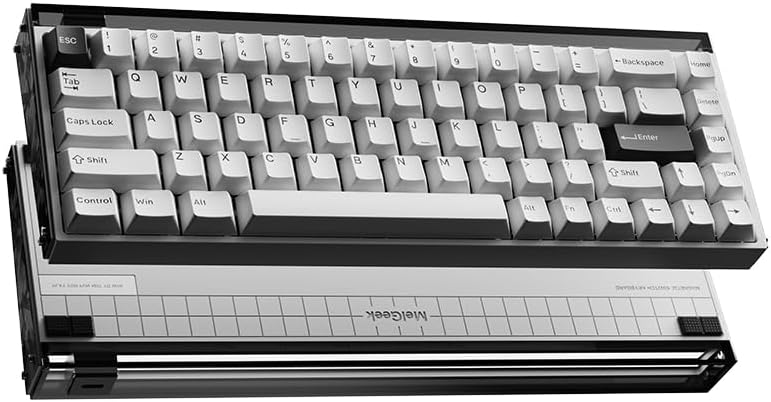
Figure 1: MelGeek MADE68 Ultra Wired Gaming Keyboard.
איור 2: מעלview of key features including DIY customization, web driver, and rapid trigger.
3. תכולת החבילה
Upon opening your MelGeek MADE68 Ultra package, you should find the following items:
- 1 x Made68 Keyboard
- 1 x כבל Type-C
- מדריך למשתמש אחד (מסמך זה)
Video 1: Unboxing the MelGeek MADE68 Ultra keyboard, showing the contents and initial setup.
4. התקנה
Follow these steps to set up your MelGeek MADE68 Ultra keyboard:
- חבר את המקלדת: Use the provided USB-C cable to connect the keyboard to an available USB port on your computer (PC, Laptop, Gaming Console, or Tablet).
- הפעלה ראשונית: The keyboard will automatically power on and its RGB lighting will activate upon successful connection.
- התקנת דרייבר: The keyboard is plug-and-play. For advanced customization and features, access the MelGeek HIVE web נהג ב hive.melgeek.com.

Figure 3: The keyboard features hot-swappable sockets for easy switch replacement.
5. הוראות הפעלה
FN Key Instructions:
The MADE68 Ultra utilizes FN key combinations for various functions. Refer to the quick guide for a full layout. Common functions include:
- FN + Q/W/E/R/T: Toggle between different keyboard profiles.
- FN + A/S: Toggle between Mac/Windows operating system modes.
- FN + Z/X/C/V: כוונון אפקטים של תאורה.
- FN + F1-F12: Multimedia controls (Play/Pause, Volume Up/Down, Mute, etc.).
HIVE Software Customization:
The MelGeek HIVE web-based software allows for extensive customization:
- תכנות מאקרו: Create and assign custom macros to keys.
- Dynamic Keystroke Strategy (DKS): Configure advanced key behaviors.
- SnapTap Anti-Jitter: Optimize key response for precision.
- הפעלה מתכווננת: Fine-tune the actuation point of each magnetic switch (0.1-4.0mm).
- טריגר מהיר: Set dynamic actuation points for faster key resets.
- תאורת RGB: Customize 16.8 million RGB lighting effects and 7 lighting modes.
Access the HIVE software at hive.melgeek.com. No download is required.
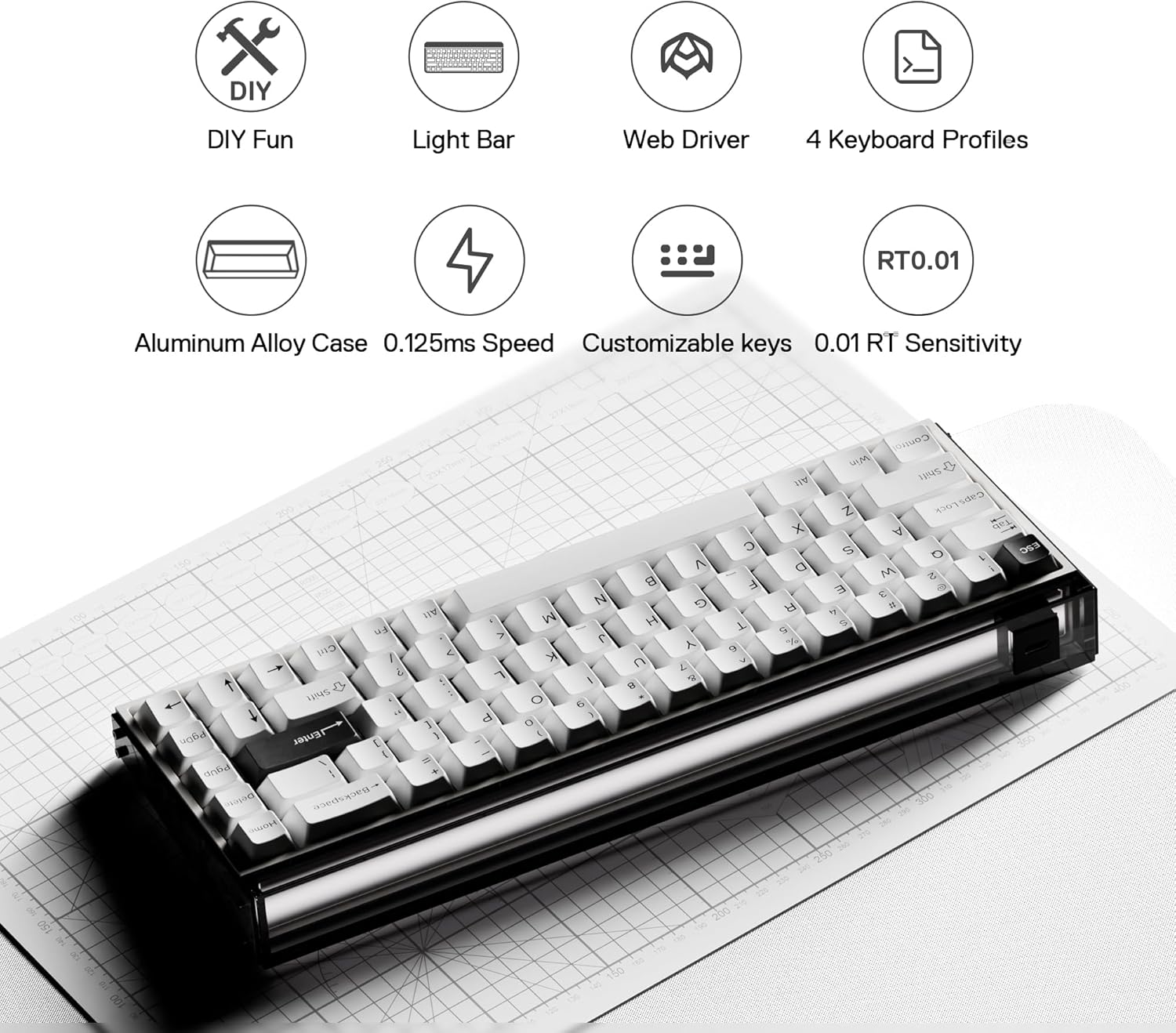
Figure 4: The HIVE web driver provides comprehensive customization options.
Physical Customization:
- מתגים הניתנים להחלפה חמה: Easily remove and replace switches to change typing feel or sound.
- Replaceable Lightbox Panels & Side Plates: Customize the aesthetic of your keyboard by swapping out the RGB lightbox panels and side plates.

Figure 5: The keyboard supports interchangeable side panels for personalized aesthetics.
Video 2: Demonstration of the typing sound profile of the MelGeek MADE68 Ultra keyboard.
Video 3: A typing demonstration of the MelGeek MADE68 Ultra keyboard in use.
6. תחזוקה
- ניקוי: נקו את המקלדת באופן קבוע בעזרת מטלית רכה ויבשה. לניקוי עמוק יותר, הסירו את מכסי המקשים והשתמשו באוויר דחוס כדי לפנות פסולת.
- טיפול במתג: When hot-swapping switches, ensure proper alignment to avoid bending pins.
- ניהול כבלים: הימנעו מכיפופים חדים או משיכה מוגזמת של כבל ה-USB-C כדי למנוע נזק.
7. פתרון תקלות
- המקלדת לא מגיבה: ודא שכבל ה-USB-C מחובר היטב הן למקלדת והן למחשב. נסה יציאת USB או כבל אחר.
- מפתחות לא נרשמים: If specific keys are not working, check if the switches are properly seated. If hot-swappable, try reseating or replacing the switch.
- בעיות תאורה: Use the FN key combinations or the HIVE software to adjust lighting settings. If the issue persists, ensure the keyboard firmware is up to date via HIVE.
- תוכנה לא מזהה מקלדת: Ensure your internet connection is stable when accessing the HIVE web driver. Try clearing your browser cache or using a different browser.
8. מפרטים
| תכונה | פְּרָט |
|---|---|
| דֶגֶם | MADE68 Ultra |
| מספר מפתחות | 68 |
| מַעֲרָך | ANSI (US) |
| חומר מארז | סגסוגת אלומיניום |
| סוג מתג | Magnetic (TTC Magneto) |
| חומר Keycap | ABS כפול |
| טריגר מהיר | כֵּן |
| הפעלה מתכווננת | 0.1-4.0 מ"מ |
| שיעור סקרים | 8000 הרץ |
| תאורה אחורית | RGB |
| טכנולוגיית קישוריות | USB-C (חוטי) |
| מערכות תואמות | Mac/Windows/Linux |
| משקל פריט | 4.16 פאונד |
| מידות (L x W x H) | 12.48 x 4.61 x 1.57 אינץ' (317 x 117 x 40 מ"מ) |

Figure 6: Detailed specifications and dimensions of the MADE68 Ultra.
9. אחריות ותאימות
MelGeek warrants that its hardware product shall be free from defects in materials and workmanship for a period of one year from the date of purchase. This warranty is subject to normal use and conditions. For detailed warranty information and product compliance, please refer to the included 'Important Safety, Compliance and Warranty Information' document or visit the official MelGeek webאֲתַר.
Warning: Risk of Repair: Opening or servicing your equipment may present the risk of electric shock, personal injury, or other hazards. MelGeek recommends that you seek professional help to service the appliance.
Warning: High Risk Use: This equipment is not designed or intended for use in any application or situation with a high risk of equipment failure which could lead to death, serious injury, or severe environmental damage.
MelGeek Compliance: This product complies with all applicable requirements for the Restriction of Hazardous Substances (RoHS) and WEEE (Waste Electrical and Electronic Equipment) directives.
10. תמיכה
For further assistance, technical support, or to provide feedback, please contact MelGeek through the following channels:
- רִשְׁמִי Webאֲתַר: www.melgeek.com
- כוורת Web נֶהָג: hive.melgeek.com
- מדיה חברתית: Follow MelGeek on official social media platforms for updates and community support.