מָבוֹא
תודה על הרכישהasing the VATOS RC Helicopter XK-1. This remote-controlled helicopter is designed for ease of use, featuring one-key take-off, altitude hold, and a stable coaxial rotor system, making it suitable for beginners. Please read this manual thoroughly before operation to ensure safe and correct use of the product.

Image: The VATOS RC Helicopter XK-1, showcasinהעיצוב והתכונות שלו.
מידע בטיחות
- המלצת גיל: This product is not suitable for children under 3 years of age due to small parts. The manufacturer recommends this product for ages 6 years and older.
- הַשׁגָחָה: מומלץ להשתמש בפיקוח של מבוגר, במיוחד עבור משתמשים צעירים יותר.
- סְבִיבָה: Operate the helicopter in open, clear spaces, away from people, animals, and obstacles. Avoid flying near walls as air suction can affect control. When flying outdoors, ensure there is no wind.
- חשיפה למים: Keep the helicopter and remote control away from water and moisture to prevent damage to electronic components.
- בטיחות סוללה: Do not short-circuit, disassemble, or expose batteries to extreme temperatures. Use only the provided charging cables.
- מדחפים: Do not touch the rotating propellers. In case of collision, the helicopter features an automatic power-off function to stop propellers.
תוכן החבילה
אנא בדקו את תוכן החבילה כדי לוודא שכל הפריטים נמצאים:
- RC Helicopter (x1)
- שלט רחוק (x1)
- Spare A/B Propellers (x1 set)
- כבלי טעינה USB (x2)
- סוללות נטענות (x2)
- מברג (x1)

Image: The package includes the VATOS RC Helicopter, one remote control, a set of spare A/B propellers, two USB charging cables, two rechargeable batteries, and a screwdriver.
הגדרה
1. טעינת סוללות
The helicopter comes with two rechargeable batteries. Ensure they are fully charged before first use.
- Connect one end of the USB charging cable to the battery and the other end to a USB power source (e.g., computer, USB adapter).
- Alternatively, you can charge the battery directly while it is installed in the helicopter by connecting the USB cable to the helicopter's charging port. Ensure the helicopter is powered OFF during this method.
- The battery indicator light will be red during charging and will turn off automatically when charging is complete.
- A full charge typically takes about 60 minutes.

Image: The helicopter batteries can be charged directly by connecting a USB cable to the helicopter (ensure helicopter is powered off), or by charging the battery separately using a USB cable. The battery indicator is red during charging and turns off when complete. Safe charging time is 60 minutes.
2. התקנת סוללת המסוק
Carefully insert a charged battery into the battery compartment of the helicopter. Ensure it is securely connected.
3. התקנת סוללות שלט רחוק
השלט רחוק דורש 3 סוללות AAA (לא כלולות).
- פתחו את תא הסוללות בגב השלט הרחוק באמצעות המברג המצורף.
- הכניסו 3 סוללות AAA, תוך הקפדה על קוטביות נכונה (+/-).
- סגור את תא הסוללות ואבטח אותו באמצעות הבורג.

Image: The remote control requires the installation of 3 AAA batteries (not included). Open the battery compartment on the back of the remote control to insert them.
4. זיווג השלט הרחוק
- הנח את המסוק על משטח ישר.
- Power on the helicopter. The LED lights on the helicopter will flash.
- הפעל את השלט הרחוק.
- Push the throttle stick (left stick) all the way up, then all the way down. The remote control will beep, and the helicopter's LED lights will become solid, indicating successful pairing.
הוראות הפעלה
1. בקרות בסיסיות
- המראה בלחיצת כפתור אחת: After pairing, press the one-key take-off button on the remote control. The helicopter will automatically ascend and hover at a stable altitude.
- נחיתה במפתח אחד: Press the one-key landing button, and the helicopter will slowly descend and land automatically.
- החזקת גובה: The helicopter features an altitude hold function, allowing it to maintain a stable height without constant throttle input.
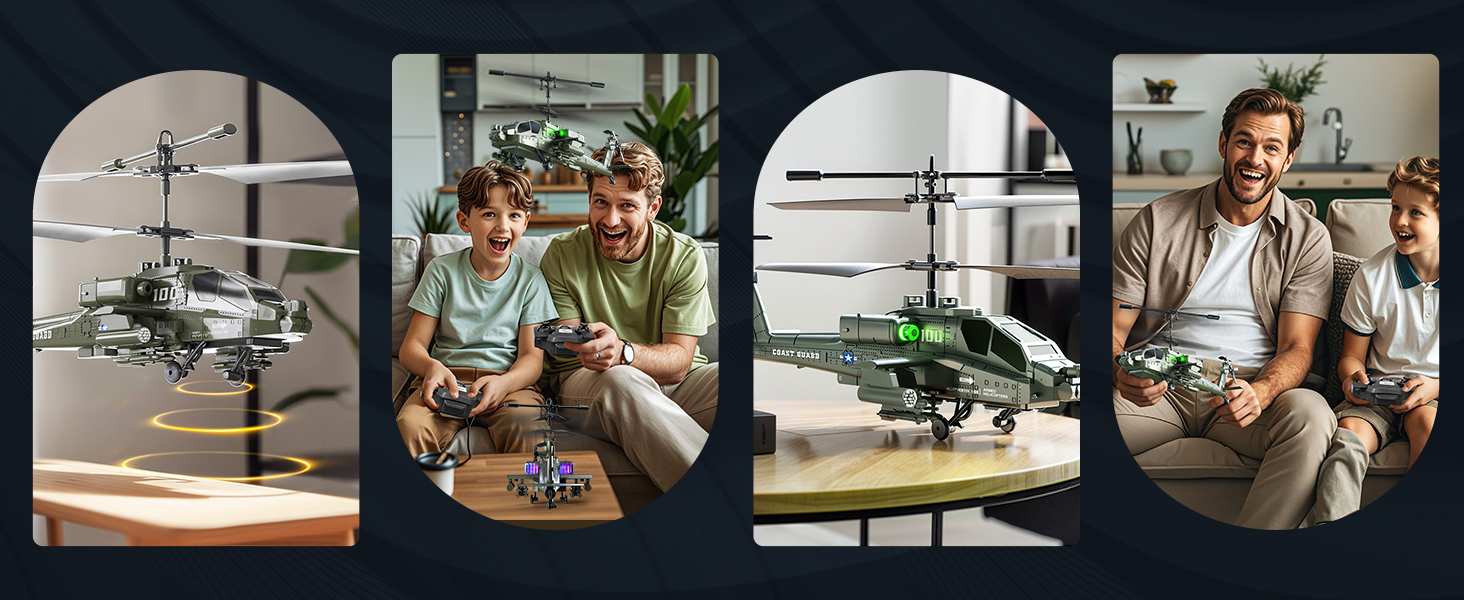
Image: The helicopter features one-key take-off and landing for simplified operation. It also includes an altitude hold function, allowing it to maintain a stable height automatically.
2. 3.5 Channel Control
The 3.5-channel remote control allows for various flight maneuvers:
- Throttle Stick (Left): Push up to rise, pull down to fall.
- Direction Stick (Right): Push up for forward flight, pull down for backward flight. Push left to turn left, push right to turn right.
- התאמת מהירות: The remote control allows for acceleration and deceleration, making flight more flexible.

Image: The 3.5-channel design allows for comprehensive control, including rising, falling, moving forward, backward, turning left, and turning right. It also supports speed adjustment.
3. נורות לד
The helicopter is equipped with colorful LED lights that illuminate when powered on, enhancing visibility and adding to the flying experience, especially in low-light conditions.

Image: The helicopter features colorful LED lights that are visible during flight.
תַחזוּקָה
- ניקוי: השתמשו במטלית רכה ויבשה לניקוי המסוק והשלט רחוק. אין להשתמש במים או בחומרי ניקוי כימיים.
- טיפול בסוללה: Always remove batteries from the remote control when not in use for extended periods. Store rechargeable helicopter batteries in a cool, dry place. Do not overcharge or completely discharge the batteries.
- בדיקת מדחף: Regularly check the propellers for any damage or cracks. Replace damaged propellers with the provided spare parts using the screwdriver.
- אִחסוּן: Store the helicopter and remote control in a safe place, away from direct sunlight and extreme temperatures.
פתרון בעיות
| בְּעָיָה | סיבה אפשרית | פִּתָרוֹן |
|---|---|---|
| המסוק לא מגיב לשלט רחוק. | Not paired; low batteries in helicopter or remote. | Ensure both helicopter and remote are powered on and successfully paired. Charge helicopter batteries; replace remote control batteries. |
| זמן טיסה קצר. | הסוללה לא טעונה במלואה; סוללה מזדקנת. | Ensure batteries are fully charged (60 minutes). Consider replacing old batteries if performance significantly degrades. |
| Unstable flight or difficulty controlling. | Windy conditions; damaged propellers; incorrect calibration. | Fly in calm conditions. Check and replace damaged propellers. Ensure helicopter is placed on a flat surface before take-off. |
| LED lights flashing quickly. | תזכורת לסוללה חלשה. | יש להנחית את המסוק מיד ולטעון את הסוללה. |
| Helicopter propellers stop after a collision. | Automatic power-off protection activated. | This is a safety feature. Check for damage, then power cycle the helicopter and remote to resume operation. |

Image: The helicopter is equipped with double protection functions. In case of a collision, the propellers will automatically stop rotating to prevent damage. A low battery reminder is indicated by quickly flashing LED lights.
מפרטים
| תכונה | פְּרָט |
|---|---|
| מספר דגם | XK-1 |
| מידות המוצר | 18 x 10 x 8 cm (7.09 x 3.94 x 3.15 inches); 450 g |
| גיל מומלץ | 6 שנים ומעלה |
| מצב שליטה | שלט רחוק (2.4G) |
| ערוצים | 3.5 ערוצים |
| מקור כוח | סוללה (ליתיום-יון) |
| סוללות שלט רחוק | 3 x AAA סוללות (לא כלול) |
| תכונות מיוחדות | Flashing LED lights, One-Key Take-off/Landing, Altitude Hold, Anti-collision design |
| סוג חומר | פּלָסטִי |
| צֶבַע | יָרוֹק |

Image: The helicopter measures approximately 23 cm (9.05 inches) in length, 8.5 cm (3.35 inches) in height (to main rotor), and 9.5 cm (3.70 inches) in tail height.
אחריות ותמיכה
This product is covered by a standard manufacturer's warranty. For specific warranty details, please refer to the product packaging or contact the retailer where the product was purchased. For technical support or inquiries, please contact VATOS customer service through their official channels.