
1. הקדמה
This manual provides detailed instructions for the safe and proper installation, operation, and maintenance of your MOUNTUP MU0057-L Full Motion TV Wall Mount. Please read all instructions carefully before installation to ensure correct setup and to prevent damage or injury. Keep this manual for future reference.
The MOUNTUP MU0057-L is designed to securely mount most 42-75 inch flat or curved screen televisions weighing up to 99 lbs (45 kg). It features a 30-inch extension arm, +/-90° swivel, +5°/-10° tilt, and +/-3° leveling for optimal viewמגמישות.
2. מידע בטיחות
WARNING: Failure to read and follow these instructions may result in serious personal injury, property damage, or voiding of warranty.
- קיבולת משקל: אין לחרוג מקיבולת המשקל המרבית של 45 ק"ג (99 ליברות). תושבת זו מיועדת לשימוש אך ורק עם המשקלים המרביים המצוינים. שימוש עם מוצרים כבדים יותר מהמשקלים המרביים המצוינים עלול לגרום לחוסר יציבות ולפציעה אפשרית.
- גודל טלוויזיה: This mount is compatible with TVs from 42 to 75 inches.
- תאימות VESA: Ensure your TV's VESA pattern (mounting hole spacing) is within the range of 150x100mm to 600x400mm.
- סוג קיר: This mount is designed for installation on solid concrete/brick walls or single wood studs. אין להתקין בקיר גבס בלבד.
- התקנה מקצועית: If you have any doubts about your ability to safely install this mount, consult a qualified professional.
- בדיקת רכיבים: Before installation, verify that all components are present and undamaged. Do not use damaged or defective parts.
- כְּלֵי עֲבוֹדָה: השתמש בכלים מתאימים להתקנה.
3. תכולת החבילה
Please check the package to ensure all parts are included and undamaged. If any parts are missing or damaged, contact MOUNTUP customer service.
- הרכבת לוחית קיר
- סוגרי טלוויזיה (2)
- ערכת חומרת הרכבה (ברגים שונים, דיסקיות, מרווחים, עוגנים)
- רמת בועה
- תבנית קידוח
- מדריך הוראות
4. מפרטים
| מִפרָט | עֵרֶך |
|---|---|
| דֶגֶם | MU0057-L |
| תאימות גודל טלוויזיה | 42 - 75 אינץ' |
| קיבולת משקל | עד 99 פאונד (45 ק"ג) |
| תאימות VESA | 150x100 מ"מ עד 600x400 מ"מ |
| הארכה מהקיר | 3 אינץ' (מכווץ) עד 30 אינץ' (מורחב) |
| טווח מסתובב | +/-90° |
| טווח הטיה | +5° / -10° |
| התאמת רמה | +/-3° |
| חוֹמֶר | מַתֶכֶת |
| צֶבַע | שָׁחוֹר |
| משקל פריט | 13.77 פאונד |
פֶּתֶק: The TV plate is offset approximately 8.5 inches (215mm) from the wall plate center. Consider this when positioning your TV on the wall.

Image: TV Plate Offset Diagram
5. הוראות התקנה
5.1 בדיקות טרום התקנה
- אימות תאימות טלוויזיה: Check your TV's size, weight, and VESA mounting pattern. The VESA pattern refers to the four mounting holes on the back of your TV.
- זיהוי סוג קיר: Determine if your wall is solid concrete/brick or a single wood stud.
- Check TV Ports: Ensure the mount will not block any necessary ports on your TV.

Image: Available VESA Patterns and TV Mounting Holes

Image: Diverse Wall Compatibility

Image: Ensure Mount Won't Block Ports
5.2 התקנה שלב אחר שלב
The installation process involves three main steps:
- תושבות להרכבה על הטלוויזיה: Attach the TV brackets to the back of your television using the appropriate screws, washers, and spacers from the hardware kit. Ensure they are securely fastened.
- התקן לוחית קיר: Using the provided drilling template and bubble level, mark and drill pilot holes in your wall. Secure the wall plate assembly to the wall with the appropriate anchors and lag bolts.
- תליית טלוויזיה על משטח קיר: Carefully lift your TV with the attached brackets and hook them onto the wall plate. Secure the TV to the wall plate using the safety screws or locking mechanisms.


Image: Easy & Quick 3-Step Installation Overview
6. הפעלה והתאמות
6.1 הארכה והסרה
The mount allows your TV to extend up to 30 inches from the wall and retract to approximately 3 inches, providing flexibility for various viewing positions and saving space when not in use.
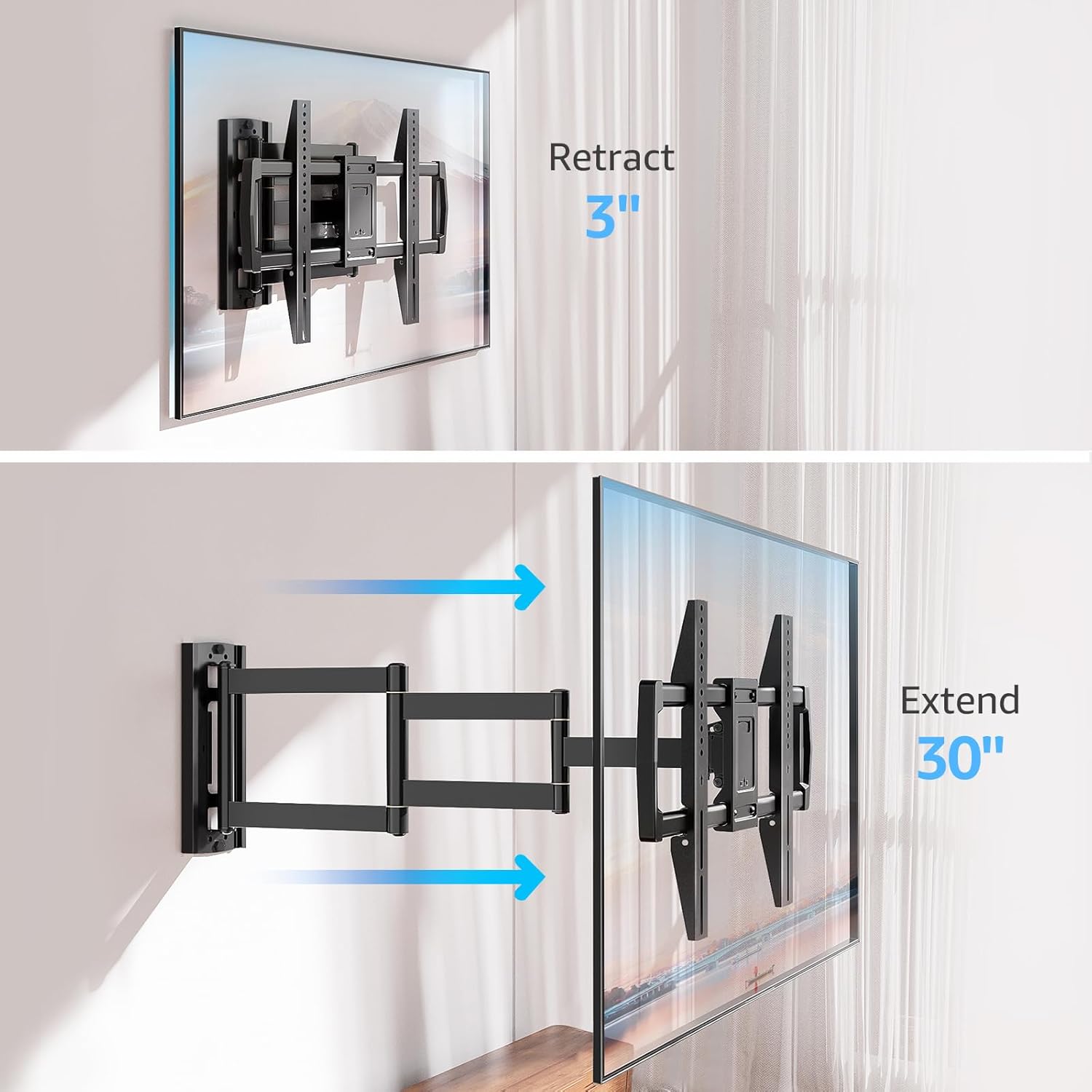
Image: Mount Extension and Retraction
6.2 כוונון סיבוב
The articulating arm allows for a smooth +/-90° swivel, enabling you to adjust the TV's angle to suit different viewing areas within a room, including corner mounting scenarios.
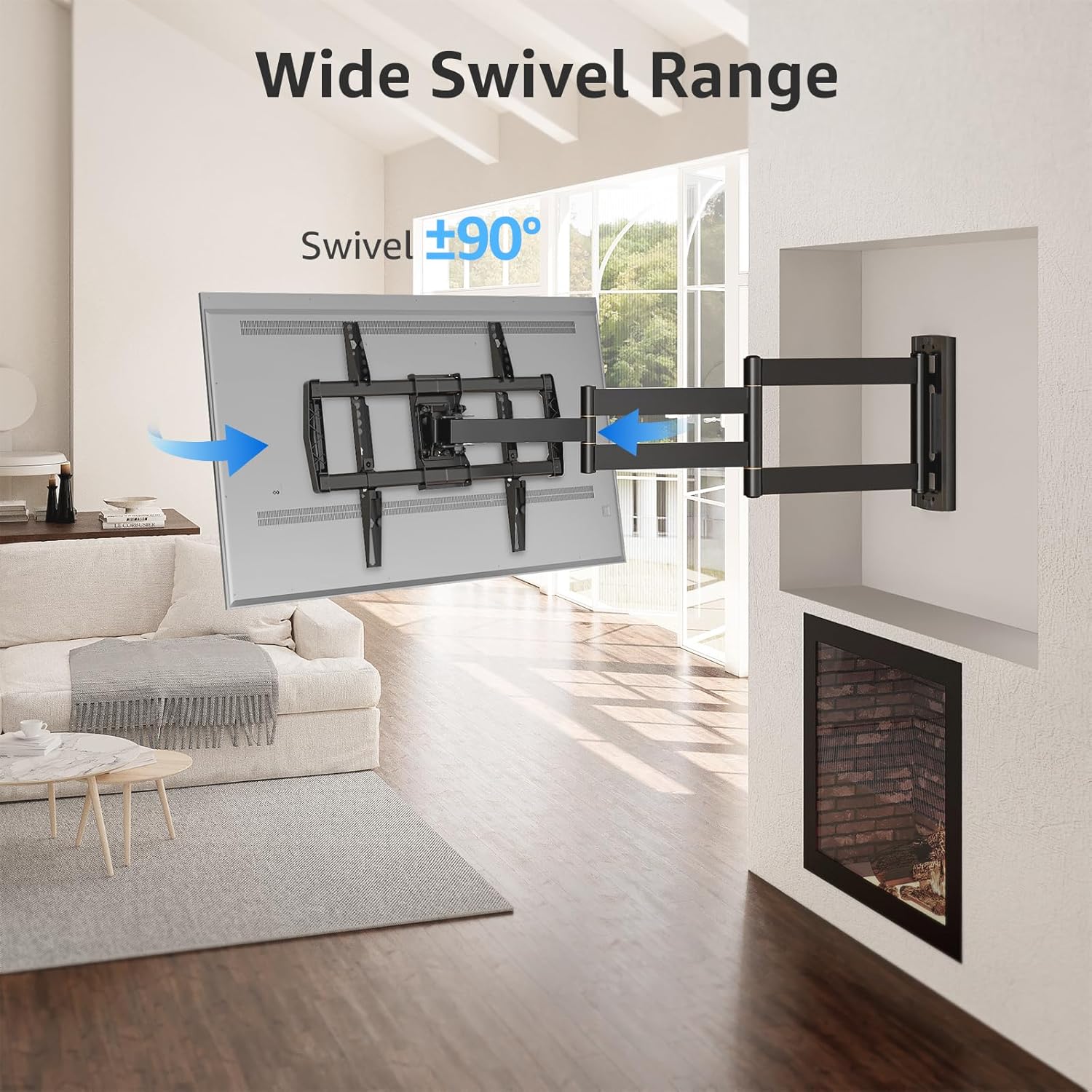
Image: Wide Swivel Range for Corner Mounting
6.3 התאמת הטיה
Adjust the TV's vertical angle with a +5°/-10° tilt range. This feature helps reduce glare from lights or windows and provides a comfortable viewזווית ing.
6.4 Leveling Adjustment
After installation, you can make minor horizontal adjustments of +/-3° to ensure the TV is perfectly level.

Image: Level and Tilt Adjustments
7. תחזוקה
תחזוקה שוטפת מבטיחה את אורך החיים ואת פעולתו הבטוחה של מתקן הקיר לטלוויזיה.
- ניקוי: נגבו את התושבת בעזרת מטלית רכה ויבשה. הימנעו מחומרי ניקוי שוחקים או ממסים שעלולים לפגוע בגימור.
- בדיקת מחבר: בדקו מעת לעת את כל הברגים והברגים כדי לוודא שהם נשארים מהודקים ומאובטחים. הדקו מחדש במידת הצורך.
- בדיקת תנועה: Test the mount's full range of motion (extension, retraction, swivel, tilt) occasionally to ensure smooth operation.
8. פתרון תקלות
אם נתקלת בבעיות במהלך ההתקנה או לאחריה, עיין בבעיות הנפוצות ובפתרונות הבאים:
- הטלוויזיה אינה מאוזן: Use the +/-3° post-installation leveling feature to adjust the TV's horizontal position.
- הר מרגיש רופף: Re-check all wall and TV fasteners to ensure they are securely tightened. Do not overtighten.
- Difficulty moving the arm: The mount's joints may be stiff initially. Apply gentle force. If persistent, ensure no cables are snagged.
- TV not fitting VESA pattern: Double-check your TV's VESA pattern against the mount's specifications (150x100mm to 600x400mm). If incompatible, the mount cannot be used.
9. אחריות ותמיכה
MOUNTUP is dedicated to providing quality products and customer satisfaction. While specific warranty details are not provided in this document, MOUNTUP offers comprehensive support.
If you have any questions, require assistance with installation, or need to report a missing/damaged part, please contact MOUNTUP customer service. Experts are available 7 days a week to provide support and advanced technology solutions.
For more information or to contact support, please visit the official MOUNTUP store or webאֲתַר.