
Geshowit S1 Pro
Geshowit S1 Pro Portable Air Conditioner User Manual
Model: S1 Pro | Brand: Geshowit
מָבוֹא
Thank you for choosing the Geshowit S1 Pro Portable Air Conditioner. This manual provides essential information for the safe and efficient operation of your new device. Please read it thoroughly before use and retain it for future reference.
מידע בטיחות חשוב
כדי להפחית את הסיכון לשריפה, התחשמלות או פציעה, יש להקפיד תמיד על אמצעי הזהירות הבסיסיים הבאים:
- בטיחות חשמל: ודא שמקור הכוח מתאים לנפחtage requirements of the unit. Do not use damaged power cords or plugs. Avoid operating the unit with wet hands.
- מיקום: Place the unit on a stable, level surface. Ensure adequate ventilation around the unit, keeping at least 12 inches (30 cm) clear from walls or other objects. Do not block air inlets or outlets.
- מים ולחות: Do not expose the unit to rain or excessive moisture. If using in high humidity, ensure the drain hose is properly connected to prevent water overflow.
- ילדים וחיות מחמד: Keep the unit out of reach of children and pets. Do not allow them to play with or operate the appliance.
- תַחזוּקָה: Always unplug the unit before cleaning or performing any maintenance. Do not attempt to repair or modify the unit yourself. Contact qualified service personnel for assistance.
- שימוש מיועד: This appliance is designed for cooling and dehumidifying purposes in various environments such as rooms, tents, RVs, cars, and trucks. Do not use it for any other purpose.
המוצר נגמרview
תוכן החבילה
The Geshowit S1 Pro Portable Air Conditioner package includes the following items:
- Geshowit S1 Pro Portable Air Conditioner Unit
- כיסוי אוויר קדמי
- כיסוי אוויר אחורי
- Drain Pipe (D: 1.6cm, L: 100cm)
- Air Duct (D: 10cm, L: 120cm)
- Air Duct (D: 13cm, L: 120cm)
- מדריך למשתמש
- Note: Remote Control and Storage Bag are sold separately.

תכונות מפתח
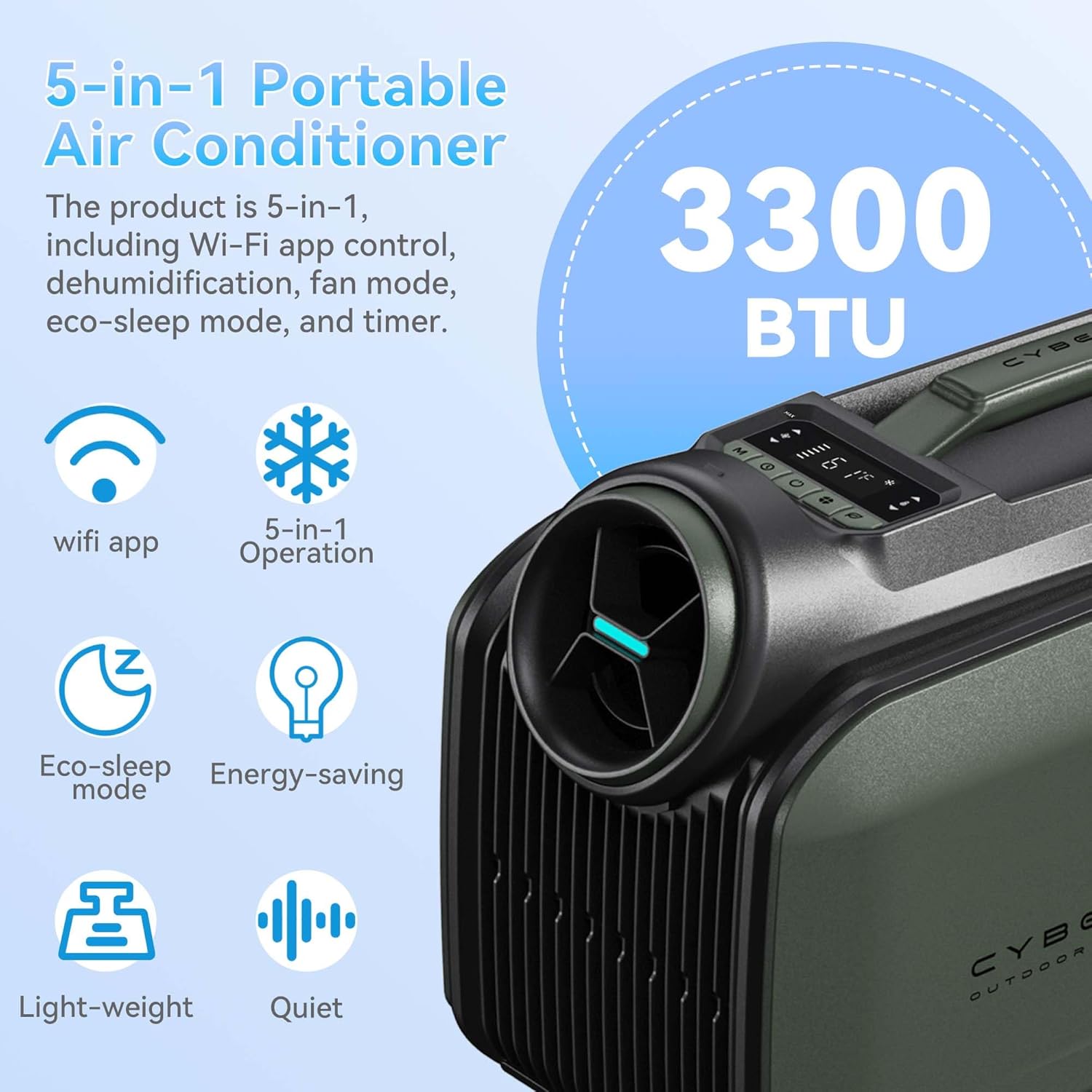
- קירור עוצמתי: Rapidly cools spaces by 18°F (10°C) in approximately 5 minutes with 3300 BTU cooling capacity.
- יעילות אנרגטית: Features a high-efficiency 48V DC system and smart 3.0 inverter algorithm, consuming only 100W per hour in sleep mode.
- אפשרויות כוח מרובות: Supports AC power, DC battery, portable power stations (with solar panels), and car chargers.
- פעולה שקטה: Ultra-quiet 38 dB Sleep Mode for undisturbed comfort.
- פונקציית ללא ניקוז: Operates without drainage in cooling mode when humidity is below 70%. A drain hose can be connected for high humidity conditions.
- קומפקטי ונייד: Weighs 21.6 lbs (9.8 kg) with an aluminum alloy frame and ergonomic handle for easy transport.
- 5 ב-1 צדדיות: Offers Cooling, Dehumidifier, Fan, Eco-Sleep Mode, and a 24-hour Timer.
- שליטה חכמה: WiFi App Control and a top-mounted control panel with LED display.
התקנה והתקנה
1. התקנת צינורות
Follow these steps to properly install the air ducts:
- Connect the Tube: Attach the air duct to the tube connector by twisting it clockwise.
- Insert Cold Air Outlet: Insert the tube connector into the cold air outlet on the unit.
- Insert Air Inlet: Insert the other end of the tube connector into the air inlet on the unit.

2. מיקום היחידות
The Geshowit S1 Pro offers flexible placement options depending on your cooling needs:
- Outside the Tent: For optimal cooling and reduced noise inside, place the AC unit outside the tent and direct the cold air in.
- Inside the Tent/Room: The unit can also be placed inside the tent or room, ensuring proper ventilation for the exhaust.
- Under a Canopy/Awning: Position the unit under a canopy or awning to provide cooling for outdoor seating areas.
הוראות הפעלה
לוּחַ בַּקָרָה
The unit features a top-mounted control panel with an LED display for easy operation. Refer to the diagram below for button functions:

- לחצן הפעלה: מדליק/מכבה את היחידה.
- לחצן מצב: Cycles through Cooling, Dehumidifier, Fan, and Eco-Sleep modes.
- לחצני כוונון טמפרטורה: הגדלה או הקטנה של טמפרטורת היעד.
- כפתור טיימר: מגדיר את טיימר 24 השעות לפעולה אוטומטית.
- תצוגת לד: מציג את הטמפרטורה, המצב והגדרות הטיימר הנוכחיות.
מצבי הפעלה
- מצב קירור: Provides powerful cooling to lower ambient temperature.
- מצב מסיר לחות: Reduces humidity in the air. In high humidity, connect the drain hose.
- מצב מאוורר: מזרימת אוויר ללא קירור.
- Eco-Sleep Mode: Operates quietly and efficiently, consuming only 100W per hour. Ideal for overnight use.
- מצב טיימר: Set the unit to turn on or off automatically after a specified duration (up to 24 hours).
בקרת אפליקציית WiFi
The Geshowit S1 Pro can be controlled via a dedicated WiFi application. Download the app from your device's app store and follow the in-app instructions for pairing and control.
שלט רחוק אופציונלי
An optional remote control (sold separately) can be used to operate the unit. This remote also functions as a temperature and humidity display.

תַחזוּקָה
תחזוקה שוטפת מבטיחה ביצועים אופטימליים ומאריכה את תוחלת החיים של המזגן שלכם.
- ניקוי מסנן האוויר: יש לנקות את מסנן האוויר כל שבועיים או בתדירות גבוהה יותר, בהתאם לשימוש.
- נתק את היחידה ממקור החשמל.
- הסר את מכסה מסנן האוויר.
- הסר בעדינות את המסנן.
- שטפו את המסנן במים חמימים וסבון. שטפו היטב ותנו לו להתייבש לחלוטין באוויר לפני החזרתו.
- Reattach the filter cover.
- Draining Water (High Humidity): If operating in high humidity, water may accumulate.
- ודא שהיחידה כבויה ומנותקת מהחשמל.
- Connect the drain pipe to the drainage outlet.
- Direct the other end of the drain pipe into a suitable container or drain.
- Monitor the water level in the container and empty as needed.
- ניקוי חיצוני: נגב את החלק החיצוני של היחידה בעזרת חומר רך, דamp בַּד. אין להשתמש בכימיקלים קשים או בחומרי ניקוי שוחקים.
- אִחסוּן: When not in use for extended periods, unplug the unit, clean it thoroughly, and store it in a cool, dry place.
פתרון בעיות
לפני פנייה לתמיכת הלקוחות, אנא עיינו בטבלה הבאה לקבלת בעיות נפוצות ופתרונותיהן:
| בְּעָיָה | סיבה אפשרית | פִּתָרוֹן |
|---|---|---|
| היחידה לא נדלקת. | No power supply; power cord not properly connected; power outlet faulty. | Check power connection; try a different outlet; ensure battery is charged if using DC power. |
| קירור לא מספיק. | Air filter is dirty; air inlets/outlets blocked; room/area too large; doors/windows open. | Clean the air filter; ensure clear airflow; close doors/windows; consider unit capacity for the space. |
| היחידה רועשת. | Unit not on a level surface; internal components vibrating. | Place unit on a stable, level surface; ensure no loose parts. |
| דליפת מים. | Drain pipe not connected or blocked (in high humidity); unit tilted. | Ensure drain pipe is properly connected and clear; place unit on a level surface. |
| השלט רחוק לא עובד. | Batteries dead; remote out of range; obstruction between remote and unit. | Replace batteries; ensure remote is within range and pointed at the unit; remove obstructions. |
מפרט טכני
| תכונה | מִפרָט |
|---|---|
| מותג | Geshowit |
| שם הדגם | S1 Pro |
| כוח קירור | 3300 יחידות תרמיות בריטיות (BTU) |
| משקל פריט | 21.6 פאונד (9.8 ק"ג) |
| מידות המוצר | מידות: 46 x 24 x 33 ס"מ (עומק 18.1 אינץ' x רוחב 9.4 אינץ' x גובה 13 אינץ') |
| רמת רעש | 48 dB (as low as 38 dB in Sleep Mode) |
| כרך ידtage | 110 וולט |
| מהtage | 400 Watt-hours (100W/hour in Sleep Mode) |
| חומר קירור | R-290 |
| סוג התקנה | Installation free |
| תכונות מיוחדות | Fast Cooling, No Drainage Required (under 70% humidity), Sleep saving energy mode, Timer Mode, WiFi App Control |
אחריות ותמיכה
For information regarding product warranty, please refer to the warranty card included with your purchase or contact Geshowit customer support directly. Protection plans are available for purchase separately to extend coverage.
If you encounter any issues not covered in the troubleshooting section, or require further assistance, please contact Geshowit customer service through the official webאתר או פרטי הקשר המופיעים בתיעוד המוצר שלך.
Ask a question about this manual
Ask about setup, troubleshooting, compatibility, parts, safety, or missing instructions. Manuals+ will review the question and use this page’s manual context to help answer it.