
NOILLER ZY-BB2
NOILLER 4.3" Video Baby Monitor User Manual
Model: ZY-BB2
מָבוֹא
Thank you for choosing the NOILLER 4.3" Video Baby Monitor. This device is designed to provide a reliable and convenient way to monitor your baby, offering both a dedicated monitor unit and smartphone app connectivity. Please read this manual thoroughly before use to ensure proper operation and safety.
תוכן החבילה
- יחידת מצלמת תינוקות
- 4.3" LCD Monitor Unit
- מתאם חשמל למצלמה
- מתאם מתח למסך
- כבל טעינה USB
- מדריך למשתמש (מסמך זה)
המוצר נגמרview
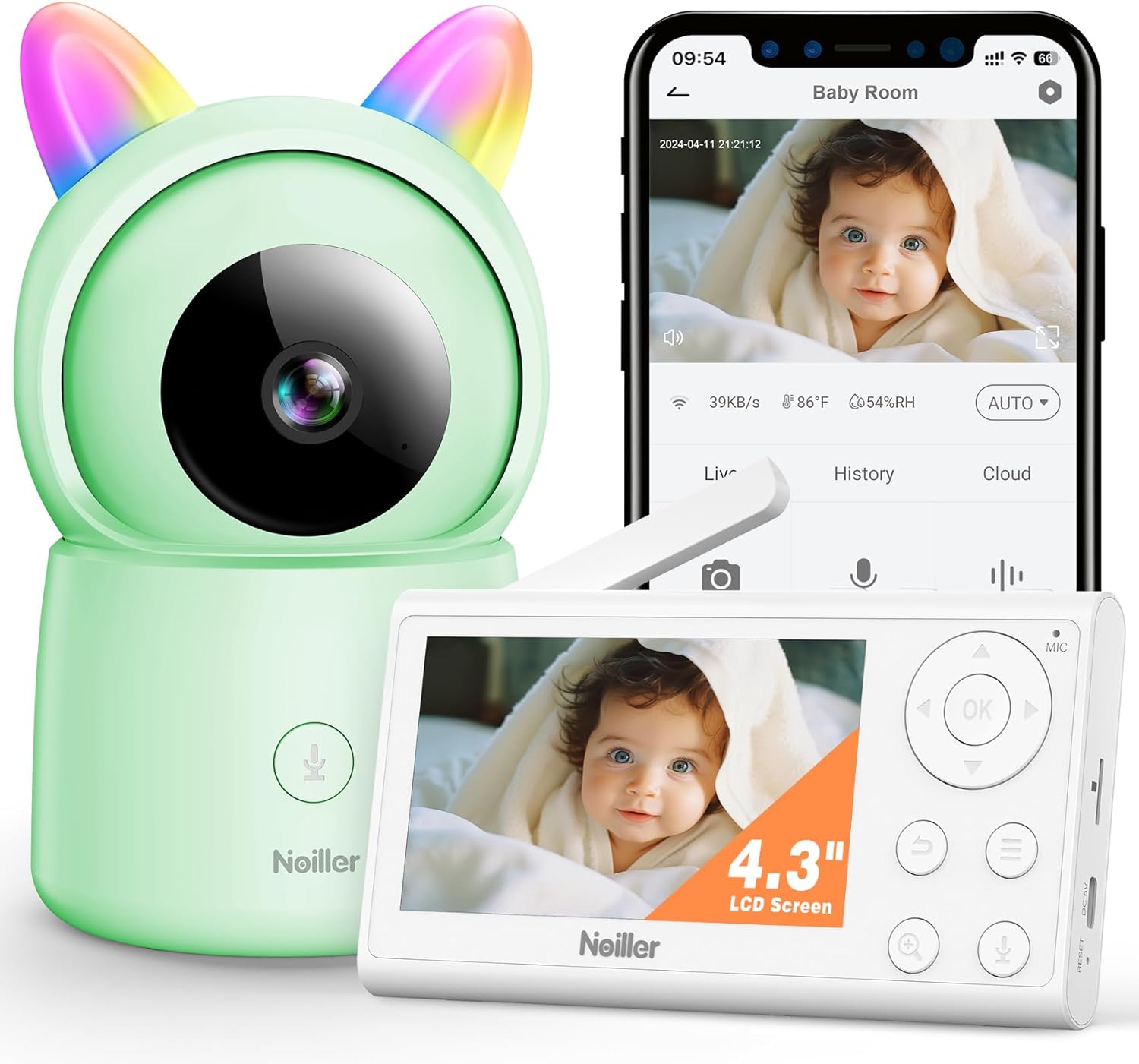
תְמוּנָה: The NOILLER 4.3" Video Baby Monitor system, featuring the green camera unit with rainbow ears, the white 4.3-inch LCD monitor, and a smartphone displaying the "Safeview" app interface with a live baby feed. The monitor shows control buttons for navigation, microphone, and zoom. The camera has a microphone button on its base.
The NOILLER Baby Video Monitor system consists of two main components: the Camera Unit and the Monitor Unit. It also supports a smartphone application for remote viewing.
Camera Unit Features:
- 1080P HD Camera Lens
- נוריות אינפרא אדום לראיית לילה
- Microphone and Speaker for Two-Way Talk
- חיישני טמפרטורה ולחות
- RGB Night Lights (on ears)
- יציאת כניסת חשמל
- לחצן איפוס
Monitor Unit Features:
- צג LCD בגודל 4.3 אינץ'
- כפתורי ניווט (למעלה, למטה, שמאלה, ימינה, אישור)
- מיקרופון ורמקול
- בקרת עוצמת הקול
- פונקציית זום
- לחצן תפריט
- כפתור שיחה דו-כיווני
- יציאת כניסת חשמל
- אַנטֶנָה
מדריך התקנה
1. הפעלת היחידות
- Connect the camera unit to a power outlet using its dedicated power adapter. Ensure the adapter is securely plugged in.
- Connect the monitor unit to a power outlet using its dedicated power adapter. The monitor unit has a built-in rechargeable battery for portable use, but it is recommended to charge it fully before first use.
- Press and hold the power button on the monitor unit to turn it on.
2. צימוד המצלמה והמסך
The camera and monitor units are pre-paired at the factory. If they do not connect automatically, or if you need to add another camera (sold separately), follow these steps:
- On the monitor unit, press the תַפרִיט לַחְצָן.
- נווט אל מַצלֵמָה סמל ובחר אותו.
- Choose an available camera channel (e.g., Camera 1, Camera 2).
- בחר את צִמוּד option. The monitor will begin searching for a camera.
- תוך 30 שניות, לחץ על צִמוּד כפתור בגב יחידת המצלמה.
- Once paired, the monitor will display the camera's live feed.
3. Smartphone App Setup (Optional)
לשלט viewing and additional features, download the "Safeview" app:
- Scan the QR code provided in the package or search for "Safeview" in your smartphone's app store (iOS/Android).
- הירשם לחשבון חדש או התחבר אם כבר יש לך אחד.
- Follow the in-app instructions to add your camera device. This typically involves connecting the camera to your 2.4G Wi-Fi network.
- Ensure your smartphone is connected to a 2.4G Wi-Fi network during the initial setup process.
4. מיקום המצלמה
Place the camera on a flat, stable surface such as a dresser or shelf, ensuring it has a clear, unobstructed view of the baby's crib or play area. Keep the camera and its power cord out of reach of children (at least 3 feet / 1 meter away from the crib).
הוראות הפעלה
לִחיוֹת View
Once the camera and monitor are paired, the monitor will automatically display the live video feed. On the smartphone app, select the camera from your device list to view הפיד החי.
שיחה דו סטרית
- יחידת צג: Press and hold the microphone button on the monitor unit to speak. Release the button to hear your baby.
- אפליקציית סמארטפון: Tap the microphone icon on the app interface to speak.
ראיית לילה
The camera automatically switches to infrared night vision in low-light conditions, providing clear black and white images. No manual adjustment is required.
פונקציית זום
On the monitor unit, press the זום button to digitally zoom in or out on the video feed.
שירי ערש
The monitor unit allows you to play pre-programmed lullabies through the camera's speaker. Access this feature via the תַפרִיט on the monitor unit.
נורות לילה RGB
The camera unit features RGB night lights on its "ears." These can be controlled via the monitor unit's menu or the smartphone app to provide a soothing glow in the baby's room.
ניטור טמפרטורה ולחות
The monitor unit and smartphone app display the real-time temperature and humidity of the baby's room, as detected by the camera's sensors.
מצב VOX (מופעל באמצעות קול)
The monitor can be set to VOX mode, where the screen and audio activate only when sound is detected from the baby's room. You can adjust the sensitivity level in the monitor's settings.
תַחזוּקָה
ניקוי
Wipe the camera and monitor units with a soft, dry, lint-free cloth. Do not use cleaning agents, solvents, or abrasive cleaners. Avoid getting moisture into any openings.
Battery Care (Monitor Unit)
- כדי להאריך את חיי הסוללה, הימנעו מפריקת הסוללה לחלוטין לעתים קרובות.
- Charge the monitor unit regularly, especially if it will not be used for an extended period.
- אחסן את היחידה במקום קריר ויבש כאשר אינו בשימוש.
אִחסוּן
If storing the device for a long period, ensure both units are powered off and stored in a dry, dust-free environment.
פתרון בעיות
| בְּעָיָה | סיבה אפשרית | פִּתָרוֹן |
|---|---|---|
| אין תמונה/אות על המסך |
|
|
| איכות תמונה ירודה |
|
|
| אין צליל או צליל מעוות |
|
|
| האפליקציה לא יכולה להתחבר למצלמה |
|
|
מפרטים
| תכונה | פְּרָט |
|---|---|
| שם הדגם | ZY-BB2 |
| גודל צג | LCD בגודל 4.3 אינץ' |
| רזולוציית לכידת וידאו | 1080p |
| טכנולוגיית קישוריות | Wireless Monitor & 2.4G WiFi Smartphone APP |
| מקור כוח | Battery Powered Monitor & Corded Electric Camera |
| שימוש בפנים/חוץ | מקורה |
| סוג בקר | Mobile Phone APP, LCD Monitor |
| סוג הרכבה | מתקן לשולחן |
| מידות פריט (L x W x H) | 5 x 3 x 2 אינץ' |
| משקל פריט | 1.43 פאונד |
| סוללות | נדרשת סוללת ליתיום יון אחת (כלול) |
| UPC | 750961862307 |
אחריות ותמיכה
NOILLER products are designed for reliability and performance. For warranty information, please refer to the warranty card included in your product packaging or visit the official NOILLER website. If you encounter any issues or have questions regarding your product, please contact our customer support team:
- אֶלֶקטרוֹנִי: support@noiller.com
- Webאֲתַר: www.noiller.com
- Please have your model number (ZY-BB2) and purchase details ready when contacting support.
Ask a question about this manual
Ask about setup, troubleshooting, compatibility, parts, safety, or missing instructions. Manuals+ will review the question and use this page’s manual context to help answer it.