
1. המוצר נגמרview
This document provides instructions for the Saillong Treadmill Remote Control Replacement, designed exclusively for the Walking Pad Q1 treadmill. This remote allows for convenient control of your Walking Pad Q1, including starting, stopping, and adjusting speed.
Important: This remote control is ONLY compatible with the Walking Pad Q1 treadmill. It will NOT function with other treadmill brands or models.
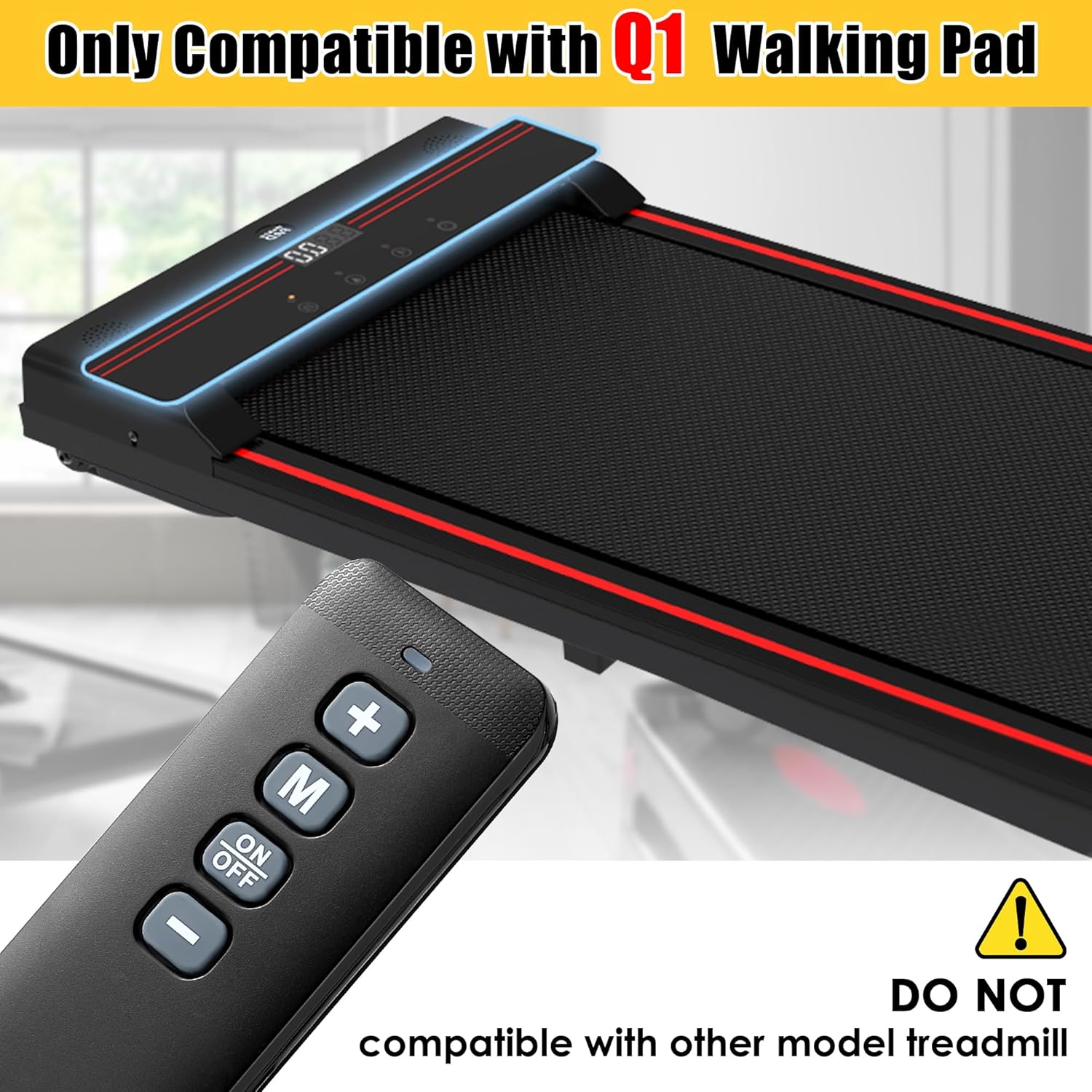
Image: Saillong remote control positioned next to a Walking Pad Q1 treadmill, emphasizing its specific compatibility.
2. מה בקופסה
- 1x Saillong Treadmill Remote Control Replacement
- 2x סוללות AAA
3. התקנה: התקנת סוללה
The remote control requires two AAA batteries (included) for operation. Follow these steps to install them:
- אתר את מכסה תא הסוללות בגב השלט הרחוק.
- החלק בעדינות את המכסה כלפי מטה כדי לפתוח את התא.
- הכנס את שתי סוללות ה-AAA, וודא שהקוטבים החיוביים (+) והשליליים (-) מיושרים כהלכה עם הסימונים בתוך התא.
- החלק את מכסה תא הסוללה בחזרה למקומו עד שיישמע נקישה בטוחה.

Image: The Saillong remote control with its battery cover removed, illustrating the correct placement for two AAA batteries.
Video: Battery Installation and Button Overview
Video Description: This video demonstrates how to install the AAA batteries into the Saillong remote control and shows the function of each button, including power, mode, and speed adjustments.
4. הוראות הפעלה
The remote control provides simple and direct control over your Walking Pad Q1 treadmill. No pairing or downloads are required; simply turn on your treadmill to use the remote.
פונקציות כפתור:
- לחצן הפעלה/כיבוי: Press to power the treadmill on or off.
- כפתור '+': Increases the treadmill's speed. Also used to increase time, calories, or distance in certain modes.
- כפתור '-': Decreases the treadmill's speed. Also used to decrease time, calories, or distance in certain modes.
- כפתור 'M' (מצב): מעבר בין מצבי תצוגה או הגדרות שונים על ההליכון.
- נורית חיווי כחולה: Illuminates when the remote is actively transmitting a signal.

Image: A hand holding the Saillong remote control, with clear labels indicating the function of each button.
Image: A close-up of the Saillong remote control, highlighting the blue indicator light when active.
טווח שליטה:
The remote offers precise control from a distance of up to 33 feet (approximately 10 meters) with 360-degree infrared sensing, allowing for flexible operation.

Image: Graphic illustrating the Saillong remote control's 360-degree, 33-foot control range and rapid 0.2-second response time.
Video: Remote Control in Action
Video Description: This video illustrates the Saillong remote control in use with a Walking Pad Q1 treadmill, demonstrating how to power on the treadmill, adjust speed, and power off using the remote.
5. תכונות מוצר
- חוֹמֶר: בנוי מחומר ABS עמיד.
- עיצוב קל משקל: Weighs approximately 0.12 pounds (0.06 kg) for comfortable handling.
- Long-Lasting Buttons: Buttons are designed to withstand over 100,000 presses.

Image: The Saillong remote control accompanied by icons highlighting its ABS material, lightweight nature, and durable buttons.
6. מפרטים
| מידות חבילה של פריט (L x B x H) | 5 x 3.94 x 0.63 אינץ' |
| משקל החבילה | 0.06 קילוגרם |
| מידות פריט (L x W x H) | 4.72 x 0.78 x 1.57 אינץ' |
| משקל פריט | 0.12 פאונד |
| שם מותג | סיילונג |
| שם הדגם | Treadmill Remote Control Replacement |
| צֶבַע | שָׁחוֹר |
| חוֹמֶר | ABS |
| מספר פריטים | 1 |
| מכשירים תואמים | Walking Pad Q1 |
7. פתרון תקלות
- שלט לא מגיב:
- ודא שהסוללות מותקנות כהלכה עם הקוטביות הנכונה (+/-).
- החליפו סוללות ישנות בסוללות AAA חדשות.
- Verify that the remote is pointed towards the treadmill's receiver and there are no obstructions.
- Check the battery contacts inside the remote. If they appear loose or corroded, gently adjust them to ensure proper connection with the batteries.
- Treadmill Not Responding to Remote:
- Confirm that your treadmill is a Walking Pad Q1 model. This remote is not compatible with other models.
- Ensure the treadmill is powered on and in a ready state.
8. אחריות ותמיכה
Information regarding product warranty and specific support contacts is not provided in the available product data. Please refer to the retailer or manufacturer's website for details on warranty coverage and customer support options.