
1. הקדמה
This manual provides essential information for setting up, operating, maintaining, and troubleshooting your Acer Nitro V ANV15-41 gaming laptop. Please read this manual thoroughly to ensure proper use and to maximize the performance and longevity of your device.

איור 1.1: חזית view of the Acer Nitro V ANV15-41 Gaming Laptop.
2. תחילת העבודה
2.1 פריקה והתקנה ראשונית
- הוציאו בזהירות את המחשב הנייד ואת כל האביזרים מהאריזה.
- ודא שכל הרכיבים המפורטים בסעיף 'מה בקופסה' קיימים.
- Connect the power adapter to the laptop's power connector and then to an electrical outlet.
- פתח את מכסה המחשב הנייד ולחץ על כפתור ההפעלה כדי להפעיל את המכשיר.
- Follow the on-screen instructions to complete the initial Windows 11 Home setup.
2.2 מה בקופסה
- Acer Nitro V ANV15-41 Laptop
- מתאם מתח
- סוללה (משולבת)
3. חומרה נגמרהview
3.1 תצוגה
The laptop features a 15.6-inch (39.6 cm) Full HD (1920 x 1080) IPS display with a 165 Hz refresh rate. It includes Acer ComfyView technology for reduced glare and enhanced viewנוחות.

Figure 3.1: The laptop's 15.6-inch Full HD IPS display with a high refresh rate.
3.2 מקלדת ומשטח מגע
The Acer Nitro V ANV15-41 is equipped with a backlit keyboard, offering visibility in low-light conditions. It includes a dedicated NitroSense key for quick access to system performance settings and a Copilot key for AI assistance.
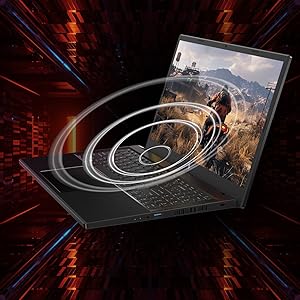
Figure 3.2: Keyboard layout highlighting the NitroSense and Copilot keys.
3.3 יציאות ומחברים
The laptop provides various ports for connectivity:
- 2 x יציאות USB 3.2 Gen 1
- 1 x USB 3.2 Gen 1 port with power-off charging
- 1 x יציאת USB 4
- 1 x יציאת HDMI 2.1
- 1 x יציאת Ethernet (RJ-45).
- 1 x Headset/speaker jack
- Power connector (DC-in)
- חריץ מנעול קנסינגטון
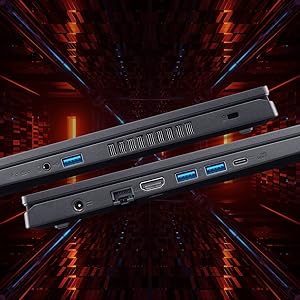
איור 3.3: צד view illustrating the available ports and connectors.
4. תכונות ביצועים
מעבד וגרפיקה 4.1
The laptop is powered by an AMD Ryzen 5 6600H hexa-core processor and features an NVIDIA GeForce RTX 3050 GPU with 6 GB of dedicated GDDR6 VRAM for graphics processing.
4.2 זיכרון ואחסון
It comes with 16 GB of DDR5 system memory, upgradable up to 32 GB. Storage is provided by a 512 GB PCIe Gen4 NVMe SSD, with support for up to two 1 TB drives.
4.3 מערכת קירור
The Acer Nitro V ANV15-41 incorporates a dual-fan cooling system designed to maintain optimal operating temperatures during intensive use.
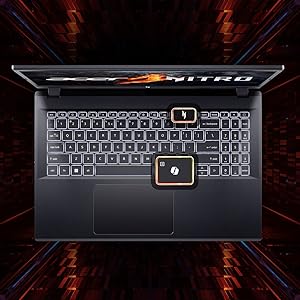
Figure 4.1: Illustration of the dual-fan cooling system.
5. Audio and Visual
5.1 טכנולוגיית אודיו
The laptop features DTS:X Ultra Audio for an immersive sound experience. Acer PurifiedVoice technology, with AI-powered noise reduction, enhances clarity for built-in microphones.

Figure 5.1: Visual representation of DTS:X Ultra Audio and Acer PurifiedVoice technologies.
5.2 Webפִּקָה
A T-Type HD camera is integrated for video conferencing and communication.
6. תחזוקה וטיפול
- ניקוי: Use a soft, lint-free cloth to clean the screen and exterior. Avoid harsh chemicals.
- אוורור: Ensure the laptop's ventilation openings are clear and unobstructed to prevent overheating.
- עדכוני תוכנה: Regularly update your operating system and drivers to ensure optimal performance and security.
- טיפול בסוללה: To prolong battery life, avoid extreme temperatures and fully discharging the battery frequently.
- אִחסוּן: Store the laptop in a cool, dry place when not in use.
7. פתרון תקלות
7.1 בעיות ופתרונות נפוצים
| לְהַנפִּיק | פתרון אפשרי |
|---|---|
| המחשב הנייד לא נדלק | Ensure the power adapter is securely connected and the outlet is functional. Check battery charge level. |
| המערכת איטית או לא מגיבה | Close unnecessary applications. Check for background processes. Ensure sufficient free storage space. Update drivers. |
| התחממות יתר | Ensure ventilation openings are clear. Use the laptop on a hard, flat surface. Consider using NitroSense software to adjust fan speeds. |
| בעיות תצוגה (אין תמונה, ריצוד) | Check display cable connections if using an external monitor. Restart the laptop. Update graphics drivers. |
| תאורת המקלדת לא עובדת | Check keyboard backlight settings in Windows or via dedicated function keys. |
8. מפרט טכני
| תכונה | מִפרָט |
|---|---|
| מותג | Acer |
| שם הדגם | ניטרו V |
| מספר דגם | ANV15-41 |
| גודל מסך | 15.6 אינץ' |
| רזולוציית תצוגה | 1920 x 1080 (Full HD) |
| טכנולוגיית תצוגה | IPS, LED, 165 Hz Refresh Rate |
| מעבד | AMD Ryzen 5 6600H hexa-core (3.3 GHz base, up to 4.5 GHz max boost) |
| כרטיס מסך | NVIDIA GeForce RTX 3050 עם 6 ג'יגה-בייט GDDR6 VRAM |
| זיכרון RAM | 16 GB DDR5 (4800 MHz), upgradable to 32 GB |
| אִחסוּן | 512 GB NVMe SSD (PCIe Gen4) |
| מַעֲרֶכֶת הַפעָלָה | Windows 11 Home |
| קישוריות אלחוטית | Wi-Fi 6 (802.11ax), בלוטות' |
| נמלים | 2x USB 3.2 Gen 1, 1x USB 3.2 Gen 1 (power-off charging), 1x USB 4, 1x HDMI 2.1, 1x RJ-45, 1x Headset/speaker jack |
| Webפִּקָה | T-Type HD camera |
| מִקלֶדֶת | מקלדת עם תאורה אחורית, מקלדת מספרית |
| תכולת האנרגיה של הסוללה | 57 Watt Hours (Lithium Ion) |
| משקל פריט | 2.1 קילוגרם |
| Dimensions (L x W x Thickness) | 24L x 36.2W x 2.4Th Centimeters |
9. אחריות ותמיכה
9.1 מידע אחריות
This product comes with a 1-Year Manufacturer's Limited Warranty. Please refer to the warranty card included with your product for detailed terms and conditions.
9.2 מידע על היצרן והיבואן
יַצרָן: Acer, Compal Electronics Pvt Ltd, No.D01, Zone D, Air Port Section of LiangLu CunTan Free Trade Port Area, YuBei District, Chongqing, China
יְבוּאָן: ACER INDIA PRIVATE LIMITED Embassy Heights, 6th Floor, No. 13 Magrath Road, Next to HOSMAT Hospital, Bangalore, INDIA – 560025
For technical support or service inquiries, please contact your local Acer support center or visit the official Acer webאֲתַר.