
1. הקדמה
Thank you for choosing the Sharkoon AK6 RGB ATX PC Case. This manual provides essential information for the proper installation, operation, and maintenance of your new PC case. Please read this guide thoroughly before beginning the assembly process to ensure optimal performance and longevity of your components.
2. מידע בטיחות
- Always disconnect the power supply from the wall outlet before installing or removing any components inside the PC case.
- יש לטפל בזהירות בלוחות זכוכית מחוסמת. הם שבירים ועלולים להישבר אם הם נופלים או נחשפים למכה.
- Avoid exposing the case to extreme temperatures, humidity, or direct sunlight.
- Keep small parts and screws out of reach of children.
- ודא הארקה נאותה כדי למנוע נזק לפריקה אלקטרוסטטית (ESD) לרכיבים אלקטרוניים רגישים.
3. תכולת החבילה
אנא ודא שכל הפריטים נמצאים בחבילה שלך:
- כיסוי למחשב Sharkoon AK6 RGB ATX
- Accessory box (containing screws, cable ties, and other small parts)
- מדריך למשתמש (מסמך זה)
4. המוצר נגמרview
The Sharkoon AK6 RGB ATX PC Case is designed with a modern glass aesthetic, featuring seamless integration of tempered glass on the front and side panels. It includes four pre-installed 120mm addressable RGB PWM fans for optimal airflow and visual appeal. The case supports a wide range of components, including BTF motherboards, and offers ample space for high-performance hardware.

איור 4.1: פנים החזית view of the Sharkoon AK6 RGB PC case, showcasing the pre-installed addressable RGB fans and the spacious main chamber.

איור 4.2: זוויתי view of the Sharkoon AK6 RGB PC case, highlighting the tempered glass side panel and the top mesh for ventilation.

איור 4.3: אחורי view of the Sharkoon AK6 RGB PC case, showing the I/O shield cutout, rear exhaust fan mount, and expansion slots.
פאנל קלט/פלט קדמי
The front I/O panel is located on the side of the case and includes:
- כפתור הפעלה
- לחצן איפוס
- 2 x USB Ports (Type-A)
- 1 x יציאת USB Type-C
- Audio Jacks (TRRS)
5. התקנה והתקנה
Follow these steps to install your components into the Sharkoon AK6 RGB PC Case.
5.1 הכנת התיק
- הנח את המארז על משטח ישר ויציב.
- Carefully remove the tempered glass side panel by unscrewing the thumb screws at the rear and gently pulling the panel away.
- Remove the rear metal side panel by unscrewing the thumb screws.
5.2 התקנת לוח אם
The AK6 RGB supports Mini-ITX, Micro-ATX, ATX, and BTF motherboards.
- Install the I/O shield into the cutout at the rear of the case (if not pre-installed on your motherboard).
- Align your motherboard with the standoffs inside the case. Ensure all standoffs match the motherboard's mounting holes.
- אבטחו את לוח האם באמצעות הברגים המתאימים מקופסת האביזרים.
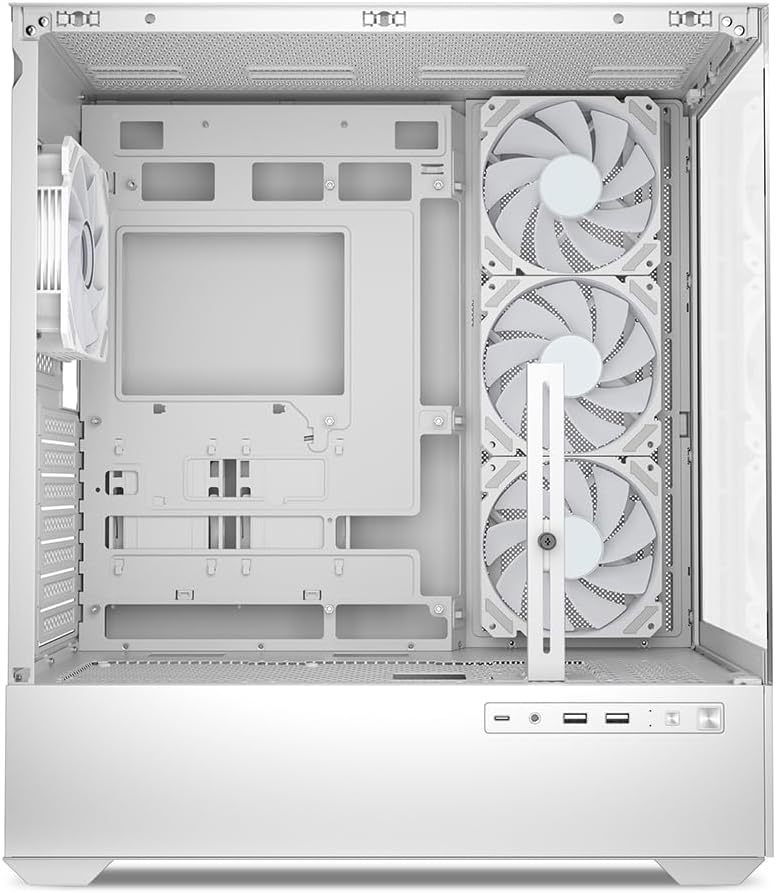
איור 5.1: פנים view of the Sharkoon AK6 RGB PC case, illustrating the motherboard tray, cable management cutouts, and front fan mounting points.
5.3 התקנת ספק כוח
The case features a bottom-mount power supply design.
- Slide the power supply unit (PSU) into the dedicated compartment at the bottom rear of the case.
- Align the PSU with the screw holes at the rear of the case.
- Secure the PSU with the provided screws.
5.4 התקנת התקן אחסון
The AK6 RGB supports up to two 3.5" HDDs or four 2.5" SSDs.
- For 3.5" HDDs: Locate the drive cages beneath the PSU shroud. Slide the HDD into a drive tray and secure it with screws.
- For 2.5" SSDs: SSDs can be mounted on the dedicated brackets behind the motherboard tray or on the 3.5" drive trays using adapter screws.
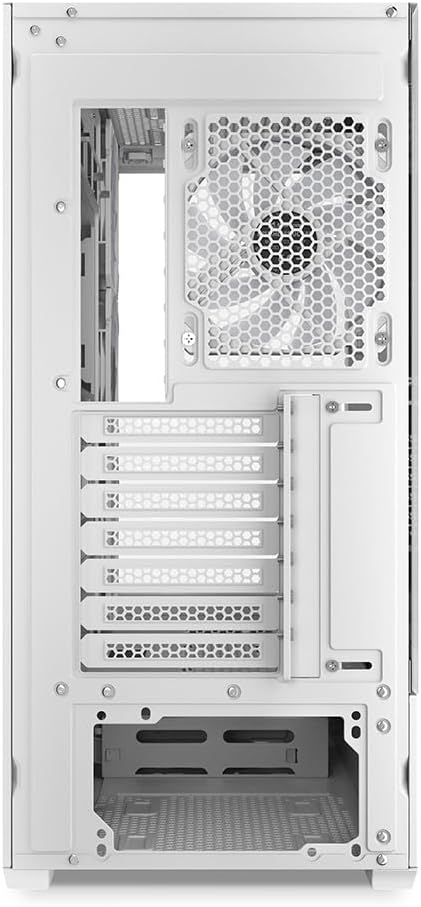
איור 5.2: פנים האחורי view of the Sharkoon AK6 RGB PC case, detailing the drive cages for 3.5-inch HDDs and 2.5-inch SSDs, and the power supply shroud area.
5.5 התקנת כרטיס מסך וכרטיס הרחבה
- הסר את כיסויי חריצי ההרחבה הדרושים בחלק האחורי של המארז.
- הכנס את כרטיס המסך או כרטיסי הרחבה אחרים לחריצי ה-PCIe המתאימים בלוח האם שלך.
- Secure the cards with screws. The case includes a rubberized graphics card support for larger cards.
5.6 CPU Cooler and Radiator Installation
The case supports CPU coolers up to 17 cm in height and allows for extensive liquid cooling setups.
- התקן את מקרר המעבד שלך בהתאם להוראות היצרן.
- For liquid cooling, the case can accommodate a 360mm radiator at the top and an additional 280mm radiator.
5.7 ניהול כבלים
השתמשו בפתחי ניהול הכבלים ובנקודות הקשירה שמאחורי מגש לוח האם כדי לנתב ולאבטח כבלים. זה משפר את זרימת האוויר והאסתטיקה.
6. הוראות הפעלה
6.1 הפעלה
After all components are installed and cables are connected, replace the side panels. Connect the power cable to your PSU and a wall outlet, then press the power button on the front I/O panel to start your system.
6.2 RGB Fan Control
The AK6 RGB comes with four pre-installed addressable RGB PWM fans. These fans are connected to an RGB controller which also provides connections for up to four LED elements and four PWM fans. The RGB lighting can typically be controlled via your motherboard's RGB software (if compatible) or through a dedicated button on the case (if present and connected).
6.3 אופטימיזציה של זרימת אוויר
The case is designed for ideal airflow, with three inverted fans drawing air from the side into the case. The top and rear fan mounts allow for additional exhaust fans. Ensure proper fan orientation for optimal cooling performance.

איור 6.1: דוגמהample of a fully assembled system within the Sharkoon AK6 RGB PC case, featuring various components and active RGB lighting.
7. תחזוקה
תחזוקה שוטפת מסייעת להבטיח את אורך החיים והביצועים של רכיבי המחשב שלך.
- מסנני אבק: Periodically clean the removable dust filters (e.g., on the top and bottom) to maintain optimal airflow and prevent dust buildup inside the case. Use compressed air or a soft brush.
- פאנלים מזכוכית: Clean tempered glass panels with a soft, lint-free cloth and a glass cleaner. Avoid abrasive materials that could scratch the surface.
- ניקוי פנים: השתמש באוויר דחוס כדי להסיר אבק מרכיבים פנימיים ומאווררים. ודא שהמערכת כבויה ומנותקת מהחשמל לפני הניקוי.
8. פתרון תקלות
If you encounter issues with your PC case, refer to the following common troubleshooting steps:
- אין כוח: Ensure the power supply is properly connected to the wall outlet and the motherboard. Check all internal power cables (24-pin ATX, 8-pin CPU, PCIe power).
- מאווררים לא מסתובבים/RGB לא עובד: Verify that all fan and RGB cables are correctly connected to the motherboard or the included RGB controller. Check your motherboard's BIOS/UEFI settings or RGB software for fan speed and lighting control.
- יציאות קלט/פלט קדמיות אינן פועלות: Confirm that the front panel connectors (USB, audio, power/reset switches) are correctly plugged into the corresponding headers on your motherboard.
- התחממות יתר: Ensure all fans are spinning correctly and oriented for proper airflow. Clean dust filters and internal components. Verify CPU cooler installation.
For further assistance, please contact Sharkoon support.
9. מפרטים
| תכונה | מִפרָט |
|---|---|
| מותג | שרקון |
| שם הדגם | AK6 RGB |
| מספר דגם | C-AK6W |
| סוג מקרה | מגדל ATX |
| צֶבַע | לָבָן |
| חוֹמֶר | זכוכית מחוסמת |
| תאימות לוח אם | Mini ITX, Micro ATX, ATX, BTF |
| סוג הרכבה של ספק כוח | הר תחתון |
| שיטת קירור | אֲוִיר |
| מאווררים מותקנים מראש | 4 x 120mm Addressable RGB PWM Fans |
| מקסימום גובה מצנן מעבד | 17 ס"מ |
| אורך מקסימלי של כרטיס מסך | 41 cm (with rubberized support) |
| אורך PSU מקסימלי | 23.5 ס"מ |
| תמיכת רדיאטור | Top: up to 360mm, Additional: up to 280mm |
| דרייב בייס | 2 x 3.5" HDD or 4 x 2.5" SSD |
| יציאות קלט / פלט קדמיות | 2 x USB Type-A, 1 x USB Type-C, Audio (TRRS) |
| משקל פריט | 6.1 קילוגרם |
| תכונות מיוחדות | RGB Lighting, Unique Glass Appearance, BTF Motherboard Support |
10. אחריות
Sharkoon products are manufactured to high quality standards. For detailed warranty information, please refer to the warranty card included with your product or visit the official Sharkoon webבאתר. האחריות מכסה בדרך כלל פגמים בחומרים ובעבודה תחת שימוש רגיל.
11. תמיכה
If you require technical assistance or have questions regarding your Sharkoon AK6 RGB ATX PC Case, please visit the official Sharkoon website for support resources, FAQs, and contact information. You may also find updated drivers or software for the RGB controller there.
Webאֲתַר: www.sharkoon.com