
מָבוֹא
This manual provides instructions for the AWEI H25 Smart Watch. Please read this manual carefully before using the device to ensure proper operation and maintenance.

Figure 1: AWEI H25 Smart Watch in use.
1. התקנה
1.1 תכולת החבילה
ודא שהפריטים הבאים כלולים בחבילה שלך:
- AWEI H25 Smart Watch
- כבל טעינה
- מדריך למשתמש (מסמך זה)
1.2 טעינת המכשיר
Before first use, fully charge the smart watch. Connect the charging cable to the charging port on the back of the watch and to a standard USB power adapter (not included).
- טעינה מלאה נמשכת בדרך כלל 2-3 שעות.
- The watch has a 230mAh battery capacity.
- Battery life is approximately 5-7 days with daily use, and up to 30 days in standby mode.

Figure 2: Battery life and performance overview.
1.3 הורדת אפליקציה וצימוד
To utilize all features, download the companion app to your smartphone. Scan the QR code provided in the watch's interface or search for the app name (usually mentioned in the watch's initial setup screen or packaging) in your phone's app store.
- הפעל Bluetooth בטלפון החכם שלך.
- פתחו את האפליקציה הנלווית ופעל לפי ההוראות שעל המסך כדי ליצור חשבון או להתחבר.
- בחר "הוסף מכשיר" או "התאם מכשיר" בתוך האפליקציה.
- The app will search for available devices. Select "AWEI H25" from the list.
- אשר את בקשת הצימוד גם בשעון וגם בטלפון החכם.
1.4 התאמה אישית של צג השעון
The AWEI H25 features a 1.83-inch screen. You can customize the watch face through the companion app.
- Choose from multiple cloud-based watch faces.
- Upload your own photos to create a personalized watch face.
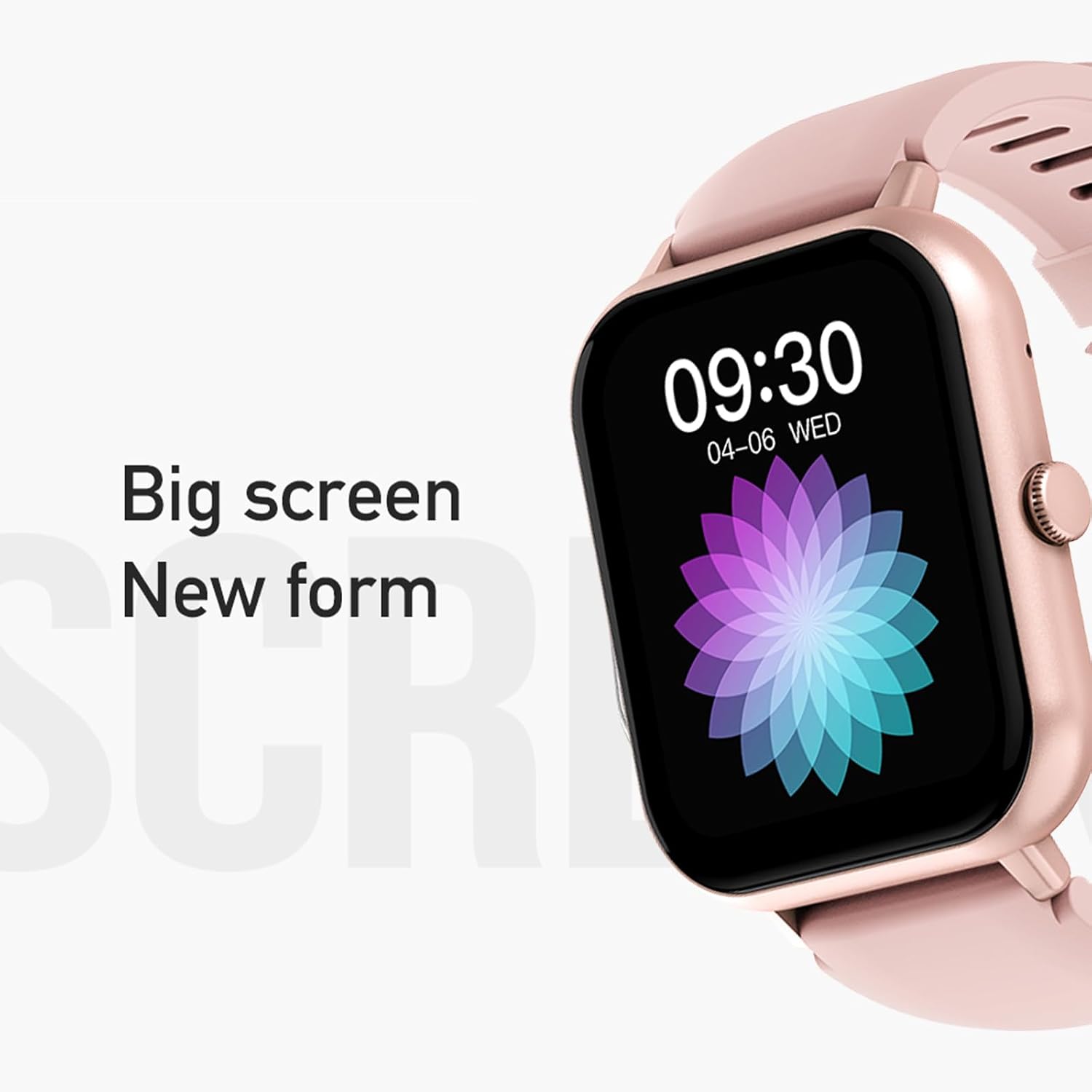
Figure 3: The 1.83-inch screen of the AWEI H25 Smart Watch.
2. הוראות הפעלה
2.1 ניווט בסיסי
- החלק למעלה/מטה: ניווט בין תפריטים והתראות.
- החלק שמאלה/ימינה: גישה לפונקציות מהירות או ווידג'טים.
- לחץ על כפתור הצד: חזור למסך הבית או גש לרשימת האפליקציות.
- לחיצה ארוכה על כפתור הצד: Power on/off or access system settings.
2.2 פונקציית שיחות בלוטות'
After successful pairing with your smartphone, the watch supports Bluetooth calls.
- מענה לשיחות: כאשר מתקבלת שיחה, הקישו על הסמל הירוק במסך השעון.
- ביצוע שיחות: גש ללוח החיוג או לרשימת אנשי הקשר בשעון כדי להתחיל שיחה.
2.3 מצבי ספורט
The AWEI H25 offers over 100 sport modes to track your physical activity.
- Access the "Sports" menu on the watch.
- Select your desired activity (e.g., Running, Walking, Hiking, Basketball, Cycling, Yoga).
- The watch will track exercise time, calories burned, and other relevant metrics.

איור 4: מעלview of available sport modes.
2.4 ניטור בריאות
The watch provides monitoring for various health metrics:
- ניטור קצב הלב: Continuous or on-demand heart rate measurement.
- ניטור לחץ דם: מספק קריאות לחץ דם משוערות.
- ניטור חמצן בדם: מודד את רוויון החמצן בדם (SpO2).
- נקבה מחזור פיזיולוגי: Track and predict menstrual cycles (requires setup in the app).
- תזכורות בישיבה: מתריע בפניך על תנועה לאחר תקופות של חוסר פעילות.
פֶּתֶק: The health monitoring features are for reference only and should not be used for medical diagnosis or treatment. Consult a medical professional for health concerns.
2.5 עוזר קולי חכם
After binding the watch to the companion app, you can use the smart voice assistant function.
- Click the voice function icon on the watch's menu screen.
- Speak your command (e.g., "What's the weather today?", "Call [Contact Name]").

איור 5: ממשק העוזר הקולי החכם.
2.6 תכונות נוספות
- בקרת מוזיקה: שליטה על השמעת מוזיקה בטלפון החכם שלך.
- צילום מרחוק: השתמשו בשעון כשלט רחוק למצלמת הטלפון שלכם.
- שעון מעורר: הגדר התראות ישירות מהשעון.
- תצוגת זמן: תצוגת שעה ותאריך סטנדרטית.
- תצוגת סיבוב פרק כף היד: Screen activates when you raise your wrist.
3. תחזוקה
דירוג עמידות למים 3.1 (IP67)
The AWEI H25 Smart Watch has an IP67 waterproof rating. This means it is protected against dust ingress and can withstand immersion in water up to 1 meter for up to 30 minutes.
- Suitable for daily use such as washing hands, face, or light rain.
- לא מתאים ל: Swimming, diving, hot showers, saunas, or high-pressure water activities.
- Avoid contact with hot water, steam, or corrosive liquids.
3.2 ניקיון וטיפול
- נגבו את השעון והרצועה באופן קבוע בעזרת מטלית רכה ויבשה.
- אם יש צורך, השתמש מעט דamp מטלית עם סבון עדין, ולאחר מכן לנגב יבש.
- אין להשתמש בכימיקלים חזקים, בחומרי ניקוי שוחקים או בממיסים.
- שמרו על מגעי הטעינה נקיים ויבשים כדי להבטיח טעינה תקינה.
3.3 טיפול בסוללה
- הימנעו מפריקת הסוללה באופן מלא לעתים קרובות.
- אין לחשוף את השעון לטמפרטורות קיצוניות (חמות מאוד או קור מאוד).
- אם מאחסנים את השעון לתקופה ממושכת, טען אותו עד לכ-50% ואחסן אותו במקום קריר ויבש.
4. פתרון תקלות
4.1 המכשיר לא נדלק
- ודא שהשעון טעון במלואו. חבר אותו למטען למשך 30 דקות לפחות.
- Try a long press (approx. 10-15 seconds) of the side button to force a power-on.
4.2 לא ניתן להתאים עם סמארטפון
- ודא שה-Bluetooth מופעל בטלפון החכם שלך.
- ודא שהשעון נמצא בטווח Bluetooth (בדרך כלל 10 מטרים).
- הפעל מחדש גם את השעון וגם את הטלפון החכם שלך.
- נקה את מטמון ה-Bluetooth בטלפון שלך (אם רלוונטי) ונסה לבצע התאמה שוב.
- ודא שהאפליקציה הנלווית מעודכנת לגרסה העדכנית ביותר.
4.3 קריאות בריאות לא מדויקות
- ודאו שהשעון צמוד לפרק כף היד, לא הדוק מדי או רפוי מדי.
- שמרו על ניקיון החיישן בגב השעון וללא לכלוך.
- הימנעו מתנועה מוגזמת במהלך המדידות.
- Remember that these readings are for reference and not medical grade.
4.4 שעון לא מקבל התראות
- בדוק את הרשאות ההתראות עבור האפליקציה הנלווית בטלפון החכם שלך.
- ודא שהשעון מחובר לטלפון שלך באמצעות בלוטות'.
- ודא שמצב "נא לא להפריע" אינו פעיל בשעון או בטלפון.
5. מפרטים
| מספר דגם | H25 |
| מותג | AWEI |
| גודל מסך | 1.83 אינץ' |
| קיבולת סוללה | 230 מיליאמפר/שעה |
| קישוריות | בלוטות' |
| דירוג עמיד למים | IP67 |
| תכונות מיוחדות | 100+ sport modes, Multiple customizable dials, Smart voice assistant, Heart rate, Blood pressure, Blood oxygen monitoring, Bluetooth call function. |
| GPS | אין GPS |
6. אחריות ותמיכה
6.1 אחריות למוצר
The AWEI H25 Smart Watch comes with a one-year warranty from the date of purchase. This warranty covers manufacturing defects under normal use. It does not cover damage caused by misuse, accidents, unauthorized modifications, or failure to follow instructions in this manual.
אנא שמור את הוכחת הרכישה שלך עבור תביעות אחריות.
6.2 תמיכת לקוחות
If you encounter any issues not covered in the troubleshooting section or require further assistance, please contact AWEI customer support. Refer to the product packaging or the official AWEI webאתר לקבלת פרטי הקשר העדכניים ביותר.