
מָבוֹא
Thank you for choosing the AWEI T36 Bluetooth Earbuds. This manual provides detailed instructions on how to set up, operate, and maintain your new earbuds. Please read this manual carefully before use to ensure optimal performance and longevity of your device.
תוכן החבילה
- אוזניות אלחוטיות AWEI T36 (שמאל וימין)
- נרתיק טעינה
- כבל טעינה USB-C
- אוזניים (בגדלים שונים)
- מדריך למשתמש
המוצר נגמרview
הכירו את רכיבי אוזניות ה-AWEI T36 ונרתיק הטעינה שלכם.
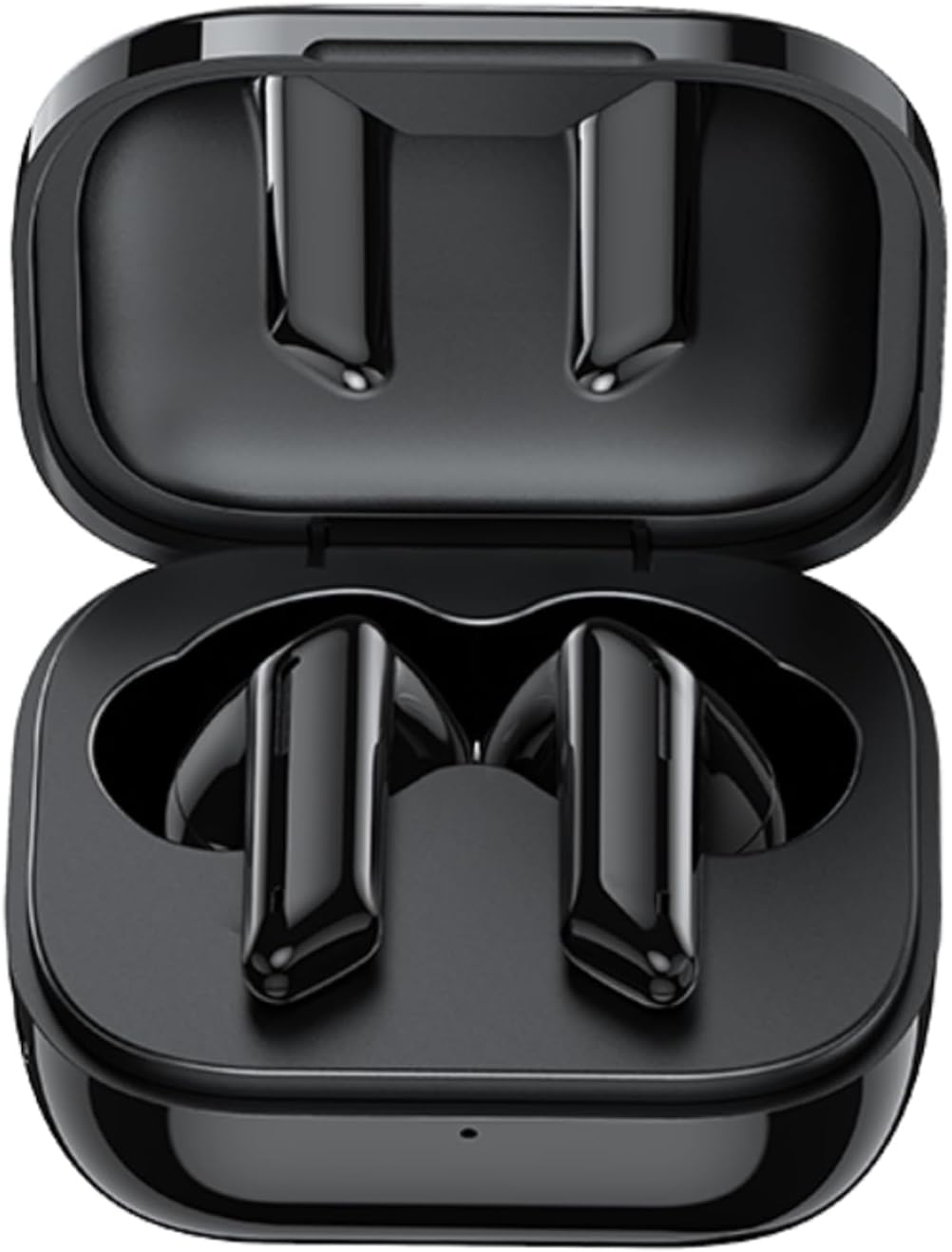
Image: AWEI T36 earbuds securely placed inside their open charging case, showcasing the sleek black design of both the earbuds and the case interior.
רכיבי האוזניות
- אזור בקרת מגע: לניהול השמעת מוזיקה, שיחות ועוזר קולי.
- מִיקרוֹפוֹן: For clear call performance.
- טעינת אנשי קשר: Located at the bottom of each earbud.
- מחוון LED: מציג את סטטוס הצימוד ואת רמת הסוללה.
רכיבי מארז הטעינה
- חריצי טעינה לאוזניות: החזיקו וטענו את האוזניות בצורה בטוחה.
- יציאת טעינה USB-C: לטעינת המארז.
- מחוון LED: מציג את סטטוס הטעינה של המארז.
הגדרה
1. טעינת האוזניות והמארז
לפני השימוש הראשון, יש לטעון במלואן את האוזניות ואת נרתיק הטעינה.
- Place the earbuds into the charging case, ensuring they are correctly seated. The earbuds' LED indicators will light up to show they are charging.
- חברו את כבל הטעינה USB-C ליציאת הטעינה במארז ואת הקצה השני לספק כוח USB (לא כלול) או ליציאת USB של מחשב.
- The charging case LED indicator will show charging progress. A full charge takes approximately 1.5 hours for the case.

Image: AWEI T36 earbuds and their charging case resting on a circular charging pad, illustrating the product's battery life and charging capabilities. The image indicates a 320mAh charging case, 4-5 hours playtime, and 1.5 hours charging time.
Note: The product specifications indicate 7 hours of continuous use per charge for earbuds and 35 hours of playback with the charging case.
2. צימוד עם המכשיר שלך
האוזניות תומכות ב-Bluetooth 5.3 לחיבור יציב ומהיר.
- התאמה ראשונה:
- פתחו את מארז הטעינה. האוזניות יידלקו אוטומטית ויכנסו למצב צימוד.
- במכשיר שלך (סמארטפון, טאבלט, מחשב נייד), הפעל את Bluetooth.
- חפש "AWEI T36" ברשימת התקני ה-Bluetooth הזמינים ובחר אותו כדי להתחבר.
- Once connected, you will hear a confirmation tone, and the earbud LED indicators will turn off or flash slowly.
- זיווג לאחר מכן:
- Once paired, the earbuds will automatically connect to the last paired device when taken out of the charging case, provided Bluetooth is enabled on the device.

Image: A smartphone displaying a game, with the AWEI T36 earbuds and their charging case in the foreground, illustrating the Bluetooth connection. The image highlights "Bluetooth 5.1 Faster & More Stable" (Note: Product specifications state Bluetooth 5.3 for this model, which offers improved performance.)

Image: Two AWEI T36 earbuds, one in its open charging case and one outside, demonstrating that both earbuds can function independently as "hosts" or "main engines" for flexible use.
הוראות הפעלה
The AWEI T36 earbuds feature smart touch controls for easy operation.
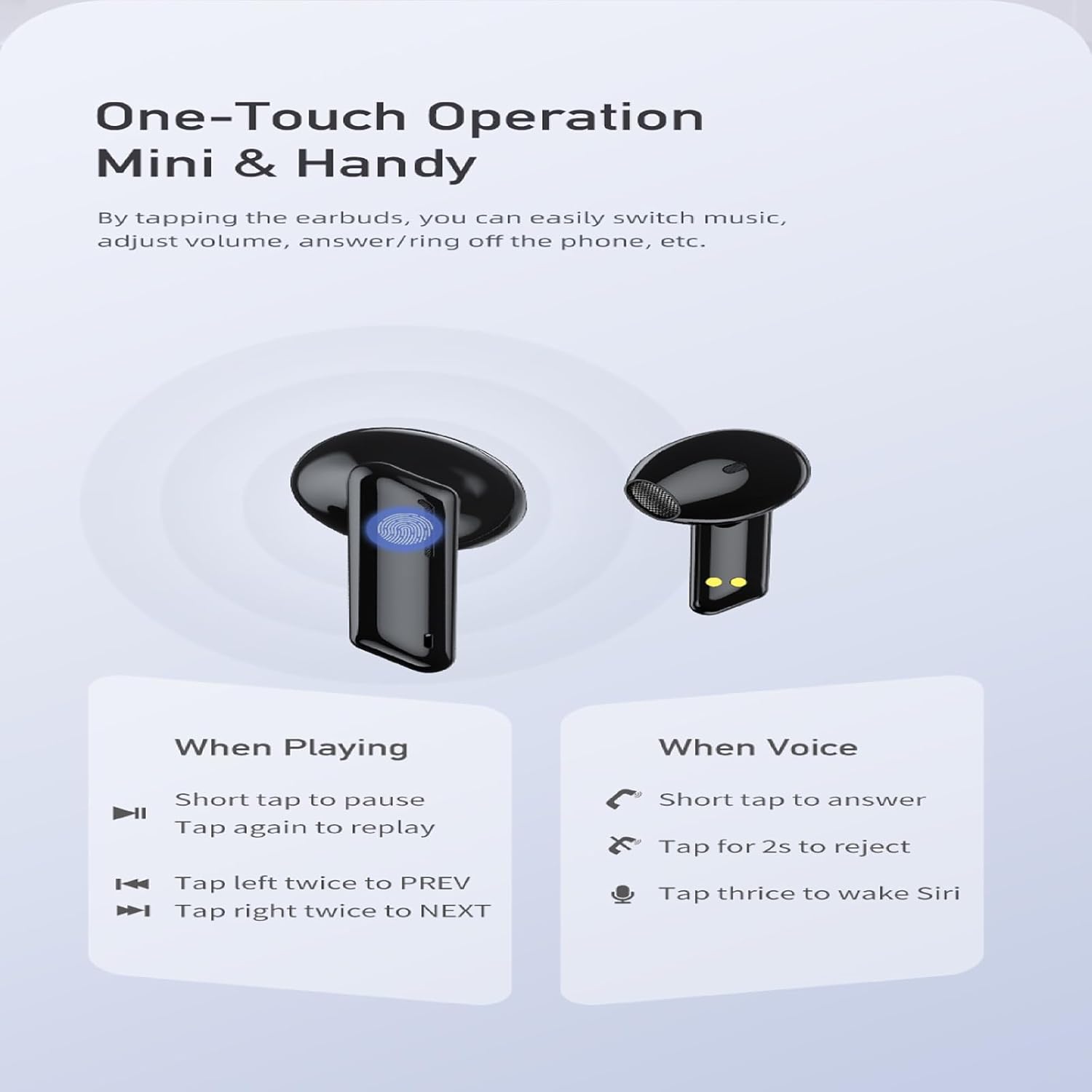
Image: A visual guide to the one-touch operation of the AWEI T36 earbuds, detailing touch commands for music playback (pause/play, previous/next song) and call management (answer/reject, activate voice assistant).
השמעת מוסיקה
- הפעל/השהה: Short tap on either earbud.
- השיר הבא: הקישו פעמיים על האוזניה הימנית.
- השיר הקודם: הקישו פעמיים על האוזניה השמאלית.
- בקרת עוצמת הקול: (Specific gesture not detailed in image, typically long press or multiple taps. Refer to device settings if not working as expected.)
ניהול שיחות
- תשובה לשיחה: Short tap on either earbud.
- דחה שיחה: הקש והחזק את אחת האוזניות למשך 2 שניות.
- סיום שיחה: Short tap on either earbud during a call.
עוזר קולי
- הפעלת העוזר הקולי (Siri/Google Assistant): הקישו על כל אחת מהאוזניות שלוש פעמים.
הפעלה/כיבוי
- הפעלה: האוזניות נדלקות אוטומטית עם הוצאתן ממארז הטעינה.
- כיבוי: האוזניות כבות אוטומטית כאשר הן מוחזרות למארז הטעינה והמכסה סגור.
תַחזוּקָה
ניקוי
- נקו באופן קבוע את האוזניות ואת נרתיק הטעינה בעזרת מטלית רכה, יבשה ונטולת סיבים.
- השתמש במקלון צמר גפן קלות דampened with isopropyl alcohol to clean the charging contacts on both the earbuds and inside the case.
- אין להשתמש בחומרי ניקוי שוחקים או לטבול את האוזניות או את המארז במים.
אִחסוּן
- אחסן את האוזניות בתיק הטעינה שלהן כאשר אינן בשימוש כדי להגן עליהן ולשמור עליהן טעונות.
- Avoid storing the device in extreme temperatures (hot or cold) or in highly humid environments.
טיפול בסוללה
- כדי לשמר את חיי הסוללה, טען את האוזניות ואת המארז באופן קבוע, גם אם לא נעשה בהם שימוש תכוף.
- הימנעו מריקון מוחלט של הסוללה לפני טעינה מחדש.

Image: AWEI T36 earbuds and their charging case with water droplets on them, emphasizing their IPX4 waterproof rating, which protects against sweat and light rain during exercise.
פתרון בעיות
If you encounter any issues with your AWEI T36 earbuds, please refer to the following common solutions:
- אוזניות לא מתחברות למכשיר:
- ודא שהאוזניות טעונות במלואן.
- Make sure Bluetooth is enabled on your device and the earbuds are within range (up to 10 meters).
- שכחו את "AWEI T36" מרשימת ה-Bluetooth של המכשיר שלכם ונסו שוב לקשר.
- Place both earbuds back into the charging case, close the lid, wait a few seconds, then open the lid to reset them.
- רק אוזניה אחת עובדת:
- ודא ששתי האוזניות טעונות.
- החזירו את שתי האוזניות למארז הטעינה, סגרו את המכסה ופתחו אותו שוב. פעולה זו לעיתים קרובות מסנכרנת אותן מחדש.
- נקו את מגעי הטעינה בשתי האוזניות ובתוך המארז.
- האוזניות לא נטענות:
- בדוק אם כבל הטעינה מחובר היטב הן למארז והן למקור החשמל.
- ודאו שמגעי הטעינה באוזניות ובתוך המארז נקיים וללא לכלוך.
- נסה כבל USB-C או מתאם מתח אחר.
- עוצמת קול נמוכה או איכות צליל ירודה:
- כוונן את עוצמת הקול גם במכשיר וגם באוזניות.
- Ensure the eartips are properly seated in your ears to create a good seal. Try different sized eartips.
- נקו כל שעוות אוזניים או פסולת מרשת הרמקול של האוזניה.
מפרטים
| תכונה | תֵאוּר |
|---|---|
| שם הדגם | T36 |
| מותג | AWEI |
| טכנולוגיית קישוריות | אלחוטי (בלוטות' 5.3) |
| טווח בלוטות' | עד 10 מטר (33 רגל) |
| חיי סוללה של אוזניות | עד 7 שעות (טעינה אחת) |
| זמן משחק כולל (עם כיסוי) | עד 35 שעות |
| זמן טעינה (מארז) | כ. 1.5 שעות |
| עמידות במים | IPX4 (עמיד בפני זיעה והתזות) |
| סוג בקרה | בקרת מגע |
| צורת אפרכסת | בתוך האוזן |
| חוֹמֶר | סיליקון (אטמי אוזניים) |
| רכיבים כלולים | Earbuds, Charging Case, USB-C Cable, Eartips, User Manual |
אחריות ותמיכה
AWEI products are manufactured to the highest quality standards. For information regarding warranty coverage, technical support, or customer service, please refer to the warranty card included in your package or visit the official AWEI webאֲתַר.
For further assistance, please contact AWEI customer support with your product model number (T36) and purchase details.